1:03

Optimize your AI spend with Microsoft Agent 365
Microsoft · AI · Nov 2026
Screenpipe · Dec 2024 · 1:00 · Full motion · AI-annotated
Screenpipe’s 1:00 launch film runs 10 scenes, about 6.0 s each. The product is on screen from the first frame and 2 features are revealed. The call to action lands at 0:46 (77% in), over a voiceover. The video is a single continuous screen recording with a pinned facecam, where smooth zooms and pans follow the cursor from the store grid into each feature demo and finally to a terminal command. Bold white captions on rounded dark pills narrate every step, keeping the pacing steady and the focus on the interface.
Is this your launch? to your site or press kit.
Microsoft · AI · Nov 2026
OpenEvidence · Nov 2026
Anthropic · AI · Oct 2026
Films whose music sounds like this one, voice left out
Cenote · Corporate tech presentation
Calltree · Speech
Confident AI · Voiceover
A macOS desktop shows the ScreenPipe store window with a grid of pipe cards and a webcam self-view in the top-right corner. The cursor hovers over the cards as the view zooms in on the grid, while white subtitles roll along the bottom.
On-screen text: “everyone, I'm so excited to”, “introduce ScreenPipe Store.”, “Now the app is free and”, “developers can build agents that”, “watch your screen 24/7 and do”, “things in the background while”, “everything stays on your”, “computer. Your data does not”, “leave your computer. And”, “these apps look like native apps.”
Techniques: Cursor demo, UI zoom
Camera: Push in
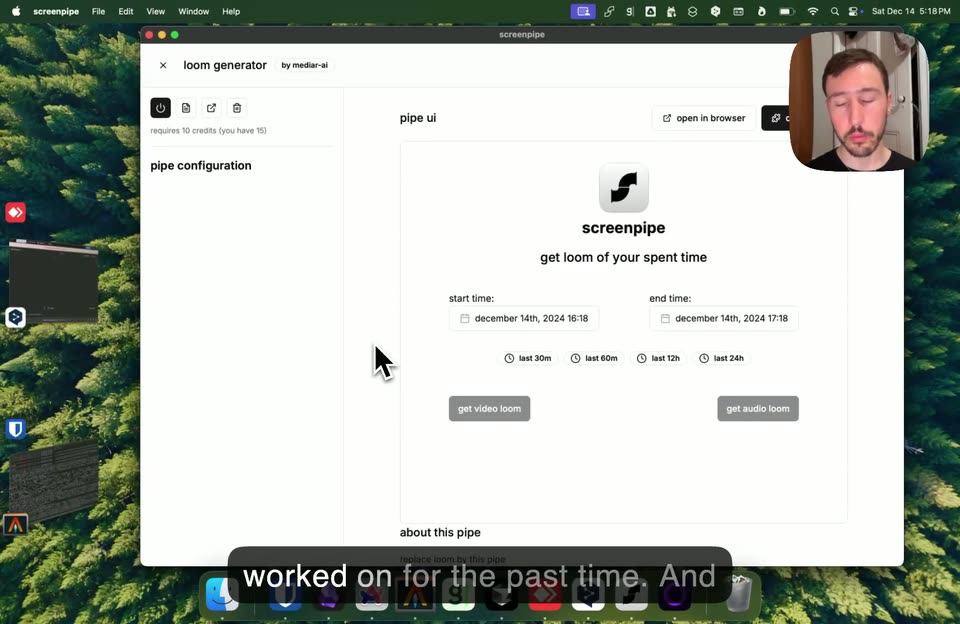
A screen recording of the screenpipe app: a hand cursor scrolls the form, clicks get video loom, then the camera zooms out to the macOS desktop and into the generated video player as it plays. White caption bars narrate at the bottom; a facecam sits top-right.
On-screen text: “these apps look like native apps.”, “For example, this one allows you”, “to get a loom of what you”, “worked on for the past time. And”
Techniques: Cursor demo, UI zoom
Camera: Pan
A screen capture of the app interface fills the frame, with a small face-cam inset in the top-right corner. A cursor drags the player's timeline scrubber while a bold headline scales above and a caption bar sits at the bottom.
On-screen text: “loom for your spent time”, “worked on for the past time. And”
Techniques: Kinetic type, Cursor demo
Camera: Static
A screen recording of the n8n interface on a desktop with a forest wallpaper; a bold headline scales above the window and a large cursor moves across. The view then zooms into the loom generator pipe page, with a small webcam of a man in the top right.
On-screen text: “loom for your spent time”, “worked on for the past time. And”
Techniques: Kinetic type, Cursor demo, UI zoom
Camera: Pan
A screen recording scrolls across a grid of plugin cards, a hand cursor hovering over icons. The view zooms into an 'add your own pipe' panel with a text field and buttons. A webcam feed of a man stays top right while a caption bar runs along the bottom.
On-screen text: “worked on for the past time. And”, “developers can publish their”
Techniques: Cursor demo, UI zoom
Camera: Pan
A tight crop on a publish form zooms out to reveal the full screenpipe window on a green desktop, then the modal closes to show the main interface. A cursor hovers over the fields while a small facecam sits in the top corner.
On-screen text: “developers can publish their”, “apps and make it paid or free.”
Techniques: UI zoom, Cursor demo
Camera: Pull out
A macOS window displays the screenpipe interface as a grid of cards, with a man's webcam feed in the top right and 3D objects on a grassy desktop. A white caption sits on a dark bar at the bottom while the cursor drifts across the empty right panel.
On-screen text: “So if you want to get started as a”
Camera: Static
Screen capture of the Screenpipe website beside a dark terminal, with a webcam self-view in the top right corner. The view slides slightly left to center the homepage, and a white caption bar sits at the bottom.
On-screen text: “So if you want to get started as a”
Camera: Pan
A dark code editor with a terminal shows a bunx command, with the presenter's webcam in the top right. White captions on a black pill at the bottom swap line by line; at the end the screen slides right to reveal a white panel with a black badge.
On-screen text: “So if you want to get started as a”, “developer, you can just run this”, “command line. It will start the”, “pipe that you can publish to the”, “get $200 in chatgpt credits”
Techniques: Cursor demo
Camera: Pan
A screen recording of the screenpipe homepage fills the frame, with a man's webcam pinned to the top right corner. A dark rounded caption bar at the bottom reads the closing line while the mouse cursor drifts down the left side.
On-screen text: “store. Thanks for listening.”
Camera: Pan