0:58

Ploid Demo: Creating a Dataset
Ploid · B2B · Oct 2026
Calltree · Jan 2025 · 1:22 · Full motion · AI-annotated
Calltree’s 1:22 launch film runs 3 scenes, about 28 s each. The product is on screen from the first frame and 2 features are revealed. There is no explicit call to action. A split-screen talking-head demo where the presenter in the green polo narrates in a right-side tile while the product UI advances on the left from the landing page to the workflow dashboard to the project view. The style is calm and steady with no cuts, a warm beige backdrop with soft tan shapes, clean sans-serif type, and a cycling value-prop headline as the signature move.
Is this your launch? to your site or press kit.
Films whose music sounds like this one, voice left out
Confident AI · Voiceover
Fenrock AI · Corporate narration
Drillbit · Spoken word / Corporate presentation
A split-screen shows the Calltree.ai website on the left, its headline cycling between 'cost to serve,' 'ops expense,' and 'handle time,' while a bearded man in a green polo speaks to a webcam on the right. White subtitles on a dark bar appear at the bottom.
On-screen text: “Inside of a contact center Today,”, “it's very hard to understand what agents are doing”, “and for how long,”, “which makes it really hard to drive down average”, “handle time.”, “Previously you had to have someone actually watch”, “what agents were doing,”, “which is expensive,”, “unscalable and limited.”, “At Call Tree we built an AI that watches every screen recording for you, aggregating millions of minutes of insights broken down by call types, workflows and 2.”
Techniques: Split screen, Kinetic type
Camera: Static
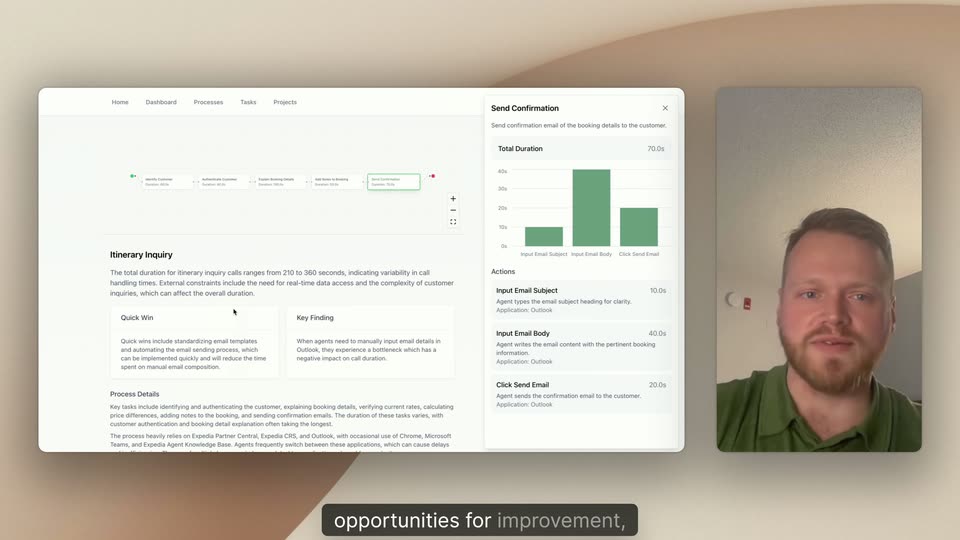
A product dashboard on the left switches from workflow cards to a process flow diagram as a cursor clicks a step, opening a side panel with a bar chart, while a man in a green shirt talks to the camera in a small right panel.
On-screen text: “We automatically extract workflow steps.”, “So if I go to this itinerary inquiry,”, “I can see that we start with identification before”, “moving all the way through to sending a”, “confirmation email”, “We can go a level deeper and see which actions”, “actually make up a workflow.”, “And here we can see that when we send a”, “confirmation email,”, “agents spend about 10 seconds writing a subject,, 40 seconds inputting the email body, and 20 seconds sending the email.. From examining all of the recordings, ”
Techniques: Split screen, Cursor demo
Camera: Static
A project detail page scrolls slowly down the left side, revealing goal progress bars, then Summary, Actionable Steps and Wins sections, while a man in a green shirt talks in a video tile on the right. A dark caption bar at the bottom updates with his words.
On-screen text: “Projects have goals like consolidating down to a”, “single pane of glass where we can track the”, “percentage of contacts that actually meet the”, “In to close,”, “65% of calls have actions that are only within a”, “single application.”, “Intermediate project wins are also tracked,”, “proving out the incremental return on investment”, “before a project complet completion.”, “Calltree lets you identify and quantify', 'opportunities to cut cost as if you are watching', 'every contact.', 'Feel free to send through any questions.”
Techniques: Split screen, Cursor demo
Camera: Pan