1:10

Introducing Realtime Broadcast from Database
Supabase · Developer tools · Apr 2025
Ploid · Oct 2026 · 0:58 · AI-annotated
A linear screen-recording walkthrough that follows one cursor through a single task: query, agent, table, verification, enrichment, export. Pacing is slow and deliberate, with panels sliding in, rows filling one by one, and modals popping over a dimmed interface.
Supabase · Developer tools · Apr 2025
Microsoft · AI · Sep 2026
Nothing · Hardware · Sep 2026
A cursor drifts up from the Import Data button into the search field, which highlights as it focuses. It types a query about heads of growth at Series A fintech startups in New York, then moves to the corner arrow and presses it.
Techniques: Cursor demo
Camera: Static
The Ploid Create dataset screen shows a typed query with the cursor at the send control; it then switches to the agent view, the query as a top bubble and an Understanding your request status above an empty prompt bar.
Techniques: Cursor demo
Camera: Static
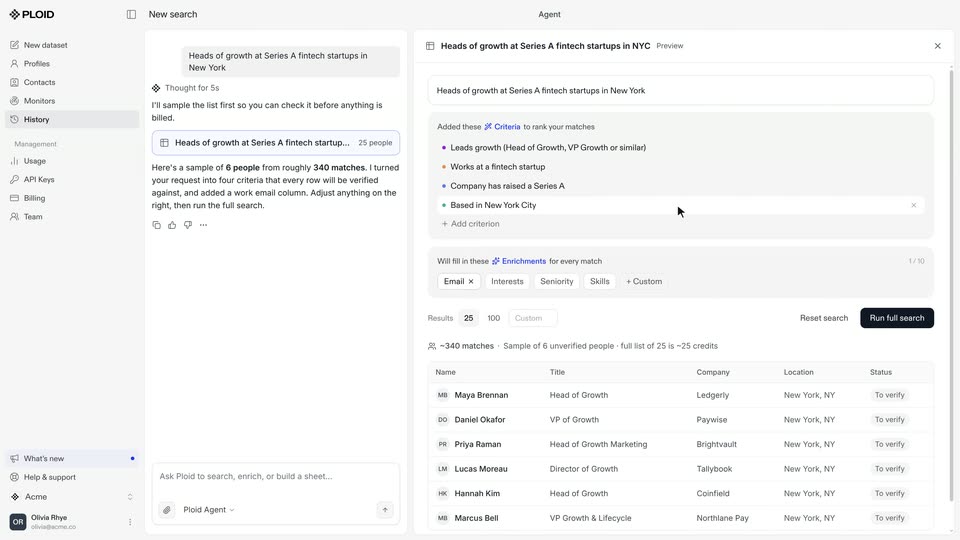
In the Ploid agent chat, a thinking counter ticks up while a results panel slides in from the right, showing criteria chips and a table of six people. The cursor clicks the Seniority chip, then Run full search, and the panel switches to a searching progress bar.
Techniques: Cursor demo
Camera: Static
A split-screen view of the Ploid app: an AI agent chat on the left explains a search while a contacts table on the right fills row by row, then scrolls horizontally to reveal email columns. A cursor drifts across the panels.
Techniques: Split screen, Cursor demo
Camera: Pull out
A flat product interface shows a contact table on the right and an agent chat panel on the left. A white detail card for Maya Brennan is centered, showing a Series A match, reasoning and a reference link. A cursor hovers over the Company column.
Techniques: Cursor demo
Camera: Static
Left chat panel and right data table of NYC growth heads. Cursor clicks the Enrich button; an Add Enrichment modal pops over the dimmed screen, the column name and instructions fields type themselves, then the modal fades.
Techniques: Cursor demo
Camera: Static
The Ploid app screen shows an agent chat on the left and a contacts table on the right. The table scrolls sideways to reveal email, seniority and funding round columns, then the cursor opens the Export menu and a CSV dropdown appears.
Techniques: Cursor demo
Camera: Pull out