1:34
Introducing Automations: always-on coding agents
Cursor · Developer tools · Mar 2026
OpenEvidence · Nov 2026 · 0:57 · AI-annotated
OpenEvidence’s 0:57 launch film runs 19 scenes, about 3.0 s each. The product is on screen from the first frame and 3 features are revealed. There is no explicit call to action. The video is one continuous zoom tour: the camera dives from the pastel Learn hub into a module, plays a cursor driven interaction, then pulls back out, with no hard cuts between beats. Signature moves are the card to fullscreen zoom, count up stats and the coral accent on a cream field, with serif type reserved for headings and the closing tagline.
Is this your launch? to your site or press kit.
Cursor · Developer tools · Mar 2026
Ramp · Finance · Mar 2021
Topograph · Nov 2026
A light Learn dashboard with four pastel cards and a streak calendar; numbers count up in the right panel and calendar days fill in, then the view zooms into the Test Prep card, which expands to fill the screen while the rest of the interface fades.
Techniques: UI zoom
Camera: Push in
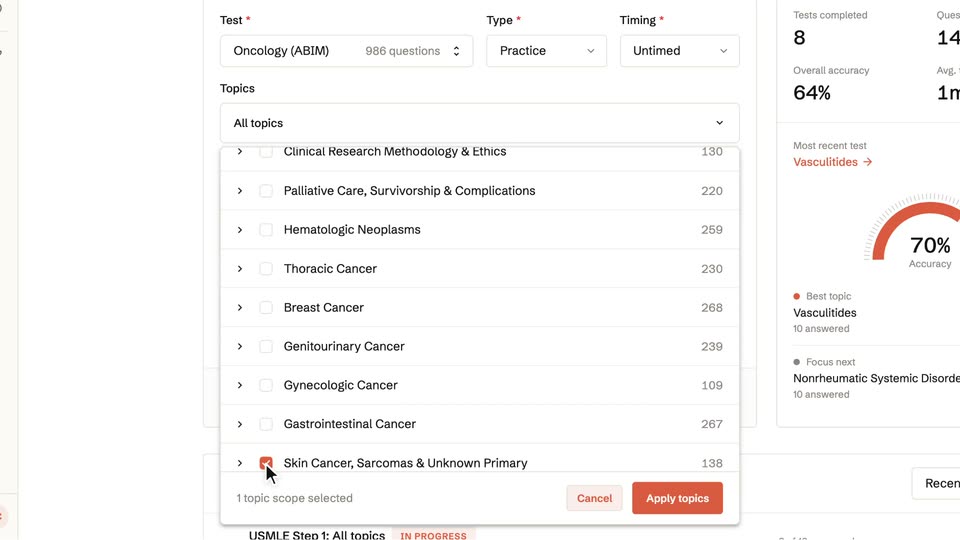
A light-themed dashboard page zooms in on a form as a cursor clicks the Topics dropdown, which expands to a list of subjects; the cursor checks one row and a selection footer with an Apply button appears.
Techniques: UI zoom, Cursor demo
Camera: Push in
A product screen cuts from a practice-test builder form, with a performance dashboard at right, to a question view. The view pairs a clinical vignette with a chest CT scan, flanked by numbered question lists. A cursor shifts from the Build test button to the image.
Techniques: Cursor demo
Camera: Pull out
A medical exam screen zooms in and scrolls past a question vignette and two chest CT images to five answer choices. The cursor clicks choice B, which highlights green with a check and a Correct stats panel, then cuts to two other questions showing graded answers.
Techniques: UI zoom, Cursor demo
Camera: Push in
A still view of a quiz screen: a multiple-choice question with option A highlighted green and checked, a Correct banner showing 64% and 1m 08s, and an expanded evidence-backed explanation panel below. The frame holds without motion.
Camera: Static
A quiz answer panel with a green correct banner and explanation text zooms out, revealing a learning dashboard: a Learn heading, feature cards for Test Prep, Preceptor, Flashcards and CME, plus a right sidebar with a streak counter and calendar.
Techniques: UI zoom
Camera: Pull out
A cursor taps the Start a case button on the Preceptor card, and the grid zooms into the Preceptor detail page showing a searchable case list. The right panel swaps from a calendar to performance stats.
Techniques: Cursor demo, UI zoom
Camera: Push in
A light product dashboard titled Preceptor fills the frame, then the view zooms into the case filter row as a cursor opens the Training level dropdown, revealing Preclinical, Clerkship, Resident and Fellowship.
Techniques: UI zoom, Cursor demo
Camera: Push in
A light-themed dashboard titled Preceptor lists patient cases, with a cursor resting on the first Start button. The view cuts to a case detail page holding a long clinical note and a checklist, then returns to the dashboard.
Techniques: Cursor demo
Camera: Static
A clinical case app interface reframes between the full three-panel layout and a close-up of the central chat. A cursor types a diagnosis into the input box and sends it; the right panel marks the first objective complete, a reference citation appears, and a new lab-results divider slides in.
Techniques: UI zoom, Cursor demo
Camera: Pan
A medical case interface scrolls the center panel down, past a lab-results table, to an AIR score table, while the left patient sidebar and right objectives panel stay fixed. A cursor hovers at the input field.
Camera: Static
The medical case app UI fills the frame. The center panel crossfades from a scoring table to a chat reply with an evidence paragraph, while the right panel updates to 6/6 objectives. The view zooms into the reply, then cuts back to the full layout showing a hub dashboard.
Techniques: Cursor demo, UI zoom
Camera: Pull out
A light dashboard titled Learn shows four module cards (Test Prep, Preceptor, Flashcards, CME) beside a streak and calendar panel, then switches to the Flashcards screen with generation options and a seven-day review chart. A cursor hovers the Flashcards card.
Techniques: Cursor demo
Camera: Push in
The flashcards dashboard reframes with a zoom onto the Review activity card, isolating the red bar chart and the 5 days streak label while a cursor hovers by the last bar.
Techniques: UI zoom
Camera: Push in
A cursor glides to the “From conversations” button and presses it, the button shading gray, then the whole screen fades to white.
Techniques: Cursor demo
Camera: Static
White rounded cards scattered across a cream background fade out, revealing a flashcard study screen with a serif question in the center and action buttons along the bottom.
Camera: Static
The view tightens on a flashcard showing a serif question and its revealed answer. A cursor moves down and clicks the Good button; the card crossfades to the next question as the progress bar fills and the counter jumps to 4 of 9.
Techniques: UI zoom, Cursor demo
Camera: Static
A plain beige background displays a two-line text block that slides into the center of the frame.
On-screen text: “Personalized medical education platform”, “for every stage of a clinician's career.”
Techniques: Kinetic type
Camera: Static
On a cream background a two-line serif tagline holds center, then the OpenEvidence Learn logo fades in above it as its orange ring draws around the final e, and the tagline slides down to sit beneath the lockup.
On-screen text: “Personalized medical education platform for every stage of a clinician's career.”
Camera: Static