0:57
OpenEvidence - Introducing Learn, a free, personalized medical education platform fr
OpenEvidence · Nov 2026
Anthropic · Oct 2026 · 1:13 · AI-annotated
Anthropic’s 1:13 launch film runs 19 scenes, about 3.8 s each. The product is on screen from the first frame and 4 features are revealed. There is no explicit call to action. The video alternates full-frame serif title cards, which fade in word by word, with flat front-facing browser mockups that slide up to demo one feature at a time. Pacing is slow and even, driven by a single cursor, cross-fades and scrolling chips, and the video closes on the animated starburst logo lockup.
Is this your launch? to your site or press kit.
OpenEvidence · Nov 2026
Cursor · Developer tools · Mar 2026
Ramp · Finance · Mar 2021
Centered on a cream background, two lines of serif text fade in word by word, each word shifting from light gray to black. The first line completes before the second begins, then both lines fade back out.
On-screen text: “Tools built for lawyers,”, “securely deployed in Claude.”
Techniques: Kinetic type
Camera: Static
A serif headline, securely deployed in Claude., sits on a cream field as a flat browser mockup of the Claude app slides up from the bottom edge. The headline exits the top while the sidebar and the Back at it, Robert greeting fill the frame.
On-screen text: “securely deployed in Claude.”
Camera: Pan
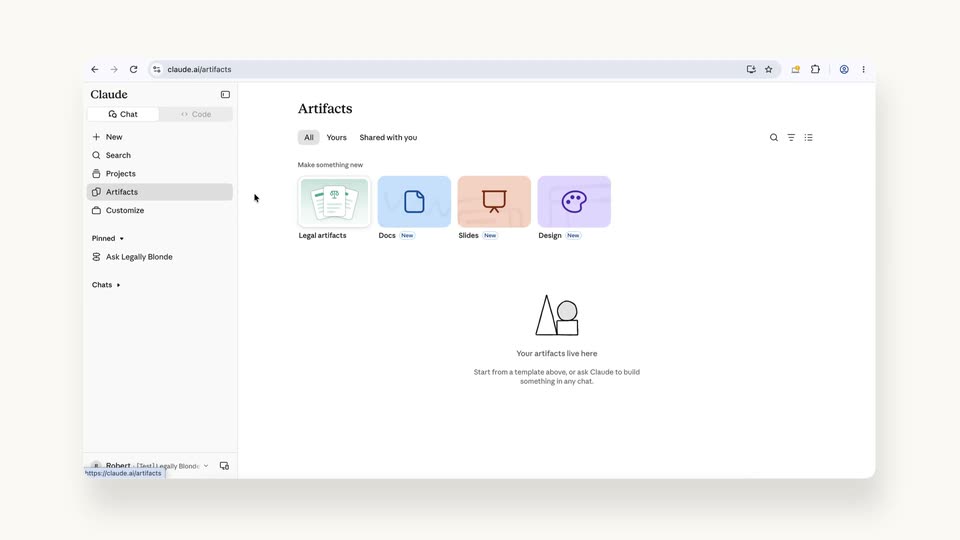
A flat browser window on cream shows the Claude app. A cursor clicks Artifacts in the left sidebar; the main pane cross-fades from the “Back at it, Robert” greeting to the Artifacts template grid, then a tooltip pops up under the Legal artifacts card.
Techniques: Cursor demo
Camera: Static
A browser window shows the Claude app with a Legal artifacts template panel open. A cursor clicks Regulatory horizon scan in the sidebar list, and the right preview pane cross-fades from a contracts table to a law timeline under a new serif headline.
Techniques: Cursor demo
Camera: Static
A browser window shows the Claude app. A cursor sits on the Try it button of a Legal artifacts preview card, then the view changes to a chat where the cursor types into a New scan name field.
Techniques: Cursor demo
Camera: Static
A browser window displays the Claude app, with a New scan form on the right. A cursor types a sentence into the watch field, then clicks Start scan, and the panel switches to a waiting state.
Techniques: Cursor demo
Camera: Static
A Claude chat window shows a regulatory scan artifact with a Gantt-style timeline and a checklist. A cursor moves to the top-right Chat button and clicks it; the narrow chat column collapses and the artifact panel widens to fill the full window.
Techniques: Cursor demo, UI zoom
Camera: Static
A regulatory dashboard fills the browser window: a timeline of compliance dates sits above a list of rules. The view scrolls down a few rows, then a detail panel slides in from the right to open one regulation's summary and status, while a cursor hovers at the top right.
Techniques: Cursor demo
Camera: Static
A browser window shows the Claude regulatory dashboard. A cursor picks an owner from a dropdown, a confirmation toast slides in, then the right panel closes and the list gains due dates. The view zooms in as a new regulation's detail panel opens.
Techniques: Cursor demo, UI zoom
Camera: Pull out
A two-line serif headline fades in word by word at the top of a pale background as the flat Claude web interface, showing a regulatory timeline and a chat panel, slides up from the bottom to fill the lower frame.
On-screen text: “Ask Claude to tailor the artifact and share it with”
Techniques: Kinetic type
Camera: Static
A centered black serif headline sits above a flat Claude browser window. Its last words, your team, fade in from gray to black, while the window shows a regulatory scan artifact with a timeline, a to-do list, and a detail panel.
On-screen text: “Ask Claude to tailor the artifact and share it with your team”
Techniques: Kinetic type
Camera: Static
A serif headline sits above a flat browser mockup of the Claude app. A cursor dismisses a connector dialog, the briefing document types itself out, then the cursor clicks Export Word and Save file, prompting a download toast. The window slides down out of frame.
On-screen text: “Ask Claude to tailor the artifact and share it with your team”
Techniques: Cursor demo
Camera: Pan
A light product panel with a board selector and a red action button slides up out of frame, revealing a dense grid of gray template titles such as Matter Board and Obligations Tracker on a cream background.
Camera: Static
A serif headline sits above five horizontal rows of pill-shaped chips listing artifact names. The chips scroll continuously across the frame, with alternating rows drifting in opposite directions, while the headline fades in from gray to black.
On-screen text: “Get access to 20+ customizable artifacts”
Camera: Pan
A black serif headline appears word by word at the top while five rows of white pill-shaped labels scroll left across a cream background. The headline and the scrolling labels then fade out to an empty field.
On-screen text: “Including artifacts built to expand access to justice”
Techniques: Kinetic type
Camera: Pan
A cream slide holds a centered black serif headline that completes word by word, while a grid of partner app icons and names fills in row by row, fading from faint to full, then the whole composition fades out.
On-screen text: “Connected to the tools legal teams already use”
Techniques: Kinetic type
Camera: Static
A black serif headline sits at the top of a cream background. A grid of partner logos fades in row by row below it, filling the frame.
On-screen text: “Connected to the tools legal teams already use”
Camera: Static
A small coral asterisk-shaped glyph, the character 米, sits centered on a plain cream field and scales up, its eight rounded strokes resolving from a tight burst into a clean star mark.
On-screen text: “米”
Techniques: Kinetic type
Camera: Static
On a cream background, the terracotta starburst mark rotates slowly at center, beside the black serif wordmark “Claude”, which stays locked off and static. The lockup holds as a sign-off.
On-screen text: “Claude”
Camera: Static