4:12

Docflow (YC F24) Launch YC Video
Durate · Healthcare · Nov 2024
Mica AI · Sep 2024 · 1:07 · Full motion · AI-annotated
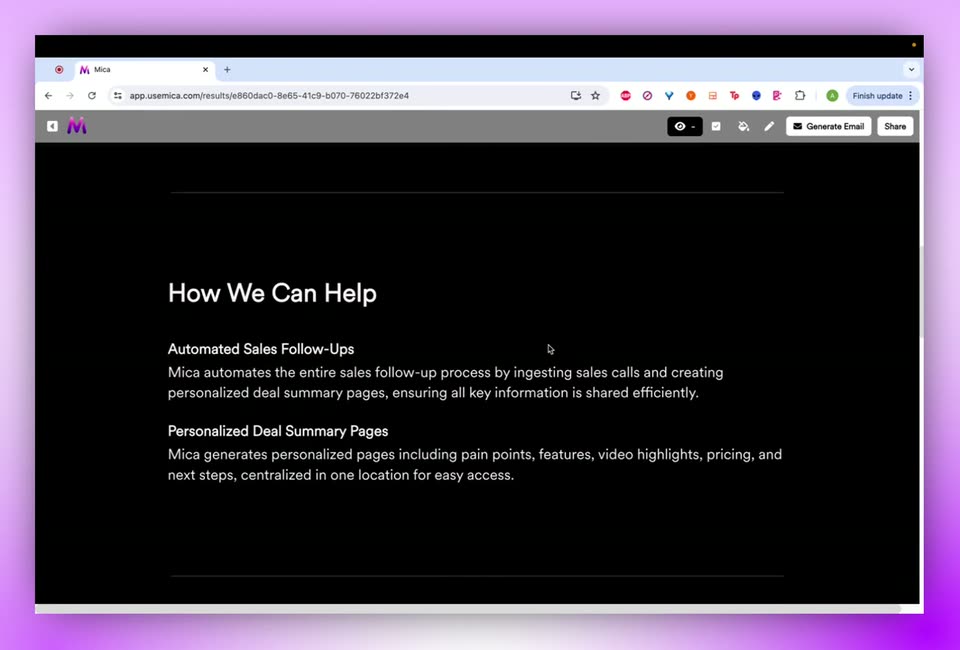
Mica AI’s 1:07 launch film runs 12 scenes, about 5.6 s each. The product is on screen from the first frame and 2 features are revealed, with social proof. The call to action lands at 1:05 (97% in), over a voiceover. The video is a single continuous screen capture of the Mica web app, framed in a browser window on a lavender gradient, walking from the call upload flow to the generated deal page and the follow-up email. Pacing is steady, driven by slow zooms, crossfades and cursor moves between UI states, and the only graphic moment is the static logo card with the URL at the end.
Is this your launch? to your site or press kit.
Durate · Healthcare · Nov 2024
Axal · Industrials · Jun 2025
Google · AI · Apr 2011
Films whose music sounds like this one, voice left out
Forge · Corporate Electronic
Novella · Modern corporate electronic
ZeroSettle · Upbeat electronic
A browser window on a purple gradient background shows the Mica Pages interface, with a Recent Calls grid holding a page preview and a video of a man speaking. A mouse cursor drifts from the right side to the video, then up to the page title.
Techniques: Cursor demo
Camera: Static
A browser window shows the Mica Pages screen with a purple Upload Sales Call button and a white Insert Link button. The view zooms in as a cursor moves onto the purple button, above a Recent Calls row holding a landing page thumbnail and a video of a man.
Techniques: UI zoom, Cursor demo
Camera: Push in
A browser view of the Mica Pages app, dimmed, with a dark Upload Sales Call modal on the right showing a purple cloud icon and a Submit button. The cursor hovers the purple Upload button, then slides right as the modal sharpens into place.
Techniques: Cursor demo
Camera: Static
A browser window on a purple desktop zooms out from a close-up of the Mica Pages interface to reveal the full page, showing two recent-call cards, a webpage mockup and a video of a man, while a cursor hovers over the cards.
Techniques: Cursor demo, UI zoom
Camera: Pull out
A browser window sits on a soft purple gradient, locked off. Inside, the dark Mica results page loads and scrolls down through its section headings, a white cursor hovering near the center.
Camera: Pull out
A Chrome browser window on a purple gradient shows a dark Mica page. Faded sections from the previous page crossfade out, revealing the centered headline 'Transform Your Sales Follow-up with Mica', which holds still. A cursor rests in the middle of the page.
On-screen text: “Transform Your Sales Follow-up with Mica”
Camera: Static
A dark Mica webpage in a browser shows the white headline Transform Your Sales Follow-up with Mica. A cursor moves to the Generate Email button in the toolbar and clicks it, opening a white popup card that reads Loading.
Techniques: Cursor demo
Camera: Push in
A browser window shows a Follow-up Email dialog with a drafted message and a purple Copy Email button, set over a black background. The camera pans and reframes so the dialog centers while a large white headline reading Transform v-up with emerges behind it.
On-screen text: “Transform v-up with”
Techniques: UI zoom
Camera: Pan
A white Follow-up Email modal sits centered on a black screen, with a large gray headline partly hidden behind it. A cursor travels from the top toolbar into the email body and hovers over the shareable link, which glows pink under the pointer.
On-screen text: “Transform v-up with”
Techniques: Cursor demo
Camera: Static
A blank white screen holds a small black arrow cursor near the center, static throughout the clip. No interface, text or logo is visible, only the idle pointer against the plain background.
Camera: Static
A dark browser window on a purple gradient background shows the Mica preview page: a white heading “Transform Your Sales Follow-up with Mica” above a “Your Pain Points” section. The shot holds static, a cursor arrow resting mid-page.
Camera: Pull out
A soft purple gradient fills the frame. A small pink-to-purple M logo sits at top center above two centered lines of purple text, Book a Demo at and usemica.com. The composition is locked off and static throughout.
On-screen text: “Book a Demo at”, “usemica.com”
Camera: Static