0:22

Dia - Never late, always prepared. Meeting Tab Groups, now in Dia.
The Browser Company · Productivity · Jan 2026
Forge’s 0:51 launch film runs 10 scenes, about 5.2 s each. The product is on screen from the first frame. The call to action lands at 0:45 (88% in), over a voiceover. A single cursor-driven walkthrough of the Forge interface, alternating flat and tilted browser frames over a solid periwinkle field, with modals opening over a dimmed dashboard. Steady pacing at about 8 cuts per minute, built on zoom-ins to fields and checklists, closing on a plain centered URL card.
Is this your launch? to your site or press kit.
The Browser Company · Productivity · Jan 2026
Films whose music sounds like this one, voice left out
Novella · Modern corporate electronic
Mica AI · Upbeat electronic
Genesis · Modern corporate electronic
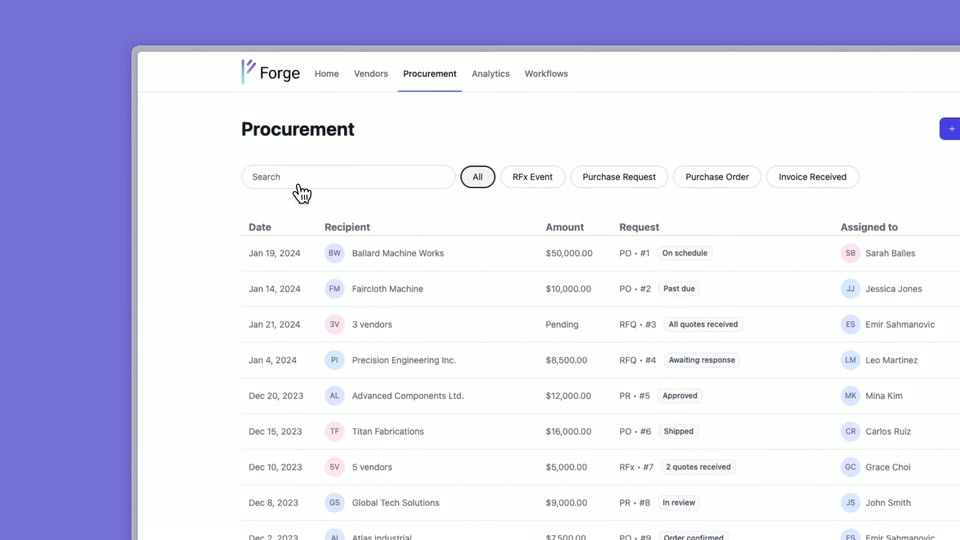
A solid periwinkle field fades into a flat product screen showing a procurement table. The view holds static, listing vendor rows under a top navigation bar and a row of filter pills.
Camera: Static
A tilted browser window on a purple field shows the Forge procurement table. The cursor hovers rows, then the view zooms to the search bar; the cursor types “sarah” and the list filters to one highlighted row.
Techniques: 3D mockup, Cursor demo, UI zoom
Camera: Push in
A white purchase order panel for PO #1 sits over the dimmed Forge screen as the camera pulls back to the full interface. A cursor glides across the line items table, hovering over the gasket row, the delivery date and the 96% rate, then moves to the close icon.
Techniques: UI zoom, Cursor demo
Camera: Pull out
A white Forge procurement dashboard sits on a purple field. A hand cursor glides from the top navigation to the lower left, hovering a small tooltip that reads Ballard Machine Works.
Techniques: Cursor demo
Camera: Static
The Forge dashboard sits in a browser frame on a lavender background. A cursor moves from the Home tab down to the open actions table and hovers the first RFQ row, which highlights, as the view scrolls slightly to frame it.
On-screen text: “Workflow automation - arcick.com”
Techniques: Cursor demo, UI zoom
Camera: Static
A quote-comparison modal sits over a dimmed Forge dashboard. The cursor checks the Midship Machining row, clicks Submit, and the table fades to a green checkmark with a finance-approval message. The cursor then opens the Overview tab, revealing a three-step status flow.
Techniques: Cursor demo
Camera: Static
A modal workflow canvas sits over a dimmed dashboard. A cursor taps the zoom-out control, the dotted-grid view scales down to reveal a chain of five task cards with avatars and icons, then the cursor drifts to the close button.
Techniques: Cursor demo, UI zoom
Camera: Static
A browser window on a purple background shows the Forge dashboard: a January 2024 calendar left, a spend bar chart and vendor list right, an open actions table below. A hand cursor hovers near the greeting line, then exits the frame.
Techniques: Cursor demo
Camera: Static
A faint dashboard UI dissolves out over a solid purple field, leaving the centered URL in light white type. The frame then holds still on the address as the closing card.
On-screen text: “www.forgehq.com”
Camera: Static
A white URL sits centered on a flat purple-blue field, held perfectly still. After a few seconds the text fades out, leaving the plain background empty as the sign-off ends.
On-screen text: “www.forgehq.com”
Camera: Static