1:50

Airweave AI // Launch YC Demo
Airweave · B2B · May 2025
Axal · Jun 2025 · 3:08 · Full motion · AI-annotated
Axal’s 3:08 launch film runs 13 scenes, about 15 s each. The product is on screen from the first frame and 2 features are revealed. The call to action lands at 2:38 (84% in), over a voiceover. The video is built as a slow, single-narrator walkthrough: a static product landing page, then a run of floating UI windows over a green-blue gradient, each held with a gentle push-in zoom on the detail being explained. A circular live-video inset of the presenter stays pinned to the bottom-right corner in every frame, and the pacing is deliberately unhurried so each screen and the voiceover can carry the point on their own.
Is this your launch? to your site or press kit.
Airweave · B2B · May 2025
GitHub · Developer tools · Nov 2024
Coasts · B2B · Nov 2025
The Axal landing page is shown flat against a green and blue gradient, its headline and teal shapes filling the frame. A small circular video of the presenter sits in the bottom right corner as he speaks. The layout stays static throughout.
Camera: Static
A dark GitHub repository page floats over a blue-green gradient, with a circular webcam bubble of a presenter in the corner. The view zooms into the repo name and file list, then pulls back as a cursor hovers the About text.
Techniques: UI zoom, Cursor demo
Camera: Static
A flat view of the DayTrader web app on a Windows XP desktop shows a market summary table listing stock symbols, prices and changes. A small circular webcam of a man sits in the lower right corner while a cursor hovers near the top of the screen.
Camera: Static
A browser window shows the DayTrader web app on a desktop. A cursor clicks the Home tab, the welcome page loads, then the view zooms into the user statistics before pulling back, while a circular webcam of the presenter stays in the corner.
Techniques: Cursor demo, UI zoom
Camera: Pull out
A full-screen capture of the DayTrader web app displays a stock table with a cursor near the top menu. The view zooms into the price and trade columns, the cursor settling on a buy button, while a small circular webcam of a man stays in the lower right corner.
Techniques: UI zoom, Cursor demo
Camera: Push in
A browser window shows the DayTrader app. A cursor selects the Portfolio tab, hovers a sell link in the holdings table, and zooms into the row, then jumps to the Market Summary tab and a new-order page. A circular webcam of a presenter sits bottom right.
Techniques: Cursor demo, UI zoom
Camera: Pull out
A browser window shows the DayTrader market summary, a table of top gainers and losers with green and red figures, over a blue-green desktop wallpaper. A circular webcam of a man speaking sits in the lower right corner. A cursor hovers the Market Summary tab, then drifts down the page.
Techniques: Cursor demo
Camera: Static
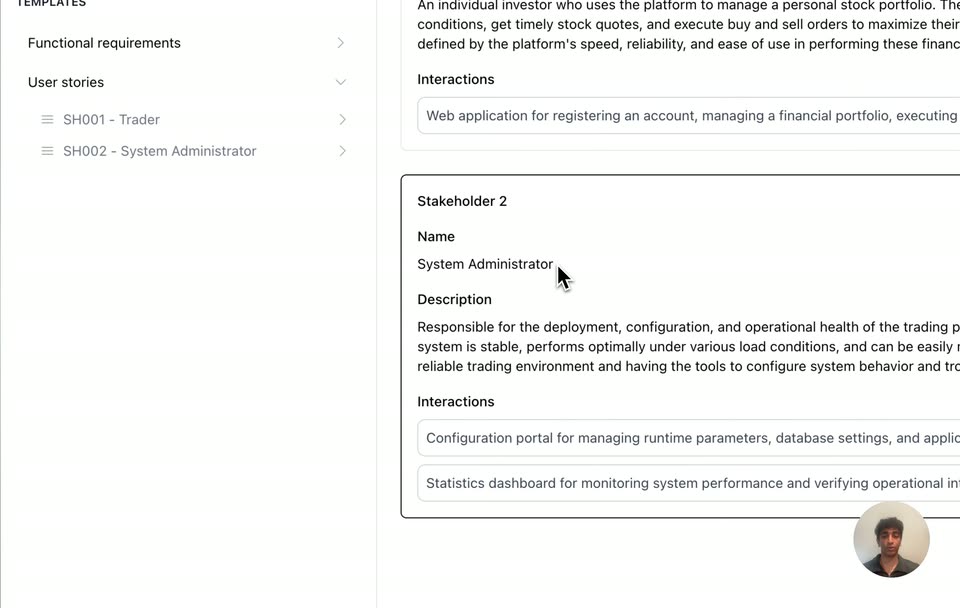
A product interface shows a stakeholder page with two cards on a gradient background, a circular webcam of the presenter in the corner. The view zooms into the Trader name, scrolls to the System Administrator field, and the cursor highlights the text before zooming back out.
Techniques: UI zoom, Cursor demo
Camera: Static
A screen recording of a stakeholder view shows two cards, Trader and System Administrator, next to a sidebar menu, with a circular presenter webcam in the corner. The cursor hovers over a card, then the frame zooms in on the Trader card and back out.
Techniques: Cursor demo, UI zoom
Camera: Static
A product screen on a gradient desktop, with a small presenter inset bottom right. The view zooms into the left sidebar as a cursor expands the Trader user stories list and hovers down the items. Selecting one updates the main panel, then the frame zooms back out.
Techniques: UI zoom, Cursor demo
Camera: Push in
The US0008 user story fills the frame, then the view pulls back to a floating window on a blue-green gradient desktop before zooming into the Functional detail flowchart. A cursor traces the TRIGGER and FR0053 nodes while a presenter's webcam circle holds the corner.
Techniques: UI zoom, Cursor demo
Camera: Pan
A trading spec tool interface sits on a blue-green gradient, with a circular webcam of a presenter in the corner. The view zooms into the flowchart under Functional detail, scrolling past decision and process nodes, then zooms back out to the full window.
Techniques: UI zoom, Cursor demo
Camera: Pull out
A requirements tool window displays the US0008 user story with preliminary conditions and a flowchart holding a blue process box and a purple decision box. A presenter speaks in a small circular webcam at the bottom right. The frame then zooms into the Edit content button at the top right.
Techniques: UI zoom
Camera: Pull out