0:52

Y Combinator - Lexius turns existing security cameras into AI security guards that d
Lexius · B2B · Feb 2026
Hallmark · May 2026 · 0:39 · Full motion · AI-annotated
Hallmark’s 0:39 launch film runs 19 scenes, about 2.1 s each. The product shows up at 0:02 and 4 features are revealed. The call to action lands at 0:34 (87% in). The video opens with a scattered wall of distinct landing pages and a one line promise, names the product, then lets a typed command spawn a stream of pages before a left sidebar tours four commands, closes with a with versus without comparison and a two word payoff, and ends on an install command. The style is typographic and minimal: white and cream fields, a high contrast serif wordmark, monospace prompts, and 3D tilted mockups that scroll, spin and crossfade to show the product working.
Is this your launch? to your site or press kit.
Lexius · B2B · Feb 2026
SlashVibe · Oct 2026
Replit · Developer tools · Jul 2026
A grid of twelve website mockups fades in on a white background, the cards shifting from a flat aligned layout into a scattered, offset arrangement mixing light cream and dark themes.
Camera: Static
A perspective wall of website screenshots, soft-focused at the edges, fills the frame. Centered black serif text reading “Every style. One skill.” fades in over the grid.
On-screen text: “Every style. One skill.”
Techniques: 3D mockup
Camera: Push in
On a plain white field, the serif wordmark /hallmark holds center with a blinking text caret. A small monospace line types a command along the top edge, then clears, while the frame stays locked off.
On-screen text: “/hallmark”, “• /hallmark build a landin”
Camera: Static
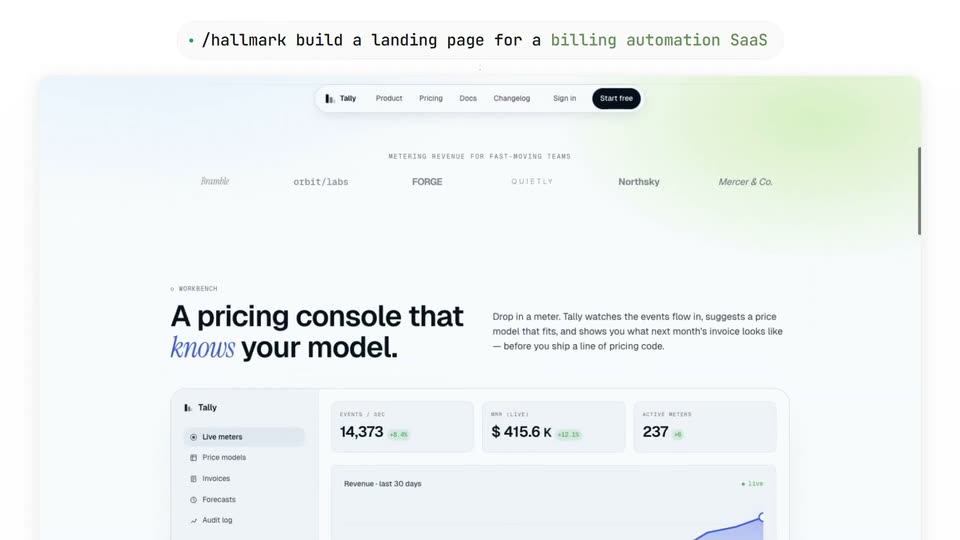
A Tally landing page sits inside a tilted 3D browser window while a command bar at the top types a prompt. The page scrolls down past the hero headline, a client logo strip, and a pricing dashboard showing live metrics and a revenue chart.
On-screen text: “/hallmark build a landing page for a billing automation SaaS”
Techniques: 3D mockup
Camera: Pan
A dark landing page mockup is shown front-on on a light field. The top command pill resolves from overlapping ghost text into a clean prompt, while the white headline “For engineers who ship” slides down to sit above the orange italic “after dark.”
Techniques: Kinetic type
Camera: Static
A top command bar holds a typed prompt above a dark landing page that scrolls down, its oversized serif headlines drifting at different speeds past a schedule table and bold section titles.
Techniques: Parallax
Camera: Pan
A white command bar at top types a prompt, then a dark landing-page mockup scrolls down, reframing from the white-and-red hero onto a departures board of large white city names.
On-screen text: “/hallmark build a landing page for a travel booking startup”
Techniques: Kinetic type, UI zoom
Camera: Pan
A white command pill at the top types out a prompt ending in orange words, while a dark podcast landing page sits below it. The page's vinyl record spins and its tonearm sways as the text completes.
On-screen text: “/hallmark build a landing page for an indie podcast”
Techniques: Kinetic type
Camera: Static
Crossfading in from a record player, a left column shows the /build command active while a terminal types a prompt. Inside a rounded card a NAIM fashion landing page fades in, its orange marquee, hero and product card resolving.
On-screen text: “From a single prompt.”
Camera: Static
A tilted 3D mockup of the app floats on white. The /audit item is active and an audit report card with green checks and red crosses slides into the top right corner. The nav then switches to /redesign and the main canvas crossfades to a student software shop page.
On-screen text: “Score it. Rank it. No edits.”
Techniques: 3D mockup
Camera: Static
A flat software-shop homepage sits static while a black BEFORE pill pops in beside the logo and the left sidebar labels dim, then both reset to normal.
On-screen text: “/hallmark”, “/build”, “/audit”, “/redesign”, “/study”, “Same intent. New fingerprint.”, “BEFORE”
Camera: Static
A flat browser mockup of a software store homepage fills the right side, its right third sharpening from a faded ghost state to full color while the sign-in button fills solid. A left column of slash-prefixed serif labels sits beside it, /redesign marked active, with a tagline below.
On-screen text: “/hallmark”, “/build”, “/audit”, “/redesign”, “/study”, “Same intent. New fingerprint.”
Camera: Static
A dark MakeComics screen with a comic grid sits beside a white column of monospace items and a serif caption. A Design DNA card fades in over the panels, then the frame dissolves to white.
On-screen text: “/hallmark”, “/build”, “/audit”, “/redesign”, “/study”, “Extract the DNA. Not the pixels.”
Techniques: Split screen
Camera: Static
Two tilted website mockups float side by side, labeled Without /hallmark and With /hallmark. The camera glides from the left card, a purple gradient wine club landing page, to the right card, a cream editorial layout with a wine bottle sketch, blurring the background card.
On-screen text: “Without /hallmark”, “With /hallmark”
Techniques: 3D mockup, Parallax
Camera: Push in
A cream newsletter card fades in over a pale gray background, its large italic serif headline and red bottle line-drawing dissolving into place, while a small label with a green checkmark appears centered above it.
On-screen text: “With /hallmark”
Camera: Pull out
Two flat browser windows ease into place side by side on a pale lavender field. The left, a purple gradient wine landing page, sits under a red X and 'Without /hallmark'; the right, a cream newspaper-style page, sits under a green check and 'With /hallmark'.
On-screen text: “Without /hallmark”, “With /hallmark”
Techniques: Split screen
Camera: Static
On a plain white field, a centered serif line builds up: 'Designed.' sits in black, then 'Not generated.' fades in to its right in light gray. The frame stays locked off.
On-screen text: “Designed. Not generated.”
Techniques: Kinetic type
Camera: Static
A plain off-white background holds a centered line of text. The line remains static for the full shot.
On-screen text: “Designed. Not generated.”
Camera: Static
A white card centers a dark gray serif headline. Below it, a black rounded terminal box types the install command letter by letter, widening as it fills. A small URL pill fades in at the top and a row of four app icons appears under the box.
On-screen text: “Designed. Not generated.”, “$ npx skills add nutlope/hallmark”, “github.com/nutlope/hallmark”, “Works with”
Techniques: Kinetic type
Camera: Static