1:42
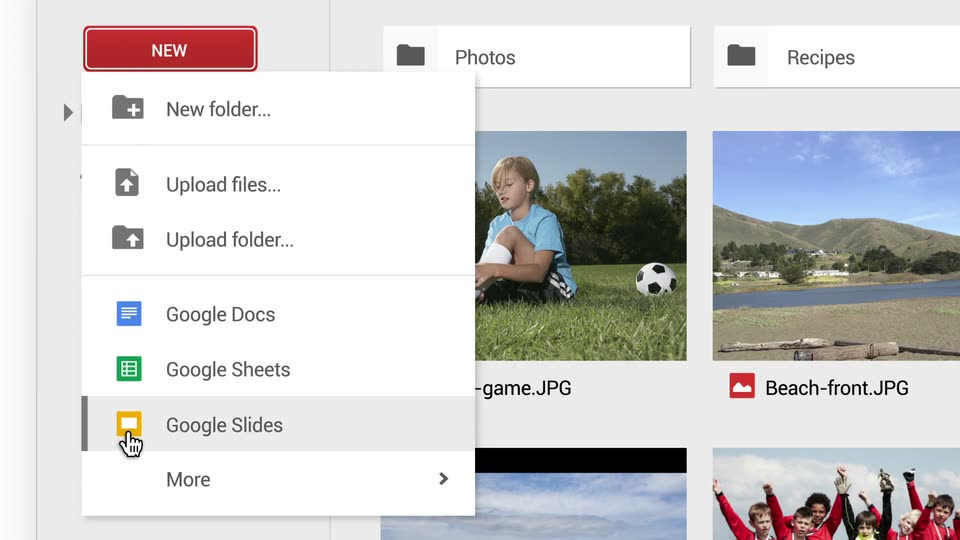

Meet the new Google Drive
Google · AI · Jun 2014
Replit · Jul 2026 · 1:11 · AI-annotated
Replit’s 1:11 launch film runs 39 scenes, about 1.8 s each. The product is on screen from the first frame and 3 features are revealed. The call to action lands at 1:09 (97% in). The video alternates surreal 3D classical-art tagline cards with clean cream-grid interface demos, each feature opened by a centered white tagline before cutting to the product. Signature moves are the white hand cursor, glowing pink card frames, and push-ins that morph paintings into live screens.
Is this your launch? to your site or press kit.
Google · AI · Jun 2014
Shopify · Business software · Feb 2023
A blank canvas on an easel in a columned pavilion overlooks a lake. 'Introducing' scales in at the center, then gives way to the orange Replit mark and 'Replit Design' lockup as the camera pushes in. Paint splatters bloom across the canvas, revealing a classical landscape painting beneath.
On-screen text: “Introducing”, “Replit Design”
Techniques: Kinetic type, Masking
Camera: Push in
A grid of classical art fragments, a cloudy landscape painting, a marble statue and a gilded swan mirror, fills the frame as the white headline assembles across the center, an orange Replit logo standing in for one letter.
On-screen text: “Now anyone can be a designer”
Techniques: Kinetic type
Camera: Push in
A surreal composite: a white swan on the left lowers its neck before a gilded mirror, a cloudy classical landscape fills the center, and a marble statue on the right holds a tablet and stylus. A thin white grid overlays the frame; the headline sits centered and static.
On-screen text: “Now anyone can be a designer”
Techniques: 3D mockup
Camera: Static
A white swan with spread wings flaps across a surreal collage: a marble statue of a woman holds a tablet and stylus at right, an ornate gold frame at left, a classical landscape behind. A thin design grid overlays the scene; the title Replit Design sits still.
On-screen text: “Replit Design”
Camera: Static
A draped cheetah sits before a classical landscape painting, beside a marble statue holding a tablet, inside a gold frame with a white grid overlay. Centered phrases swap in sequence as the camera pushes in, then the image shrinks to a card on white as the cheetah pounces out.
On-screen text: “Your creative partner”, “that guides you”, “to stunning designs”, “faster than any other AI design tool”, “with Ambient Intelligence at every step”
Techniques: Kinetic type
Camera: Push in
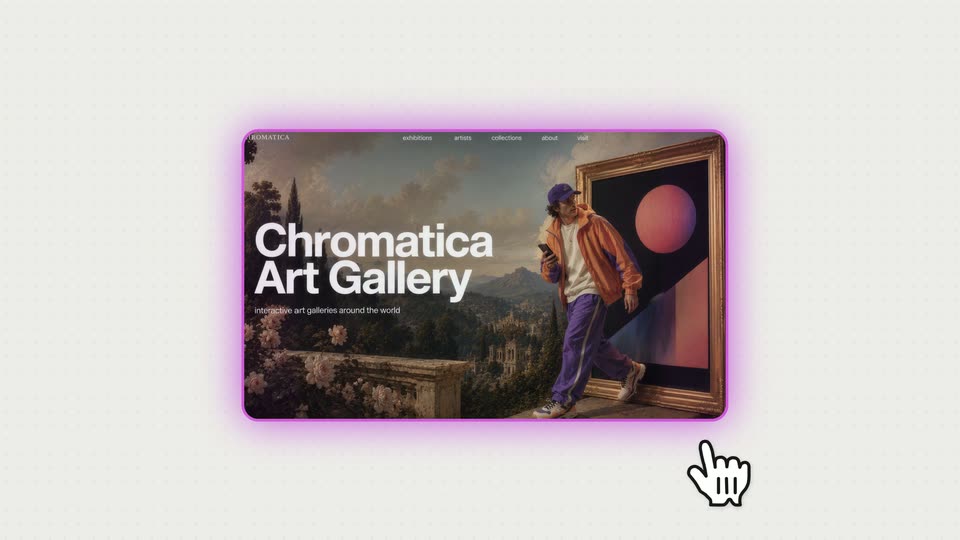
A blurred hillside photo fills a card on a cream grid as white text appears word by word. The card shrinks, gains a pink glow, then scales up and sharpens into a Chromatica Art Gallery website mockup, where a white hand cursor taps the hero.
On-screen text: “with Ambient Intelligence at every step”
Techniques: Kinetic type, UI zoom, Cursor demo
Camera: Pull out
A dark “Chromatica Art Gallery” card with a person before a framed orange-sphere painting shrinks and slides out to the top-left, revealing three pink-bordered option cards. A white hand cursor glides onto the “Gallery preview” card.
Techniques: Cursor demo
Camera: Push in
A row of white UI cards on a cream dot-grid background slides left, centering the selected card outlined in glowing purple. A cartoon hand cursor hovers over its Click to build button.
Techniques: Cursor demo
Camera: Static
A rounded rectangle with a glowing pink border sits on a light gray background. A blurred image fills the frame under a white halftone dot pattern that recedes toward the top right corner, while a black cursor rests just below the frame.
Techniques: Cursor demo, Masking
Camera: Static
A tablet floats at an angle on a cream background, glowing purple. A pink overlay of vertical bands wipes across its screen, revealing a website hero of three women in pastel clothing at a table in a cypress garden as the tablet turns to face the camera.
Techniques: 3D mockup, Masking
Camera: Pull out
A light gray canvas holds a website mockup on the left and three prompt cards with magenta glows on the right. A cursor moves to the middle card and clicks it as the camera zooms in, the card text blurs and a loading indicator fades in.
Techniques: Cursor demo, UI zoom
Camera: Push in
A pink wash lifts off a browser window of an art exhibition site, revealing the white interface with a hero image and three gallery cards. A second window with three women in bright clothing sits left on a textured wall. A hand and arrow cursor hover over the layout.
Techniques: Cursor demo
Camera: Pull out
A gallery website mockup sits left of a vertical stack of builder cards on a pale background. The cursor glides to the Click to build link, the card list scrolls up, and a blank page with a pink dot grid opens beside the site.
Techniques: Cursor demo
Camera: Push in
Three rounded website cards for a gallery site slide into a centered row on a light gray field. The left shows a hero image, the middle a current-exhibition page, the right a contact page in a glowing magenta frame. A cursor sits at the right edge.
Camera: Pull out
Three rounded website mockups sit in a row on a pale gray field, the right one ringed by a pink glow. They drift apart and the frame pushes in until two full interface panels, a pink exhibitions list and a dark contact page, fill the screen side by side.
Techniques: UI zoom, Split screen
Camera: Push in
A dark contact form panel slides off to the left, revealing a 3D-rendered garden with a pink rotary phone on a stone pedestal and cypress hedges. A white headline fades in over the hero as pink petals drift through the air.
On-screen text: “Browse hundreds of templates”
Techniques: Particles
Camera: Push in
A 3D-rendered garden path lined with tall green hedges, a pink rotary phone and a vase of roses on a stone table, white grid lines overlay the frame, two lines of white text fade in center-left as pink petals drift.
On-screen text: “Browse hundreds of templates”, “so you never start from scratch”
Techniques: Kinetic type, Particles
Camera: Static
A template grid in a library view scrolls up, the Landing Pages filter pill highlighted, then a hand cursor slides in and hovers over the Terra Viva card.
Techniques: Cursor demo
Camera: Pull out
A template gallery screen with a search bar and category tabs sits above a grid of landing page cards. The camera zooms in on the central Terra Viva card, which carries a hand pointer icon, while the surrounding cards slide out of frame.
Techniques: UI zoom
Camera: Pan
A travel landing page mockup floats in 3D perspective at center, edged with a soft pink glow, as a large white cursor hovers over it and slides down away. A narrow project list with thumbnails runs down the right edge.
Techniques: 3D mockup, Cursor demo
Camera: Push in
A travel journal website mockup sits over a Tuscan landscape; the header and button fade out as the frame reframes onto the full landscape, while a white headline types out across the center under a thin grid overlay.
On-screen text: “On brand everywhere in a single click”
Techniques: Kinetic type, UI zoom
Camera: Push in
A sunlit Tuscan landscape of rolling hills, cypress trees and a single flying bird sits behind a thin white layout grid. The white tagline holds centered and still across the middle of the frame.
On-screen text: “On brand everywhere in a single click”
Camera: Pull out
A design tool canvas shows a travel site hero card titled Terra Viva over a sunset hillside. A cursor clicks the overflow button to open a small menu, then the view zooms in on the card.
Techniques: Cursor demo, UI zoom
Camera: Pull out
A flat web-design mockup of a travel site titled TERRA VIVA sits on a light gray field with a toolbar above it. A dropdown menu of design-system actions pops open top right, a hand pointer taps it, then the pointer becomes an arrow cursor drifting right.
Techniques: Cursor demo
Camera: Push in
A flat website hero mockup for a travel journal, TERRA VIVA, sits on a light gray canvas with tool controls above. The view zooms into the rounded card, filling the frame with the sunset Tuscan landscape, dotted overlay, serif title and START EXPLORING button.
Techniques: UI zoom
Camera: Push in
A hazy classical garden painting with a peacock, fountain and roses sharpens into full color under a white 3x3 grid of lines and dots. Faint serif letters fade out as the tagline Visualize it. Design it. Ship it. Grow it. types in word by word across the middle.
On-screen text: “STORIES”, “Visualize it. Design it. Ship it. Grow it.”
Techniques: Kinetic type
Camera: Static
A still classical garden painting, a peacock on a stone bench beside a fountain and a vase of pink roses, is overlaid with a thin white 3x3 grid. Centered white text holds the tagline, then dims as the scene closes.
On-screen text: “Visualize it. Design it. Ship it. Grow it.”
Camera: Pull out
A square post card sits centered on a cream grid background. The peacock garden photo sharpens from blur to focus while the title CHROMATICA slides across the middle and ART GALLERY appears below it.
On-screen text: “CHROMATICA”, “ART GALLERY”
Techniques: Kinetic type
Camera: Static
Four Chromatica Art Gallery post mockups (email header, square post, Instagram story, LinkedIn ad) are arranged on a light gray background. A blue Launch button with a globe icon appears at right and a cursor clicks it, then the frame pushes in and blurs across the cards.
Techniques: Cursor demo
Camera: Static
A smartphone mockup in 3D quickly rotates from a tilted, blurred angle to a flat front view, the screen sharpening to reveal an Instagram post with a peacock image and the gallery name.
Techniques: 3D mockup
Camera: Static
A front-facing phone mockup is centered on a pale speckled background. Its screen shows a Chromatica Art Gallery story with a classical statue, a sliding title, and reaction icons above a message field.
Camera: Static
A front-facing iPhone mockup sits centered on a light grid background. Its screen shows a social app post of a woman seated with two cheetahs by a lake, while a Chromatica Art Gallery wordmark and tagline overlay slides across the image.
Camera: Static
A full-bleed website hero shows a woman seated with two cheetahs in an Italian garden, under a fixed top nav. The centered serif title CHROMATICA and the line ART GALLERY scale up and fade in, then a white START EXPLORING button appears below.
Techniques: Kinetic type
Camera: Static
A full-bleed art gallery website hero, a woman seated with cheetahs, pulls back to reveal the page on a tilted tablet in 3D perspective against a pale background, with a white section of circular thumbnails sliding into view below.
Techniques: 3D mockup
Camera: Pull out
A front-facing laptop mockup on a pale background displays an art gallery website that scrolls down through hero, gallery, and exhibition sections. The 'Worlds of Color & Light' heading scales up as it enters the frame.
Techniques: 3D mockup
Camera: Pull out
A silver laptop mockup on a plain off-white background shows a gallery website. The page scrolls from a top menu to a hero image of an arched gallery hall, while the laptop scales up to center the title CHROMATICA ART GALLERY.
Techniques: 3D mockup, UI zoom
Camera: Static
A large billboard on a stone street wall shows a sunlit gallery interior with an arched view of a sunset landscape. A slow push-in reframes the screen, enlarging the CHROMATICA ART GALLERY wordmark centered over the arch.
On-screen text: “CHROMATICA”, “ART GALLERY”, “GALERIE D'ART”
Techniques: 3D mockup
Camera: Push in
A woman in pink trousers walks through a sunlit gallery arch overlooking a sunset valley as a glowing CHROMATICA wordmark fades out. White taglines appear word by word over the view, a row of five white model logos under the second line, while the camera pushes in through the arch.
On-screen text: “CHROMATICA”, “ART GALLERY”, “Turn your vision into reality”, “Powered by the best models for design”, “You choose how you create”
Techniques: Kinetic type, Parallax
Camera: Push in
A 3D rendered palace interior frames a sunset valley with a lake and cypress trees. The white Replit mark and wordmark fade in at center, the URL settling below.
On-screen text: “replit.com/design”
Camera: Push in