0:28

Cursor - The Agent SDK is now available. Define agents as code, with prompts
Cursor · Developer tools · Oct 2026
Framer · May 2024 · 0:36 · AI-annotated
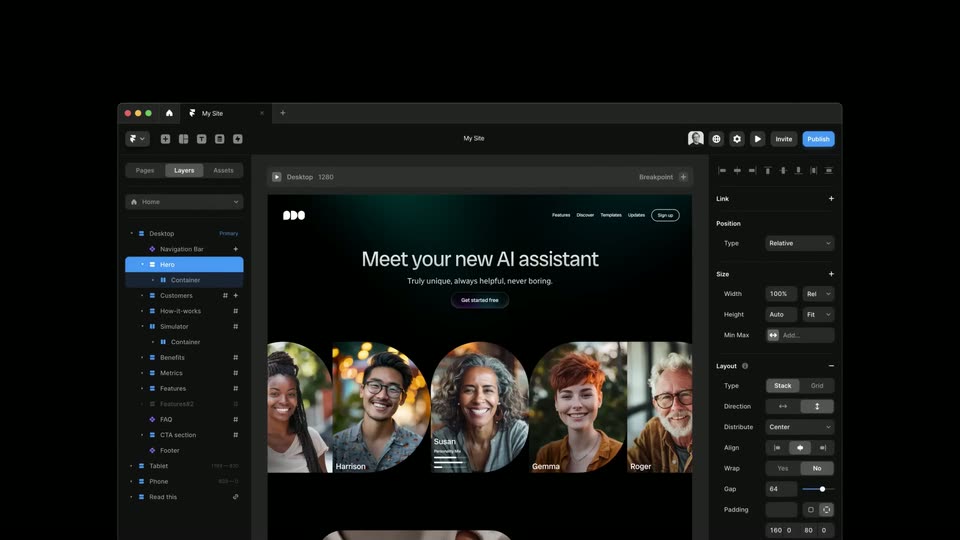
Framer’s 0:36 launch film runs 21 scenes, about 1.8 s each. The product is on screen from the first frame and 3 features are revealed. There is no explicit call to action; a voiceover carries the film. The ad alternates between typographic beats (typed headlines, glowing pill buttons) and the editor building a website in real time, closing on the Publish click and the logo. Fast 152 BPM cutting, a near-black stage, gradient glow accents, and typing or selection-box animations carry the pacing.
Is this your launch? to your site or press kit.
Cursor · Developer tools · Oct 2026
Shielded · B2B · Jul 2026
On a black background, a pill-shaped field with a purple-to-teal glow grows wider as white text types itself out letter by letter, ending on “Get started for free” with a blinking cursor.
On-screen text: “Get started for free”
Techniques: Kinetic type
Camera: Static
A dark editor canvas holds a row of empty rounded panels in dashed blue with handles, a gradient Get started for free button above and a blue Add Section pill below. The view scrolls to a top nav bar and right properties panel as heading text rises from the bottom.
Camera: Static
A close-up of a design tool canvas shows a dark website nav bar with white links and a white-outlined Sign up button, each inside blue dashed selection boxes. A cursor hovers near the Team link while a pink circular badge counts up from 120 to 225. A right panel shows a Breakpoint control.
Techniques: Cursor demo
Camera: Static
Two circular video masks on black show a man in a floral shirt and a person in a gray shirt. Over the right mask, white text reads Susan and Personality Mix above three bars, the middle one highlighted blue as a small knob slides left to right.
Camera: Static
A near-black background with faint teal glow. A large white headline types out letter by letter to “Meet your new AI”, a thin caret line tracks the end, and faint horizontal guide lines frame it. Below, a pill button with a purple-to-teal gradient border reads “Get started for free”.
On-screen text: “Meet your new AI”, “Get started for free”
Techniques: Kinetic type
Camera: Static
A dark website in a browser window shows the headline “Meet your new AI assistant” above a row of arched portrait cards. The portraits scroll left in a continuous loop while the page header stays fixed.
Camera: Pull out
A dark landing page sits inside a browser window on a black background. The page scrolls down, carrying the headline and a get started button upward until a row of five arched portrait cards fills the lower half.
Camera: Pan
A dark website-builder screen with a layers panel, empty canvas and properties panel drifts and zooms in; a rounded dark tile with orange, purple, blue and green dots drops in at the top center while the panel rows slide.
Techniques: UI zoom
Camera: Static
A dark web builder interface fills the lower frame, with a left layers panel and a right properties panel around a black canvas. A colorful Figma app icon floats above it, and a cursor hovers over the icon before moving down to the My Site tab.
Techniques: Cursor demo
Camera: Static
A glowing three-pill app icon hovers above a dark design editor, a hand cursor resting on it. The framing widens to reveal the full window as the canvas fills with a portfolio hero and the icon shrinks to a small badge.
Camera: Static
A dark web-design editor fills the frame: layers panel left, a portfolio page on the central canvas, properties panel right. A hand cursor hovers over the top tab while the opening doubled frame resolves into one clean view.
Camera: Pull out
A dense masonry grid of template thumbnails scrolls slowly upward. Frames mix device mockups (laptop, tablet, phone) and flat layouts in orange, yellow, purple and white, each showing a different website or app design.
Camera: Pull out
A dense grid of website design mockups fills the frame on a black background. The camera slowly pushes in toward the central orange card, bringing its headline into focus.
Techniques: UI zoom
Camera: Push in
The Framer editor shows a dark hero section with the headline “Meet your new AI assistant” and a row of circular portraits. The canvas scrolls down slightly as the layer selection moves from Hero to Container and the right panel switches to layout settings.
Camera: Push in
A design tool interface fills the frame. Its canvas centers a rounded video of a person in a cream sweater typing on a laptop, beside the headline 'Everywhere you work', a short paragraph, and two pill buttons; the text block crossfades. Side property panels fade in and out.
Camera: Push in
On a black canvas, a wireframe section fades in: a blue-outlined frame on the left and a text stack on the right with a headline, body line and two pill buttons. The text glows softly, then crisp blue selection boxes appear, and the left frame narrows as the layout reflows.
On-screen text: “Everywhere you work”, “Our suite of apps keep your assistant always at hand”, “Get Started”, “Learn More”
Camera: Static
A blue wireframe grid on black fills with a grayscale aerial photo, a dotted-globe contact card, and a Create Account form, then the layout cuts to a UI editor window showing the same site in desktop and tablet viewports.
Camera: Pan
The screen shows the Framer interface with a website mockup in the center. The canvas zooms out to display the mockup's responsive design across desktop, tablet, and phone breakpoints simultaneously.
Techniques: UI zoom
Camera: Pan
The Framer editor fills the frame with a dark site mockup titled “Meet your new AI assistant” and a row of circular portraits. The view zooms to the right as a large blue Publish button scales in over the phone preview.
Techniques: UI zoom
Camera: Push in
A blue rounded button reading Publish sits centered on a black field with a soft glow. A white arrow cursor glides up from below, switches to a pointing hand, and presses the button, which brightens on click.
Techniques: Cursor demo
Camera: Static
A small white geometric logo sits centered on a black field. It appears with a brief soft edge, then holds static for the rest of the shot.
Camera: Static