1:43


6a8ddb1179365966f46b2ca6_Sopht Product Showcase 23 august
Sopht · Aug 2026
Cursor · Oct 2026 · 0:28 · AI-annotated
Cursor’s 0:28 launch film runs 11 scenes, about 2.6 s each. The product is on screen from the first frame and 4 features are revealed. There is no explicit call to action. The video is built as a chain of static centered headline cards, each naming one feature, followed by a short floating UI panel demo over a grainy sunset gradient. Signature moves are the 3D cube logo spin, blur-in headlines, and slow vertical scroll reveals inside the panels.
Is this your launch? to your site or press kit.
Sopht · Aug 2026
OpenEvidence · Nov 2026
Anthropic · AI · Oct 2026
A black cube mark spins in 3D on a white field and settles into the flat Agent SDK logo lockup. The lockup is then replaced by the headline “Agents” centered on the plain background.
On-screen text: “Agents as code”
Camera: Static
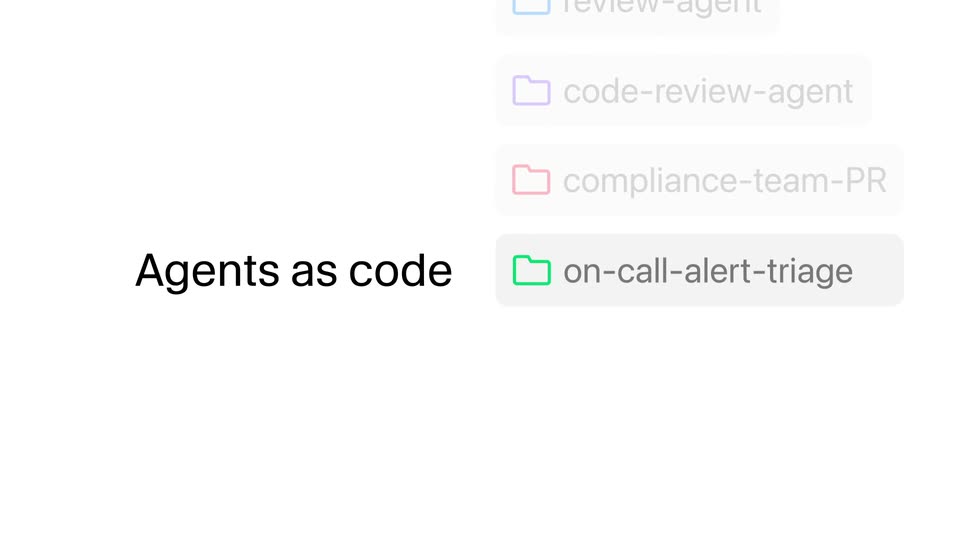
A black headline reads left on a white field while a vertical stack of folder chips builds on the right. Each chip, a colored folder icon with an agent name, slides in and highlights, pushing the list upward.
On-screen text: “Agents as code”
Camera: Static
On a plain white field, a black sans-serif headline blurs horizontally as it slides into place, settling into two centered lines. A small black 'AI' label then fades in at the left edge. The frame stays locked off throughout.
On-screen text: “Agents as code, to power your software factory”, “AI”
Techniques: Kinetic type
Camera: Static
On a plain white background, the black headline “All on SpaceXSI Infra” holds center-left, locked off. A rounded status pill to its right shows an orange dot and “Building”; after a pause the dot turns green and the label swaps to “Ready”, then “Deploy”.
On-screen text: “All on SpaceXSI Infra”, “Building”, “Ready”, “Deploy”
Camera: Static
A white background holds the centered black text “Deterministic and predictable”; the line “behavior on every run” then appears below to complete the statement. The frame is static with no camera movement.
On-screen text: “Deterministic and predictable”, “behavior on every run”
Camera: Static
A white Runs dashboard panel with two stat cards sits over a sunset gradient, drifting slowly upward to reveal lower rows. A two-line headline holds static in the frame.
On-screen text: “Deterministic and predictable”, “behavior on every run”
Camera: Pan
A light product panel floats over a sunset strip on the left. The view scrolls up past a Team toggle and two 24-hour stat cards, then through a list of automation runs with timestamps, before reframing out to a dense table of integrations and green or amber status pills.
Techniques: UI zoom
Camera: Pull out
A light job-log list fills the frame, each row showing a task name, a timestamp, integration chips and a status badge. The bottom three rows switch their badge from a muted Running to a green Successful.
Camera: Static
A plain white card holds a centered black sans headline. The phrase builds left to right, the trailing words fading from light gray to full black.
On-screen text: “Easy to evaluate and iterate”
Techniques: Kinetic type
Camera: Static
A flat white chat panel sits on a grainy blue-to-orange gradient with a mountain silhouette. The panel scrolls down to reveal two pills and an input field, where a prompt types out letter by letter, then a hand cursor presses the round send button.
On-screen text: “Easy to evaluate and iterate”
Techniques: Cursor demo
Camera: Pan
A small black hexagonal logo, built as an isometric cube with a white triangle cutout, rotates in 3D on a plain off-white field and settles into a flat front-facing mark at center, then holds still for the rest of the clip.
On-screen text: “on cloud every 30 minutes”, “deepsec-recall”, “smoke”, “Pay particular attention to remote code”, “execution issues”
Camera: Static