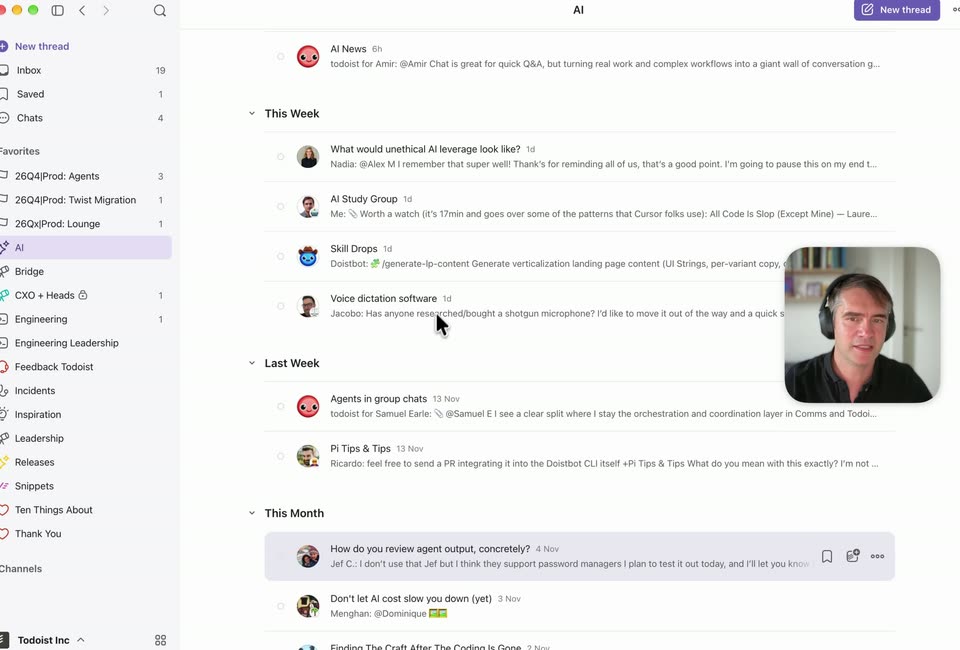
0:30
Explore
Amir Salihefendić - Todoist Comms is now in public beta 🚀 What's in it: ⋅ Turn any thre
Todoist · Nov 2026 · 3:02 · Full motion · AI-annotated
- Length
- 3:02
- Scenes
- 22 · 8.3 s avg
- Product on screen
- 0:00
- Features shown
- 6
- Call to action
- 2:43 · 89%
- Voiceover
- Yes
- Views
- 18K on X
as of November 23, 2026
00:00:00 / 03:03:00
- Length
- 3:02
- Scenes
- 22 · 8.3 s avg
- Product on screen
- 0:00
- Features shown
- 6
- Call to action
- 2:43 · 89%
- Voiceover
- Yes
- Views
- 18K on X
as of November 23, 2026
Todoist’s 3:02 launch film runs 22 scenes, about 8.3 s each. The product is on screen from the first frame and 6 features are revealed. The call to action lands at 2:43 (89% in), over a voiceover. The video is a single continuous screen-share walkthrough with a fixed facecam tile in the corner, where the cursor leads the eye and zoom-ins punctuate each feature. Flat UI cards float on a pale teal field with steady, conversational pacing, and zoom transitions plus cursor hovers are the signature moves.
No filming indicatedEstimated needs: 8 capture groups — your screens or recordings · 1 3D passage — build or supply
Is this your launch? to your site or press kit.
More like this



Amir Salihefendić - Todoist Comms is now in public beta 🚀 What's in it: ⋅ Turn any thre, scene by scene
· 22 scenes as text
01 · Product intro · 0:00–0:24
A flat Todoist comms inbox fills the frame on a pale teal background, with a small video-call tile of a man in headphones overlaid at the bottom right. A cursor drifts across the inbox and hovers the AI item in the sidebar as the man gestures while speaking.
Techniques: Cursor demo
Camera: Static
02 · Feature reveal · 0:24–0:29
A thread-list interface fills the frame beside a small webcam inset of a man wearing headphones at the lower right. A cursor hovers across rows, highlighting each and revealing action icons, while the view zooms into the list and back.
Techniques: Cursor demo, UI zoom
Camera: Push in
03 · Feature reveal · 0:29–0:31
A Todoist thread list fills the screen with a small talking-head video in the lower right corner. A cursor clicks the AI News row and the view zooms into the thread, revealing a post and a row of reaction icons.
Techniques: Cursor demo, UI zoom
Camera: Static
04 · Feature reveal · 0:31–0:32
A Slack-style channel titled AI News fills the screen, a left sidebar lists channels, and an annotated Claude screenshot with yellow arrows floats over the thread. A small video call window of a man in headphones sits bottom right. The thread scrolls up slightly.
Camera: Static
05 · Feature reveal · 0:32–0:45
A chat thread in a Slack-like app scrolls down past posts and memes while a presenter's video call stays pinned at right. The window shrinks onto a green backdrop, a tagged reply box opens, and the cursor hovers over Discard before returning to full screen.
Techniques: UI zoom, Cursor demo
Camera: Pan
06 · Feature reveal · 0:45–0:47
A Todoist screen shows the AI channel with a thread list; a small rounded video window of a man in headphones sits at the right. The cursor moves to Chats in the left sidebar, and a keyboard shortcut tooltip pops up.
Techniques: Cursor demo
Camera: Static
07 · Feature reveal · 0:47–0:58
A three-pane chat app fills the screen; a hand cursor taps Chats and scrolls the messages while a small video-call inset of a man with headphones sits lower right. The view zooms out to reveal the macOS window on a pale background as the cursor hovers chat rows.
Techniques: Cursor demo, UI zoom
Camera: Pull out
08 · Feature reveal · 0:58–1:04
A chat app window sits in 3D perspective on a pale green backdrop, its sidebar and message pane fully populated. A video-call bubble shows a man with headphones speaking, while a cursor drifts across the interface and hovers over the sidebar.
Techniques: 3D mockup, Cursor demo
Camera: Static
09 · Feature reveal · 1:04–1:28
A flat inbox interface fills the frame, with a facecam of a talking presenter in the lower right corner. The cursor hovers over rows as the view zooms in to show collapsed sections, Worth reading, Skim and Low priority, then expands Low priority to list its threads.
Techniques: Cursor demo, UI zoom
Camera: Push in
10 · Feature reveal · 1:28–1:42
A presenter's webcam sits in the corner of a chat app screen. The cursor clicks a recent search, skeleton rows load, results with highlighted terms appear. The frame pulls back to a card on a gradient, the cursor opens the workspace menu, and the view zooms into the sidebar.
Techniques: Cursor demo, UI zoom
Camera: Push in
11 · Feature reveal · 1:42–1:43
A Slack-style account settings panel is open over a dimmed workspace. A hand cursor travels down the menu, hovering People & Groups then Billing, while a video call thumbnail of a man with headphones sits at the right.
Techniques: Cursor demo
Camera: Static
12 · Feature reveal · 1:43–1:43
A settings panel over a chat app; a cursor clicks Integrations and the panel zooms into a grid of integration cards for MCP, API, CLI and SDK. A video call window with a man in headphones stays at the right.
Techniques: Cursor demo, UI zoom
Camera: Pan
13 · Feature reveal · 1:43–1:59
An Integrations modal dissolves into the full settings page, revealing a left nav and five feature cards. The screen holds steady with a presenter in a video tile on the right and a chat log below, then fades out.
Techniques: Cursor demo
Camera: Pan
14 · Feature reveal · 1:59–2:00
A settings panel listing General, People and Groups, Billing and Integrations floats over a dimmed chat thread with a video call tile at right. A mouse cursor drifts slowly across the middle of the screen.
Techniques: Cursor demo
Camera: Static
15 · Feature reveal · 2:00–2:09
A messaging app interface fills the frame as a hand cursor hovers a highlighted thread row. The view reframes to a full search window, then the cursor picks the AI channel in the sidebar, opening its threads. A picture-in-picture video of a presenter with headphones sits at right.
Techniques: Cursor demo, UI zoom
Camera: Pull out
16 · Feature reveal · 2:09–2:11
A team-chat interface fills the frame as its thread list scrolls down; a hand cursor hovers over a row, opening a small action menu, while a presenter's video call window floats in the right corner.
Techniques: Cursor demo
Camera: Static
17 · Feature reveal · 2:11–2:12
A cursor clicks a row in a flat thread-list interface, opening a detail panel that slides in from the right with the post and reactions, while a video call window sits in the corner.
Techniques: Cursor demo
Camera: Static
18 · Feature reveal · 2:12–2:22
A Slack-style chat thread fills the frame, with a video-call tile of a man in headphones on the right. A cursor clicks a button in the top-right header, then moves to a dark toast reading “Task created. Open in Todoist.” at the bottom right.
Techniques: Cursor demo
Camera: Static
19 · Feature reveal · 2:22–2:28
A Todoist inbox modal sits over a document, with a video-call inset of a man at the right. The cursor moves up and clicks the Priority field, opening a dropdown. The frame zooms in on the dropdown as Priority 4 is selected.
Techniques: Cursor demo, UI zoom
Camera: Push in
20 · Feature reveal · 2:28–2:29
A task detail panel lists fields such as Date, Priority and Reminders while a cursor hovers over the Reminders row. The panel scrolls slightly as a dark toast pops in at the bottom right. A small webcam feed of the presenter with headphones stays fixed in the corner.
Techniques: Cursor demo
Camera: Pan
21 · Feature reveal · 2:29–2:43
A chat thread in a team app fills the screen, a video call of a man with headphones pinned at the right. The cursor hovers a linked task, an Open in Todoist tooltip pops, and the view zooms into the messages before pulling back out.
Techniques: UI zoom, Cursor demo
Camera: Pull out
22 · CTA · 2:43–3:02
A static screen share of a task app shows a 'PI Tips & Tips' detail panel over a channel sidebar, with a cursor drifting to the lower pane. A rounded-corner webcam inset on the right shows a man in headphones talking and gesturing throughout.
Techniques: Cursor demo
Camera: Static