3:02
Explore
HeyBrain - Brain works with the AI stack your company already uses. Connect you
HeyBrain · Sep 2026 · 0:22 · Full motion · AI-annotated
- Length
- 0:22
- Scenes
- 12 · 1.9 s avg
- Product on screen
- 0:00
- Features shown
- 2
- Call to action
- 0:17 · 77%
- Voiceover
- No
- Views
- 3.8K on X
as of November 17, 2026
00:00:00 / 00:22:27
- Length
- 0:22
- Scenes
- 12 · 1.9 s avg
- Product on screen
- 0:00
- Features shown
- 2
- Call to action
- 0:17 · 77%
- Voiceover
- No
- Views
- 3.8K on X
as of November 17, 2026
HeyBrain’s 0:22 launch film runs 12 scenes, about 1.9 s each. The product is on screen from the first frame and 2 features are revealed. The call to action lands at 0:17 (77% in). A slow, minimal product film built from clean UI close-ups on a cream field, moving from a named tagline through two feature tours (Connectors, then Brain MCP) to a centered logo and URL. Pacing is unhurried with long holds and slow camera pushes, and the signature moves are the 3D app tilt-down, the cursor-driven tab and card hovers, and the crossfade between UI states and centered tagline cards.
No filming indicatedEstimated needs: 3 capture groups — your screens or recordings · 1 official logo — reused across the film
Is this your launch? to your site or press kit.
More like this
1:48

OpenAI Developers - Building apps with GPT-Live-1? Give them a voice that fits. Here’s h
OpenAI Developers · Oct 2026
0:45

HeyBrain - Brain works with the AI stack your company already uses. Connect you, scene by scene
· 12 scenes as text
01 · Product intro · 0:00–0:00
A close-up of an Explore page shows the heading and a row of tabs. A hand cursor hovers over the Connectors label while the blue underline slides right from Overview to Connectors, switching the active tab.
Techniques: Cursor demo
Camera: Pan
02 · Product intro · 0:00–0:03
A centered tagline holds on a cream background, then a hard cut reveals a close-up of the product's Explore page with the Connectors tab underlined in blue.
On-screen text: “Brain plugs into what you already run on”
Camera: Pull out
03 · Feature reveal · 0:03–0:07
The Brain app opens tilted in 3D over a blue gradient, then settles to a flat view of the Explore page. The camera pushes in on the connector grid while a cursor hovers over the Notion and Slack cards.
Techniques: 3D mockup, Cursor demo, UI zoom
Camera: Push in
04 · Feature reveal · 0:07–0:07
A close-up of an integrations screen with filter pills across the top and app cards below. A cursor hovers over the Slack card, which shows its category, status and a Configure button, while a green Connected card sits to the left and a blurred blue gradient fills the right edge.
Techniques: Cursor demo
Camera: Static
05 · Feature reveal · 0:07–0:08
A light integration dashboard shows a grid of connector cards under filter pills; a cursor hovers the Slack card, then the view cuts to the Slack detail page with a Needs review badge and metadata fields.
Techniques: Cursor demo
Camera: Pull out
06 · Feature reveal · 0:08–0:09
A product UI presents the Explore connector marketplace on the left and the Slack connector detail panel on the right. The two panels shift slowly across the frame while the left card list updates, and a cursor hovers over the detail fields.
Camera: Push in
07 · Feature reveal · 0:09–0:10
A two-column app screen scrolls down. The left column lists connected sources such as Docs and GitHub, the right column shows the app's description, trust level and governed boundaries, while a cursor hovers near the center.
Camera: Push in
08 · Feature reveal · 0:10–0:12
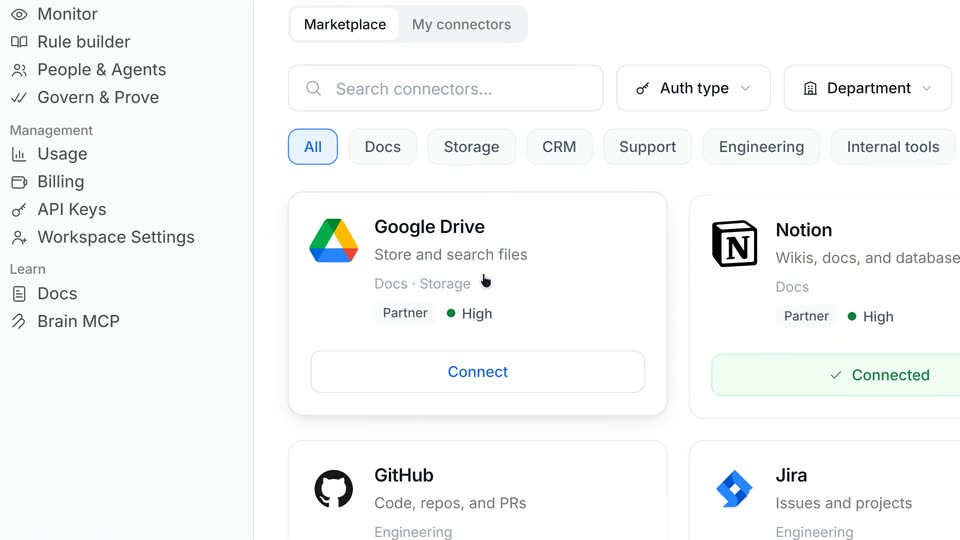
The view opens zoomed into a Trust and Governed boundaries detail panel, then pulls back to reveal the full Explore workspace: a left navigation rail, a grid of connector cards, and the right-hand detail panel. A cursor hovers over the Google Drive card.
Techniques: UI zoom, Cursor demo
Camera: Pull out
09 · Feature reveal · 0:12–0:12
A white Brain app window fills the frame. The Explore connectors page crossfades into the Brain MCP setup page, doubling the text mid-transition. A hand cursor hovers a connector card, then rests on the first setup step.
Techniques: Cursor demo
Camera: Static
10 · Feature reveal · 0:12–0:17
A wide view of the Brain MCP setup screen zooms into the Choose your tool row as a cursor hovers across the tool cards, panning right from Claude Code to OpenClaw. The connections panel stays at the right edge.
Techniques: UI zoom, Cursor demo
Camera: Push in
11 · CTA · 0:17–0:20
A single line of text fades in at the center of a plain off-white field and holds still. The frame is locked-off with no camera movement, the line settling from light gray to solid black.
On-screen text: “One brain across the stack”
Camera: Static
12 · CTA · 0:20–0:22
On a cream background, the centered tagline holds for a beat, then crossfades to the brand lockup: a dotted hexagon mark beside the bold wordmark, with the URL beneath. Everything stays static and centered through the end.
On-screen text: “One brain across the stack”, “heybrain.io”
Camera: Static