0:33
Explore
Kapwing - Reaching a global audience just got easier 🌍 Kapwing’s AI Dubbing to
Kapwing · May 2025 · 0:45 · AI-annotated
- Length
- 0:45
- Scenes
- 15 · 3.0 s avg
- Product on screen
- 0:00
- Features shown
- 5
- Call to action
- 0:38 · 86%
- Voiceover
- Yes
00:00:00 / 00:45:09
Kapwing’s 0:45 launch film runs 15 scenes, about 3.0 s each. The product is on screen from the first frame and 5 features are revealed. The call to action lands at 0:38 (86% in), over a voiceover. The video runs as a white-field walkthrough: a text promise, a cursor-driven tour of the Translate panel, then a rapid montage of four use cases under thin captions, closing on a gradient URL card. Signature moves are the tilted 3D device frames, white-to-white dissolves between segments, and the recurring rounded video card.
Footage neededEstimated needs: 1 capture group — your screens or recordings · 3 filmed passages — shoot, supply or replace · 1 graphic passage — draw or supply · 3 3D passages — build or supply
Is this your launch? to your site or press kit.
More like this

Kapwing - Reaching a global audience just got easier 🌍 Kapwing’s AI Dubbing to, scene by scene
· 15 scenes as text
01 · Product intro · 0:00–0:01
Two centered lines of text sit on a plain white background. They start as a light gray, slightly low, with a faint echo below, then fade darker and rise into their final black position.
On-screen text: “Translate any video”, “effortlessly in Kapwing”
Techniques: Kinetic type
Camera: Static
02 · Feature reveal · 0:01–0:02
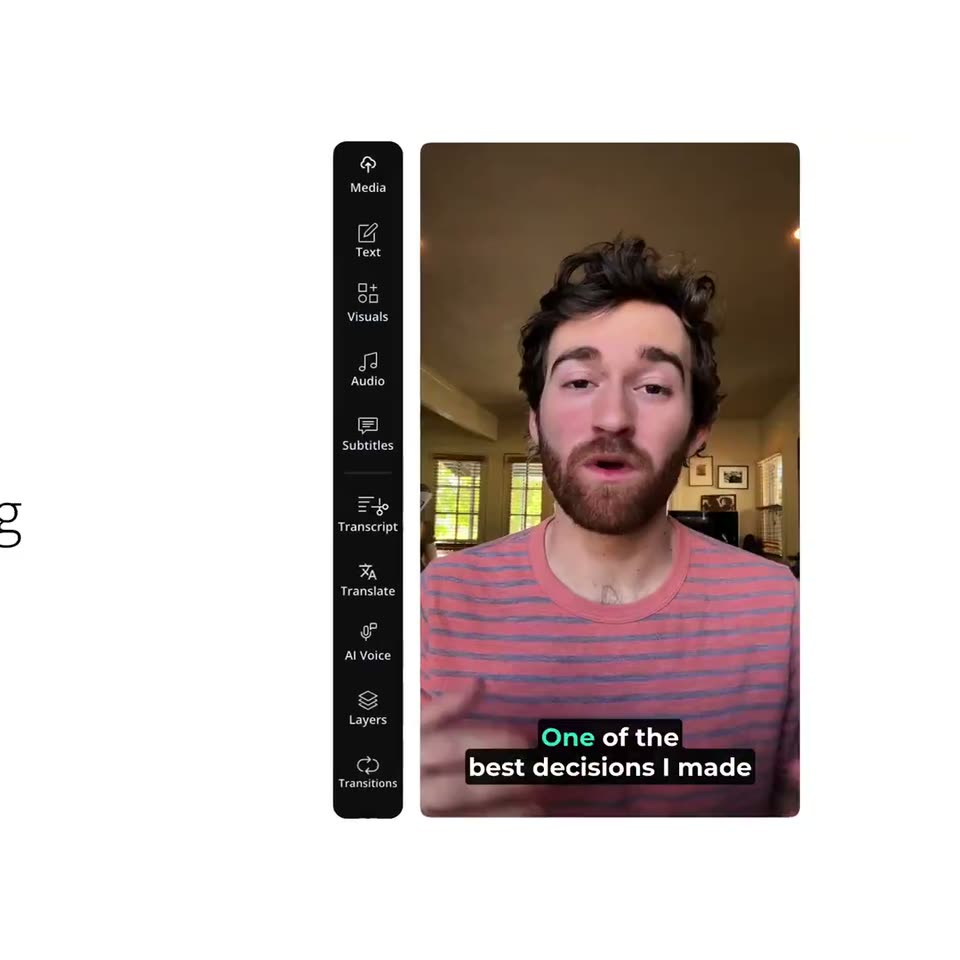
The thin gray headline exits left as two angled 3D phone screens of the editor slide in from the right, showing a vertical icon rail and a talking-head clip with green-highlighted subtitles.
On-screen text: “Translate any video”, “effortlessly in Kapwing”
Techniques: 3D mockup
Camera: Pan
03 · Feature reveal · 0:02–0:04
A dark vertical editor toolbar sits left of a talking-head video on a white background. A pink cursor arrow slides in and points at the Translate item, then the view switches to a Translate panel listing Dub video and Translate subtitles.
Techniques: Cursor demo
Camera: Static
04 · Feature reveal · 0:04–0:08
A dark translate panel sits on a white field, opening on two option cards. A pink cursor selects one, the view switches to a form, then the cursor opens the language list, picks Chinese (Mandarin), and the green Dub Video button lights up.
Techniques: Cursor demo
Camera: Static
05 · Feature reveal · 0:08–0:09
A dark Translate panel lists English to Chinese (Mandarin) above a green Dub Video button. A pink cursor taps the button as the panel slides left, revealing a man speaking in a video preview with Chinese subtitles.
Techniques: Cursor demo
Camera: Static
06 · Feature reveal · 0:09–0:14
A video editor interface shows a man in a striped shirt in the preview, with a black tool sidebar on the left. A pink cursor arrow points at the subtitles at the bottom, which update as he speaks. The view scrolls up to reveal a Translate label.
On-screen text: “Translate”
Techniques: Cursor demo, UI zoom
Camera: Static
07 · Feature reveal · 0:14–0:15
A white background holds the heading Translate at top as training fades in beside it in pale gray. Below, a 3D tablet mockup of a Google Search Console dashboard rises into view, with a white outlined caption THE MOST VISIBLE CHANGE IS THAT at the bottom.
On-screen text: “Translate training”, “THE MOST VISIBLE CHANGE IS THAT”
Techniques: 3D mockup
Camera: Static
08 · Feature reveal · 0:15–0:18
A thin black title 'Translate training' holds above a slightly tilted 3D mockup of the old Google Search Console dashboard. Bold white, black-outlined captions swap at the bottom, first English then German, while the interface stays locked off.
On-screen text: “Translate training”, “THE MOST VISIBLE CHANGE IS THAT”, “DASS DIE ALTE STARTSEITE UND DAS”, “DASHBOARD JETZT DURCH EINE”
Techniques: 3D mockup
Camera: Static
09 · Feature reveal · 0:18–0:19
A white screen holds the label Translate news at the top while a French news broadcast of two men talking in a newsroom fades in from white to full opacity below.
On-screen text: “Translate news”
Camera: Static
10 · Feature reveal · 0:19–0:25
On a white background, a rounded card plays a newsroom clip of two men talking, captioned “Translate news” above. Subtitles over the clip switch from French to Arabic, then the clip fades to black as the title dims.
On-screen text: “Translate news”, “c'est toi qui es à la barre”, “de la soirée électorale.”, “الانتخابية. ماذا تتوقع الليلة؟”
Camera: Static
11 · Feature reveal · 0:25–0:30
A thin black headline reads “Translate ads” above a flat Japanese discount banner on white. The banner builds left to right: a cleaner bottle, then socks, then men's T-shirts, each column wiping in, while pink English captions slide over the price area.
On-screen text: “Translate ads”, “Three pairs of socks for 200 yen!”, “Men's T-shirts for 300 yen!”
Techniques: Masking
Camera: Static
12 · Feature reveal · 0:30–0:32
A thin black title reads Translate ads above a Japanese discount flyer on white. A pink price line crosses the flyer, then the flyer shrinks and fades into a white rounded card while a blank white text box opens in the center.
On-screen text: “Translate ads”, “yen! Men's T-shirts for 300 yen!”
Camera: Static
13 · Feature reveal · 0:32–0:38
A black headline reads above a rounded video frame showing a woman in a navy sweatshirt talking in a bright room. Pink italic captions swap from English to Spanish line by line across the clip.
On-screen text: “Translate vlogs”, “Hey guys.”, “Welcome back to a new vlog.”, “Estoy de vuelta en casa”, “en Nueva York.”, “Siento que he estado comenzando”
Camera: Static
14 · CTA · 0:38–0:40
A faded vlog clip of a smiling woman in a New York sweatshirt dissolves to a plain white field, and the centered line appears with the domain in a multicolor gradient.
On-screen text: “Translate vlogs”, “cada vlog así”, “Siento que he estado comenzando”, “Get started at kapwing.com”
Camera: Static
15 · CTA · 0:40–0:45
A centered line of text sits on a plain white background:
On-screen text: “Get started at kapwing.com”
Camera: Static