1:53
Best AI SaaS Product Video | Apollo
Apollo · Sep 2026
Wix Harmony · Jul 2026 · 1:04 · AI-annotated
Wix Harmony’s 1:04 launch film runs 36 scenes, about 1.8 s each. The product shows up at 0:03 and 5 features are revealed. There is no explicit call to action; a voiceover carries the film. The video opens on warm kitchen footage and the WIX Harmony mark, then follows one continuous story: a prompt types in, the AI builds a family recipe site, the user edits text and photos, chats to personalize, decodes a handwritten recipe and adds commerce, before the finished site is toured and the logo closes the piece. Its signature moves are typewriter text reveals, a soft pastel gradient backdrop, the AI's black-dot avatar typing replies over sunlit live action, and a scrapbook example site
Is this your launch? to your site or press kit.
Films whose music sounds like this one, voice left out
Webflow · Modern electronic
Anthropic · Lo-fi hip-hop / Chillhop
Runway · Hip-hop, Jazz fusion
Close-up of weathered hands slicing a ripe tomato with a paring knife on a cloth-covered table, a green pepper and a bulb of garlic resting beside. Warm side light, static frame. The words The new fade in over the hands.
On-screen text: “The new”
Techniques: Kinetic type
Camera: Static
A smiling boy in a white tank top holds a tomato to his mouth in a tiled kitchen, looking upward. White text reads The new way over his chest, appearing word by word. A vintage film grain and scratch overlay covers the frame.
On-screen text: “The new way”
Techniques: Kinetic type
Camera: Static
An elderly woman feeds a young boy a piece of spaghetti at a sunlit kitchen table, both smiling. The white caption with a cursor arrow sits centered over the locked-off shot.
On-screen text: “The new way”
Camera: Static
On a pale gray field, a tight cluster of collage cutouts (a handwritten recipe card, a red-and-white striped box with a magazine cover, a photo of people at a table, a light blue envelope, a circular plate of food) fans out into a horizontal row across the center. The words your and story hold the left and right ends as the cutouts spread between them.
On-screen text: “The new way”, “to”, “tell”, “your”, “story”
Techniques: Kinetic type
Camera: Static
The WIX Harmony wordmark sits centered on a soft pastel gradient, then blurs and fades out. A line of text types in word by word with a cursor, 'for' in blue, completing 'I need a website for your story'.
On-screen text: “WIX Harmony”, “I need a website for”, “your”, “story”
Techniques: Kinetic type
Camera: Static
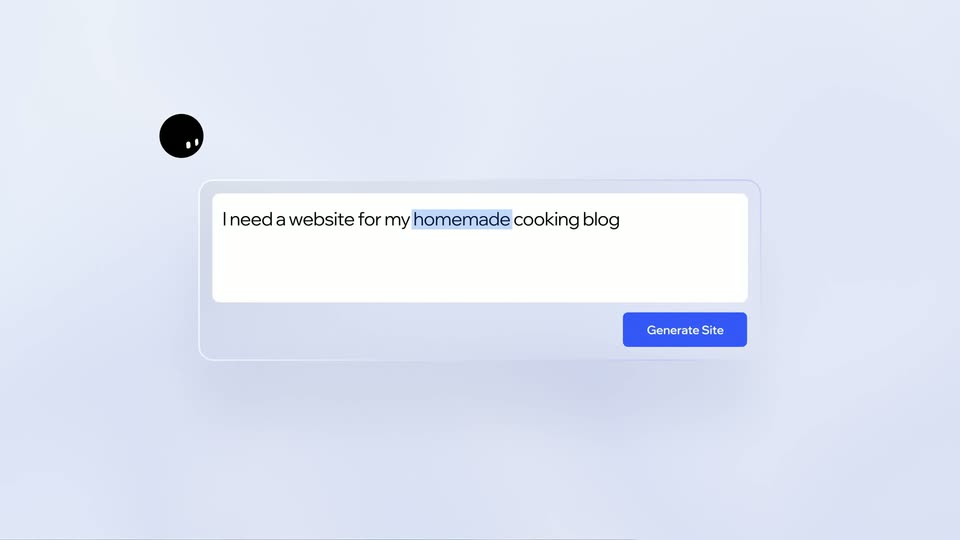
A white prompt card on pale lavender: the sentence I need a website for my homemade cooking blog is typed in, a cursor hovers over a highlighted word, then the tail is backspaced. A blue Generate Site button sits bottom right.
Techniques: Kinetic type, Cursor demo
Camera: Static
On a plain off-white background, large black lowercase words type out one after another, each trailing a thin vertical cursor bar. As new letters appear the line slides left, so words like “traditional” and “kitchen” scroll across the frame.
On-screen text: “traditional”, “kitchen”, “recipes”
Techniques: Kinetic type
Camera: Static
Extreme close-up of a prompt field where the words “cipies blog.” scroll left as a period types in, then the frame reframes onto a blue Generate Site button with a mouse cursor resting on it.
Techniques: Kinetic type, Cursor demo
Camera: Pan
A locked close-up of a pale interface frames a blue Generate Site button with a black cursor arrow on its left edge. The button scales in a press motion while words in the white field above slide by.
Techniques: Cursor demo
Camera: Static
A chat header reads Aria above a pulsing dot; the AI's reply types out word by word while the pale gradient background dissolves into a close-up of a steaming ceramic pot lid.
Techniques: Kinetic type
Camera: Static
Close-up of elderly hands pressing a flour-dusted loaf on a wooden board, warm side light, locked-off frame. A chat window overlay named Aria types a message word by word across the center of the shot.
On-screen text: “Aria”, “I'm working on building you a website that has a warm, nostalgic feel, bringing your grandma's kitchen to life through her recipes”
Techniques: Kinetic type
Camera: Static
A sunlit kitchen with a lace curtain and a vase of daisies; a translucent chat card from Aria types out a message about a nostalgic recipe website, words appearing one by one.
Techniques: Kinetic type
Camera: Static
A warm kitchen: a woman in a striped apron and a child in denim overalls press dough on a metal table beside a blue colander of vegetables. A chat message from Aria is overlaid on the left, the frame locked and static.
Camera: Static
A white caption overlay states the website brief over a warm, kitchen-themed site, then the view reframes to the Wix editor as the page generates and scrolls, with the Aria panel listing the new pages on the right.
On-screen text: “I'm working on building you a website that has a warm, nostalgic feel, bringing your grandma's kitchen to life through her recipes and your family heritage.”
Techniques: UI zoom
Camera: Pan
A design tool screen shows a recipe-book canvas with a red script headline. A cursor selects the text, a blue box and a menu appear, then the headline changes from 'Traditional heritage cuisine' to 'The way Nonna made it'.
Techniques: Cursor demo
Camera: Static
A food photo sits on a white canvas surrounded by gray outline recipe names and a tagline. A cursor hovers, a crop grid with handles snaps onto the image, then a red diagonal mask line slices it as a red handwritten signature draws in on the left.
On-screen text: “FROM ONE GENERATION”, “TO THE NEXT”, “(35MIN) / AGIOLI”, “(45MIN) / TIRAMISU”, “(55MIN) / CARBONARA”, “(45MIN) / ZUCCHINI”, “Alfre”
Techniques: Cursor demo, Masking, Kinetic type
Camera: Static
A design-tool canvas holds a gray list of Italian dish names under a red script line, Spaghetti Alfredo. A cursor grabs a framed photo of a plate of pasta and drags it across the canvas, tilting it, while the view pulls back to the full workspace.
Techniques: UI zoom, Cursor demo
Camera: Static
A tilted recipe card with a pasta photo and gray labels angles in 3D on the left. On the right, a chat field sits under a black dot avatar. A cursor types 'LOVE IT. How can I make it more personal?' then clicks the blue send button.
Techniques: 3D mockup, Cursor demo
Camera: Static
A minimal chat interface on a soft cream-to-blue gradient. A white message bubble holds the user's question, then a dark dot pulses as a reply types out word by word, suggesting the user upload photos of Nonna.
Techniques: Kinetic type
Camera: Static
A media picker screen with a top filter bar and a blue Upload Media button holds a static frame. The background photo swaps from a grandmother and toddler to a mother hugging a child, while a blue loading spinner turns over a filename pill in the center.
Camera: Static
A flat prompt box sits centered over a full-frame photo of a handwritten recipe on aged paper. A small recipe thumbnail loads in the box, then the prompt 'Wait! Can you decode this recipe?' types out word by word.
Techniques: Kinetic type
Camera: Static
A close-up of a handwritten recipe on cream paper, slightly out of focus, with red-brown cursive ink listing ingredients and steps. A small white caption sits centered over the paper, with a tiny dot marker above it that shifts from white to blue.
On-screen text: “Decoding your recipe into readable text”
Camera: Static
A handwritten recipe list begins blurred and pulls into sharp focus, as colored highlight boxes fade in around individual words. A small blue caption stays locked at center throughout the locked-off shot.
On-screen text: “Decoding your recipe into readable text”
Camera: Pan
A recipe list UI sits on a soft blue-to-green gradient. A faded blue status line and yellow-green highlight bars over a few ingredient rows dissolve, leaving the clean list of Nonna's Tomato Sauce ingredients under a spinning status header.
Camera: Static
A pale gradient background hosts a chat mockup: the status line 'Done decoding your recipe' blurs and slides out as a white message bubble slides in from the right, then a blue reply line and a faint 'Add Wix Stores' link fade in below at a slow pace.
Techniques: Kinetic type
Camera: Static
A chat view on a soft blue-green gradient. A white bubble with the user's question sits top right. A dark typing dot pulses at left, then a reply streams in line by line, the final clause in blue. The frame is locked off.
Techniques: Kinetic type
Camera: Static
A Wix Stores install dialog sits centered on a pale blue grid of faded clothing photos. A cursor glides to the Add button and rests. Caption lines slide in across the frame.
On-screen text: “Amazing. What if I turned this into”, “a meal kit?”, “That's a strong next step.”
Techniques: Cursor demo
Camera: Static
A loading dialog titled Adding Wix App with a progress bar sits over a blurred product dashboard. The dashboard shows a grid of patterned paper bags tagged with recipe cards, an orders panel, and a product detail card on the right.
Techniques: UI zoom
Camera: Static
A flat collage of storefront screens and food photos fills the frame. A white dialog at center shows a progress bar filling from 8/10 to 9/10, then the dialog swaps for a blue patterned plate holding a slice of cake. The background collage drifts and reframes slightly.
Camera: Static
A media library interface shows a top filter bar and a horizontal carousel of thumbnails. The row scrolls rightward, bringing a photo of a boy and an older woman into the center, where a blue selection border and an Image tag appear around it under a hovering cursor.
Techniques: Cursor demo
Camera: Pull out
A tilted 3D mockup of the Nonna recipe website floats over a blurred background, the page scrolling down to reveal a subscribe bar while the large red script logo spans the hero image of a grandmother and child.
Techniques: 3D mockup
Camera: Pan
A white card on a green fabric backdrop scrolls vertically, revealing a brown headline with watercolor food icons (chili, tomato, fish, fig, cucumber, shrimp) tucked between the words. Small red-dot tags label each line, and a paragraph sits top right.
On-screen text: “STAY CONNECTED with NEW RECIPES, COOKING inspiration, AND THE LATEST MEAL kits”, “A COLLECTION OF TREASURED RECIPES, FAMILY STORIES, AND THE FLAVORS THAT BRING GENERATIONS TOGETHER”
Techniques: Kinetic type
Camera: Pan
A flat website mockup sits on a green plaid backdrop. A product detail card for the Panzanella kit reflows at center, its pink panel collapsing into a white panel as the title and option buttons settle, while a red brushstroke letter holds the right side.
Camera: Static
A flat layered layout of recipe cards holds still. A red central panel shows three overhead dishes, sardines, tiramisu and pomodoro, under a script Nonna wordmark, set over tan, yellow and white panels with large serif letters and a top tagline.
Camera: Static
A white browser window over a blurred food photo holds a layered website mockup. A red card with the script word sharing and a tilted polaroid of a woman and child overlaps tan and yellow panels. The polaroid drifts gently.
Camera: Static
A dark navy WIX Harmony wordmark sits centered on a soft pastel gradient of blue, lavender and mint. The background hues drift slowly while the logo stays fixed in a locked-off frame.
On-screen text: “WIX Harmony”
Camera: Static