1:33

Kimi.ai - Meet Kimi K3.1 Pro, our most capable 3T-class model.
Moonshot AI · Oct 2026
DJI’s 2:18 launch film runs 114 scenes, about 1.2 s each. The product is on screen from the first frame and 13 features are revealed. The call to action lands at 2:11 (95% in), over a voiceover. The video is built as a fast feature reel: each capability gets a lower-left caption, a macro product insert, and a short live-action demonstration. Cuts stay fast around 44 per minute, with shallow focus, whip pans, top-down inserts, and black end cards for the final logo and CTA.
Is this your launch? to your site or press kit.
Moonshot AI · Oct 2026
DJI · Hardware · Feb 2025
Films whose music sounds like this one, voice left out
Samsung Galaxy Z Fold8 · Cinematic electronic pop
Pulse · Upbeat electronic
Stripe · Upbeat electronic
A person in a red jacket walks toward the camera along a sunlit forest path, holding a black DJI microphone at chest height. The word INTRODUCING sits centered over the jacket in thin lettering.
On-screen text: “INTRODUCING”
Camera: Static
A hand lifts a small microphone with an orange ring from an open black charging case, its lid printed with DJI logos. The case rests on a surface against a blurred forest backdrop. Centered white text reads INTRODUCING DJI MIC 3 and stays still.
On-screen text: “INTRODUCING”, “DJI MIC 3”
Camera: Push in
A macro close-up of the DJI Mic 3 receiver, its screen showing four green transmitter battery bars and a host tag, a knurled orange-ringed dial on the right. A blurred tripod camera sits in the warm bokeh background. White title text is centered above the device.
On-screen text: “INTRODUCING”, “DJI MIC 3”
Camera: Static
A black DJI mic body with a white logo sits in sharp focus at the lower center, a blurred garden path and leaves behind. The camera drifts slowly across the scene while the two captions hold still.
On-screen text: “INTRODUCING”, “DJI MIC 3”
Camera: Static
A hand turns the red-ringed dial on a small black transmitter mounted atop a Sony FX30 camera. The screen displays a four-channel grid with green level bars. A blurred forest fills the background.
Camera: Static
A black DJI device with an embossed logo rests in the lower frame against a soft green and white bokeh of trees. The camera drifts slowly, holding the device sharp while the out-of-focus background shifts behind it.
Techniques: Parallax
Camera: Pan
A hand holds a red onion on a wooden cutting board as a knife slices it in half, then sets the cut side down. A small black DJI device with a blue LED rests at the board's edge. The low camera whips past with heavy motion blur.
On-screen text: “MAGNETIC MOUNT”
Techniques: Speed ramp
Camera: Pull out
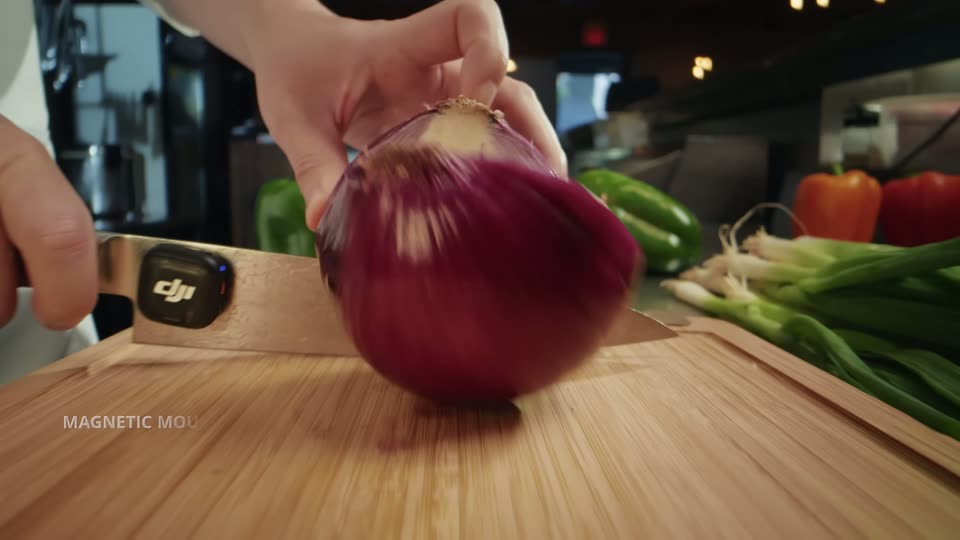
A low close-up follows a hand rocking a large knife through diced red onion on a wooden board. A small black square device with a DJI logo is fixed to the blade. White caption MAGNETIC MOUNT holds in the lower left.
On-screen text: “MAGNETIC MOUNT”
Camera: Static
Macro shot of a chef's knife on a wooden board, a small black rounded-square DJI mount clamped to the blade. A hand chops green chives out of focus behind; the knife eases from a blurred pass into a steady hold, the mount staying sharp.
On-screen text: “MAGNETIC MOUNT”, “AWAY”
Camera: Push in
Hands hold a white clipboard printed with a basketball play diagram; the left thumb presses a small black transmitter onto its top corner while a red marker rests on the metal clip. A blue scoreboard blurs in the background. White caption 'MAGNETIC MOUNT' sits at lower left.
On-screen text: “MAGNETIC MOUNT”
Camera: Static
Close-up of a person in a red shirt pressing a small black DJI device onto their sleeve, then pulling the hand away to show it stays attached. The caption sits in the lower left corner while the sleeve fills the frame.
On-screen text: “MAGNETIC MOUNT”, “AWAY”
Camera: Static
A hand holds a small black DJI mic with a rounded square face, then snaps it magnetically onto the side of a stainless steel pitcher. A coffee machine sits blurred at the right. The white label MAGNETIC MOUNT stays fixed at the lower left.
On-screen text: “MAGNETIC MOUNT”
Camera: Static
A black DJI magnetic mount rests on top of a dark rounded surface in close-up. A blurred green tree and a person in a red jacket fill the soft background. The white label MAGNETIC MOUNT holds still on the left edge.
On-screen text: “MAGNETIC MOUNT”
Camera: Static
Dark liquid pours into a stainless steel cup from above, filling it. A small black DJI device clings to the cup's side, demonstrating the magnetic mount. Tight high-angle close-up with shallow depth of field; the caption sits in the lower left.
On-screen text: “MAGNETIC MOUNT”
Camera: Static
A small black DJI mount stays in sharp focus at the bottom of the frame while a wok of red, yellow and green stir-fry blurs behind it and a utensil stirs the food. The caption MAGNETIC MOUNT sits at the left.
On-screen text: “MAGNETIC MOUNT”
Camera: Static
Top-down view of a basketball court, players in white and red moving around the blue center circle. A vertical window in the middle reveals a closer top-down of a player dribbling on a blue floor, then the window closes.
Techniques: Masking
Camera: Pan
A close-up of a person in a red striped jersey speaks while a small black DJI mic is clipped to the collar. The camera holds steady on the chest. White text 'ADAPTIVE GAIN CONTROL*' fades in at the lower left.
On-screen text: “ADAPTIVE GAIN CONTROL*”
Camera: Static
A hand turns the dial on a small wireless microphone clipped to a Sony camera's hot shoe. The mic's screen shows Adaptive Gain Control flipping from OFF to ON. A gold connector protrudes from the left side.
On-screen text: “ADAPTIVE GAIN CONTROL*”, “* The Adaptive Gain Control feature can be configured via the receiver or the DjI Mimo app, and it is turned off by default.”
Camera: Static
On an indoor volleyball court, a player in a red jersey and a woman in a red jacket receive and pass a red ball while teammates crouch in the background and spectators watch from the stands. The camera tracks the pair as they move across the frame.
On-screen text: “ADAPTIVE GAIN CONTROL*”, “* The Adaptive Gain Control feature can be configured via the receiver or the DjI Mimo app, and it is turned off by default.”
Camera: Pan
On a gym basketball court, a man in a red shirt hurls a red ball at a woman in red who raises her arms to block it, while teammates in red and white crouch behind them. The caption ADAPTIVE GAIN CONTROL* holds in the lower left.
On-screen text: “ADAPTIVE GAIN CONTROL*”, “* The Adaptive Gain Control feature can be configured via the receiver or the DJI Mimo app, and it is turned off by default.”
Camera: Push in
A red bowling ball in sharp focus rolls across the foreground of a blurred bowling alley, people and ceiling lights soft behind it. A white headline holds at left and a small red footnote runs along the bottom edge.
On-screen text: “ADAPTIVE GAIN CONTROL*”, “* The Adaptive Gain Control feature can be configured via the receiver or the DjI Mimo app, and it is turned off by default.”
Camera: Static
A player in a white jersey with purple sleeves holds a red basketball against his torso, shifting as he moves in a dark arena. A white caption sits lower left while the disclaimer line runs along the bottom edge.
On-screen text: “ADAPTIVE GAIN CONTROL*”, “* The Adaptive Gain Control feature can be configured via the receiver or the DjI Mimo app, and it is turned off by default.”
Camera: Static
Top-down view of a wood basketball court where players in red jerseys huddle in a tight circle. A figure in dark clothes walks across the lower left while the overhead frame holds steady.
On-screen text: “ADAPTIVE GAIN CONTROL*”, “* The Adaptive Gain Control feature can be configured via the receiver or the DjI Mimo app, and it is turned off by default.”
Camera: Pan
A crew in red shirts huddle and cheer on a gym floor while a camera operator in black films them with a gimbal, the handheld shot circling the group.
Camera: Pull out
A fisheye camera looks up from the center of a circle of people in orange jumpsuits who lean in, their faces ring the frame around a white domed ceiling. The group rotates slowly as they look down into the lens.
On-screen text: “from puddle”
Camera: Pan
Close-up of a black Sony camera with a small wireless mic receiver on top. A finger taps the receiver screen, switching the orange preset label from REG to BRIGHT. White headline text sits at the lower left over a blurred brown background.
On-screen text: “* The Voice Tone Preset modes can be selected via the receiver or the DJI Mimo app, with the default set to Regular.”, “THREE VOICE TONE PRESETS*”
Camera: Static
A tight close-up on two people's torsos shows small black DJI transmitters clipped to a khaki shirt and a blue puffer vest, then cuts to a man in a blue jacket holding a white cockatoo on his hand. Shallow depth of field keeps the devices and bird sharp.
On-screen text: “THREE VOICE TONE PRESETS*”, “* The Voice Tone Preset modes can be selected via the receiver or the DJI Mimo app, with the default set to Regular.”
Camera: Static
A white cockatoo with a yellow crest perches on a man's outstretched hand in a sunlit forest, his face softly blurred behind. The camera holds a tight close-up on the bird as it shifts its head, with a white caption and footnote pinned to the lower frame.
On-screen text: “THREE VOICE TONE PRESETS*”, “* The Voice Tone Preset modes can be selected via the receiver or the DJI Mimo app, with the default set to Regular.”
Camera: Push in
In a sunlit pine forest, three people sit in a row while a man at the right stands holding a white cockatoo on his hand. The woman in front speaks as the bird shifts on his arm. A white headline sits lower left with a small footnote across the bottom.
On-screen text: “THREE VOICE TONE PRESETS*”, “* The Voice Tone Preset modes can be selected via the receiver or the DJI Mimo app, with the default set to Regular.”
Camera: Static
Four friends sit and stand among forest branches; a man sets a white hat on a seated woman's head while the others smile. A lower-left caption reads THREE VOICE TONE PRESETS* with a small label switching from BRIGHT to RICH, plus a footnote line at the bottom.
On-screen text: “THREE VOICE TONE PRESETS*”, “BRIGHT”, “RICH”, “* The Voice Tone Preset modes can be selected via the receiver or the DJI Mimo app, with the default set to Regular.”
Camera: Static
A Sony mirrorless camera on a rig, with a wireless mic transmitter mounted on top, sits in a blurred forest. A hand reaches in from the right and pulls back, leaving the device in sharp focus.
Camera: Push in
A black wireless microphone receiver on a stand is held in close-up against a soft, blurred outdoor backdrop. Its screen lists four transmitter rows, TX1 to TX4, with green signal and battery bars that update. The caption FOUR-CHANNEL OUTPUT* fades in at lower left above a fine-print footnote.
On-screen text: “FOUR-CHANNEL OUTPUT*”, “* To achieve the 4TX + 8RX setup or four-channel output, additional accessories must be purchased separately. The four-channel output feature is only supported由”
Camera: Static
Three people sit in a sunlit forest, conversing. A small black transmitter is clipped to the man's shirt. A white headline holds at the left edge and a fine-print disclaimer runs along the bottom. The shot stays steady on the group as they talk.
On-screen text: “FOUR-CHANNEL OUTPUT*”, “* To achieve the 4TX + 8RX setup or four-channel output, additional accessories must be purchased separately. The four-channel output feature is only supported由”
Camera: Static
A person in a gray shirt holds a short branch; a white and yellow cockatoo perches on it and moves. A small black transmitter with a red LED sits on the wrist. The caption 'FOUR-CHANNEL OUTPUT*' scales in at lower left against a blurred forest background.
On-screen text: “FOUR-CHANNEL OUTPUT*”, “* To achieve the 4TX + 8RX setup or four-channel output, additional accessories must be purchased separately. The four-channel output feature is only supported*”, “certain Sony camera models (requiring the DJI Mic Series Camera Adapter) and certain computer software (via USB output). For details, refer to the official DJI”
Camera: Pan
A tight macro on a camera's LCD shows four green channel meters, an AF-C tag and a forest live view. A white caption reads FOUR-CHANNEL OUTPUT* at left, with a fine-print footnote along the bottom edge. The shot is locked off and static.
On-screen text: “FOUR-CHANNEL OUTPUT*”, “* To achieve the 4TX + 8RX setup or four-channel output, additional accessories must be purchased separately. The four-channel output feature is only supported由”
Camera: Static
A locked-off close-up of a camera monitor shows a four-channel output bar with green level meters, an AF-C tag and a forest live view. The caption FOUR-CHANNEL OUTPUT* holds at left and a small disclaimer line runs along the bottom.
On-screen text: “FOUR-CHANNEL OUTPUT*”, “* To achieve the 4TX + 8RX setup or four-channel output, additional accessories must be purchased separately. The four-channel output feature is only supported由”
Camera: Static
A man in a light grey sweater holds a white cockatoo in a sunlit forest. The shot opens tight on the bird's head as he offers it a seed, then eases back to frame his face and the bird perched on his hand.
Camera: Static
A man in a gray sweater stands in a sunlit forest, smiling at a white cockatoo perched on his raised hand. The bird spreads and flaps its wings while the man watches it. Medium shot, shallow depth of field blurs the trees behind.
Camera: Static
A blonde woman is seen over the shoulder, her hand on a white keyboard. A large monitor in front of her shows a green audio waveform on a dark editor screen. Handwritten sticky notes and small animal figurines sit on the wooden desk. A caption appears at the lower left.
On-screen text: “DUAL-FILE 32-BIT FLOAT INTERNAL RECORDING”
Camera: Static
A dark audio-editor screen fills the frame with a dense green waveform over a faint grid. The waveform collapses to a thin mid-line as a black cylindrical device slides in from the lower left. A white caption stays fixed at the bottom left.
On-screen text: “DUAL-FILE 32-BIT FLOAT INTERNAL RECORDING”
Techniques: 3D mockup
Camera: Static
Extreme close-up of a metal blowtorch nozzle against a blurred warm background. A bright blue flame ignites from the tip, shooting horizontally to the right. Small white text reads 'DUAL-FILE 32-BIT FLOAT INTERNAL RECORDING'.
On-screen text: “DUAL-FILE 32-BIT FLOAT INTERNAL RECORDING”
Camera: Static
A defocused macro shot of a curved, glossy surface. A cool blue arc fills the left while a warm cream glow with tiny dust specks sits on the right. The camera drifts slowly across the surface, keeping the image soft and abstract.
Camera: Static
A small black DJI microphone with its logo on top sits in sharp focus in the foreground. Behind it, a metal pan holding food and rising steam blurs against a dark stovetop. The camera holds still on the shallow depth of field.
Camera: Static
A hand in a white sweater holds a small black DJI mic, tilting it to reveal its top button and orange-ringed screen. The caption at lower left fades in from a partial word to the full line, with a fine-print footnote pinned along the bottom edge.
On-screen text: “OSMOAUDIO™ DIRECT CONNECTION*”, “* Requires a device that supports the DJI OsmoAudio™ ecosystem, such as Osmo Action 5 Pro, Osmo Action 4, or Osmo Pocket 3. Some features of DJI Mic 3 cannot be”
Camera: Static
A close-up of a hand in a white sleeve presses a button on a small black microphone, a green LED lighting up. The frame is locked off and shallow in focus. White text reads OSMOAUDIO™ DIRECT CONNECTION* at the lower left, with a small footnote line along the bottom edge.
On-screen text: “OSMOAUDIO™ DIRECT CONNECTION*”, “* Requires a device that supports the DJI OsmoAudio™ ecosystem, such as Osmo Action 5 Pro, Osmo Action 4, or Osmo Pocket 3. Some features of DJI Mic 3 cannot be”
Camera: Static
A hand holds a black Osmo gimbal with its rear screen toward the camera, the gimbal head turning slightly. The background is a blurred bar with warm bokeh lights and a person in white. A white caption sits at left.
On-screen text: “OSMOAUDIO™ DIRECT CONNECTION*”
Camera: Static
A close-up of an Osmo gimbal held steady in a blurred kitchen, its screen showing a chef at the grill with a battery-level banner. The chef moves softly in the background while the headline sits static at lower left.
On-screen text: “OSMOAUDIO™ DIRECT CONNECTION*”, “* Requires a device that supports the DJI OsmoAudio™ ecosystem, such as Osmo Action 5 Pro, Osmo Action 4, or Osmo Pocket 3. Some features of DJI Mic 3 cannot be”
Camera: Static
A hand holds an Osmo Pocket 3 in sharp focus at center, its screen displaying a live view of a person in white. The blurred background figure shifts as the on-screen timer ticks from 00:00 to 00:01.
On-screen text: “OSMOAUDIO™ DIRECT CONNECTION*”, “* Requires a device that supports the DJI OsmoAudio™ ecosystem, such as Osmo Action 5 Pro, Osmo Action 4, or Osmo Pocket 3. Some features of DJI Mic 3 cannot be”
Camera: Static
A woman in a white top holds a black handheld audio device aloft in a restaurant kitchen, a chef in a dark apron at her side and other staff working behind. The locked-off medium shot holds still with a white caption at lower left.
On-screen text: “OSMOAUDIO™ DIRECT CONNECTION*”, “* Requires a device that supports the Dji OsmoAudio™ ecosystem, such as Osmo Action 5 Pro, Osmo Action 4, or Osmo Pocket 3. Some features of DJI Mic 3 cannot be”
Camera: Static
A woman holds the camera selfie-style in a busy restaurant kitchen, a small mic clipped to her top. Behind her a man in a dark apron smiles and waves while other staff work at the counter. A white caption sits lower left.
On-screen text: “OSMOAUDIO™ DIRECT CONNECTION*”, “* Requires a device that supports the DJI OsmoAudio™ ecosystem, such as Osmo Action 5 Pro, Osmo Action 4, or Osmo Pocket 3. Some features of DJI Mic 3 cannot be”
Camera: Static
A hand reaches down and grips a red onion on a wooden board, flanked by red and green peppers and a bunch of parsley, in a low-angle close-up. Small white title and disclaimer text sit still in the frame.
On-screen text: “OSMO”, “OSMOAUDIOTDIRECT CONNECTION*”, “* Requires a device that supports the DJI OsmoAudio ecosystem, such as Osmo Action 5 Pro, Osmo Action”
Camera: Push in
A hand grips a black DJI battery against an orange shirt, then lowers it onto a pile of chopped red onions. The focus shifts from the battery logo to the onion pieces in the foreground.
Camera: Pan
A stainless steel pan sits on a gas stove, a piece of meat sizzling in bubbling oil. A hand stirs with a metal spoon. A small black DJI device with a blue light is clipped to the pan handle. Close-up, dark background.
Camera: Static
An extreme macro shot of a crumbly orange-brown mass resting on a dark reflective surface. The camera holds a tight, shallow-focus frame as the textured object slowly rotates, its rough surface filling the screen.
Camera: Push in
A woman in a white top gestures toward the camera in a dim restaurant hung with red lanterns. Yellow waveform icons with the words STRONG and BASIC slide in beside her face, then BASIC slides off and STRONG holds center. A small caption reads TWO-LEVEL NOISE CANCELLING* at lower left.
On-screen text: “STRONG”, “BASIC”, “TWO-LEVEL NOISE CANCELLING*”, “* The Noise Cancelling feature is turned off by default but can be activated and set to either Strong or Basic level through the receiver, DJI Mimo app, or a DJ”
Techniques: Kinetic type
Camera: Static
A dim restaurant with red lanterns shows a woman in white holding a microphone at a table. STRONG slides in large on the left, then the frame darkens to isolate her as TWO-LEVEL NOISE CANCELLING* appears at lower left, with a small disclaimer line at the bottom.
On-screen text: “STRONG”, “TWO-LEVEL NOISE CANCELLING*”, “* The Noise Cancelling feature is turned off by default but can be activated and set to either Strong or Basic level through the receiver, DJ Mimo app, or a Osm”
Techniques: Kinetic type
Camera: Push in
A woman with a lavalier mic on her white top speaks to camera in a dim bar, the caption TWO-LEVEL NOISE CANCELLING* fixed at lower left. The shot cuts to her smiling wider as an orange lantern glows behind her.
On-screen text: “TWO-LEVEL NOISE CANCELLING*”, “* The Noise Cancelling feature is turned off by default but can be activated and set to either Strong or Basic level through the receiver, DJI Mimo app, or 0.5m”
Camera: Push in
A woman in a grey shirt sits on a red couch and clips a small black lavalier transmitter onto her collar with both hands. The warm cafe background stays softly blurred while a small white disclaimer caption holds at the bottom of the frame.
On-screen text: “* Do not use with thick clothing, as the transmitter may fall off. Use with caution during vigorous activity.”
Camera: Static
A woman in a denim shirt clips a small black DJI transmitter to her white t-shirt, then the shot cuts to a tight close-up of the device on the fabric as her hand moves away.
On-screen text: “* Do not use with thick clothing, as the transmitter may fall off. Use with caution during vigorous activity.”
Camera: Static
A hand presses a small black DJI transmitter onto the cuff of a light shirt, then releases it, leaving the device attached. The frame stays locked off as the hand moves away.
On-screen text: “* Do not use with thick clothing, as the transmitter may fall off. Use with caution during vigorous activity.”
Camera: Static
A tight macro shot of a black camera with a small monitor and gold-ringed cable on top, a blurred hand adjusting the body in the foreground. The frame holds still as a white caption fades in at lower left and a fine-print footnote sits along the bottom edge.
On-screen text: “4TX + 8RX CAPABILITY*”, “* To achieve the 4TX + 8RX setup or four-channel output, additional accessories must be purchased separately. The four-channel output feature is only supported”
Camera: Push in
A macro shot frames a small black transmitter on a Sony camera as a finger taps its screen; the display switches from a running timer to a syncing message with a spinner. A gold XLR connector and a red-ringed dial flank the screen.
On-screen text: “4TX + 8RX CAPABILITY*”, “* To achieve the 4TX + 8RX setup or four-channel output, additional accessories must be purchased separately. The four-channel output feature is only supported由”
Camera: Static
A close-up of a black wireless microphone device rests on a camera body, its small screen showing a green checkmark and the word Synced. A white caption at the lower left states the 4TX + 8RX capability, with a fine-print footnote running along the bottom edge. The frame stays locked.
On-screen text: “4TX + 8RX CAPABILITY*”, “* To achieve the 4TX + 8RX setup or four-channel output, additional accessories must be purchased separately. The four-channel output feature is only supported由”
Camera: Static
Two Sony cameras on white gimbals rest on a red ledge against a soft-focus plant. A hand enters from the right and tilts the second rig into place. The caption 4TX + 8RX CAPABILITY* and a fine footnote stay locked on the left and bottom.
On-screen text: “4TX + 8RX CAPABILITY*”, “* To achieve the 4TX + 8RX setup or four-channel output, additional accessories must be purchased separately. The four-channel output feature is only supported ”, “”, “by certain Sony camera models (requiring the DJI Mic Series Camera Adapter) and certain computer software (via USB output). For details, refer to the official ”, “”, “DJI website.”
Camera: Static
Top-down view of a red-carpeted floor dotted with people and camera rigs, then the frame opens to a high-angle 3D render of a multi-story venue with the same red floor and a central stage. White caption stays locked at lower left throughout.
On-screen text: “4TX + 8RX CAPABILITY*”, “* To achieve the 4TX + 8RX setup or four-channel output, additional accessories must be purchased separately. The four-channel output feature is only supported”
Camera: Static
A locked-off high-angle view looks down into a multi-story library atrium with red carpeted floors and white curved balconies. A small stage holding a white cube and a few people sits on the ground floor, while a headline and fine-print disclaimer sit in the lower left and along the bottom edge.
On-screen text: “4TX + 8RX CAPABILITY*”, “* To achieve the 4TX + 8RX setup or four-channel output, additional accessories must be purchased separately. The four-channel output feature is only supported由”
Camera: Static
A woman stands behind blurred green plants in a bright room with orange shelving and signs. The camera moves quickly across the foreground, ending on a green wall.
Camera: Static
A locked-off close-up shows a mirrorless camera with a small timecode unit on top, aimed down a blurred library aisle; its LCD displays the same view with a running timecode. A white footnote line sits along the bottom edge.
On-screen text: “* For details on supported timecode modes, frame rates, and timecode output formats, refer to the FAQ page on the official DJI Mic 3 website.”
Camera: Static
A Sony camera carrying a DJI Mic 3 on its top hot shoe, on a white gimbal, dollies forward through a red-carpeted library aisle. Shallow depth of field blurs the bookshelves as they pass, and the camera's LCD shows the live view of a person walking ahead.
On-screen text: “TIMECODE*”, “* For details on supported timecode modes, frame rates, and timecode output formats, refer to the FAQ page on the official DJI Mic 3 website.”
Camera: Static
A woman runs through a library in full frame, then the view splits into a 2x2 grid of four camera angles as a timeline bar with timecode readouts appears along the bottom. A white TIMECODE* label holds at left.
On-screen text: “TIMECODE*”, “* For details on supported timecode modes, frame rates, and timecode output formats, refer to the FAQ page on the official DJI Mic 3 website.”
Techniques: Split screen
Camera: Pull out
A man with glasses in a plaid shirt sits at a desk in a dim studio, facing a large monitor. His hand rests on a keyboard as he studies the screen. The locked-off shot holds while a white TIMECODE* label and a timecode reading sit at lower left above a small footnote line.
On-screen text: “TIMECODE*”, “00:02:16”, “* For details on supported timecode modes, frame rates, and timecode output formats, refer to the FAQ page on the official DJI Mic 3 website.”
Camera: Static
A large monitor shows a video editor with a four-panel multi-cam preview of a shopper walking store aisles and a timeline of blue and green clips below. A blurred head sits in the right foreground. The label TIMECODE* and a footnote stay locked in place.
On-screen text: “TIMECODE*”, “* For details on supported timecode modes, frame rates, and timecode output formats, refer to the FAQ page on the official DJI Mic 3 website.”
Camera: Static
A dark editing timeline with green and blue clips fills the lower frame while a Synchronize Clips dialog, Timecode option selected, floats at upper right with a cursor over its OK button. A bold white TIMECODE* label anchors the left and a small footnote line runs along the bottom edge.
On-screen text: “TIMECODE*”, “* For details on supported timecode modes, frame rates, and timecode output formats, refer to the FAQ page on the official DJI Mic 3 website.”
Techniques: Cursor demo
Camera: Static
A video editor timeline with blue and green tracks flashes briefly, then a 360-degree fisheye view of a red-carpeted retail store rotates slowly. The headline TIMECODE* and a small footnote stay locked over the moving image.
On-screen text: “TIMECODE*”, “* For details on supported timecode modes, frame rates, and timecode output formats, refer to the FAQ page on the official DJI Mic 3 website.”
Camera: Push in
A multi-level library interior with red carpet and white railings is filmed from above. The camera pushes in as a blue-violet burst of light rays expands across the floor from the center, and a white headline fades in on the left.
On-screen text: “DUAL-BAND INTERFERENCE RESISTANCE*”, “* Operating frequency allowed varies among countries and regions. Refer to local laws and regulations for more information.”
Techniques: Light sweep
Camera: Pull out
A tilted 3D render of a multi-story library with orange shelves and white spiral staircases; blue light streaks sweep across the foreground. The camera pushes in as a man holding a tablet and a woman in a blue sweater browse the shelves.
On-screen text: “DUAL-BAND INTERFERENCE RESISTANCE*”, “* Operating frequency allowed varies among countries and regions. Refer to local laws and regulations for more information.”
Techniques: Light sweep
Camera: Push in
In a library aisle with red carpet and rows of media shelves, a man in a black shirt holds a gimbal stabilizer and films a woman in a denim jacket who runs past him. The wide shot is static as she sprints across the frame.
On-screen text: “DUAL-BAND INTERFERENCE RESISTANCE*”, “* Operating frequency allowed varies among countries and regions. Refer to local laws and regulations for more information.”
Camera: Static
A man in a black tee walks a library aisle holding a phone gimbal, smiling. Cut to a blonde woman in a green jacket walking toward the camera down an aisle, grinning. Bookshelves fill the frame as the camera tracks each subject.
On-screen text: “DUAL-BAND INTERFERENCE RESISTANCE*”, “Operating frequency allowed varies among countries and regions. Refer to local laws and regulations for more information.”
Camera: Push in
A man in a red hoodie and gray beanie bends by a river, framed through a car window with the side mirror in the foreground. Misty forested hills fill the background as he handles gear at the water's edge. The view stays fixed from inside the car.
On-screen text: “DUAL-BAND INTERFERENCE RESISTANCE*”, “Operating frequency allowed varies among countries and regions. Refer to local laws and regulations for more information.”
Techniques: Kinetic type
Camera: Static
A person in a red jacket holds a small black charging case against a blurred lake backdrop, flips the lid open, and presses a battery module into the slot. The caption 28-HOUR BATTERY LIFE* scales in at the lower left as a fine-print disclaimer sits along the bottom.
On-screen text: “28-HOUR BATTERY LIFE*”, “* Data was collected in a controlled environment. For details, refer to the product page on the official Dji website.”
Techniques: Kinetic type
Camera: Push in
A hand lifts a small black DJI microphone into focus against red fabric, then the shot cuts to a close-up of its screen showing a green battery bar. A white caption sits on the left.
On-screen text: “28-HOUR BATTERY LIFE*”, “* Data was collected in a controlled environment. For details, refer to the product page on the official Dji website.”
Camera: Static
A black DJI Mic 3 sits in sharp focus, its screen showing a green battery bar and a red-ringed dial, while a blurred figure in a red shirt raises a phone to photograph a dog in a sunlit forest. The caption '28-HOUR BATTERY LIFE*' scales in on the left.
On-screen text: “28-HOUR BATTERY LIFE*”, “* Data was collected in a controlled environment. For details, refer to the product page on the official Dji website.”
Techniques: Kinetic type
Camera: Static
A cream tent with red trim fills the frame, then cuts to a person in a yellow jacket holding a phone showing a video call and a black drone remote. The caption 28-HOUR BATTERY LIFE* scales in at the bottom.
On-screen text: “28-HOUR BATTERY LIFE*”, “* Data was collected in a controlled environment. For details, refer to the product page on the official Dji website.”
Techniques: Kinetic type
Camera: Pull out
A hand holds a phone in an orange case, its screen showing a video call with a person in a red sweater and beanie against a parked SUV and tent. The seated figure wears brown trousers and a tan sweater; the room behind stays softly blurred.
Camera: Static
A black smartphone clamped to a small tripod stand stands in a sunlit forest. A person in a red jacket walks out of the right edge of the frame, revealing the phone against a soft, blurred green background.
Camera: Static
A small black DJI puck with gold contact pins rests on the metal rim of a gas stove. The burner behind it ignites, a blue flame flaring around the white center cap.
Camera: Static
A tight high-angle close-up of a gas stove burner in a dark setting. Blue flames ignite and flicker around the base of the round metal cap, growing brighter as the shot holds.
Camera: Static
A close-up of a black frying pan on a stovetop, steam rising as a hand stirs mixed peppers and onions with a fork while the other hand steadies the handle. A lidded pot sits blurred in the background.
Camera: Static
A hand in a red sleeve lowers a small black USB stick, white logo facing out, and plugs its metal connector into the handle of a black frying pan. A second hand steadies the pan in front of a lidded pot, blurred forest behind.
Camera: Static
A hand closes the lid of a black DJI charging case resting on a white slatted table, then withdraws. The open case briefly shows two mics and batteries. A white caption '5-MINUTE QUICK CHARGE*' sits lower left while a small disclaimer line runs along the bottom.
On-screen text: “5-MINUTE QUICK CHARGE*”, “* Data was collected in a controlled environment. For details, refer to the product page on the official DJI website.”
Techniques: Kinetic type
Camera: Static
Macro close-up of a black DJI controller with an OLED screen showing three green charging icons and 18.7h and RX labels, beside an orange-ringed dial. A finger enters at the right edge. A white caption scales in at lower left above a small disclaimer line.
On-screen text: “5-MINUTE QUICK CHARGE*”, “* Data was collected in a controlled environment. For details, refer to the product page on the official DJI website.”
Techniques: Kinetic type
Camera: Static
A dim forest campsite at night, framed by dark tree trunks. A grey canopy shelters an SUV with its open trunk glowing warm, and a person in a red jacket bends over a small light beside a lit orange tent. The shot holds still.
Camera: Static
A person in a red jacket walks past a glowing orange tent at night. A smartphone on a small tripod in the foreground films the tent, its screen showing the live camera view.
Camera: Static
A small black square DJI mic with a green indicator light rests on a curved blue mesh hoop inside an orange tent. The shot is a locked-off close-up; the white label AUTO POWER-OFF* sits lower left, with a fine-print footnote running along the bottom edge.
On-screen text: “AUTO POWER-OFF*”, “* This feature is only effective when the device is powered on. If the auto power-off feature for the transmitter and receiver is enabled in the DJI Mimo app or”
Camera: Static
A small black DJI microphone rests on an orange surface in a tight close-up, its logo softly lit. The white title AUTO POWER-OFF* sits at left while a fine-print footnote lines the bottom edge; the frame holds with a slight drift and shallow focus.
On-screen text: “AUTO POWER-OFF*”, “* This feature is only effective when the device is powered on. If the auto power-off feature for the transmitter and receiver is enabled in the DJI Mimo app or”, “on the receiver screen, both devices will automatically shut down if no pairing signal is detected after 15 minutes.”
Camera: Static
A person sleeps in a dark room, head on a pillow, wearing a rust jacket and knit beanie. A small black mic with a green light is clipped to the chest. The frame is static; white text sits at lower left and a footnote runs along the bottom.
On-screen text: “AUTO POWER-OFF*”, “* This feature is only effective when the device is powered on. If the auto power-off feature for the transmitter and receiver is enabled in the DJI Mimo app or”, “on the receiver screen, both devices will automatically shut down if no pairing signal is detected after 15 minutes.”
Camera: Static
A dim bedroom at night. A small black DJI wireless mic rests on rust-colored bed sheets, its green status LED glowing. The frame stays locked off on the device while a white caption sits at lower left.
On-screen text: “AUTO POWER-OFF*”, “* This feature is only effective when the device is powered on. If the auto power-off feature for the transmitter and receiver is enabled in the DJI Mimo app or”
Camera: Static
A small black DJI mic receiver rests on a rumpled red bed sheet in dim, low-key light. The locked-off frame stays dark and still, the device glowing faintly center-right while a headline and footnote sit in the lower corners.
On-screen text: “AUTO POWER-OFF*”, “* This feature is only effective when the device is powered on. If the auto power-off feature for the transmitter and receiver is enabled in the DJI Mimo app or”, “both devices will automatically shut down if no pairing signal is detected after 15 minutes.”
Camera: Static
Fading in from black, a black charging case with an open lid rests on a dark surface outdoors. A hand in a red sleeve reaches down and presses the white pads between the two earbuds. Shallow depth of field blurs the green background.
Camera: Static
A hand reaches into an open black charging case on a dark textured surface and settles a battery into its slot. A small green indicator light glows beside the battery. The outdoor background stays softly blurred.
Camera: Static
A hand pinches a small black DJI case between two fingers, holding it up in a tight close-up. The person wears a red shirt, and the stadium background stays soft and out of focus.
Camera: Static
A person in a dark blazer holds a small black rounded device with a white DJI logo between two fingers, centered in frame. The blurred interior background stays soft while the hand holds the device steady toward the camera.
Camera: Static
A manicured hand presents a small black square DJI device, logo facing the lens, at chest height. The woman behind it stays soft and out of focus in a warm, bokeh-lit room while the frame holds on the product.
Camera: Static
Close-up of a hand holding a small black square device with a white dji logo, then pressing it flat against the red fabric of a jacket. The fingers adjust the device as it rests on the chest.
Camera: Static
A person in a red jacket stands at a misty lake shore, back to camera, raising a device to film the fog-wrapped mountains. The wide shot holds steady as the mist drifts across the pines and the figure adjusts their grip.
Camera: Static
A person in an orange jacket and knit beanie with a headlamp sips from a steel cup, eyes glancing sideways. A small black mic clips to the chest. The framing holds a side profile against soft, out-of-focus evergreen trees.
Camera: Static
A small black action camera bearing the DJI logo spins in mid-air against a black void, rotating to expose its side buttons and mounting bracket. A second unit with a lit rear screen rises from the bottom edge into frame.
Techniques: 3D mockup
Camera: Static
Two black earbuds and a small camera module float and rotate in a black void as a charging case rises from the bottom and opens beneath them.
Techniques: 3D mockup
Camera: Static
A charcoal earbud case sits centered on black, lid open with two earbuds and a green light visible inside. The lid swings down and closes over the base, leaving the sealed case with four front indicator dots.
Techniques: 3D mockup
Camera: Static
A small dark rectangular transmitter sits centered on black, then fades out as the title and tagline fade in in its place.
On-screen text: “DJI MIC 3”, “PERFORMANCE THAT SPEAKS”
Camera: Static
White product name centered on a black field with a smaller tagline set below it. The frame holds still with no motion, a locked-off title card.
On-screen text: “DJI MIC 3”, “PERFORMANCE THAT SPEAKS”
Camera: Static
A gray angular logo mark assembles at the center of a black screen. The C-shaped form and a small offset bar fade from dim to bright, settling into the final brand mark.
Camera: Static
A white stylized logo fades in at the center of a black screen, holds steady, and then fades out to black.
Camera: Static
On a near-black background with faint diagonal bands drifting, three white all-caps captions sit at the corners: WATCH MORE top left, BUY NOW with a left arrow bottom center, SUBSCRIBE NOW bottom right. A thin white ring with dashed arcs and small dots rotates slowly above the subscribe label.
On-screen text: “WATCH MORE”, “SUBSCRIBE NOW”, “BUY NOW”
Camera: Static