1:16

Best AI SaaS Product Launch Video | Covu
Covu · Apr 2026
Riverside · Jun 2026 · 1:42 · AI-annotated
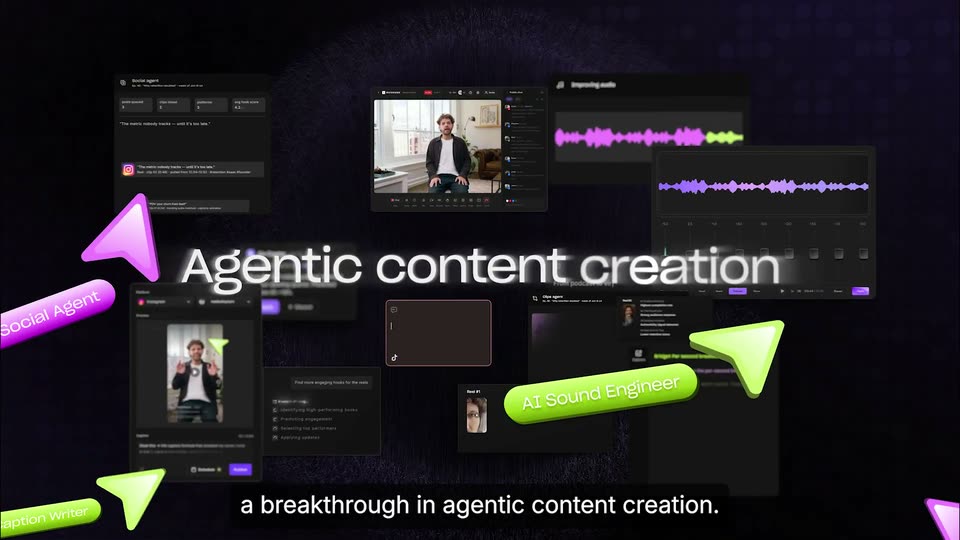
Riverside’s 1:42 launch film runs 59 scenes, about 1.7 s each. The product is on screen from the first frame and 3 features are revealed, with social proof. The call to action lands at 1:34 (92% in), over a voiceover. Presented as a presenter-led walkthrough: live-action cutaways in a sunlit room alternate with 3D interface flythroughs and tight UI close-ups, all cut at roughly 12 cuts per minute to a 123 BPM pulse. Signature moves are the glossy magenta and lime 3D cursors and agent pills that fly across the frame, and the purple dot-grid backdrop that unifies the dark product shots.
Is this your launch? to your site or press kit.
Covu · Apr 2026
Luma AI · Jun 2024
A curly-haired man in a dark cardigan stands in a bright room, gesturing with both hands while a large white title reads across his chest. The shot then cuts to the Riverside logo centered on a dark field with a purple dot grid, the caption pill held at the bottom.
On-screen text: “AI head of production”, “Introducing Riverside 2.0”
Camera: Pull out
Centered on a near-black field with a faint purple dot grid top right, a white Riverside icon and wordmark hold a locked-off frame. A small white tagline at the bottom switches from one line to the next.
On-screen text: “Introducing Riverside 2.0”, “a breakthrough in agentic content creation.”
Camera: Static
On a near-black background with a faint dot grid, the white RIVERSIDE 2.0 lockup holds center. A purple 3D ring sweeps in from the lower right, rotating into a tilted disc that carries the dark wavy-line icon, while the caption stays fixed at the bottom.
On-screen text: “RIVERSIDE 2.0”, “a breakthrough in agentic content creation.”
Techniques: 3D mockup
Camera: Static
A purple 3D badge with a white tilde mark holds the center of a dark dotted field, then the frame opens into floating interface panels, magenta and lime arrows, and agent pills as the headline Agentic content creation blurs into the middle.
On-screen text: “a breakthrough in agentic content creation.”, “Agentic content creation”, “AI Social Agent”, “AI Sound Engineer”
Techniques: 3D mockup, Kinetic type
Camera: Push in
Riverside interface panels (video editor, waveforms, social feed) float at different depths in a dark 3D space. Magenta and green 3D arrow pointers labeled AI Social Agent, AI Sound Engineer, AI Caption Writer and AI Editor fly across the foreground past the white headline 'Agentic content creation'.
On-screen text: “Agentic content creation”, “Riverside acts as your AI head of production,”, “AI Social Agent”, “AI Sound Engineer”, “AI Editor”, “AI Caption Writer”
Techniques: 3D mockup, Parallax
Camera: Push in
A tilted 3D mockup of the Riverside video-call interface floats over a blurred echo of itself on black, showing a seated host on the left and a chat feed on the right. The frame slowly pushes in as a white caption sits at the bottom.
On-screen text: “Riverside acts as your AI head of production,”
Techniques: 3D mockup
Camera: Push in
A dark editor screen shows a video preview above a timeline of purple and green waveforms. A Co-Creator trim card and a white AI hand icon labeled AI Senior Editor hover over the timeline, then fade out, leaving the playhead resting at 00:05.
On-screen text: “Riverside acts as your AI head of production,”, “editor, content writer and much more.”
Camera: Push in
A flat newsletter document brightens from dim to full on a dark background. A green and a purple 'AI Content Writer' tag pop in over it, then slide off to the right. A white caption sits in a black box at the bottom.
On-screen text: “editor, content writer and much more.”, “AI Content Writer”
Camera: Static
A dark purple field of floating UI panels, waveforms and video cards sits in 3D perspective, drifting slowly. A green cursor hovers over a social panel on the right. A white caption reads in a black bar at the bottom.
On-screen text: “editor, content writer and much more.”
Techniques: 3D mockup, Cursor demo
Camera: Pull out
A man in a dark shirt over a white tee sits in a chair in a sunlit room with tall windows and a brown leather sofa, facing the camera. He talks and gestures with open hands. White subtitles on a dark box appear at the bottom of the frame.
On-screen text: “Let me show you how it works.”, “Let's say you just recorded a 60 minute”
Camera: Static
A soft-bokeh view of a desk racks focus into a sharp over-the-shoulder shot of a woman facing a monitor that shows a video editing timeline. Softboxes, a camera rig and a plant frame the home studio. White subtitles read at the bottom.
On-screen text: “Let's say you just recorded a 60 minute”, “YouTube video, interview or podcast”
Camera: Pull out
A woman with long hair sits at a wooden desk facing a monitor running editing software, framed by studio softboxes and a gimbal-mounted camera. The shot holds, then a fast radial zoom blurs the frame while the bottom caption stays still.
On-screen text: “YouTube video, interview or podcast”
Camera: Static
A man in a dark sweater sits in a bright room, then the shot blurs and cuts to a podcast studio where two hosts face each other on black leather couches with boom mics. A caption bar stays fixed at the bottom.
On-screen text: “YouTube video, interview or podcast”
Camera: Pull out
A bearded man in a green shirt and a woman in a denim jacket sit in black leather armchairs facing each other, each with a boom mic, a laptop and mixer between them, against a wooden slat wall lit in warm orange. A white caption sits at the bottom.
On-screen text: “YouTube video, interview or podcast”
Camera: Static
A red dot pulses inside a gray ring on a dark background while the word recording fades in and a timecode ticks forward. White captions in a black box read at the bottom of the frame.
On-screen text: “YouTube video, interview or podcast”, “The minute you finish recording,”
Camera: Static
A dark podcast editor interface fills the frame, a man seated in a sunlit room in the preview window above a green-and-purple waveform timeline. The view drifts in to center the timeline, and a white caption sits on a black bar at the bottom.
On-screen text: “The minute you finish recording,”
Techniques: UI zoom
Camera: Pan
A dark 3D workspace of floating interface panels drifts in depth as green and pink cursors and agent pills, AI Sound Engineer and AI Caption Writer, move across it. The camera zooms in to settle on a clearer layout of audio, clip and social panels.
On-screen text: “Riverside orchestrates”, “a team of agents to get to work”
Techniques: Parallax, UI zoom
Camera: Push in
Two tilted browser windows float in a dark 3D space, the upper one showing a video with a loading spinner. A pink 3D cursor and a pink “Video Editor” pill slide across the frame while the windows shift upward, revealing a second chat window below.
On-screen text: “In minutes, the agents hands you”, “Video Editor”
Techniques: 3D mockup
Camera: Push in
A tilted 3D video editor interface zooms into its preview panel, which spins up and resolves into a man speaking into a studio microphone. A pink 3D 'Video Editor' tag slides in from the left while a dark caption bar appears at the bottom.
On-screen text: “In minutes, the agents hands you”, “Video Editor”, “a multicam rough cut,”
Techniques: 3D mockup, UI zoom
Camera: Push in
A video editor fills the frame: a man in a beige sweater talks into a microphone inside the preview window, captions updating beneath him. The view eases out to reveal the transcript column on the left, where matching text lines sit beside layer icons.
Techniques: UI zoom
Camera: Pull out
The dark editor UI reconfigures: the video preview shrinks to a small card on the left, a green pill and a glossy pink 3D ribbon labeled Video Editor appear on the right, and a black caption 4 reels. drops in at the bottom.
On-screen text: “Behind every great idea”, “Video Editor”, “4 reels.”
Techniques: 3D mockup
Camera: Pull out
A dark video editor interface fills the frame. Vertical video clips shuffle and reorder across the central canvas while green and purple label pills drift over them. A black caption box appears at the bottom center.
On-screen text: “4 reels.”
Camera: Static
A video editor canvas shows a horizontal strip of vertical reel clips sliding left past a dark icon sidebar. The clips alternate a close-up of a blue eye and a curly-haired man in a beige sweater speaking into a microphone, each clip carrying a sliding caption bar.
Camera: Pan
Vertical video panels slide left in a horizontal row, separated by dark bars. Each panel shows a different live-action shot: a man speaking into a microphone, a man smiling at a desk, and hands typing on a keyboard, each carrying a caption.
On-screen text: “You see wrong”, “AND I THINK THAT'S THE KEY, YOU KNOW?”, “Behind every great idea”, “Master your typing”
Techniques: Split screen
Camera: Pan
A row of vertical video cards slides left on black. The first shows a smiling man at a desk with a green caption box; the second, a hand typing on a keyboard with a white caption box. A dark purple card with “A newsletter.” enters from the right.
On-screen text: “Behind every great idea”, “Master your typing”, “A newsletter.”
Techniques: Kinetic type, Split screen
Camera: Static
Split view on a dark background: a left agent panel ticks off checklist lines while a white newsletter card on the right slides upward and settles. Green and purple agent pills with arrow cursors point at the headline and the send button.
On-screen text: “A newsletter.”
Camera: Push in
A glossy pink cursor hovers over a purple Approve & Send button next to an outlined Make Changes button, with checklist lines above. The focus racks, blurring the buttons and bringing a phone mockup of a man in a black jacket into view, with a yellow play icon at right.
Techniques: Cursor demo
Camera: Static
Close-up of a dark distribution panel: a green cursor opens the Platform dropdown (Instagram, LinkedIn, X, TikTok, YouTube, YouTube Shorts) with a green 'AI Distributor' pill. The frame pulls back to the full panel with video preview and caption field, above the subtitle 'And this week's post captions.'
On-screen text: “AI Distributor”, “And this week's post captions.”
Techniques: Cursor demo, UI zoom
Camera: Static
A dark interface panel shows a Schedule button and a purple Publish button; a pink cursor hovers over Publish as the panel slides up and blurs, then a pink pill labeled AI Distributor slides in from the right. A white caption reads And this week's post captions.
On-screen text: “And this week's post captions.”, “AI Distributor”
Techniques: Cursor demo
Camera: Static
A dark content-planner calendar is held in 3D perspective. A purple-glowing card in the center shrinks to its normal size while the surrounding week of content thumbnails brightens, then a white caption fades in along the bottom edge.
On-screen text: “But Riverside doesn't stop there.”
Techniques: 3D mockup, UI zoom
Camera: Pull out
A man in a brown shirt sits in a sunlit room, speaking to camera. A dark planner UI, with a calendar and video cards, fades in over him and then clears. White subtitles caption his line at the bottom.
On-screen text: “But Riverside doesn't stop there.”, “It reviews its own work”
Camera: Pull out
A podcast editor UI shows a man speaking into a mic above a waveform timeline. The camera pans and zooms across the screen as a purple 3D pencil and arrow cursor highlight a segment, tick a task list, and click Apply to move the clip.
On-screen text: “It reviews its own work”, “like the best marketing team would.”, “It knows minutes 11-15 will perform”, “better in the first quarter of the video,”
Techniques: UI zoom, Cursor demo
Camera: Pan
A man in a beige sweater sits at a studio microphone; a dark AI recommendation panel sits to his right and a green-and-purple waveform timeline runs along the bottom. The panel dims as the shot refocuses on the man.
On-screen text: “ranks your reels by predicted engagements,”
Camera: Push in
A dark product UI in split view: vertical reel thumbnails scroll up in a left column while an AI chat panel on the right lists ranked moments with thumbnails. The view opens zoomed on one card, pulls back to the full list, then defocuses into a blur.
On-screen text: “ranks your reels by predicted engagements,”, “and even mixes your audio for you.”
Techniques: UI zoom, Split screen
Camera: Pan
A dark audio equalizer panel fades in over a dotted purple backdrop; the waveform plays with a lavender progress fill, the nine faders slide to new positions, and the dB values update. The scene cuts to a bearded man in a wheelchair seated in a bright living room.
On-screen text: “and even mixes your audio for you.”, “And I think that's the key,”, “you know, when it's showing up”, “even when it's hard.”
Camera: Pull out
A man sits in a bright room and speaks to camera; a dark prompt bar with a purple send button overlays the lower frame. The frame then splits, and a purple chat panel on the right shows the typed prompt “Can you cut the interview down 20%”.
On-screen text: “Now we'll make edits to”, “our content with one prompt.”
Techniques: Split screen
Camera: Push in
Split screen: on the left, a curly-haired man in a brown cardigan sits by a bright window, gesturing while speaking. On the right, a dark panel with a purple glow shows a chat prompt and a step list that fills in. A white caption sits at the bottom.
On-screen text: “We'll tell Riverside”
Techniques: Split screen
Camera: Pull out
The Riverside editor shows a man seated on a floor in the preview above a waveform timeline, where a purple block marks a cut. To the right, a chat prompt and a step checklist appear with two items checked. A white-on-black caption repeats the prompt at the bottom.
On-screen text: “can you cut the interview down 20%?”
Camera: Pull out
A dark video editor fills the frame, its preview showing a seated interviewee above a waveform timeline. A green cursor glides across the purple selection block as a right-hand panel ticks off AI steps, and a bottom caption repeats the prompt.
On-screen text: “can you cut the interview down 20%?”
Techniques: Cursor demo
Camera: Static
A video editing interface pans down, sliding the top video preview out of frame as a new prompt appears in the right-hand chat panel.
On-screen text: “can you cut the interview down 20%?”
Techniques: Cursor demo
Camera: Static
A dark video editor screen shows a row of vertical reel clips of a man speaking. A pink cursor arrow and a green Content Strategist pill glide across the clips while a task checklist on the right ticks off items one by one. White captions swap in at the bottom.
On-screen text: “Find more engaging hooks for the reels.”, “Owen, thanks for joining us today.”
Techniques: Cursor demo
Camera: Static
A dark podcast editor interface displays a split-screen video of two male hosts, with a white caption line along the bottom. The framing shifts from the right-hand AI panel to the central editor as the caption changes to a follow-up question.
Techniques: UI zoom
Camera: Pan
Inside a dark podcast editor, two talking-head clips sit side by side, labeled Michael and Stephen. A caption box at the bottom swaps from an interview question to a new line as the playhead rests at 00:05. The left tool rail and timeline frame the canvas.
Techniques: UI zoom
Camera: Pan
The view zooms into a dark transcript editor as purple and green “AI Editor Agent” cursors hop between speaker names. A right-side chat panel ticks off verification steps while white captions roll along the bottom.
On-screen text: “Oh, and can you make sure”, “I'm calling my interviewee Michael”, “not Owen, in scene five”
Techniques: UI zoom, Cursor demo
Camera: Push in
The dark Riverside editor shows a transcript, two speaker video tiles and an audio waveform. The view zooms into the waveform as purple segment bars appear, then a cursor drags a boundary and green handles snap into place. White captions in black boxes narrate at the bottom.
On-screen text: “Riverside even regenerates”, “audio in your own voice”, “using a proprietary audio dubbing model,”, “and syncs your lips to the new audio.”
Techniques: UI zoom, Cursor demo
Camera: Pan
A split-screen call view shows two men; the right side starts blurred with a small purple ring on the man's face, then snaps into focus. The left panel slides off and the right frame expands to fill the screen. Subtitles caption the speech.
On-screen text: “and syncs your lips to the new audio.”, “Michael, thanks for joining us today.”
Techniques: Split screen, UI zoom
Camera: Pull out
A bearded man in a beige sweater speaks into a studio microphone in a softly lit room with shelves, posters and a window, while a second person sits at the left edge. Subtitles and a sliding name label appear along the bottom.
On-screen text: “Michael, thanks for joining us today.”, “Stephen”, “What inspired you to start the company?”
Camera: Pull out
A glowing lavender app icon with a wavy mark holds the center of a dark dotted background while a grid of dark rounded logo tiles, including Microsoft, Netflix and Spotify, sharpens and settles into place around it. White subtitles at the bottom name the businesses.
On-screen text: “Over thousands of businesses”, “like Microsoft, Spotify, The New York Times,”
Techniques: 3D mockup
Camera: Pull out
A dark dotted backdrop holds a grid of 3D logo tiles in purple and black, arranged around a glowing purple tile with a wavy line. The tiles sit at varying depths in perspective while a bottom caption line updates.
On-screen text: “like Microsoft, Spotify, The New York Times,”, “and creators like the Kelce Brothers,”
Techniques: 3D mockup
Camera: Pan
A split-screen podcast clip: a bearded host in a dark shirt fills the left panel; a man in a blue hoodie and a blonde woman share the right, all in headphones at mics. A purple frame borders both, a Riverside logo sits top right, a white caption sits below.
On-screen text: “and creators like the Kelce Brothers,”, “RIVERSIDE”
Techniques: Split screen
Camera: Static
A purple-framed split screen shows three podcasters with headphones and microphones: a bearded man on the left, a man in a blue hoodie and a woman in white on the right. A Riverside badge sits top right. White captions read at the bottom.
On-screen text: “and creators like the Kelce Brothers,”, “and Tim Ferris”
Techniques: Split screen
Camera: Static
A man in a gray graphic t-shirt sits at a studio microphone and speaks, facing slightly off camera. An animated purple rounded border draws in around the frame, and a white subtitle sits at the bottom.
On-screen text: “run their content on Riverside.”
Techniques: Masking
Camera: Pull out
A curly-haired man in a dark jacket over a white tee speaks to camera in a bright room with a big window, plant, and leather sofa. The image racks from soft focus to sharp, and a white subtitle line sits at the bottom.
On-screen text: “To celebrate our launch,”
Camera: Pull out
A glossy purple 3D arrow cursor grabs the lock knob on a dark 'Slide to unlock' pill and drags it from left to right against a black grid backdrop. A white caption box sits at the bottom center.
On-screen text: “To celebrate our launch,”, “we're giving away”
Techniques: Cursor demo
Camera: Static
A dark pill bar over a purple-glowing black background opens tight on a lock button with a purple cursor, then pulls back to reveal the white Riverside Pro wordmark with a light sweep. A caption below reads “we're giving away,” then “a free month of Riverside Pro.”
On-screen text: “we're giving away”, “a free month of Riverside Pro.”
Techniques: UI zoom, 3D mockup, Light sweep
Camera: Static
A Twitter post about Riverside 2.0 fills the screen, the cursor drifts down to the reply box, and a dark caption bar at the bottom reads the offer, swapping from one line to the next.
On-screen text: “a free month of Riverside Pro.”, “Leave a comment below and”
Techniques: Cursor demo, UI zoom
Camera: Push in
A blurred YouTube comment view fills the frame. A cursor types a comment line by line, ending with a blinking caret, while a black Reply button slides in on the right. A dark caption box at the bottom reads 'Leave a comment below and'.
On-screen text: “Leave a comment below and”
Techniques: Cursor demo
Camera: Push in
A YouTube comment row with a profile photo and a short note sits on a white interface. A black cursor arrow glides right to rest on the dark Reply button, while a gray caption box at the bottom holds the line.
On-screen text: “we'll grant you access.”
Techniques: Cursor demo
Camera: Static
On a near-black field with a faint purple dot grid, the Riverside icon and wordmark assemble letter by letter above a dark riverside.com pill. A glossy purple arrow cursor glides in to hover over the glowing pill while the caption scales in at the bottom.
On-screen text: “we'll grant you access.”, “riverside.com”
Techniques: Kinetic type
Camera: Static