0:50


Hera Video - Introducing Hera for launch videos. Opus 5.5 is great at animating.
Hera · B2B · Nov 2026
Warp · Nov 2022 · 0:51 · Full motion · AI-annotated
Warp’s 0:51 launch film runs 16 scenes, about 3.2 s each. The product is on screen from the first frame and 6 features are revealed. The call to action lands at 0:45 (88% in). The video bookends a rapid montage of single-feature terminal demos with the warp logo card, each feature announced by a bottom caption rather than voiceover. Pacing is steady at about 80 BPM and six cuts per minute, with the terminal window floating over a slow marbled purple backdrop while tooltips and captions carry the information.
Is this your launch? to your site or press kit.
Hera · B2B · Nov 2026
MecAgent · Feb 2026
Films whose music sounds like this one, voice left out
Cohere · Electronic, Lo-fi Hip-Hop, Chillwave
ElevenLabs · Upbeat electronic dance music (EDM), house style
On a near-black background, the warp logo sits centered above a two-line tagline. The lockup fades in from a soft blur, holds steady, then dims slightly toward the end. The frame stays locked.
On-screen text: “The power of the IDE”, “built into the terminal”
Camera: Static
A 3D terminal window floats over a dark purple marbled backdrop, auto-typing shell commands and a directory listing. The window then dims while the warp logo and a two-line tagline appear across the lower half.
On-screen text: “The power of the IDE”, “built into the terminal”
Techniques: 3D mockup
Camera: Push in
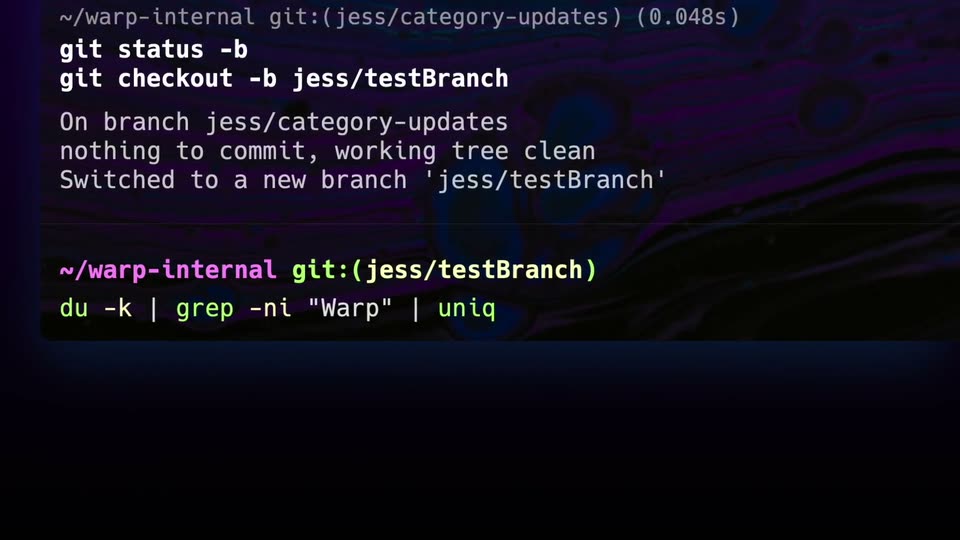
A terminal window shows a git command line. Gray tooltips pop up one after another over each token, explaining the command and its flags. The caption reads 'Hover Over Commands for Documentation'. Then the word 'unique' gets a red error underline and the view zooms in on it.
On-screen text: “Hover Over Commands for Documentation”, “Error Underlining”
Techniques: UI zoom
Camera: Push in
A terminal window over a dark, abstract purple fluid background types out git commands line by line. Individual words flash green as they are entered, and a block caret sits at the end. The caption Syntax Highlighting is centered below.
On-screen text: “Syntax Highlighting”
Techniques: Cursor demo
Camera: Static
A dark terminal over a purple fluid backdrop types a git checkout command. A fuzzy search popup lists branch names, the pink-highlighted match shifting as letters appear, then closes to leave the full name in the prompt. A white caption sits below.
On-screen text: “Fuzzy Search Completions”
Techniques: Cursor demo
Camera: Static
A dark terminal window opens a command search panel over its history. A query is typed into the field and a matching line surfaces below it, while a white caption fades in at the bottom center.
On-screen text: “Access History,”
Camera: Pull out
A dark terminal window shows a fuzzy search list of commands and history entries. As the user types, the list updates and a purple highlight jumps between results, while a faint git log scrolls behind. A white caption sits centered at the bottom.
On-screen text: “Access History,”
Camera: Static
A terminal window with a list of saved commands floats over dark blue and purple abstract shapes. Two detail panels hover to its right beside a highlighted purple row, and the list and panels drift slowly as a white caption sits below.
On-screen text: “Access History, Saved Commands,”
Techniques: Parallax
Camera: Static
A dark terminal panel lists saved commands with small icons. A cursor types an alias line at the bottom, and a gray tooltip card slides in on the right to explain a highlighted command. The view then reframes closer to reveal more history entries, including an AI translation row.
On-screen text: “Access History, Saved Commands, and AI”
Techniques: Cursor demo, UI zoom
Camera: Static
A dark terminal shows a prompt line and a gray A.I. Command Search panel that swaps from instruction text to a suggested git command with an Input Command button. A white two-line caption sits centered below the window.
On-screen text: “Access History, Saved Commands, and AI Search”
Camera: Static
A terminal window floats over a marbled purple and blue background. Git commands type out and execute, the log scrolling up to reveal branch output. A white caption at the bottom fades away as the new prompt appears.
On-screen text: “Access History, Saved Commands, and AI Search”
Camera: Pull out
A dark terminal screen shows git commands being typed with an autocomplete dropdown, then scrolls up to a fatal error and a suggested command bar, while a white two-line caption fades in below and fades out at the end.
On-screen text: “Correct Errors”, “in Previous Commands”
Camera: Static
A dark terminal window scrolls through git commands over a purple abstract background, highlighting a suggested command line with a sparkle icon. A white two-line caption reading “Completions Pop Up Automatically” appears centered at the bottom.
On-screen text: “Completions”, “Pop Up Automatically”
Camera: Static
A dark terminal window sits over a purple liquid-texture background. Git commands type in as the user works, and autocomplete suggestion popups appear beside the cursor. A two-line caption is centered at the bottom, fading in and out.
On-screen text: “Completions Pop Up Automatically”
Camera: Pull out
A Warp terminal window floats over a marbled purple and teal backdrop. Overlapping command lines resolve into a clean list, then the window gives way to the blue Warp logo and white wordmark centered on a dark field.
On-screen text: “warp”
Camera: Pull out
On a dark purple field, the blue-green warp icon and white wordmark sit centered. The wordmark scales into place as its last letter finishes, then the URL fades in below and the frame holds still.
On-screen text: “warp”, “www.warp.dev”
Techniques: Kinetic type
Camera: Static