1:30

Adi Singh - Frontier coding performance at up to 20x lower cost. Introducing the
Reason Machines · B2B · Nov 2026
Warp · Nov 2025 · 1:41 · Full motion · AI-annotated
Warp’s 1:41 launch film runs 40 scenes, about 2.5 s each. The product is on screen from the first frame and 4 features are revealed, with social proof. The call to action lands at 1:33 (92% in). Built as four back-to-back feature blocks, each opened by a centered headline with one keyword inside a rounded monospace chip, then a screen recording that brightens from dim to full. It closes with a scale-up stat, a recap chip swap into the URL, and the Warp mark.
Is this your launch? to your site or press kit.
Reason Machines · B2B · Nov 2026
Orgo · B2B · Oct 2026
Webflow · Design · Oct 2026
Films whose music sounds like this one, voice left out
AutoSitu · Lo-fi hip-hop, chillwave, and cinematic ambient electronic
Pitch · Upbeat electronic
Shopify · Modern upbeat electronic
A near-black background holds the white word Introducing centered, then it gives way to the larger word Agents in the same position. The two words appear in sequence, each locked still while it is on screen.
On-screen text: “Introducing”, “Agents”
Techniques: Kinetic type
Camera: Static
On a near-black background, the white title Agents 1.0 holds center. A small dark terminal card slides in from the right, centers to show the Warp logo and feature text, then tilts in 3D and exits upward as the version number flips to 2.0.
On-screen text: “Agents 1.0”, “warp Presents”, “Agents 2.0”
Techniques: 3D mockup
Camera: Static
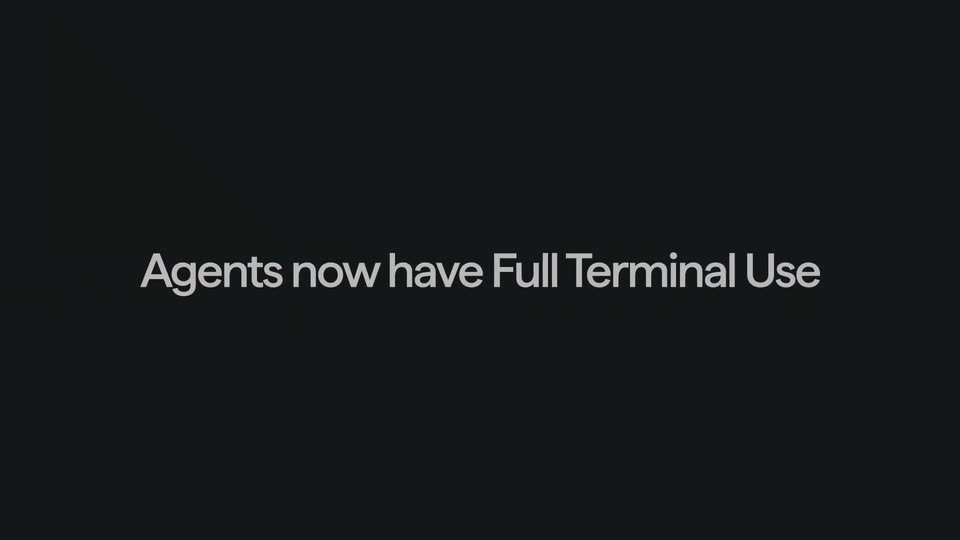
A dark frame holds the centered title “Agents 3.0” in white, then the line reflows into the sentence “Agents now have Full Terminal Use” as the added words fade in from the right.
On-screen text: “Agents 3.0”, “Agents now have Full Terminal Use”
Techniques: Kinetic type
Camera: Static
A gray sans-serif headline sits centered on a near-black background. A rounded selection box with a yellow cursor bar slides across the words while a dim monospace echo of the phrase fades in below, and the headline brightens to white.
On-screen text: “Agents now have Full Terminal Use”, “Full Terminal Use”
Camera: Static
On a dark background, the headline “Agents can use a REPL” sits centered with a blinking cursor inside a rounded outline box, and a dim caption reads “Full Terminal Use”. A terminal window with table output and a prompt bar fades in across the top of the frame.
On-screen text: “Agents can use a REPL”, “Full Terminal Use”
Camera: Pan
A dark terminal window fills the frame beneath the top headline. A psql table list scrolls line by line as the prompt advances, and a small chat bubble on the right types the agent's next steps. The boxed monospace phrase settles into place at the top.
On-screen text: “Agents can use a REPL”
Camera: Static
On a near-black background, the centered word Agents types out into Agents can debug, a rounded terminal cursor block sitting at the end. A smaller monospace caption, Full Terminal Use, stays fixed at the bottom throughout.
On-screen text: “Agents can debug”, “Full Terminal Use”
Techniques: Kinetic type
Camera: Static
A dimmed terminal interface opens with a large centered headline “Agents can debug”. The screen brightens as the headline drops to a bottom caption; an lldb session runs, code scrolls, and an AI chat panel types debugging notes on the right.
On-screen text: “Agents can debug”, “Full Terminal Use”
Techniques: Kinetic type
Camera: Pan
On a near-black field, the white headline types out left to right with a blinking caret, the trailing words forming inside a thin rounded terminal box. The monospace caption Full Terminal Use brightens from dim gray to white at the bottom.
On-screen text: “Agents can even order coffee”, “Full Terminal Use”
Techniques: Kinetic type
Camera: Static
A dark terminal interface cycles through a coffee shop's product list, cart and shipping address screens while the agent's reasoning updates in a side panel, then the UI fades to black as the closing lines appear.
On-screen text: “Agents can even order coffee”, “You can take over”, “Full Terminal Use”
Techniques: Kinetic type
Camera: Static
A dark card holds the headline “You can take over at any time,” with “take over” inside a rounded highlight pill, while a terminal window slides up from the bottom edge showing the agent’s message and a monitoring line.
On-screen text: “Full Terminal Use”, “You can take over at any time”
Techniques: Masking
Camera: Static
A dark terminal interface fills the frame, a CLI agent creating an Astro project, with the headline “You can take over at any time” pinned above. The view slowly zooms in toward the command line and the highlighted “Take over” button.
On-screen text: “You can take over at any time”
Techniques: UI zoom
Camera: Push in
A dark terminal shows a chat bubble reading 'Let me wait a moment for the wizard prompts to appear:' beneath the headline. A hand cursor hovers the Take over shortcut, revealing a tooltip, as the frame reframes onto the command row.
On-screen text: “You can take over at any time”
Techniques: UI zoom, Cursor demo
Camera: Static
A dark terminal card scrolls as Astro CLI wizard prompts appear line by line with colored tags, while an agent bubble types a status comment on the right. A hand cursor hovers the Take over button beneath the fixed headline.
On-screen text: “You can take over at any time”
Techniques: Cursor demo, UI zoom
Camera: Pull out
On a near-black background, a white sentence types out letter by letter: “Use /plan to draft a detailed”, with “/plan” set inside a rounded rectangle chip. A small gray “/plan” caption sits at the bottom center. The frame is locked off and the text is mid-typing when the clip ends.
On-screen text: “/plan”, “Use /plan to draft a detailed”
Techniques: Kinetic type
Camera: Static
A dark chat input field with a folder path and branch tag sits centered, while a stack of task rows scrolls at the top right. The caption Use /plan to draft a detailed plan rises into view at the bottom.
On-screen text: “Use /plan to draft a detailed plan”
Camera: Static
A dark terminal screen: a slash-command dropdown fades in over the /plan prompt, then the view switches to a project home where the prompt is typed and sent. A plan streams into the left chat column while a markdown document fills the right panel.
On-screen text: “Use /plan to draft a detailed plan”
Camera: Pull out
On a dark frame, a centered headline reads with the word plan set in a monospace chip. The line completes to directly in a PR and slides up as a product dropdown panel rises from the bottom, a cursor hovering over its controls.
On-screen text: “Link to the plan directly in a PR”, “/plan”
Techniques: Kinetic type
Camera: Static
A dark pull request view under the headline about linking a plan. A white hand cursor clicks the three-dot icon on a document card, a dropdown opens, then the cursor hovers and clicks Copy link, which highlights blue.
On-screen text: “Link to the plan directly in a PR”
Techniques: Cursor demo
Camera: Static
A white GitHub pull request panel slides in from the left under a static headline, settling into a full view of the PR title, description box and reviewer list on a dark background.
On-screen text: “Link to the plan directly in a PR”
Camera: Pull out
A GitHub pull request page sits under a white headline reading Link to the plan directly in a PR, with plan boxed in black. A comment box fills with typed text, then posts, and the view scrolls down to reveal the published comment.
On-screen text: “Link to the plan directly in a PR”
Camera: Static
A GitHub pull request view fills the frame beneath a white headline. A cursor glides from the comment field down to the green Update comment button and clicks it.
On-screen text: “Link to the plan directly in a PR”
Techniques: Cursor demo
Camera: Static
Near-black frame: “change the plan” types out letter by letter inside a thin rounded outline with a gold caret, then “at any time” fades in to its right. A small gray “/plan” label sits below, and a syntax-highlighted code editor panel slides up from the bottom edge.
On-screen text: “change the plan”, “/plan”, “at any time”
Techniques: Kinetic type
Camera: Static
A dark plan document scrolls down past Rust code blocks and numbered steps. Under the 'Update dropdown UI' heading, a bullet line types itself out word by word. The view then shifts to the chat panel, where the input types 'Looks'.
On-screen text: “change the plan at anytime”
Techniques: Cursor demo
Camera: Push in
Under a top caption reading change the plan at anytime, a dark chat interface shows the user typing a command that then posts as a message with a blue avatar, while a Warping status line appears.
On-screen text: “change the plan at anytime”
Camera: Static
On a dark background, the white phrase 'comment directly on agent code' scales up, 'comment' in a rounded outline box, as a code-review diff panel with green and red lines fades in behind it. A gray monospace tagline 'Interactive Code Review' sits below.
On-screen text: “comment directly on agent code”, “Interactive Code Review”
Techniques: Kinetic type
Camera: Pan
A dark code diff panel fills the left half, green and red changed lines beside line numbers, while a white cursor hovers over a line. On the right, the word comment sits in a rounded outline above two lines of text.
On-screen text: “comment”, “directly on agent written code”
Techniques: Cursor demo
Camera: Static
A code review screen scrolls up through Rust code while a cursor hovers over comment and edit icons. On the right, the word comment in a rounded outline box and the line directly on agent written code sit static on black.
On-screen text: “comment”, “directly on agent written code”
Techniques: Cursor demo
Camera: Pan
On a plain dark field, the line 'And send to agent to keep refining' assembles word by word, the middle phrase set inside a rounded button. The headline fades as a code review panel with diff lines and a 'Send diff comments to Agent' dialog slides up from the bottom left.
On-screen text: “written code”, “And”, “send to agent”, “to keep refining”, “Interactive Code Review”
Techniques: Kinetic type, Masking
Camera: Push in
A dark code diff with green and red lines fills the right side. A cursor hovers over the Send to Agent button and clicks it, raising a tooltip. On the left, the caption send to agent sits in a gray pill above to keep refining.
On-screen text: “send to agent”, “to keep refining”
Techniques: Cursor demo
Camera: Pan
The code diff view with a cursor on the Send to Agent button dissolves to black as the headline Bring @warp into your and the caption Remote Agents fade in at center.
On-screen text: “send to agent to keep refining”, “Bring @warp into your”, “Remote Agents”
Camera: Static
Headline 'Bring @warp into your' holds on a near-black field, @warp in a thin rounded box; 'workflow' slides in from the right with a blur. A small icon on the right cycles a cat, a striped circle, and a controller, then fades out. Dim 'Remote Agents' caption below.
On-screen text: “Bring @warp into your”, “Remote Agents”, “workflow”
Techniques: Kinetic type
Camera: Static
A white Linear activity panel slides in from the left over a black field, its comment feed partially cut off at the edge. On the right, the headline builds line by line: 'Tag' and a boxed '@warp' chip appear first, then 'in a Linear issue' drops in below.
On-screen text: “Tag @warp”, “in a Linear issue”
Techniques: Kinetic type
Camera: Static
A Linear issue comment thread scrolls upward on the left, revealing a Warp agent connected entry and a waiting spinner. On the right, the headline Tag @warp in a Linear issue stays fixed, with @warp set inside a rounded outline box.
On-screen text: “Tag @warp in a Linear issue”
Camera: Pan
On a near-black field, one centered line of white text fades in to read “Join a remote agent session to steer its work.” A small gray monospace label, “Remote Agents,” sits low and dims out during the first half.
On-screen text: “Join a remote agent session to steer its work”
Techniques: Kinetic type
Camera: Static
A white panel on a dark background shows a Warp header with a hand cursor over the label, plus body text about syntax highlighting and a session ID. A large gray caption at the bottom reads Join a remote agent session to steer its work. The frame holds still.
On-screen text: “Join a remote agent session to steer its work”
Techniques: Cursor demo
Camera: Static
A flat browser window mockup of the Warp app floats on a dark background. It opens on a session-join card, then the content switches to the full agent session with a task list and a markdown brief, while the window scales and drifts upward over a static bottom caption.
On-screen text: “Join a remote agent session to steer its work”
Techniques: UI zoom
Camera: Static
Two lines of white text sit centered on a near-black background and scale up smoothly from a small size to a larger one over the two seconds.
On-screen text: “Developers have launched”, “millions of Agents with Warp”
Techniques: Kinetic type
Camera: Static
On a near-black background, a dim line reads “Developers have launched millions of Agents with Warp”. It gives way to “Now, they can” in white, with a rounded chip cycling “use a REPL”, “@warp”, “debug” in a blur swap, ending on the dim URL “warp.dev/agents”.
On-screen text: “Developers have launched”, “millions of Agents with Warp”, “Now, they can use a REPL”, “Now, they can @warp”, “Now, they can debug”, “warp.dev/agents”
Techniques: Kinetic type
Camera: Static
A blurred gray URL warp.dev/agents sharpens at the center of a near-black field, then the letters collapse into the warp logo: two overlapping rounded panes beside the lowercase wordmark, which holds to the end.
On-screen text: “warp.dev/agents”, “warp”
Techniques: Morph
Camera: Static