
0:41
Explore
Hera Video - Introducing Hera for launch videos. Opus 5.5 is great at animating.
Hera · Nov 2026 · 0:50 · Full motion · AI-annotated
- Length
- 0:50
- Scenes
- 33 · 1.5 s avg
- Product on screen
- 0:00
- Features shown
- 3
- Call to action
- 0:43 · 86%
- Voiceover
- Yes
- Views
- 217 on X
as of November 25, 2026
00:00:00 / 00:50:03
- Length
- 0:50
- Scenes
- 33 · 1.5 s avg
- Product on screen
- 0:00
- Features shown
- 3
- Call to action
- 0:43 · 86%
- Voiceover
- Yes
- Views
- 217 on X
as of November 25, 2026
Hera’s 0:50 launch film runs 33 scenes, about 1.5 s each. The product is on screen from the first frame and 3 features are revealed. The call to action lands at 0:43 (86% in), over a voiceover. Built as a three-step walkthrough (brand kit, storyboard, video) bookended by a logo intro and a URL sign-off, the video alternates near-black text cards with soft red glows against pale cream dotted-grid UI demos. Its signature moves are word-by-word headline builds with a single red accent word, fast 3D tilts of tilted cards, and sunset-gradient storyboard tiles that slide across the frame like a filmstrip.
No filming indicatedEstimated needs: 3 capture groups — your screens or recordings · 1 official logo — reused across the film · 4 graphic passages — draw or supply · 6 3D passages — build or supply
Is this your launch? to your site or press kit.
More like this
1:03
Introducing MecAgent Copilot - AI for CAD
MecAgent · Feb 2026
2:36
MecAgent - Introducing MecAgent V2.0.0 - The Future of AI & CAD.
MecAgent · Oct 2026
Similar soundtrack
Films whose music sounds like this one, voice left out
0:39
Meet Viby: your AI marketing team in iMessage
Vibiz · Liquid Drum and Bass
0:57

New MacBook Pro with PROLED XDR Display and Touch: The world’s best laptop display
Apple · Drum and Bass / Electronic
0:44

Totalis - Introducing Combos on HIP-4 markets Pick outcomes across sports, cry
Totalis · Electronic dance music (drum and bass / UK Hardcore)
Hera Video - Introducing Hera for launch videos. Opus 5.5 is great at animating., scene by scene
· 33 scenes as text
01 · Product intro · 0:00–0:02
A near-black background with a faint red glow. The white Hera logo and the words “Introducing Hera for launch videos” scale up from the center, while three small interface cards drift in around them.
On-screen text: “Introducing”, “Hera”, “for”, “launch videos”
Techniques: Kinetic type
Camera: Pull out
02 · Product intro · 0:02–0:03
On a dark gradient background, the white Hera mark and the headline words scale in at the center, ringed by small orange-glowing notification cards that drift around the text.
On-screen text: “Introducing”, “Hera”, “for”, “launch videos”
Techniques: Kinetic type
Camera: Pull out
03 · Product intro · 0:03–0:04
A dark panel tilted in 3D perspective carries the headline, the words turning from gray to white as red AI snaps in at the end. The camera pulls back to reveal surrounding cards, a white note and a glowing orange slab, while the brand mark sits small in the corner.
On-screen text: “Hera”, “Introducing”, “for”, “launch videos”, “sitefire”, “Create launch videos with AI”
Techniques: Kinetic type, 3D mockup
Camera: Pull out
04 · Product intro · 0:04–0:06
A dark 3D scene holds tilted product cards and UI screenshots drifting at different depths. A centered white headline cycles word by word from “Create launch videos with AI” to “without the slop”, the final word in red.
On-screen text: “Create launch videos with AI”, “without the slop”
Techniques: Kinetic type, 3D mockup, Parallax
Camera: Pull out
05 · Feature reveal · 0:06–0:09
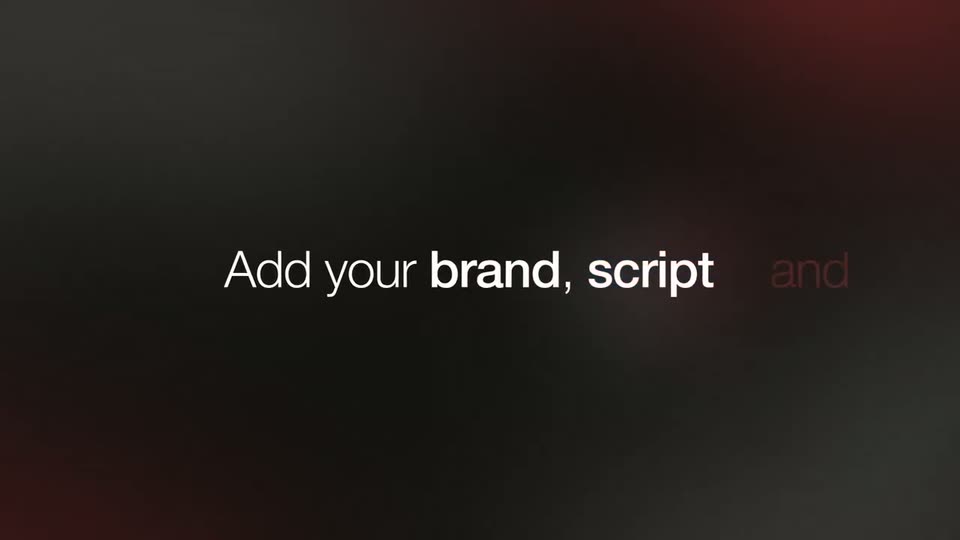
On a dark charcoal field with deep red glows in the corners, thin peach text reads Step 1, centered. It gives way to the line Add your brand, script and screenshots, which builds word by word, with the final word screenshots in peach.
On-screen text: “Step 1”, “Add your brand, script and screenshots”
Techniques: Kinetic type
Camera: Static
06 · Feature reveal · 0:09–0:10
A white form card floats on a light dotted background. A large headline scales in over the card, then a text cursor types sitefire.ai into the input field while the black Build brand kit button sits at the lower right.
On-screen text: “Add your brand, script and screenshots”
Techniques: Kinetic type, Cursor demo
Camera: Pull out
07 · Feature reveal · 0:10–0:12
A brand kit board on a dotted grid assembles: five color dots, a red sitefire logo box, a links card, a type specimen and a gradient swatch fade and scale into position around a dark button.
Camera: Static
08 · Feature reveal · 0:12–0:13
A flat brand-kit board with color swatches, a red sitefire logo, a type sample and an orange gradient zooms out fast to reveal the full layout as a fan of white UI cards tilted in 3D perspective on a dotted grid, a black cursor resting at the center.
Techniques: UI zoom, 3D mockup
Camera: Pan
09 · Feature reveal · 0:13–0:15
Four product interface screens float on a light dotted grid, captioned Analytics UI, Sitefire content, Script and Home. A cursor hovers at the center while the screens drift downward and the captions slide and scale into place.
On-screen text: “Analytics UI”, “Sitefire content”, “Script”, “Home”
Camera: Push in
10 · Feature reveal · 0:15–0:18
On a near-black background with faint red corners, centered text animates in sequence: a thin 'Step 2' scales up, then 'Create your' appears in light weight as 'storyboard' pops in bold white. The frame stays locked off.
On-screen text: “Step 2”, “Create your storyboard”
Techniques: Kinetic type
Camera: Static
11 · Feature reveal · 0:18–0:19
A close-up of a light chat bubble slides left, revealing the prompt line by line with the last words in bold black. The view then pulls back to a dotted-grid canvas, showing the dark prompt bubble beside a tilted white document card.
On-screen text: “Make a storyboard for our launch video from the script”
Techniques: Kinetic type, UI zoom
Camera: Pull out
12 · Feature reveal · 0:19–0:21
A chat mockup on a dotted gray field: a black prompt bubble, 'Make a storyboard for our launch video from the script', holds two tilted document pages. It slides up and blurs as a red sparkle avatar and a gray reply bubble, 'Created storyboard from the script', snap into focus.
Camera: Static
13 · Feature reveal · 0:21–0:22
On a light dotted grid, a sunset-gradient card with white text slides left while a second pink-gradient card slides in from the right. Each card carries a short line of text and a small window icon with a scene label beneath it.
On-screen text: “In AI search”, “Scene 01”, “you either get mentioned”, “Scene 02”
Techniques: Kinetic type
Camera: Pan
14 · Feature reveal · 0:22–0:22
Three orange-to-dark gradient cards slide right across a dotted grid, each carrying a sentence fragment, with gray scene labels and icons beneath. The motion reads as a storyboard advancing left to right.
On-screen text: “In AI search you either get mentioned”, “or you're invisible.”, “Scene 01”, “Scene 02”, “Scene 03”
Techniques: Kinetic type
Camera: Pan
15 · Feature reveal · 0:22–0:23
A light dotted-grid canvas holds three scene cards in a row. The middle card shifts from a pink to an orange-to-black gradient as the white text “Write content...” fades in. The side cards read “or you're invisible.” and “that AI actually cites.”
Camera: Static
16 · Feature reveal · 0:23–0:23
A horizontal filmstrip of three rounded cards slides left across a light dotted background. Each card holds a product headline or a UI mockup, with a small Scene label beneath it.
On-screen text: “Scene 04”, “Scene 05”, “Scene 06”, “Scene 07”
Camera: Static
17 · Feature reveal · 0:23–0:25
Three flat product mockups sit side by side on a light dotted grid, each tagged with a scene number and icon. A slow horizontal drift slides the row right, revealing the left panel's briefing list, the red agent panel, and the article preview.
On-screen text: “Scene 07”, “Scene 08”, “Scene 09”
Camera: Pull out
18 · Feature reveal · 0:25–0:26
A gradient panel on a dotted grid holds a red-outlined button whose label swaps from “Instantly.” to “One click.” behind a pink highlight, a cursor moving in to click. Right, a 3D product dashboard displays a “Recommended best action” list.
On-screen text: “Instantly.”, “The Create Content agent takes over.”, “One click.”
Techniques: Kinetic type, 3D mockup, Cursor demo
Camera: Push in
19 · Feature reveal · 0:26–0:27
A flat typography panel hovers left with a cursor over its alignment buttons, while a tilted 3D interface on the right shows a document list and a recommendation card. A bold headline with a pink highlight sits over an orange gradient.
On-screen text: “One click. The Create Content agent takes over.”
Techniques: 3D mockup, Cursor demo
Camera: Static
20 · Feature reveal · 0:27–0:28
Two white UI cards settle side by side on a dotted background. The left card shows a red selection box around the words One click above the line The Create Content agent takes over, while the right card is a typography inspector with a cursor on the color row.
Techniques: Cursor demo
Camera: Push in
21 · Feature reveal · 0:28–0:31
Two flat cards sit on a dotted cream background. The left card shows “One click.” in a red outline box above “The Create Content agent takes over.” On the right, a white panel holds a red-to-black gradient square; a cursor glides across it to the top corner, with an alignment settings panel behind.
On-screen text: “One click.”, “The Create Content agent takes over.”
Techniques: Cursor demo, Split screen
Camera: Static
22 · Feature reveal · 0:31–0:32
A typography panel sits right of a gradient card on a dotted grid. A red line ties the font size slider to the card headline, which scales up as the size is raised, while a cursor hovers the font family field.
Techniques: Cursor demo
Camera: Push in
23 · Feature reveal · 0:32–0:34
On a near-black background with faint red glows in the corners, white text builds in the center: “Step” gains a “3”, then the line is replaced by “Turn your storyboard”, and “into a video” scales in in red. The frame stays locked off.
On-screen text: “Step 3”, “Turn your storyboard into a video”
Techniques: Kinetic type
Camera: Static
24 · Feature reveal · 0:34–0:35
A dark field with faint red glows in the corners holds a centered white headline that scales down slightly to settle in place.
On-screen text: “Turn your storyboard into a video”
Techniques: Kinetic type
Camera: Static
25 · Feature reveal · 0:35–0:36
A storyboard grid of gradient cards fills a dotted canvas under the title Storyboard. A control panel slides up from the bottom, revealing a text field with a blinking caret and a row of animation settings.
Camera: Pull out
26 · Feature reveal · 0:36–0:39
A dotted-grid canvas holds a storyboard board with a floating prompt panel. A cursor types a command into the panel, then the panel closes and the view zooms out to reveal the full grid of orange-gradient cards.
Techniques: Cursor demo, UI zoom
Camera: Pull out
27 · Feature reveal · 0:39–0:40
A rounded rectangular card sits centered on a pale cream dotted background. Inside, a vertical sunset gradient runs from bright yellow-orange at the top to deep red and black at the bottom, with the white headline 'In AI search' held in the middle. The frame is locked off and static.
On-screen text: “In AI search”
Camera: Static
28 · Feature reveal · 0:40–0:41
A dashboard interface card floats in 3D perspective in front of an orange-to-yellow gradient panel on a dotted off-white background. The headline above it reveals from left to right, the final word in red, while the card and panel hold a static angled tilt.
On-screen text: “Start with a topic you're losing.”
Techniques: 3D mockup, Kinetic type
Camera: Push in
29 · Feature reveal · 0:41–0:42
A white article-editor window on a warm orange gradient fills in: a CMS guide heading types out and a contents list appears on the right. Above it the dark headline reads “Out comes an article built from live evidence.” and a second line “Publish in one click.” fades in.
On-screen text: “Out comes an article built from live evidence.”, “Publish in one click.”
Camera: Push in
30 · Feature reveal · 0:42–0:42
A white product card sits on an orange-to-black gradient, listing four briefing steps with green check icons and a progress line; the Brand row is highlighted in pink. A static caption line accompanies it.
On-screen text: “Out comes an article built from live evidence.”
Camera: Static
31 · Feature reveal · 0:42–0:43
A rounded card with an orange to black gradient holds two centered white lines of text, static over a white dotted backdrop.
On-screen text: “Built from what's winning now.”, “Not from a blank page.”
Camera: Pull out
32 · CTA · 0:43–0:48
On a near-black field with a soft red glow in the corners, the white Hera mark slides into place beside the wordmark, forming a centered sign-off. A caption line builds in beneath, the URL tinted red, then the whole lockup fades to black.
On-screen text: “Built from what's winning now.”, “Launch now at hera.video”
Camera: Static
33 · CTA · 0:48–0:50
A solid black screen fills the frame for the entire duration of the clip, showing no visible elements, text, or motion.
Camera: Static