2:55
Explore
Cohere - Multi-step tool use is now available in the Cohere API! Build advanc
Cohere · Jun 2024 · 0:41 · AI-annotated
- Length
- 0:41
- Scenes
- 12 · 3.4 s avg
- Product on screen
- 0:00
- Features shown
- 2
- Call to action
- 0:36 · 87%
- Voiceover
- No
00:00:00 / 00:41:10
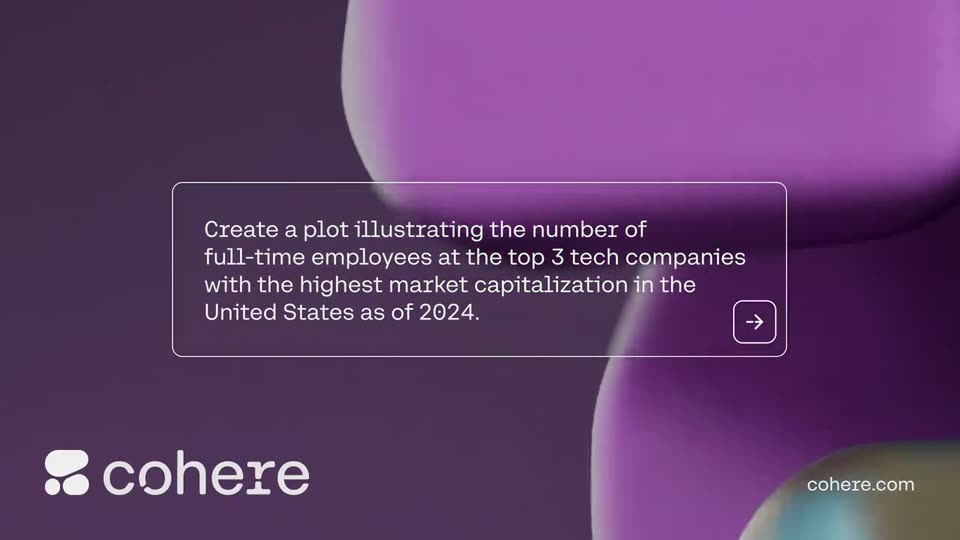
Cohere’s 0:41 launch film runs 12 scenes, about 3.4 s each. The product is on screen from the first frame and 2 features are revealed. The call to action lands at 0:36 (87% in). The video is built as a single workflow walkthrough: a branded title card, a prompt typed into the chat, then two caption cards that each announce a tool step while the live interface demonstrates it, ending on a static end card with the URL. Its signature moves are the chat window sliding in and out over a fixed purple 3D-blob background, self-typing text, and a slow push-in on the generated chart.
No filming indicatedEstimated needs: 3 capture groups — your screens or recordings · 1 official logo — reused across the film · 2 graphic passages — draw or supply · 1 3D passage — build or supply
Is this your launch? to your site or press kit.
More like this

1:00

Introducing Canvas in Gemini
Google · AI · Mar 2025
1:24

Voyager - AI Harness for Creative Work
Voyager · B2B · Oct 2026
Cohere - Multi-step tool use is now available in the Cohere API! Build advanc, scene by scene
· 12 scenes as text
01 · Product intro · 0:00–0:02
A purple abstract 3D blob field drifts slowly on the right inside a white rounded frame. A white headline builds top left, completing “Automate Enterprise Workflows with Multi-step Tool Use”, while the Cohere logo and URL stay fixed.
On-screen text: “Automate Enterprise Workflows with Multi-step Tool Use”, “cohere.com”
Techniques: Kinetic type
Camera: Static
02 · Product intro · 0:02–0:03
A locked-off purple frame shows a white headline over abstract 3D blobs. A rounded message input card with a placeholder and send arrow appears center-right, while the Cohere logo and URL stay in the lower corners.
On-screen text: “Automate Enterprise”, “Workflows with”, “Multi-step Tool Use”, “cohere.com”
Camera: Static
03 · Feature reveal · 0:03–0:08
A flat white-outlined message box sits over a dark purple field of soft 3D blobs that slowly rotate. Inside the box, a prompt about plotting tech-company employees types itself in word by word, while the cohere logo and cohere.com stay fixed in the corners.
On-screen text: “cohere.com”
Techniques: Kinetic type
Camera: Static
04 · Feature reveal · 0:08–0:08
On a purple field of rounded 3D blobs, a white-outlined card holds a plotting prompt on the left as a Cohere chat window slides in from the right. The cohere wordmark and cohere.com stay fixed in the lower corners.
On-screen text: “cohere.com”
Techniques: Parallax
Camera: Pan
05 · Feature reveal · 0:08–0:18
The Cohere chat interface streams a user prompt and step-by-step search responses as the view scrolls down. The window then slides off left, revealing a white-outlined caption card on purple that reads 'First, using the web search tool to gather the necessary data'.
On-screen text: “First, using the web search tool to gather the necessary data”
Camera: Pan
06 · Feature reveal · 0:18–0:25
A white three-line headline sits over a blurred chat window, then clears to reveal the Cohere interface in focus. The conversation scrolls upward as search steps and a Python code block are typed out line by line.
On-screen text: “First, using the web search tool to gather the necessary data”
Camera: Pan
07 · Feature reveal · 0:25–0:25
The Cohere chat window, showing a search query and a Python code block, shrinks and slides to the left as a dark text panel with a white headline slides in from the right edge.
On-screen text: “Then, using the Python interpreter tool to plot the”
Techniques: UI zoom
Camera: Pan
08 · Feature reveal · 0:25–0:29
A purple background features abstract 3D shapes in the bottom right and white outlined rounded rectangles. The text 'Then, using the Python interpreter tool to plot the data' slides into the top left corner in a white sans-serif font.
On-screen text: “Then, using the”, “Python interpreter”, “tool to plot the data”
Techniques: Kinetic type
Camera: Pan
09 · Feature reveal · 0:29–0:29
Two rounded white outline panels sit side by side on a purple field above soft teal and grey 3D blobs. The left panel holds a static white headline; the right panel fills with the Cohere chat interface, displaying a Python plotting script and a message box.
On-screen text: “Then, using the Python interpreter tool to plot the data”
Techniques: Masking, Split screen
Camera: Pan
10 · Feature reveal · 0:29–0:36
A Cohere chat window with a dark green bar chart dissolves in, then the frame zooms onto the chart. The window slides left over a purple 3D background as a white-outlined card carrying cohere.com slides in from the right.
On-screen text: “cohere.com”
Techniques: UI zoom
Camera: Push in
11 · CTA · 0:36–0:36
A purple end card holds the white headline, the cohere logo and the URL, framed by thin white rounded outlines, with glossy 3D rounded shapes in dark purple and magenta on the right. A white interface panel slides out to the left at the start, then the card stays locked off.
On-screen text: “Start Automating with Command R and R+”, “cohere”, “cohere.com”
Camera: Static
12 · CTA · 0:36–0:41
A purple end card framed by a white rounded border with a vertical divider. The headline and the cohere logo sit left, the URL bottom right, all static. Glossy 3D blobs in purple, teal and white drift and rotate slowly across the right panel.
On-screen text: “Start Automating with Command R and R+”, “cohere.com”
Camera: Static