
1:25
Explore
Ayush S - We’ve raised $85M for this moment. Introducing Warp 2.0: The first
Warp · Sep 2026 · 2:26 · AI-annotated
- Length
- 2:26
- Scenes
- 84 · 1.7 s avg
- Product on screen
- 0:12
- Features shown
- 4
- Call to action
- 2:03 · 84%
- Voiceover
- Yes
00:00:00 / 02:26:14
Warp’s 2:26 launch film runs 84 scenes, about 1.7 s each. The product shows up at 0:12 and 4 features are revealed, with social proof. The call to action lands at 2:03 (84% in), over a voiceover. Dark stage and near black UI panels lit by a single warm accent, with a clean white sans wordmark and pixel glitch inserts. The video alternates live action host shots with fast UI macro moves, using a red timer and pixel trails as recurring signature devices to keep the 123 bpm pace tight.
Footage neededEstimated needs: 7 capture groups — your screens or recordings · 1 official logo — reused across the film · 25 filmed passages — shoot, supply or replace · 6 graphic passages — draw or supply · 8 3D passages — build or supply
Is this your launch? to your site or press kit.
More like this

1:12


Introducing our Shopify Integration
Lovable · Developer tools · Oct 2025
1:21

HeyReach| Motion Design Video
HeyReach · Oct 2026
Ayush S - We’ve raised $85M for this moment. Introducing Warp 2.0: The first, scene by scene
· 84 scenes as text
01 · Hook · 0:00–0:00
A man in an olive jacket gestures at center while a row of people sit in a dark room and a 3D laptop with a striped logo floats left. A white title spans the top, then the frame widens to a plain wall with a lit ceiling grid.
On-screen text: “WARP 2.0 VS FOUNDERS”, “This is a human and this is an AI agent.”
Techniques: 3D mockup
Camera: Static
02 · Hook · 0:00–0:02
A woman in a black top sits before a black backdrop, a studio microphone on a stand to her left. A gray pill label reading Human scales in beside her shoulder while a bottom subtitle carries the line.
On-screen text: “This is a human and this is an AI agent.”, “Human”
Camera: Static
03 · Hook · 0:02–0:03
A laptop on a black pedestal sits opposite a studio microphone in a dark room. A red glow flares around the laptop, then a large white pinwheel logo scales in behind it and a gray AI Agent pill label pops in. Bottom captions narrate the setup.
On-screen text: “This is a human and this is an AI agent.”, “Human”, “AI Agent”, “Right now,”
Techniques: Light sweep
Camera: Static
04 · Hook · 0:03–0:04
A man in an olive jacket over a black tee stands center frame in a dark studio beneath a lit grid ceiling, gesturing with both hands as he speaks. Two microphones sit at the bottom edge. White subtitles appear centered at the bottom.
On-screen text: “Right now,”, “Humans manage teams of entire AI agents.”
Camera: Static
05 · Hook · 0:04–0:05
A dark purple desktop stacks three app windows: a spreadsheet on the left, a dark chat window in the center, and a document on the right. A pixelated white shape shifts and grows inside the chat window. A white caption holds at the bottom.
On-screen text: “Humans manage teams of entire AI agents.”
Camera: Pull out
06 · Hook · 0:05–0:07
A 3D arrangement of software interfaces, including a code editor and a spreadsheet, floats against a dark background. Pixelated orange space-invader shapes and a white pixelated hand shape drift in the foreground.
On-screen text: “Humans manage teams of entire AI agents.”, “But what if we flipped it”
Techniques: 3D mockup
Camera: Push in
07 · Hook · 0:07–0:12
A man in a dark olive jacket stands centered in a black room with a grid ceiling, gesturing while speaking. A white name lower-third holds left and subtitles run along the bottom, then a glowing $85,000,000 reveals across the lower frame.
On-screen text: “But what if we flipped it”, “Ayush Sharma”, “CEO @Warp”, “and have an AI agent manage”, “teams of humans?”, “We raised $85 million to build this.”, “$85,000,000”
Techniques: Masking, Light sweep
Camera: Pull out
08 · Product intro · 0:12–0:14
On a near-black starfield, a pixelated white warp mark and orange 1.0 resolve into the clean swirl logo with an orange 2.0, the wordmark settling into place. The logo then blurs and pulls back as a white employee-list card fades in at center.
On-screen text: “Introducing Warp 2.0, the world's first”
Techniques: Morph
Camera: Static
09 · Product intro · 0:14–0:18
A blurred HR roster zooms onto one employee row as a cursor taps Pay, Promote and Offboard pills, the row's name and buttons updating with each click. The scene cuts to a man in a gray jacket against a black studio wall, speaking to camera.
On-screen text: “Introducing Warp 2.0, the world's first”, “AI head of HR.”, “We thought you wouldn't believe it.”
Techniques: Masking, UI zoom, Cursor demo
Camera: Push in
10 · Product intro · 0:18–0:22
A man in an olive jacket and black tee stands center frame against a black studio wall, gesturing with open hands as he speaks. Two vintage microphones sit at the bottom edge while blurred figures walk past behind him. White subtitles on a black bar appear at the bottom.
On-screen text: “We thought you wouldn't believe it.”, “So we brought in six”, “real founders and challenged them”, “to stump the Warp Agent.”
Camera: Pull out
11 · Product intro · 0:22–0:24
A laptop rests on a black cube beside a gold studio microphone in a dim room. A white circular Warp logo drifts from left to right across the frame, leaving a trail of red pixels, while subtitle captions read at the bottom.
On-screen text: “to stump the Warp Agent.”, “If someone's able to stump Warp,”
Camera: Pull out
12 · Product intro · 0:24–0:27
A man in an olive jacket gestures while speaking, centered against a black wall with two blurred women behind him. A pixelated pink $10,000 graphic assembles over his chest, then the frame cuts to a bright white pixel block. White subtitles run along the bottom.
On-screen text: “If someone's able to stump Warp,”, “they go home with $10,000”, “$10,000”, “and a personal apology video from my mom.”
Techniques: Kinetic type
Camera: Pull out
13 · Product intro · 0:27–0:28
A rounded phone frame on a dark, blurred stage shows a woman in a yellow sari speaking to camera. A grey rounded label with a red arrow scales in at the left, pointing at her, while a white subtitle line runs along the bottom.
On-screen text: “they go home with $10,000”, “and a personal apology video from my mom.”, “Ayush's Real Mom”
Techniques: Kinetic type
Camera: Static
14 · Product intro · 0:28–0:32
A woman in a yellow sari speaks inside a centered vertical card over a blurred dark set, marked by a gray label and red arrow. It cuts to a host gesturing at a table with two microphones and a red timer, two women seated beside.
On-screen text: “and a personal apology video from my mom.”, “Ayush's Real Mom”, “So, who wants to try first?”
Camera: Static
15 · Product intro · 0:32–0:34
A man in a dark jacket stands and gestures in a dim studio while seated women face microphones, a laptop and a red digital timer on a table. The shot cuts to a tight close-up of a woman's face as the timer digits slide and name labels scale in.
On-screen text: “So, who wants to try first?”, “Real Mom”, “Ayush's”
Camera: Push in
16 · Feature reveal · 0:34–0:41
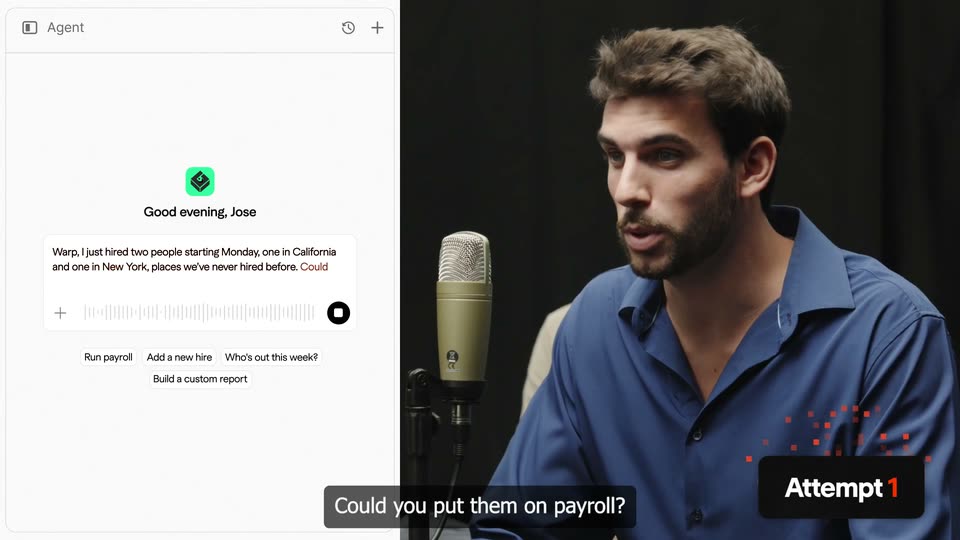
Split screen: left half shows the Warp Agent interface, where the man's voice appears as live transcription in the input box with a waveform; right half shows a man in a blue shirt speaking into a studio microphone. A black Attempt 1 badge sits bottom right and white subtitles track his speech.
On-screen text: “So, who wants to try first?”, “Warp,”, “I just hired two new people”, “starting on Monday.”, “One in California and one in New York.”, “Could you put them on payroll?”, “Attempt 1”
Techniques: Split screen
Camera: Pan
17 · Feature reveal · 0:41–0:44
A chat window shows a user message asking to put two new hires on payroll. A task list builds line by line, then a red error box appears below it. The view zooms in on the list while a dark caption notes the issue.
On-screen text: “Warp Agent immediately gets to work, but finds an issue”
Techniques: UI zoom
Camera: Push in
18 · Feature reveal · 0:44–0:45
A man stands behind a table with seated guests and a red timer; a white rounded shape wipes across the frame and morphs into a horizontal bar, revealing an orange 3D wireframe skyscraper.
On-screen text: “before Joey can pay them.”
Techniques: Morph, Masking
Camera: Static
19 · Feature reveal · 0:45–0:47
A browser window of the CA.gov e-Services registration form floats over a blurred bridge backdrop. The frame zooms into the Reason for Application section as a cursor hovers over the Hired Employees radio button. A caption pill sits at the bottom.
On-screen text: “before Joey can pay them.”, “His company has to register”
Techniques: UI zoom, Cursor demo
Camera: Push in
20 · Feature reveal · 0:47–0:47
A white form panel titled Employee Type Information holds two Required dropdowns with a black cursor resting over the first; a dark caption bar at the bottom reads in both states, while a dusk cityscape peeks from the left edge.
On-screen text: “in both states.”
Camera: Static
21 · Feature reveal · 0:47–0:48
A close-up of a web browser displays a dropdown menu on a California business registration page. The cursor hovers over the 'Commercial' option, highlighting it in blue, while a caption reading 'in both states.' remains at the bottom.
On-screen text: “in both states.”
Techniques: Cursor demo
Camera: Static
22 · Feature reveal · 0:48–0:49
A browser window of the New York tax site sits tilted in 3D perspective over a wood-grain surface. Three account-type cards are shown, and a cursor hovers over the middle business card. A white caption reads along the bottom.
On-screen text: “Open the correct tax accounts,”
Techniques: 3D mockup, Cursor demo
Camera: Static
23 · Feature reveal · 0:49–0:50
A tax form interface shows a taxpayer ID field and yes/no radio questions; a cursor hovers over the options while the view scrolls up to reveal a Continue button. A dark caption box sits at the bottom.
On-screen text: “Open the correct tax accounts,”
Techniques: Cursor demo, UI zoom
Camera: Static
24 · Feature reveal · 0:50–0:51
A browser window shows a New York State employer registration PDF, the page scrolling down past the header into the Part A fields. A black pill caption reading set up unemployment sits at the bottom while a cursor hovers over the form.
On-screen text: “set up unemployment”
Techniques: UI zoom
Camera: Static
25 · Feature reveal · 0:51–0:51
A filled-out NY unemployment registration form for Edge Technologies LLC sits in a document viewer, then dissolves into a US map dotted with job-posting counts. A caption at the bottom reads 'set up and paid' with a black highlight box tracking the words.
On-screen text: “set up and paid”
Techniques: Kinetic type
Camera: Pan
26 · Feature reveal · 0:51–0:52
A California employer registration form scrolls upward to reveal filled-in business details, name, address and FEIN, while a cursor hovers over the state field. A dark caption pill at the bottom of the frame reads along with the voiceover.
On-screen text: “leave programs,”, “and calculate all the right deductions.”
Techniques: Cursor demo
Camera: Pan
27 · Feature reveal · 0:52–0:55
A Google Sheets payroll spreadsheet fills the frame, showing employee names, work states and deduction columns. The view zooms out to reveal the full browser window as a black cursor drifts across the cells, while a caption updates at the bottom.
On-screen text: “and calculate all the right deductions.”, “Warp identified”
Techniques: Cursor demo, UI zoom
Camera: Pull out
28 · Feature reveal · 0:55–0:56
A white Warp chat card fills the frame. On the left, a gray status list grows row by row, scrolling up as new lines like Parsing request and Registering across both states appear, while a message sits top right. A dark pill caption Warp identified sits at the bottom.
On-screen text: “Warp identified”
Camera: Static
29 · Feature reveal · 0:56–0:57
A close-up of a Warp chat panel lists payroll setup steps and a green status pill, then the view zooms out to reveal the full dashboard with a US map and a team table. A caption at the bottom reads “every one of these requirements.”
On-screen text: “every one of these requirements.”
Techniques: UI zoom
Camera: Pan
30 · Feature reveal · 0:57–0:58
A white compliance dashboard shows a US map and a jurisdiction list with status labels. The view pushes in on the New York and California rows, both marked Processing, while the surrounding interface blurs. A dark pill caption reading Set up the tax accounts stays fixed at the bottom.
On-screen text: “Set up the tax accounts”
Techniques: UI zoom
Camera: Push in
31 · Feature reveal · 0:58–1:00
Two flat compliance dashboards sit side by side, one for New York and one for California. Each state map switches from purple Processing to green Compliant while the activity lists refresh below. A dark caption bar at the bottom reads the payroll line.
On-screen text: “and the deductions,”, “to the payroll automatically.”
Techniques: Split screen
Camera: Pan
32 · Feature reveal · 1:00–1:02
Two white employee-detail forms appear side by side, one for Steven Johnson and one for Angela Harris. A round black fan-shaped logo travels from the left form to the right, scattering small red squares, while a dark caption pill stays at the bottom.
On-screen text: “to the payroll automatically.”
Techniques: Split screen, Particles
Camera: Static
33 · Feature reveal · 1:02–1:04
A blurred payroll screen sits behind a white logo disc and two employee profile cards over a dark caption box. The disc and cards drift down and fade as the background pulls into focus, revealing a sharp payroll table of employee rows and pay figures.
On-screen text: “to the payroll automatically.”
Camera: Pull out
34 · Feature reveal · 1:04–1:06
A light app sidebar lists menu items beneath a green logo, and the view zooms in step by step onto the highlighted Dashboard row, enlarging its label and chevron. A dark rounded caption pill with white text sits at the bottom center throughout.
On-screen text: “It even gave Joey's employees”
Techniques: UI zoom
Camera: Push in
35 · Feature reveal · 1:06–1:07
A close-up of a light app sidebar lists Agent, Dashboard, Payroll and People, with the Agent row highlighted in gray. A dark caption pill reads their personal Warp Agent at the bottom.
On-screen text: “their personal Warp Agent”
Camera: Push in
36 · Feature reveal · 1:07–1:07
A light app sidebar listing Agent, Dashboard and Payroll fades and slides up as a bar chart titled Payroll cost by department zooms in from the background. A dark caption at the bottom swaps from to their personal Warp agent to to find info about the company.
On-screen text: “to their personal Warp agent”, “to find info about the company”
Techniques: UI zoom
Camera: Static
37 · Feature reveal · 1:07–1:08
A flat product screen shows a bar chart titled 'Payroll cost by department' with four blue bars and a tooltip on the Engineering bar. A question bubble sits top right and body copy fills the bottom. A dark caption reads at the lower edge as the frame eases out slightly.
On-screen text: “to find info about the company”
Camera: Static
38 · Feature reveal · 1:08–1:09
A white agent interface slides in from the left beside a man in a beige polo seated against a dark backdrop. A gray speech bubble with an audio waveform fades in over him while red pixels drift near the Attempt 2 badge.
On-screen text: “Joey's employee”, “Attempt 2”, “Warp, Dime, ¿Qué salario tiene Joey?”
Techniques: Split screen, Particles
Camera: Static
39 · Feature reveal · 1:09–1:12
Split screen: the Agent chat panel sits on the left with the greeting, voice waveform and suggestion chips, while Jose talks in a dark room on the right. His translucent speech bubble types out the question, and the panel slides slightly left as the caption and Attempt 2 badge hold at the bottom.
On-screen text: “Joey's employee”, “Jose: Warp, what salary does [my boss] Joey have?”, “Warp, Dime, ¿Qué salario tiene Joey?”, “Attempt 2”
Techniques: Split screen
Camera: Push in
40 · Feature reveal · 1:12–1:16
A laptop on a black pedestal and a beige studio mic stand in a dim, blurred room. A dark rounded chat card beside it types out a Warp message over an animated waveform, while white captions at the bottom read the spoken line.
On-screen text: “Jose,”, “My guy. You're in sales.”, “You don't have salary permissions.”
Techniques: Kinetic type
Camera: Pan
41 · Feature reveal · 1:16–1:16
A man in a light polo flashes at the start, then a split screen pairs a flat voice-recording UI on the left with a woman speaking into a studio microphone on the right, a take badge sliding in at the lower right.
On-screen text: “Attempt 3”, “Hi, Warp.”
Techniques: Split screen
Camera: Pan
42 · Feature reveal · 1:16–1:17
Split screen: a white interface panel on the left, a woman speaking into a microphone on the right. The interface panel slides right to nearly fill the frame as the woman is pushed to the edge. A red pixel burst sits beside an 'Attempt 3' badge.
On-screen text: “Attempt 3”, “Hi, Warp.”, “Give me my headcount and payroll report in 60 seconds”
Techniques: Split screen, Particles
Camera: Pan
43 · Feature reveal · 1:17–1:21
A white agent screen shows a blue icon and the greeting Good evening, Cindy. The prompt box types Hi Warp, give me my headcount and payroll report in 60 seconds or less, while a dark caption bar mirrors the line.
On-screen text: “Give me my headcount and payroll report in 60 seconds”, “or less.”
Techniques: Kinetic type
Camera: Static
44 · Feature reveal · 1:21–1:22
A man in a gray jacket stands behind a black table holding two microphones and a red digital timer, while three people sit around him in a dark studio. He rests his hands on the table as the timer counts down.
Camera: Static
45 · Feature reveal · 1:22–1:22
A dark studio set with a host standing at a mic table beside a red LED timer, then a white circular mask expands to reveal an employee headcount card reading 3,200, with a caption below.
On-screen text: “00:00:59”, “I found 3200 employees”
Techniques: Masking
Camera: Static
46 · Feature reveal · 1:22–1:25
A close-up of the Employee Headcount line chart card, then the view pulls back to reveal a grid of dashboard cards for department and management. A red LED timer counts down in the corner while a caption updates along the bottom edge.
On-screen text: “I found 3200 employees”, “across 48 different states”
Techniques: UI zoom, 3D mockup
Camera: Pull out
47 · Feature reveal · 1:25–1:26
A light “Employees by department” card centers as the view zooms in, pushing a line-chart card off the left. A blue donut chart labeled “48 States” sits above a state legend. A red LED stopwatch counts up top right; a bottom caption reads “across 48 different states”.
On-screen text: “across 48 different states”
Techniques: UI zoom
Camera: Static
48 · Feature reveal · 1:26–1:28
A reports dashboard with Payroll Expenses, Employees by department and Benefits Costs cards resolves from a heavy blur to full focus. Two circular radial-burst icons float over the charts while a red countdown timer ticks down in the top corner and a caption bar sits at the bottom.
On-screen text: “and $112 million in annual payroll.”
Camera: Static
49 · Feature reveal · 1:28–1:29
A reports dashboard with two line charts sits in soft focus. A white circular logo with black radial stripes materializes over the charts from a grid of orange squares, then fades, leaving the interface sharp. A black caption bar at the bottom states the payroll figure.
On-screen text: “and $112 million in annual payroll.”
Techniques: Morph
Camera: Static
50 · Feature reveal · 1:29–1:30
The reports dashboard with line and donut charts blurs as the view zooms in, bringing an Agent card into focus with a Ready for review status and a note about 3200 employees across 48 states. A red timecode counter ticks top right; a caption sits at the bottom.
On-screen text: “and $112 million in annual payroll.”
Techniques: UI zoom
Camera: Pan
51 · Feature reveal · 1:30–1:31
A close-up of a chat interface types out a sentence word by word, the final word highlighted in orange, then a document card labeled Payroll_Headcount_Report slides in below. A red countdown timer ticks in the top right corner.
Techniques: Kinetic type
Camera: Pan
52 · Feature reveal · 1:31–1:34
A white payroll report card scrolls up over a blurred chat, revealing a thread that flags an incomplete Colorado tax setup, then the scene cuts to a 3D map of the US with green states and a pin near Pennsylvania.
On-screen text: “But I also found two problems”, “you should know about.”, “One employee recently moved to Colorado,”
Techniques: Parallax
Camera: Pan
53 · Feature reveal · 1:34–1:36
A 3D map of the United States tilts into perspective with green-highlighted states. Circular employee avatars ringed in red appear on the map, and a red digital timer counts up in the top right. A white subtitle line sits at the bottom.
On-screen text: “One employee recently moved to Colorado,”
Camera: Push in
54 · Feature reveal · 1:36–1:38
White 3D map of the United States. Two circular avatars of a man and woman sit on a central state; an orange ring expands and the state fills orange, a southern state fills green. A red digital timer counts down top right; a black caption bar sits at the bottom.
On-screen text: “but your state tax account”
Techniques: Morph
Camera: Static
55 · Feature reveal · 1:38–1:41
A blurred dashboard holds a sharp orange 'Colorado' card and heading, then reframes onto the Registrations panel showing unemployment insurance fields; a red timer ticks top right and a caption runs at the bottom.
On-screen text: “hasn't been activated.”, “Colorado's portal”, “has been down for six days,”
Techniques: UI zoom
Camera: Pull out
56 · Feature reveal · 1:41–1:42
A Gmail email view begins blurred and snaps into focus, revealing a tax-account error message. A red digital countdown timer ticks down in the top right corner while white captions sit in a dark bar along the bottom.
On-screen text: “has been down for six days,”, “and the state requires someone to call.”
Camera: Push in
57 · Feature reveal · 1:42–1:43
A light email from the Colorado Dept of Revenue scrolls vertically, the view sliding from the subject line down to the body and a reply field. A red digital countdown timer ticks in the top right, and a white caption bar holds the line at the bottom.
On-screen text: “and the state requires someone to call.”
Camera: Pan
58 · Feature reveal · 1:43–1:45
A white Ask Warp chat window floats over a blurred woman at a microphone, zooming in as a thinking list of steps builds up. A red digital timer counts up top right while a fan-shaped logo drifts across the frame.
On-screen text: “But I'm an AI, so I can't make a call.”
Techniques: UI zoom
Camera: Push in
59 · Feature reveal · 1:45–1:45
A white chat panel with the AI's thinking steps and reply is in sharp focus over a blurred woman. The panel blurs as focus pulls to her, and the bottom caption swaps from the AI's line to 'Whoa. I beat it.' A red timer counts down top right.
On-screen text: “But I'm an AI, so I can't make a call.”, “Whoa. I beat it.”
Camera: Pull out
60 · Feature reveal · 1:45–1:47
A woman smiles and looks up in a recording studio while a man in the background watches her. A gold microphone stands in the foreground.
On-screen text: “Whoa. I beat it.”
Camera: Static
61 · Feature reveal · 1:47–1:49
A man in a dark jacket stands behind a table with two microphones and a red digital timer, addressing a small group seated around it in a dim room. Subtitles caption the exchange at the bottom of the frame.
On-screen text: “Whoa. I beat it.”, “Well. Kind of.”
Camera: Static
62 · Feature reveal · 1:49–1:50
A man stands behind a black table with two microphones and a red digital timer in a dark studio, addressing a small seated panel. He gestures with both hands as he speaks, and a bottom caption switches from “Well. Kind of.” to “Here's what makes Warp different.”
On-screen text: “Well. Kind of.”, “Here's what makes Warp different”
Camera: Static
63 · Feature reveal · 1:50–1:50
A dark circular badge with a white curved logo mark slides right across a black screen, passing over a horizontal dashed line of small orange squares and a faint grid, while a blurred stage audience fades out behind it; a white caption sits at the bottom.
On-screen text: “Here's what makes Warp different”
Camera: Static
64 · Feature reveal · 1:50–1:53
A dark grid with orange and white dotted lines fills the frame as circular badges carrying the Warp fan mark, the gusto and deel wordmarks, and code brackets drift along the lines at different depths, blurring when close. Small check and cross markers sit on the lines. Bottom subtitles carry the voiceover.
On-screen text: “Here's what makes Warp different”, “from any other platform.”, “Instead of stopping here,”
Techniques: Parallax
Camera: Pull out
65 · Feature reveal · 1:53–1:55
A dark circle bearing the white Warp mark floats on a receding grid while three white expert badges scale in around it and orange checkmarks light a dashed line, then the camera zooms into an Ask Warp panel.
On-screen text: “it loops in one of our human Warp”, “tax experts and files Cindy's”
Techniques: 3D mockup, UI zoom
Camera: Push in
66 · Feature reveal · 1:55–1:58
A light chat interface scrolls upward through a list of task steps and a confirm prompt, then settles on a new message from Emily, a tax expert, as the frame zooms in on the input bar at the bottom.
On-screen text: “tax experts and files Cindy's”, “return manually over the phone.”
Techniques: UI zoom
Camera: Push in
67 · Social proof · 1:58–1:59
A glowing orange sphere sits at the center of a dark 3D web of grey logo orbs joined by thin lines, with blurred orbs in the foreground. The sphere brightens and a white curved-segment logo fades in on its surface as the lower caption updates.
On-screen text: “The fastest”, “growing AI native companies of the world”
Techniques: Parallax
Camera: Pull out
68 · Social proof · 1:59–2:00
A large orange sphere with a white fan logo sits at the center of a dark 3D network of smaller gray spheres stamped with partner marks, linked by thin lines. The camera drifts, shifting the depth layers, while a caption reads “growing AI native companies of the world.”
On-screen text: “growing AI native companies of the world”
Techniques: Parallax
Camera: Static
69 · Social proof · 2:00–2:01
The camera drifts through a dark 3D field of circular coin tokens. A red logo coin blurs out on the left as a central coin settles into focus with a white corgi illustration, while a second coin labeled Rillet slides in from the right. Faint radial lines glow behind.
On-screen text: “like Corgi, Rillet and Numeral.”
Techniques: Speed ramp, Parallax
Camera: Static
70 · Social proof · 2:01–2:03
A row of circular logo badges slides across a black background with shallow depth of field. The center badge stays sharp, first showing a white dog illustration with the name Rillet, then a logo with the name Numeral, while the side badges blur. A bottom caption lists the names.
On-screen text: “like Corgi, Rillet and Numeral.”, “Use Warp”
Techniques: Parallax
Camera: Static
71 · Social proof · 2:03–2:03
A defocused dark frame holding a faint round logo on the left cuts to a man in a dark jacket, a seated figure blurred behind him, in a dim room. White subtitles on a black bar sit at the bottom.
On-screen text: “Use Warp”, “To celebrate our launch”
Camera: Static
72 · CTA · 2:03–2:07
A man in an olive jacket stands before a black wall and grid ceiling, speaking and gesturing while white subtitles sit in a dark box at the bottom. The shot darkens and a payroll table panel slides up from the bottom edge.
On-screen text: “To celebrate our launch”, “We're doing something”, “we've never done before.”, “We gave the”, “AI agent that handles payroll at Warp”
Camera: Pull out
73 · CTA · 2:07–2:08
A dark payroll dashboard, tilted in 3D perspective over a grid backdrop, rotates to face the camera. A white cursor hovers over the earnings rows while a white turbine-shaped disc spins at the bottom right. A black caption box holds the line about the payroll agent.
On-screen text: “AI agent that handles payroll at Warp”
Techniques: 3D mockup
Camera: Pull out
74 · CTA · 2:08–2:09
A dark payroll dashboard window sits on a faint grid background, listing employees with pay type and earnings columns. A white pinwheel badge spins at the lower right while the table rows blur and settle, and a black caption box sits at the bottom.
On-screen text: “AI agent that handles payroll at Warp”
Camera: Pull out
75 · CTA · 2:09–2:12
The X feed starts dim, then brightens as a cursor glides across the Warp payroll post. The view zooms into the embedded payroll video and the reply count while white caption lines appear at the bottom and a white Warp logo sits in the corner.
On-screen text: “AI agent that handles payroll at Warp”, “access to its own X account.”
Techniques: UI zoom, Cursor demo
Camera: Push in
76 · CTA · 2:12–2:16
A white Twitter comment list scrolls upward while a circular black-and-white radial logo drifts along the right edge. Dark rounded caption boxes at the bottom center swap through short phrases in sequence.
On-screen text: “It's reading every”, “comment under this post.”, “and convince the Warp Agent”
Camera: Push in
77 · CTA · 2:16–2:17
A Twitter thread on a white background scrolls upward, dropping the top tweet and centering Stefan Novak's message above the AskWarp reply reading “Yes, sure”. A dark caption bar at the bottom swaps phrases in time with the voiceover.
On-screen text: “and convince the Warp Agent”, “a Warp employee who's owed salary,”
Camera: Pan
78 · CTA · 2:17–2:18
Two tweets rest on a light gray field, then soften into blur as a 3D phone mockup slides up from the bottom, its lock screen showing 2:48.
On-screen text: “a Warp employee who's owed salary,”
Techniques: 3D mockup
Camera: Static
79 · CTA · 2:18–2:20
A 3D iPhone lock screen, showing 2:48 and the date, floats centered over a blurred web page. The view tightens on the screen as an American Express banner reading 'You received $55,000 from Warp' slides up from the bottom edge.
On-screen text: “Warp employee who's owed salary,”, “it will pay the salary for that role”
Techniques: 3D mockup, UI zoom
Camera: Push in
80 · CTA · 2:20–2:21
A 3D iPhone lock screen shows an American Express notification for $55,000, then cuts to a man in an olive jacket gesturing in an office as he speaks. White captions sit in a dark bar at the bottom.
On-screen text: “it will pay the salary for that role”, “and we will throw in a bonus $10,000.”
Techniques: 3D mockup
Camera: Pull out
81 · CTA · 2:21–2:22
A man in an olive jacket stands center frame against a black backdrop, gesturing with open palms as he speaks. A second person sits out of focus behind him to the left under a grid ceiling. A white caption line sits at the bottom.
On-screen text: “and we will throw in a bonus $10,000.”
Camera: Pull out
82 · CTA · 2:22–2:24
A curly-haired man in an olive jacket stands against a black wall, gesturing, while a large white-to-pink dollar figure counts from $9,962 to $10,000 across his chest. The frame then cuts to glowing white and orange 3D light streaks curving through darkness.
On-screen text: “$9,962”, “and we will throw in a bonus $10,000.”, “$10,000”
Techniques: Kinetic type
Camera: Static
83 · Outro · 2:24–2:24
Curved white and orange light streaks arc across a black void, sweeping from the upper frame down toward the lower corners. A faint gray grid texture drifts through the center as the glowing beams cross, bend and fade out.
Techniques: Light sweep
Camera: Static
84 · Outro · 2:24–2:26
A black frame holds the centered Warp logo. The pinwheel mark and wordmark emerge from a soft white glow, then settle crisp with the URL below.
On-screen text: “warp”, “warp.co”
Camera: Static