0:44

ElevenLabs - Introducing voice, music, image, and video generation in the ElevenLa
Eleven Labs · Sep 2026
Qwen · Dec 2025 · 0:50 · AI-annotated
Qwen’s 0:50 launch film runs 28 scenes, about 1.8 s each. The product is on screen from the first frame and 7 features are revealed. The call to action lands at 0:48 (95% in). A feature tour built as a chain of 3D glass-panel reveals: each capability gets a gradient headline card, then an illustration fans into stacked translucent planes to demo it. Pacing is even at about 105 bpm with short cuts between demos, and the signature moves are the layer-fan 3D motion, typed command bars and purple-to-cyan gradient text on a dark purple gradient.
Is this your launch? to your site or press kit.
Eleven Labs · Sep 2026
Perplexity · AI · Aug 2026
A stack of translucent rounded glass panels rotates open in 3D over a dark purple glow, fanning into a diagonal pile. The title Qwen-Image-Layered sits static behind them, fully revealed as the panels spread apart.
On-screen text: “Qwen-Image-Layered”
Techniques: Parallax
Camera: Static
A centered gradient title, Qwen-Image-Layered, holds still over a dark purple field crossed by thin diagonal rounded-rectangle outlines that read as stacked layers. The frame is locked off with no movement.
On-screen text: “Qwen-Image-Layered”
Camera: Static
On a dark blue-to-black gradient, three lines of gradient text resolve from a soft blur into sharp focus, the bottom line locking in last on a locked-off frame.
On-screen text: “Next-Generation”, “Image Generation”, “Foundation Model”
Techniques: Kinetic type
Camera: Pull out
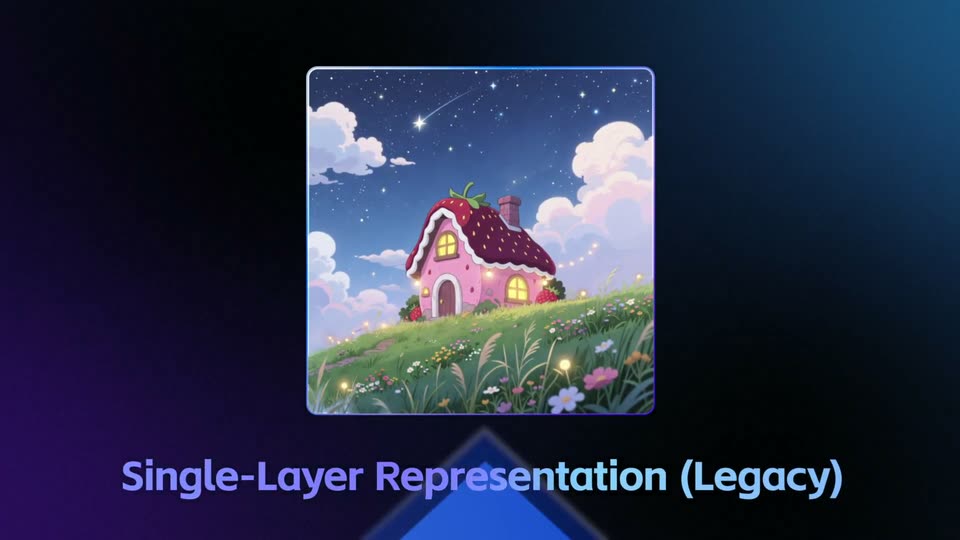
A rounded-square illustration of a pink strawberry house on a grassy hill under a starry night sky scales up from small to full size at center. The caption below it grows and sharpens into place on a dark blue gradient background.
On-screen text: “Single-Layer Representation (Legacy)”
Camera: Push in
A faint blue rectangle on a dark diagonal background resolves into a row of glowing vertical panels, each carrying a slice of a cartoon house on a starry hill, fanning out to read as stacked layers. The bottom caption swaps from a legacy label to a new one.
On-screen text: “Single-Layer Representation (Legacy)”, “Multi-Layer Representation (New)”
Techniques: Morph
Camera: Static
Three glowing cards float in 3D perspective, each holding one layer of a scene: a starry sky, a pink house, a grassy hill. The cards hold a locked frame, then spin and blur outward as a transition. A caption sits below.
On-screen text: “Multi-Layer Representation (New)”
Techniques: 3D mockup
Camera: Static
A tilted smartphone mockup rotates gently on a dark blue radial background. Its screen holds a flat Halloween illustration: a witch girl on a broom, a black cat, a grinning pumpkin and a ghost under orange curtains. A feature label sits beside the device.
On-screen text: “Multi-Layer Representation (New)”
Techniques: 3D mockup
Camera: Static
A Halloween illustration on a vertical card splits into separate layers that fan apart in 3D as two glass panels swing open. A cursor taps an up arrow on a side pill, raising the layer count from 3 to 8.
Techniques: 3D mockup, Cursor demo
Camera: Static
A curved wall of vertical glass panels in 3D perspective, each holding a flat Halloween illustration: a purple ghost, a pumpkin on a couch, a witch on a broom. The panels settle from motion blur into focus. A stylized 'TRICK OR TREAT' sits on the right panel.
On-screen text: “TRICK OR TREAT”
Techniques: 3D mockup
Camera: Static
A square Halloween party invitation card flies in from the right and spins on its vertical axis against a dark blue-purple gradient, its faces blurring as it turns. A white cursor rests over the front jack-o'-lantern.
Techniques: 3D mockup
Camera: Static
Four vertical panels float in a 3D carousel on a dark blue gradient. A white cursor moves across them as the row rotates, bringing a Halloween illustration card with pumpkins, ghosts and a witch hat to the front, while a gradient HALLOWEEN PARTY headline scales on the next panel.
Techniques: 3D mockup, Cursor demo
Camera: Static
A row of translucent vertical planes fans out in 3D space, each holding a Halloween layer: graveyard, ghost, witch-hat pumpkin, bats, lollipops and a party title. The planes slide left through the perspective while a cursor hovers on the first.
On-screen text: “Infinite Depth Decomposition”
Techniques: 3D mockup, Parallax
Camera: Static
A row of glass panels holding mixed images and titles floats in dark 3D space. The camera pushes through the row as the panels turn edge-on, while the gradient headline Dynamic Layer Decomposition scales in over the center and a bottom caption holds at the start.
On-screen text: “Infinite Depth Decomposition”, “Dynamic Layer Decomposition”
Techniques: 3D mockup, Kinetic type, Parallax
Camera: Push in
A rounded card showing an underwater mermaid illustration floats in 3D against a dark blue gradient. The card rotates on its vertical axis, flipping to reveal a blurred second panel behind it, framed by a glowing purple border with soft motion blur.
Techniques: 3D mockup
Camera: Static
Six transparent planes fan out in 3D perspective, each carrying one layer of an underwater illustration: blue water, seahorse, seaweed, a coral castle and a rainbow mermaid. The headline fades in below. A cursor then points at the castle layer as lock icons appear on the back planes.
On-screen text: “Edit Any Layer by Natural Language”
Techniques: 3D mockup, Cursor demo
Camera: Static
A fanned stack of translucent glass panels recedes in 3D perspective, each tagged with a small padlock icon, the front pane holding a colorful mermaid illustration. On the left, a pale sans headline and equation fade, scale and slide in, then blur out as the panels drift.
On-screen text: “Edit Any Layer by Natural Language”, “Physical Isolation = Zero-Offset Editing”
Techniques: Kinetic type, 3D mockup
Camera: Static
A 3D wireframe panel with a cursor blurs out of focus as a two-line headline scales in over a dark blue gradient. The top line glows in a purple-to-cyan gradient while the bottom line stays dark blue.
On-screen text: “High-Fidelity”, “Elementary Editing”
Techniques: 3D mockup, Cursor demo, Kinetic type
Camera: Pull out
Two lines of gradient text, purple to cyan, scale up from a small blurred state to full size on a dark blue background with a soft central glow.
On-screen text: “High-Fidelity”, “Elementary Editing”
Techniques: Kinetic type
Camera: Pull out
A square photo card of a suited man on a sunset pier slides left on a dark blue gradient. A glowing white cursor appears over him as the image flips horizontally, mirroring his pose, and the word Flip fills in to the right.
On-screen text: “Flip”
Techniques: Cursor demo
Camera: Push in
A comic-style illustration card sits on a dark blue gradient. A glowing command bar slides in from the right and types a prompt; the card's palette shifts from orange to blue as a cursor presses the send button. The card then slides up-left while a second orange card slides into the center.
Techniques: Cursor demo, Morph
Camera: Static
A white cursor clicks a send button while Replace types into a prompt bar beside two comic-style image cards. A Revise label fades in and the frame pushes in as the right card's title changes to Owen-Image inside a cyan selection box.
On-screen text: “Revise”
Techniques: Cursor demo, UI zoom
Camera: Pull out
A fanned stack of comic-style cards floats in 3D on a dark blue gradient. A glowing cursor taps the front card while a lemon element grows, then slides to a new spot as the card pushes toward the camera. Feature labels appear one by one on the right.
On-screen text: “Remove”, “Resize”, “Reposition”
Techniques: 3D mockup, Cursor demo
Camera: Pan
A dark blue background holds a horizontal row of comic-style posters. A cartoon bear poster holding balloons slides into sharp focus at center while the sour candy poster on its right and a blue poster on its left blur and slide off the edges.
Camera: Static
A dark blue gradient stage holds a cartoon card of a capybara holding a Qwen-Image flag and balloons. The headline types in word by word on the left, while a five-row layer panel on the right shuffles its rows as a cursor hovers, demonstrating reordering.
On-screen text: “Natively Supports Layer Composition”
Techniques: Kinetic type, Cursor demo
Camera: Static
A pastel card fades in from black at center, showing a cartoon bear holding a plate of photos and a camera lightbulb. A gradient headline on the left types out “Custom Overlay” beside a numbered layer list on the right.
On-screen text: “Supports Layer Composition”, “Custom Overlay”
Techniques: Kinetic type
Camera: Static
A pastel card shows a cartoon bear holding a camera bulb and a plate of photos. A numbered list on the right highlights each label in turn while the Qwen-Image title fades in. It cuts to a dark card titled Open Source Release with three white logo tiles.
On-screen text: “Custom Overlay”, “Open Source Release”, “ModelScope”, “Hugging Face”, “GitHub”
Camera: Static
On a dark purple gradient with faint line shapes, the gradient headline 'Open Source Release' slides in at the top. Three white rounded squares slide in below, each holding a logo, with gradient italic labels under each. The frame stays locked-off.
On-screen text: “Open Source Release”, “ModelScope”, “Hugging Face”, “GitHub”
Techniques: Kinetic type
Camera: Static
The Qwen logo lockup, a purple hexagon mark beside the wordmark, holds center on a dark blue-to-purple gradient. The headline Open Source Release and the names ModelScope, Hugging Face, GitHub slide in around it on a locked-off frame.
On-screen text: “Open Source Release”, “ModelScope”, “Hugging Face”, “GitHub”
Techniques: Kinetic type
Camera: Static