0:43
Explore
Kimi.ai - Meet Kimi K2.6 Agent Swarm 👋 Highlights: 🔹 Swarms, elevated - 300 p
Kimi · Apr 2026 · 0:37 · AI-annotated
- Length
- 0:37
- Scenes
- 24 · 1.6 s avg
- Product on screen
- 0:00
- Features shown
- 5
- Call to action
- 0:34 · 92%
- Voiceover
- No
00:00:00 / 00:37:12
Kimi’s 0:37 launch film runs 24 scenes, about 1.6 s each. The product is on screen from the first frame and 5 features are revealed. The call to action lands at 0:34 (92% in). The video alternates 3D space shots of a glowing planet with tight UI close-ups, using a recurring dark caption pill to announce each capability before showing scrolling document mockups and scaling page grids. Pacing is brisk at about 112 bpm with quick cuts, and its signature moves are typing text, scrolling pages, and grids that scale into place.
No filming indicatedEstimated needs: 5 capture groups — your screens or recordings · 1 official logo — reused across the film · 5 graphic passages — draw or supply · 6 3D passages — build or supply
Is this your launch? to your site or press kit.
More like this
0:48
Higgsfield AI 🧩 - Introducing Higgsfield API. 50+ frontier models in one API, at lower
Higgsfield AI · Sep 2026
1:01

Framer: Stop Waiting. Start Shipping.
Framer · Design · Nov 2025
Kimi.ai - Meet Kimi K2.6 Agent Swarm 👋 Highlights: 🔹 Swarms, elevated - 300 p, scene by scene
· 24 scenes as text
01 · Product intro · 0:00–0:01
A dark 3D planet fills the frame, its upper-right rim glowing orange to blue against black space. Centered white title text reads “The Elevated / Kimi Agent Swarm” and holds still while the planet surface drifts slowly.
On-screen text: “The Elevated”, “Kimi Agent Swarm”
Camera: Static
02 · Product intro · 0:01–0:03
A white dropdown chip with blue K2.6 text tilts in 3D on a black background, then expands and levels out to read K2.6 Agent Swarm with a chevron, before shrinking to a small resting size.
On-screen text: “K2.6 Agent Swarm”
Techniques: 3D mockup, Kinetic type, Morph
Camera: Pull out
03 · Demo · 0:03–0:04
A white rounded chat card sits on black, its prompt text typing out line by line to completion. A white outlined mouse cursor slides in from the lower right toward the black send button.
Techniques: Cursor demo
Camera: Static
04 · Demo · 0:04–0:05
A white rounded prompt card floats on a purple gradient. The typed prompt text fades out line by line, leaving the empty input bar with a large black cursor hovering over the circular send button.
Techniques: Cursor demo
Camera: Static
05 · Feature reveal · 0:05–0:07
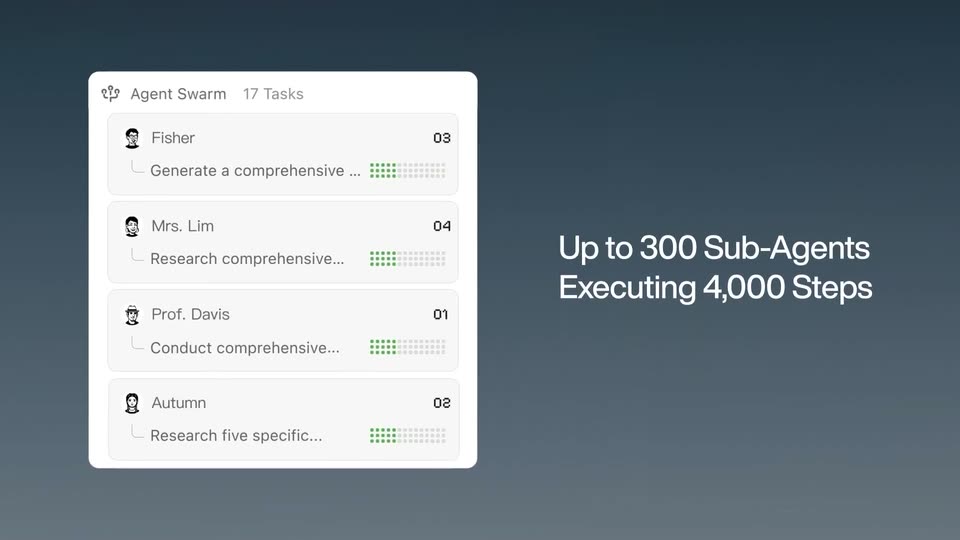
A white Agent Swarm task-list card on a dark blue-gray gradient; edge cards slide out as it centers, the task count ticks from 0 to 22, rows reorder and green dots fill, then a white headline slides in on the right.
On-screen text: “Up to 300 Sub-Agents Executing 4,000 Steps”
Techniques: Kinetic type
Camera: Pull out
06 · Feature reveal · 0:07–0:09
A light scatter plot titled Figure 2.2 fills with blue, orange and red points along a diagonal band, Earth and Neptune marked by stars, while a three-step avatar indicator at lower left highlights Iterating in blue.
Techniques: Particles
Camera: Static
07 · Feature reveal · 0:09–0:10
A spreadsheet of job listings in the Education sector scrolls down a few rows, the Fit Score column showing colored cells. A bottom-left panel marks step three, Calculating, with a blue outline.
Camera: Static
08 · Feature reveal · 0:10–0:11
A close-up of a white checklist scrolls upward as green checkmarks fill in beside each dark gray task label, ending on the PDF Production row.
Camera: Pan
09 · Feature reveal · 0:11–0:12
A white rounded card on a pale gray background holds a checklist of green check icons and dark gray sans labels. The frame tightens and the list scrolls up, dropping the top row off the top edge.
Techniques: UI zoom
Camera: Pull out
10 · Feature reveal · 0:12–0:14
A white report page scrolls upward through a dark frame, revealing an executive summary paragraph and a multi-line NAV performance chart. Format labels for DOCX and PDF production slide in at the left margin.
On-screen text: “DOCX Production (141 footn”, “PDF Production”
Camera: Pull out
11 · Feature reveal · 0:14–0:16
A vertical white textured panel scrolls upward on the left against a dark navy background, its horizontal bands shifting up. White text on the right reads “Massive Multi-Format Outputs at Scale” and stays fixed.
On-screen text: “Massive Multi-Format”, “Outputs at Scale”
Camera: Static
12 · Feature reveal · 0:16–0:18
Three document mockups sit on a dark blue gradient: a PDF with a thumbnail strip on the left, a PPT and an XLSX stacked on the right. The content inside each window scrolls and the slides advance, while a dark pill caption holds the tagline at the bottom.
On-screen text: “Massive Multi-Format”, “Outputs at Scale”, “Semiconductor_Leaders_Playbook.pdf”, “Semiconductor_Leaders_Presentation.pptx”, “Semiconductor_Leaders_Data.xlsx”, “5 Quant Strategies Delivered as PDF, PPT & Spreadsheets.”
Techniques: 3D mockup
Camera: Static
13 · Feature reveal · 0:18–0:19
Three document windows sit on a dark background: a PDF on the left, a slide deck top right, a spreadsheet bottom right, each with a filename header. Their inner content scrolls to reveal new pages and slides while the frames stay fixed. A dark pill caption spans the bottom.
On-screen text: “5 Quant Strategies Delivered as PDF, PPT & Spreadsheets.”
Techniques: Split screen
Camera: Static
14 · Feature reveal · 0:19–0:20
A grid of white report pages, some with charts and tables, sits on a dark background. A rounded caption pill at the bottom switches text from '5 Quant Strategies Delivered as PDF, PPT & Spreadsheets.' to 'Craft a 20,000 word management report by one go.'
On-screen text: “5 Quant Strategies Delivered as PDF, PPT & Spreadsheets.”, “Craft a 20,000 word management report by one go.”
Camera: Static
15 · Feature reveal · 0:20–0:23
A grid of fifty white report pages fades in cell by cell across a dark navy field, then the entire grid fades out. A dark rounded pill with the static headline sits centered over the grid.
On-screen text: “Craft a 20,000 word management report by one go.”
Camera: Static
16 · Feature reveal · 0:23–0:24
White report cards, one with a bar chart and one with a scatter plot, drift diagonally across a dark navy field and pass off frame, while a static headline holds the message.
On-screen text: “Craft a 20,000 word management report by one go.”
Camera: Static
17 · Feature reveal · 0:24–0:26
White chart cards showing scatter plots, a red correlation matrix, and box plots drift across a dark blue gradient at different depths. A rounded headline pill with white text holds the top center of the frame.
On-screen text: “Write Astrophysics Paper with 20000+ Data Points, 14 Charts”
Techniques: 3D mockup, Parallax
Camera: Static
18 · Feature reveal · 0:26–0:27
A dark scene holds a rounded pill headline reading 40-page, 7000 Word Research Paper at top. Below, floating chart cards in soft focus morph into a grid of white document pages that scale into place against a deep navy background with faint corner glows.
On-screen text: “40-page, 7000 Word Research Paper”
Techniques: 3D mockup, Morph
Camera: Static
19 · Feature reveal · 0:27–0:28
A dark frame holds a grid of white research-paper pages, each filled with text and small charts. The grid drifts slowly upward, sliding rows past the top edge, while a rounded pill badge with the headline stays fixed at the top center.
On-screen text: “40-page, 7000 Word Research Paper”
Camera: Static
20 · Feature reveal · 0:28–0:29
A close-up of a document workspace, a file list left and a grid of report pages right, zooms out to the full window on a dark background while the caption “40-page, 7000 Word Research Paper” scales in.
On-screen text: “40-page, 7000 Word Research Paper”
Techniques: UI zoom
Camera: Pull out
21 · Demo · 0:29–0:31
A product window shows an agent chat on the left listing consistency checks and file previews, and a “Kimi's Computer” panel on the right with a grid of document pages; the window eases slightly outward on a dark background.
Camera: Static
22 · Demo · 0:31–0:34
A close-up of a white chat input box on a dark background. The prompt text types out letter by letter with a blinking caret, while a model selector and a black send button sit in the row below.
Techniques: Kinetic type
Camera: Push in
23 · CTA · 0:34–0:36
A dark planet with a glowing blue and orange rim fills the 3D frame. A white headline scales in at center, with a thin outlined pill reading K2.6 Agent Swarm below it. The composition stays locked off.
On-screen text: “What are you building next?”, “K2.6 Agent Swarm”
Techniques: Kinetic type
Camera: Static
24 · Outro · 0:36–0:37
The KIMI logo, a rounded square icon with a white K and blue dot beside the white wordmark, holds centered on a plain black background. A product title and a question tagline scale in around it.
On-screen text: “K2.6 Agent Swarm”, “What are you buidling next?”
Camera: Static