1:01
Framer: Stop Waiting. Start Shipping.
Framer · Design · Nov 2025
Higgsfield AI · Sep 2026 · 0:48 · AI-annotated
Higgsfield AI’s 0:48 launch film runs 35 scenes, about 1.4 s each. The product is on screen from the first frame and 3 features are revealed. The call to action lands at 0:25 (52% in). The video is a rapid stack of single-claim beats: title cards scramble and glitch into headlines, 3D mockups drift over a dotted grid, and every offer is sealed with a padlock. Its signature moves are the lime-on-black palette, liquid morph transitions, and the glowing circuit line that threads the demo block.
Is this your launch? to your site or press kit.
Framer · Design · Nov 2025
Ramp · Finance · Oct 2026
Google · AI · Mar 2025
On a white grid with faint code in the corners, the URL types out in black, then a second line assembles: the Higgsfield mark, 'Higgsfield' and 'API' framed by glossy 3D green braces, with a magenta 'IS LIVE!' pill dropping in below.
On-screen text: “open.higgsfield.ai”, “Higgsfield{API}”, “IS LIVE!”
Techniques: Kinetic type
Camera: Static
A pale green card shows the Higgs API headline with a squiggle and green C, a pink IS LIVE! badge, node labels and corner code snippets. It cuts to a lime grid with numbered axes, where outlined text [*]+*** AND * spans a magenta triangle of thin connecting lines.
On-screen text: “open.higgsfield.ai”, “Higgs</> API”, “IS LIVE!”, “[*]+*** AND *”
Camera: Static
On a black field with a thin rectangular frame, a cream headline scrambles from asterisk glyphs into the words ALL TOP MODELS AND HIGGSFIELD PRODUCTS, the letters resolving line by line. The block then jumps larger with a soft drop shadow as the frame line drops.
On-screen text: “ALL TOP MODELS AND HIGGSFIELD PRODUCTS”
Techniques: Kinetic type
Camera: Static
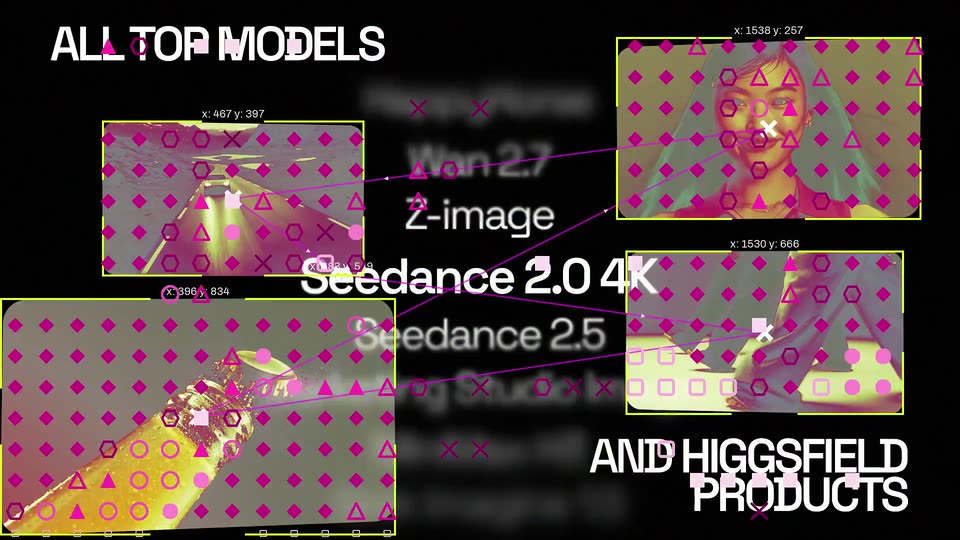
A black title card pairs the headline ALL TOP MODELS top-left with AND HIGGSFIELD PRODUCTS bottom-right around a blurred central list of model names, while video thumbnails cycle around the edges. A coordinate grid with bounding boxes then snaps over the layout as the list sharpens.
On-screen text: “ALL TOP MODELS”, “AND HIGGSFIELD PRODUCTS”
Camera: Pull out
On a black field framed by corner asterisks, NO SUBSCRIPTION holds while REQUIRED scales in beneath it and [ PAY PER REQUEST ] slides up into place, the word REQUEST lit in lime.
On-screen text: “NO SUBSCRIPTION”, “REQUIRED”, “[ PAY PER REQUEST ]”
Techniques: Kinetic type
Camera: Static
A glowing pill-shaped button with a shifting yellow-green and magenta gradient sits center on black, the word GENERATE in dark type on it. White captions read NO SUBSCRIPTION REQUIRED on the left and [ PAY PER REQUEST ] on the right, all locked still.
On-screen text: “NO SUBSCRIPTION REQUIRED”, “GENERATE”, “[ PAY PER REQUEST ]”
Camera: Static
Inside a rounded-rectangle frame on black, magenta and chartreuse fluid shapes swirl and morph, resolving into a man in a car as a yellow hand rises. A dark caption band with a glitchy headline slides in along the bottom edge.
On-screen text: “THE ONLY SEEDANCE 2.5 WITH”, “U.S. CAP”, “NO SUBSCRIPTION”, “REQUIRED”
Techniques: Morph
Camera: Static
A woman with round glasses and star hair clips bites a pink frosted donut in a car seat, then a hard cut shows her in a red car with a lollipop in her mouth. A two-line caption with a U.S. flag sits along the bottom.
On-screen text: “THE ONLY SEEDANCE 2.5 WITH”, “U.S. CAPACITY + CONSISTENT CHARACTERS”
Camera: Static
A rounded 3D form morphs and rotates in the center as the background shifts from pink to orange and green. A lime green bar with black text holds at the lower left above a black bar.
On-screen text: “THE ONLY SEEDANCE 2.5 WITH”
Techniques: Morph
Camera: Static
A magenta liquid blob on a lime green field drifts right and flattens into a horizontal band, while five small geometric shapes, dotted squares and white outlines, fade in and settle at the edges.
Techniques: Morph
Camera: Static
On a black dotted grid, a bar chart builds as colored columns in gray, magenta, orange and red grow upward. Green Higgsfield {API} badges sit at each column's base while vendor names fade in at the tops.
On-screen text: “Higgsfield {API}”, “fal”, “Replicate”, “OpenRouter”
Camera: Pull out
On a black dotted grid, four tall dark bars (fal, Replicate, OpenRouter, runway) each pair with a short lime Higgsfield {API} tile. Above, the white title and lime headline MOST AFFORDABLE ON THE MARKET settle from a chromatic glitch into clean green.
On-screen text: “Higgsfield API”, “MOST AFFORDABLE ON THE MARKET”
Techniques: Kinetic type
Camera: Static
A black dotted grid holds the white headline Higgsfield API over a yellow line, with two glowing white squares and three flat phone cards at the bottom. It cuts to centered text Only 1 week to get locked discount, the word discount glowing yellow, a white cursor at lower right.
On-screen text: “Higgsfield API”, “MOST AFFORDABLE ON THE”, “Only 1 week”, “to get locked discount”
Camera: Static
A lime-green pill button labeled 'discount' is centered on a black field with a white cursor resting on its lower edge. A black padlock icon appears beside the word as a circular ring of green square particles expands around the button and the cursor drifts to the upper right.
Techniques: Cursor demo, Particles
Camera: Static
A black card: a lime 'discount' pill with a lock icon slides up to the top while a thin rule spans the middle. Large magenta '28% OFF' with a lime rim rises from behind the rule, and 'SEEDANCE 2.5' plus a tiny '//DISCOUNT' tag settle in below.
On-screen text: “discount”, “SEEDANCE 2.5”, “//DISCOUNT”, “28% OFF”
Techniques: Masking, Kinetic type
Camera: Static
On a black background, a left list of product names types in row by row above thin white rules, while a right stack of bold magenta discount figures with green offset shadows builds and scrolls up in sync.
On-screen text: “SEEDANCE 2.5”, “38% OFF”, “KLING 3.0”, “50% OFF”, “MARKETING STUDIO IMAGE”, “25% OFF”, “MINIMAX H15”, “45% OFF”, “HAPPY HORSE 1.1”
Techniques: Kinetic type
Camera: Pan
A black price list holds six white product names on the left, each row aligned to a huge magenta discount figure on the right. The last row's 40% OFF snaps from a yellow outline to solid magenta as WAN 3.0 completes.
On-screen text: “SEEDANCE 2.5 // DISCOUNT 28% OFF”, “KLING 3.0 // DISCOUNT 50% OFF”, “MARKETING STUDIO IMAGE // DISCOUNT 20% OFF”, “MINIMAX H3 // DISCOUNT 45% OFF”, “HAPPYHORSE 1.1 // DISCOUNT 45% OFF”, “WAN 3.0 // DISCOUNT 40% OFF”, “24336”
Camera: Static
A translucent green 3D checkmark tumbles in from the left with motion blur as the text *Sign up appears over a gray card. The words for the newsletter continue in pink while the card and a yellow square slide off to the right.
On-screen text: “*Sign up for the newsletter”
Techniques: Kinetic type
Camera: Static
On a white background, lime-highlighted checklist rows stack up one by one, each with a 3D icon and a gray benefit caption on the right. The list scrolls upward as new rows enter, and the frame zooms in on the top rows at the end.
On-screen text: “15% discount on top models”, “*Sign up”, “*Create API key”, “30 concurrent requests”, “*Pick favourite models”, “up to 50% discount”, “*Deploy to production”, “get $15 free credits”
Techniques: Kinetic type, Morph
Camera: Static
A tilted dark UI panel floats in a 3D grid space on the left, showing a line of text and a green link. A glowing yellow node with a trailing line sits center right as the frame pans to reveal the panel.
Techniques: 3D mockup
Camera: Static
A flat white product interface card sits on a black grid; its content scrolls upward, moving from a photo-placement section into a second section showing two tool buttons. A yellow node and line anchor the card's right edge, and a small white label marks the corner.
On-screen text: “// SITE01”
Camera: Static
A dark landing-page mockup sits tilted in 3D perspective over a black grid, showing a short-drama site with a phone mockup and a row of thumbnails. A yellow circuit line with a glowing node runs down the right edge, and a white //SITE02 label sits top right.
On-screen text: “//SITE02”, “//SITE03”
Techniques: 3D mockup
Camera: Static
A tilted white feed window, a 3D mockup on a dark grid, scales up while its cards show “Generating” spinners and a few live listings. Neon green circuit lines and a pulsing node frame the right edge.
On-screen text: “Short dramas.”, “Long obsession.”, “//SITE03”
Techniques: 3D mockup
Camera: Static
A white browser mockup in 3D perspective fills the center, showing a feed of dark cards tagged Generating in green over a black grid, with a yellow neon circuit line and glowing dots on the right. The mockup blurs and zooms forward while the label //SITE03 holds top right.
On-screen text: “//SITE03”
Techniques: 3D mockup, UI zoom
Camera: Static
A white municipal-website card with orange arrows and two city maps dissolves out, revealing a dark preset-library interface with rows of cards behind it. A yellow circuit line with two dots sits at the right edge.
On-screen text: “//SITE03”
Camera: Static
A dark web interface mockup, dense with content panels and preset cards, floats in 3D space next to a yellow neon circuit line. It tilts and blurs as it whips across the frame, while a small site counter label ticks in the top-right corner.
On-screen text: “//SITE03”
Techniques: 3D mockup
Camera: Push in
Several website mockups fan out diagonally in 3D perspective, the middle pages in focus while the edges blur. The camera drifts slowly across the row, each page tagged with a site number.
Techniques: 3D mockup, Parallax
Camera: Pull out
A row of web design thumbnails floats in 3D perspective against a black grid, with a blurred foreground row and a sharp midground row. The camera drifts slowly, keeping the yellow grid lines diagonal.
Techniques: 3D mockup, Parallax
Camera: Static
A grid of rectangular panels floats in 3D space against a black background. The central row is in sharp focus while the top and bottom rows blur out, creating a depth effect.
On-screen text: “SIGNAL”
Techniques: Parallax, 3D mockup
Camera: Static
A tilted, out-of-focus dashboard sits in 3D perspective behind glowing lime circuit lines and nodes on black. White condensed uppercase text types out across the lower right, ending on a blinking pink cursor.
On-screen text: “DEPLOY YOUR SERVICE”, “USING HIGGSFIELD API”
Techniques: 3D mockup, Kinetic type
Camera: Static
Layered city-planning documents and a dark app panel float in 3D on black, traced by glowing yellow circuit lines. A white headline sits right as the camera glides past the stack, ending on a code window showing API calls.
On-screen text: “DEPLOY YOUR SERVICE”, “USING HIGGSFIELD API”
Techniques: 3D mockup, Parallax
Camera: Push in
A dark grid field of animated lime wireframe lines and faint code snippets. A black URL on a lime highlight bar slides across the center as the bar shrinks. A code-bracket glyph drifts in the corner.
On-screen text: “OPEN.HIGGSFIELD.AI”
Techniques: Kinetic type
Camera: Pull out
Yellow glitch blocks scatter and fade on a white field as the URL OPEN.HIGGSFIELD.AI slides in. The frame settles on {LOCK NOW} in bold black with a green L, next to a small 3D padlock that tilts into place.
On-screen text: “OPEN.HIGGSFIELD.AI”, “{LOCK NOW}”
Techniques: Kinetic type, Particles
Camera: Static
Black monospace text {LOCK NOW} sits centered on a white background. A transparent 3D padlock with a metal shackle tilts and settles to the right of the text, casting a soft shadow.
On-screen text: “{LOCK NOW}”
Camera: Static
A plain off-white end card holds two centered lines of text, the title in the middle and the URL near the bottom edge. Both lines stay locked still for the full duration, with no motion or camera move.
On-screen text: “HIGGSFIELD API”, “OPEN.HIGGSFIELD.AI”
Camera: Static