0:38

Introducing OpenHack v2
OpenHack · B2B · Nov 2026
Tusk · Jan 2025 · 3:04 · Full motion · AI-annotated
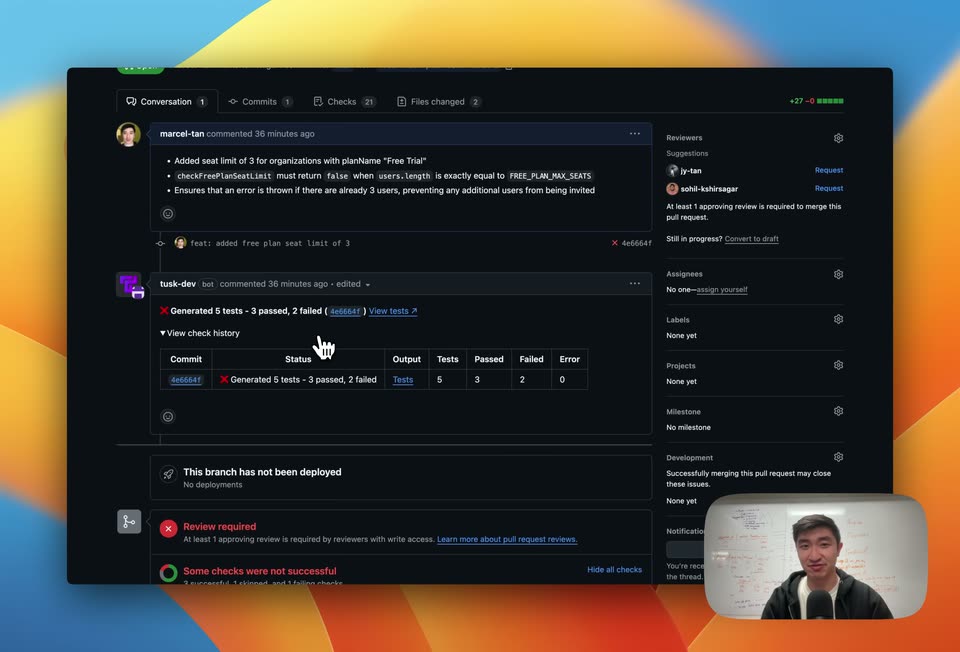
Tusk’s 3:04 launch film runs 19 scenes, about 9.7 s each. The product is on screen from the first frame and 4 features are revealed. The call to action lands at 2:47 (91% in), over a voiceover. A single continuous screen recording of a GitHub pull request, framed as a tilted 3D card over a warm diagonal gradient, with a presenter webcam pinned to the corner. Signature moves are smooth zoom-ins on code lines and buttons, blur-based transitions between zoom levels, and cursor-led navigation through the Tusk check panel.
Is this your launch? to your site or press kit.
OpenHack · B2B · Nov 2026
telli · B2B · Dec 2024
A dark GitHub pull request page sits over a colorful gradient, with a small webcam video of a man in the bottom-right corner. The cursor highlights the title text, clicks Files changed, and the view zooms into a code diff that scrolls to the new seat limit function.
Techniques: UI zoom, Cursor demo
Camera: Push in
A syntax-highlighted code diff fills the screen. A white cursor glides to the throw statement and drags a blue selection across the error message. The view zooms in on that line, then blurs out to a wider file view. A small webcam of the presenter sits in the corner.
Techniques: UI zoom, Cursor demo
Camera: Pan
A dark GitHub pull request page floats as a panel over a blue and orange gradient. A cursor scrolls the conversation and clicks View check history to expand a test-results table; the view zooms in and out, with a small webcam inset of the speaker in the corner.
Techniques: Cursor demo, UI zoom
Camera: Pan
A close-up of a dark pull-request test panel zooms out to reveal the full interface as a tilted card on a colorful abstract background. A white hand cursor hovers over the generated test list, while a presenter speaks in a small video inset at the bottom right.
Techniques: Cursor demo, UI zoom, 3D mockup
Camera: Pull out
A dark checks panel floats over a blue-and-orange gradient, with a small webcam of the presenter in the lower right. The view zooms into the generated-test list as a cursor hovers over the pass and fail counts, then clicks Details to expand bullet points and a code block.
Techniques: UI zoom, Cursor demo
Camera: Push in
A dark GitHub pull-request view over a colorful gradient lists five generated tests with pass and fail icons. The camera zooms into the code and raw output as a cursor clicks and expands details, with a small presenter webcam in the corner.
Techniques: UI zoom, Cursor demo
Camera: Push in
A dark code-review screen fills the frame, a presenter in a small webcam box at the bottom right. The view pulls back to a tilted 3D window on a gradient, then a cursor expands the raw-output section and the view zooms into the test results.
Techniques: 3D mockup, Cursor demo, UI zoom
Camera: Pan
A dark test-report screen scrolls down as a white cursor hovers to highlight the Expected/Received lines, then clicks to expand the Potential fix section. The view zooms out at the end to reveal the full window with a presenter webcam inset in the corner.
Techniques: Cursor demo, UI zoom
Camera: Pull out
A tilted 3D mockup of a dark code editor displays test output, an error line and a suggested fix on a diagonal blue, yellow and orange gradient. A small webcam of a man speaking sits in the lower right. The fix text re-renders once while the frame stays locked.
Techniques: 3D mockup
Camera: Pull out
A dark test-report window with code output and a legend sits on a diagonal blue, yellow and orange striped background, a small webcam inset of a man speaking in the lower right. The view zooms into the code text as a white hand cursor points at a line.
Techniques: UI zoom, Cursor demo
Camera: Push in
A dark PR-check window lists test cases with green checkmarks and one red X, a man in a cap appears in a small webcam box at bottom right. The view starts tight on the list and pulls back to reveal the whole window on a blue-to-orange gradient.
Techniques: UI zoom
Camera: Pull out
A dark CI dashboard screen shows a sidebar of checks and a panel of generated test results that scroll upward, with a hand cursor resting mid-screen. A small rounded video of a man speaking sits in the bottom right corner over a colorful gradient background.
Camera: Pan
A dark pull request screen fills the frame over a colorful diagonal backdrop, with a presenter's webcam in the corner. A hand cursor moves to the Incorporate tests button, a tooltip pops up, and the view zooms in on the button as it is clicked.
Techniques: Cursor demo, UI zoom
Camera: Push in
A dark GitHub pull-request page fills the frame, showing a failed check panel and an Incorporate tests button. A white hand cursor glides from the right panel to the Commits tab as the view zooms in slightly. A small webcam of the speaker sits in the lower right corner.
Techniques: Cursor demo, UI zoom
Camera: Pan
A GitHub pull request screen is shown. A cursor points to a test result comment, then the view zooms out to reveal the full page on a colorful background. The cursor moves to a new commit labeled 'Incorporated Tusk tests' as the view zooms back in.
Techniques: UI zoom, Cursor demo
Camera: Pan
A dark GitHub pull request view scrolls down from the commit header to the test file diff as the cursor moves from the tabs onto the code lines. A small webcam inset of the presenter stays in the bottom right corner.
Techniques: Cursor demo
Camera: Pull out
A dark code-review window displays a pull request diff that scrolls down through a test file, a cursor hovering over the lines. A small webcam feed of a man in a black hoodie sits in the bottom-right corner over a colorful gradient background.
Techniques: Cursor demo
Camera: Pan
A dark pull request code-review screen shows a TypeScript diff, then reframes up to reveal the merge header and tabs. A small rounded webcam inset of a man speaking sits in the lower right over a colorful gradient backdrop.
Techniques: UI zoom
Camera: Static
A dark GitHub pull request page floats in 3D over a blue-and-orange gradient, tilted, then flattening as the view zooms from a code diff to the conversation thread. A white hand cursor hovers over a comment while a rounded webcam inset of a presenter sits in the lower right.
Techniques: 3D mockup, UI zoom, Cursor demo
Camera: Static