1:10

Alex - Your AI Copilot for Xcode
Alex · B2B · Nov 2024
Quantstruct · Jan 2025 · 0:52 · AI-annotated
Quantstruct’s 0:52 launch film runs 12 scenes, about 4.3 s each. The product is on screen from the first frame and 3 features are revealed. The call to action lands at 0:46 (89% in), over a voiceover. A founder talks to camera, then the video becomes one continuous screen-recording tour (Slack, GitHub, docs editor) with the presenter held in a small rounded webcam tile in the corner. Signature moves are slow zoom-ins and zoom-outs on the UI, cursor-driven actions, and a hard cut to a locked-off cream end card.
Is this your launch? to your site or press kit.
Alex · B2B · Nov 2024
Synth · B2B · Nov 2024
Supabase · Developer tools · Jul 2025
A bearded man in a black zip jacket over a red shirt sits centered in a red mesh chair, speaking to camera in a soft-focus home office with a monitor behind him. White subtitles in a black box sit at the bottom. He smiles and shifts slightly at the end.
On-screen text: “I'm Sarthak from Quantstruct.”, “We build AI technical writers that proactively”, “improve your documentation 24×7.”, “Let's see how it saves you time.”
Camera: Static
A man in a black jacket talks to camera in a bright office, a blurred monitor and red chair behind him. A subtitle bar holds the line at the bottom of the frame while he speaks.
On-screen text: “Let's see how it saves you time.”
Camera: Pull out
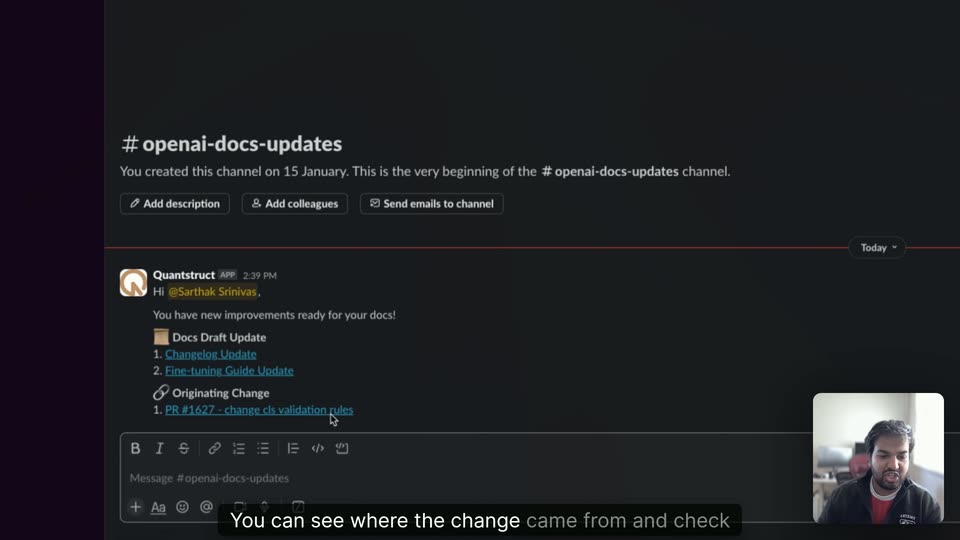
A dark Slack-style channel zooms in on a Quantstruct bot message listing doc draft updates and a source pull request. A webcam tile of a presenter sits bottom right while white captions narrate; the cursor hovers a link to reveal its URL.
On-screen text: “Quantstruct notifies you when your docs get out of date and creates drafts you can review immediately.”, “You can see where the change came from and check out a draft.”
Techniques: UI zoom, Cursor demo
Camera: Push in
A near-black product screen holds a locked-off frame while a white arrow cursor drifts slowly near the center. A small rounded webcam inset of the presenter stays fixed in the bottom right corner.
Techniques: Cursor demo
Camera: Static
A dark GitHub pull request page shows the quantstruct bot analysis comment, with a small webcam feed of a man in the bottom right. The view zooms out to reveal the full browser window and a colorful desktop gradient at the edges. White captions run along the bottom.
On-screen text: “Quantstruct does hundreds of little things that”, “make your docs great.”, “It's integrated into your specific review and”, “publishing workflows and gives you powerful tools”
Techniques: UI zoom
Camera: Pull out
A GitHub pull request diff fills the frame, then the view zooms into the comment box at the bottom. A cursor types a short note and clicks the toolbar, after which the framing pulls back to the full page. A small webcam feed of a man sits in the lower right corner.
On-screen text: “publishing workflows and gives you powerful tools”, “to improve your docs.”, “You can also ask Quantstruct to do things for you.”, “Our agent is smart,”, “so it'll actually use a web browser and add,”, “the screenshot”
Techniques: UI zoom, Cursor demo
Camera: Push in
A split screen shows a code editor and a markdown file scrolling down, then a pull request review interface. A presenter video feed sits in the bottom right corner. The caption just a few seconds. appears at the bottom center.
On-screen text: “just a few seconds.”
Techniques: Split screen
Camera: Pull out
A dark documentation editor scrolls down through markdown text and an embedded dashboard image while a cursor hovers over the content. A small talking-head video stays fixed in the bottom-right corner, and white captions on black bars appear at the bottom.
On-screen text: “just a few seconds.”, “Your docs are up to date.”
Techniques: Cursor demo
Camera: Push in
A dark documentation page scrolls upward past a list of best practices, with an embedded fine-tuning dashboard mockup held in the middle. A small presenter webcam in the lower right vanishes. A black lower-third caption reads Your docs are up to date. then That's it.
On-screen text: “Your docs are up to date.”, “That's it.”
Camera: Pull out
A GitHub code editor displays a markdown file with a dashboard preview pane below it. A small presenter video sits in the lower right corner. A white caption reads That's it. at the bottom as the editor view scales up to fill the frame.
On-screen text: “That's it.”
Techniques: UI zoom
Camera: Pull out
A dark code editor with a chat sidebar fades out, leaving a video call tile of a bearded man in a black jacket centered on diagonal blue and orange stripes. Subtitles swap from “We want to learn more.” to “Tell us about your docs.”
On-screen text: “We want to learn more.”, “Tell us about your docs.”
Techniques: UI zoom
Camera: Push in
A cream end card holds a centered black headline reading Reach out to us, with the email [email protected] in gray beneath it and a tan circular logo mark below. The frame is locked off and stays still for the full duration.
On-screen text: “Reach out to us”, “[email protected]”
Camera: Static