0:52

Shiv - Introducing Dots for Marketing If you haven't used Dots by @OpenAI y
Gooseworks · Oct 2026
Tsenta · Mar 2026 · 1:07 · Full motion · AI-annotated
Tsenta’s 1:07 launch film runs 15 scenes, about 4.5 s each. The product is on screen from the first frame and 3 features are revealed. The call to action lands at 1:01 (92% in), over a voiceover. Built as one continuous screen capture of a light, pastel-card dashboard with a fixed corner webcam and a bottom caption bar, so the cursor and the UI state changes carry all the motion. Pacing is steady and cut on every panel or status change, with brief zoom-ins on the card grid for emphasis.
Is this your launch? to your site or press kit.
A static screen recording of the Tsenta dashboard shows a grid of pastel job cards with match scores. A cursor hovers over cards, revealing a View Details link, then the view zooms into the grid. A small presenter PIP sits bottom right, with white subtitles along the bottom.
On-screen text: “Hey everybody, Agni here.”, “and today I wanted to give you all a demo of Senta.”, “Tsenta makes it super simple to apply to jobs.”, “You can see on our dashboard all jobs that are a decent match for you.”
Techniques: Cursor demo, UI zoom
Camera: Static
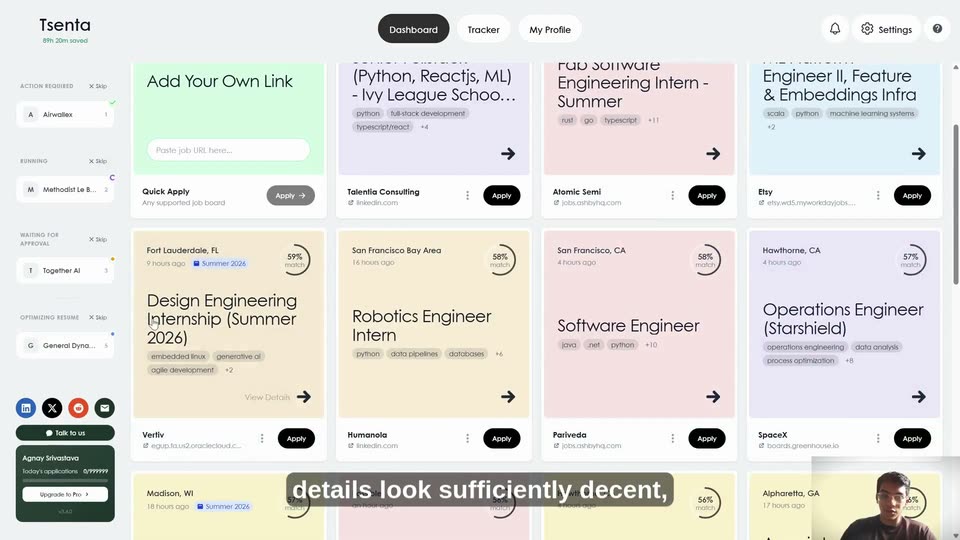
A job dashboard fills the frame: a left sidebar lists tracked companies while a grid of pastel job cards shows titles, match scores and Apply buttons. A cursor hovers over the cards. A caption bar reads the voiceover line, and a small presenter webcam sits in the corner.
On-screen text: “dashboard all jobs that are a decent match for you.”
Techniques: Cursor demo
Camera: Static
A job dashboard fills the frame: a grid of colored cards lists openings with match percentages and Apply buttons, a left sidebar tracks application statuses, and a top bar holds navigation tabs. A cursor rests on one card while a presenter appears in a small bottom-right inset and a caption bar updates at the bottom.
On-screen text: “dashboard all jobs that are a decent match for you..”, “When you click into one, you can see all of the jobs details.”
Camera: Static
A job dashboard grid fills the screen with a right-hand panel showing one posting's details. The panel closes to reveal the full grid, and a cursor moves to click the Apply button on a card. A presenter's video sits in the corner.
On-screen text: “When you click into one, you can see all of the job's details.”, “Go ahead and click apply when the”
Techniques: Cursor demo
Camera: Static
The Tsenta dashboard grid of job cards fills the frame. A cursor clicks the Apply button on the CCC Intelligent Solutions card; the card leaves the grid and appears in the left sidebar under Optimizing Resume as the grid reflows upward. A caption rolls along the bottom.
On-screen text: “Go ahead and click apply when the details look sufficiently decent,”
Techniques: Cursor demo
Camera: Static
Screen recording of a job tracker dashboard with a presenter webcam in the corner. A cursor hovers over application rows, revealing company tooltips, while a resume mockup shimmers and the status text cycles. The panel then switches to a loading spinner.
On-screen text: “and this will start optimizing your resume for all of these jobs”, “at the same time.”, “When it's done, it looks something like this,”
Techniques: Cursor demo
Camera: Static
A full-screen Tsenta dashboard shows a company list on the left, a 100% match review panel in the center, and the candidate's resume on the right. A cursor hovers the list as a dark bottom caption bar types out the spoken line.
On-screen text: “When it's done, it looks something like this, where you can go ahead and edit every single portion of the resume.”
Techniques: Cursor demo, Kinetic type
Camera: Static
A Tsentra resume dashboard fills the screen. A cursor clicks the settings icon, opening a Font Styling panel, then clicks Skip on a company row, switching the status to Ready to Submit. A presenter video plays in the bottom right corner while captions run along the bottom.
On-screen text: “where you can go ahead and edit every single portion”, “of the resume. Once you click approve,”, “this will actually start applying for the obs in”
Techniques: Cursor demo
Camera: Static
A job-application dashboard fills the screen. The cursor hovers a list item in the left panel, then a browser window with a job site loads in the main panel under a green unlock prompt. A small webcam feed sits in the bottom-right corner while captions run along the bottom.
On-screen text: “this will actually start applying for the jobs in”, “real time in front of you,”
Techniques: Cursor demo
Camera: Static
A dashboard and a browser window sit side by side, the right pane showing a GDTIT job page. A cursor hovers a row in the left company list and a status tooltip pops out. A dark caption bar with white text and a small presenter inset cover the bottom edge.
On-screen text: “and you can see I already had one from earlier”
Techniques: Cursor demo
Camera: Static
A screen recording of the Tsenta dashboard displays a job application form on the right. A cursor hovers over the Skills field, where a dropdown lists search results for 'TypeScript'. A caption bar runs across the bottom and a small webcam inset of the presenter sits in the lower corner.
On-screen text: “which is sitting and filling out the skills within a workday job.”
Techniques: Cursor demo
Camera: Static
A Tsenta dashboard sits left of a job application form. The cursor scrolls the form, picks a radio option and clicks the orange Submit button, which spins. The form panel then disappears and the cursor hits the green I've Applied button. A small presenter video plays in the corner.
On-screen text: “When it's done, it looks something like this,”, “and you can just go ahead, click submit,”, “wrap up, applying to a job, that's simply.”, “When it's done, you can go hit I have applied.”
Techniques: Cursor demo
Camera: Static
A job dashboard fills the frame with a grid of application cards. A cursor drifts up to the top navigation and clicks the Tracker tab, which turns black. A dark caption bar at the bottom swaps its line of white text.
On-screen text: “When it's done, you can go hit I have applied.”, “We also have a tracker for students who would like to track th”
Techniques: Cursor demo
Camera: Static
A light job-tracker dashboard scrolls down past a stats row, a Sankey pipeline flow and a board while a cursor hovers over rows. A small webcam feed of a man sits in the bottom-right corner, and white subtitle lines fill a dark bar along the bottom.
On-screen text: “We also have a tracker for students who would like to track th”, “applications, along with a Sankey board,”, “and all of your activity along with your past”, “resumes, is visible right here. And That's it.”
Techniques: Cursor demo
Camera: Static
A flat job-tracker dashboard fills the frame, a grid of pastel application cards that refreshes mid-scene, with a small talking-head video in the lower-right corner. White caption lines swap along the bottom edge.
On-screen text: “resumes, is visible right here. And That's it.”, “Thank you guys so much for watching. Check us out at TsentA.com”, “Bye.”
Camera: Static