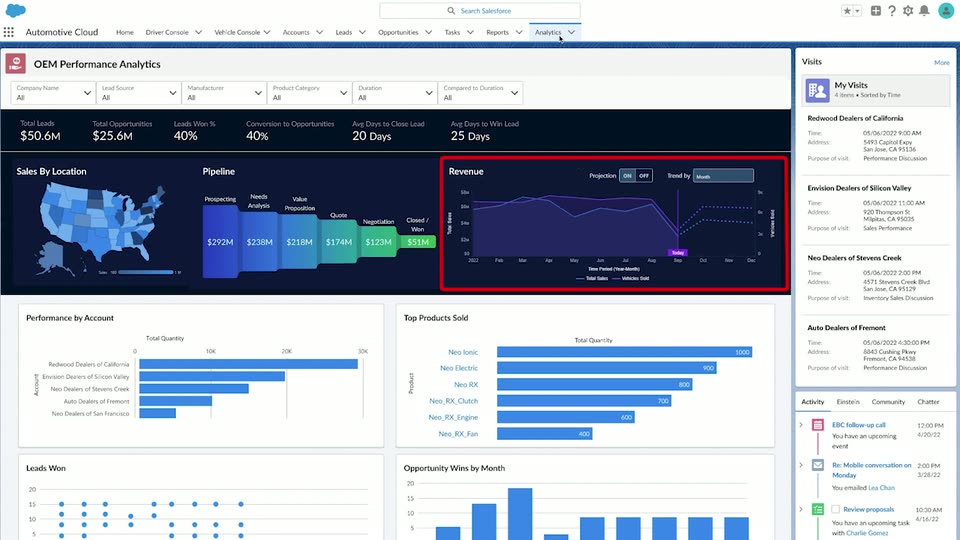
0:32
Explore
Automotive Cloud - Automotive Cloud Intelligence
Salesforce · 1:16 · Full motion · AI-annotated
- Length
- 1:16
- Scenes
- 8 · 9.6 s avg
- Product on screen
- 0:00
- Features shown
- 4
- Call to action
- 1:04 · 84%
- Voiceover
- Yes
00:00:00 / 01:16:15
- Length
- 1:16
- Scenes
- 8 · 9.6 s avg
- Product on screen
- 0:00
- Features shown
- 4
- Call to action
- 1:04 · 84%
- Voiceover
- Yes
Salesforce’s 1:16 launch film runs 8 scenes, about 9.6 s each. The product is on screen from the first frame and 4 features are revealed. The call to action lands at 1:04 (84% in), over a voiceover. The video opens on a flat illustrated title card, then holds a steady tour of pre-built analytics dashboards, isolating each panel with push-in and pull-out zooms and red outline highlights before ending on a call to action. Its signature moves are the crossfade between dashboard layouts, the brief offset ghost that eases charts into place, and the locked-off illustrated intro that scales its title in.
No filming indicatedEstimated needs: 6 capture groups — your screens or recordings · 1 graphic passage — draw or supply
Is this your launch? to your site or press kit.
More like this


1:33

NotebookLM launches Audio Overviews in over 50 new languages
Google · AI · Apr 2025
0:52

Shiv - Introducing Dots for Marketing If you haven't used Dots by @OpenAI y
Gooseworks · Oct 2026
Automotive Cloud - Automotive Cloud Intelligence, scene by scene
· 8 scenes as text
01 · Product intro · 0:00–0:05
Flat illustration of a bear on a green hill holding a blueprint and hammer, a blue bird on its shoulder, a red bird by a small birdhouse, a pink tree right. Dark blue title left, blue '23 near the bear; locked-off frame, title scales in at start.
On-screen text: “Automotive Cloud”, “Intelligence”, “Automotive Cloud”, “'23”
Techniques: Kinetic type
Camera: Static
02 · Demo · 0:05–0:16
A full-screen automotive CRM dashboard holds static, showing contact details, a vehicle milestone strip, a household tree, and side panels for alerts and cases. A mouse cursor drifts from the milestone icons to the top menu and hovers over Analytics.
On-screen text: “Automotive Cloud”, “Intelligence”, “'23”
Techniques: Cursor demo
Camera: Static
03 · Feature reveal · 0:16–0:29
A Salesforce analytics dashboard fills the frame. A red outline box highlights three chart panels in sequence: the US map, the pipeline funnel, and the revenue chart. The view then crossfades into a second dashboard layout showing inventory and incentive panels.
Camera: Static
04 · Feature reveal · 0:29–0:32
A full analytics dashboard shows inventory KPIs and blue bar charts across a white grid. The frame then zooms in, dropping the top navigation and enlarging the inventory section and its charts.
Techniques: UI zoom
Camera: Push in
05 · Feature reveal · 0:32–0:40
A full-screen analytics dashboard shows inventory KPIs and blue horizontal bar charts. At the end the frame zooms out, revealing the dashboard as one panel inside a wider Salesforce Automotive Cloud app with a visits sidebar on the right.
Techniques: UI zoom
Camera: Pull out
06 · Feature reveal · 0:40–0:51
A Salesforce dashboard titled Automotive Lead Intelligence fills the screen, showing KPI figures, blue and purple bar charts, and a right-hand Visits panel. A cursor rests on the Analytics tab. The view zooms into the central charts and bottom metric cards, then pulls back to the full layout.
Techniques: UI zoom
Camera: Static
07 · Feature reveal · 0:51–1:04
A Salesforce Automotive Cloud dashboard fills the frame, its KPI row, donut and bar charts and data table easing in from a brief offset ghost. The view pushes into the warranty and recall charts, then pulls back to the full layout while a cursor rests at the Analytics tab.
Techniques: UI zoom
Camera: Static
08 · CTA · 1:04–1:16
A full-screen view of the Automotive Cloud dashboard holds static. Three columns of panels show contact details with a blue car, a vehicle milestones timeline and household chart, plus alerts and actions lists. A cursor drifts up to hover the Driver Console tab.
Techniques: Cursor demo
Camera: Static