1:10

Manny Hernandez - Introducing Ploid. I think the world's data should belong to every
Ploid · B2B · Oct 2026
Google · Apr 2025 · 1:33 · Full motion · AI-annotated
Google’s 1:33 launch film runs 12 scenes, about 7.8 s each. The product is on screen from the first frame and 1 feature is revealed. The call to action lands at 1:13 (78% in), over a voiceover. The video is a simulated two-voice conversation: captions swap between the top-left and bottom-right corners to match each speaker, while the twin blue-green waveform pulses through the center of every graphic frame. The product walkthrough is a locked-off UI tour with a cursor and word-by-word caption fades, all over a near-black field with a green-blue glow, at a relaxed 108 BPM.
Is this your launch? to your site or press kit.
Ploid · B2B · Oct 2026
Perplexity · AI · May 2025
Films whose music sounds like this one, voice left out
Cursor · Voice-over narration
Shiplog · Corporate presentation / Product demo
Loom · Product Tutorial
A dark frame holds two thin waveform lines, one indigo and one green, rippling across the center. Captions fade in word by word at the top left and bottom right, alternating with the voiceover.
On-screen text: “Hey everyone, we're so hyped for”, “today's NotebookLM announcement.”, “Yeah. We have some”, “MASSIVE news to share.”, “Okay, deep breaths.”
Techniques: Kinetic type
Camera: Static
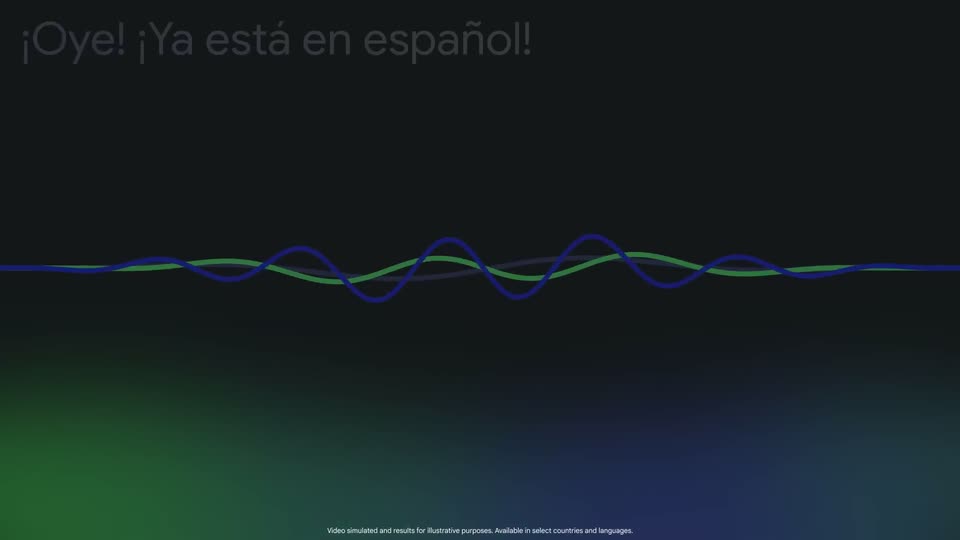
Two thin waveform lines, blue and green, oscillate along the center of a near-black frame with a soft green glow at the bottom. Short dialogue lines in a light sans-serif fade in at the top-left and bottom-right, swapping with the voiceover.
On-screen text: “Video simulated and results for illustrative purposes. Available in select countries and languages.”, “Okay, deep breaths.”, “Deep breaths.”, “You can now get your audio overviews in over FIFTY languages!”, “Fifty! No way!”, “So like whether you speak, uh Português, or Ελληνικά”, “or Deutsch or maybe 中文”, “And dozens more.”, “Let's try out a few?”, “¡Oye! ¡Ya está en español! ¡Qué chévere hablar así! ¡Claro que sí! Tienes que escucharlo, ¡es muy divertido!”
Techniques: Kinetic type
Camera: Pan
A blue and green audio waveform pulses across a dark background with a soft green glow below. Japanese lines fade in at the top left, then a pair scales up at the bottom right, then a Hindi line fades in at the top left.
On-screen text: “escucharlo, es muy divertido!”, “やった!日本語でも聞けます”, “よ!すごくないですか?”, “本当ですね!”, “ぜひ試してみてください!”, “और सुनो! अब हिंदी में भी! है ना कमाल?”
Techniques: Kinetic type
Camera: Push in
Two thin sine-wave lines, blue and green, pulse across the center of a dark background with a green glow at the bottom. Conversation captions appear in alternating corners, first in Hindi then in English, fading in word by word.
On-screen text: “और सुनो! अब हिंदी में भी! है ना कमाल?”, “अरे वाह! सच में? ज़रूर ट्राई करो!”, “Ahh, how amazing is that?!”, “Really hits different.”, “Okay, so the big question, right?”, “How do you start listening in your language?”, “Video simulated and results are for illustrative purposes. Available in select countries and languages.”
Techniques: Kinetic type
Camera: Pan
A dark field with a green-to-blue gradient at the bottom holds two thin wavy lines, blue and green, rippling horizontally like an audio waveform. The word Right. stays still in the top left corner.
On-screen text: “Right.”, “Video simulated and results are for illustrative purposes. Available in select countries and languages.”
Camera: Static
A rounded search field sits on a dark gradient background as a cursor types notebooklm.google letter by letter. A bottom caption reads “Just head over to NotebookLM.google,” then crossfades to “you know, log in, pop into your Settings.”
On-screen text: “Right.”, “Just head over to NotebookLM.google”, “Video simulated and results for illustrative purposes. Available in select countries and languages.”, “notebooklm.google”, “you know, log in, pop into your Settings.”
Techniques: Cursor demo, Kinetic type
Camera: Static
A dark three-panel workspace interface (Sources, Chat, Studio) with an Art History 107 note zooms in and brightens to full frame. White caption text sits at the bottom throughout the locked-off shot.
On-screen text: “notebooklm.google”, “you know, log in, pop into your Settings.”
Techniques: UI zoom
Camera: Push in
A dark toolbar of pill buttons (Analytics, Share, Settings, grid, profile) reframes closer as a cursor clicks Settings, opening a centered dropdown; the cursor then selects the bold Output language row and a Configure Settings modal fades in. Subtitles sit in a dark bar at the bottom.
On-screen text: “you know, let's just keep your Settings.”, “and right there, you'll see an option – says “Output language.””, “Output language, got it”, ““Output language”, got it”
Techniques: UI zoom, Cursor demo
Camera: Push in
A dark settings modal sits on a blurred gradient. A cursor clicks the language dropdown, the list expands and scrolls, then hovers over a highlighted entry. Bottom captions swap in sync with the voiceover.
On-screen text: ““Output language”, got it”, “Click that, pick your language from the list”, “and that's literally it.”, “You are good to go!”
Techniques: Cursor demo
Camera: Static
Two thin blue and green lines oscillate across the center of a dark gradient field like an audio waveform. Large captions enter word by word or scale in at the top-left and bottom-right, swapping with each spoken line, above a small disclaimer at the bottom.
On-screen text: “Simple as that!”, “Go check out the language options!”, “Give it a listen!”, “Yeah and, hey, let us know what you think! Seriously, we'd love to hear, maybe drop a note in our Discord?”, “Oh yeah, definitely!”, “The link's in the description, right? Come hang out!”, “Video simulated and results for illustrative purposes. Available in select countries and languages.”
Techniques: Kinetic type
Camera: Pan
A blue and green waveform line pulses across the center of a dark background while closing phrases fade in at the corners, top left then bottom right, then the line blurs out as the scene ends.
On-screen text: “The link's in the description, right?”, “Come hang out!”, “Until next time!”, “See ya!”
Camera: Pan
A dark field with a soft green and blue glow along the bottom. The concentric-arc NotebookLM mark resolves from blur to sharp at center, the wordmark slides in and sharpens beside it, then the URL fades in below. Locked-off frame.
On-screen text: “Video simulated and results for illustrative purposes. Available in select countries and languages.”, “NotebookLM”, “notebooklm.google”
Techniques: Kinetic type
Camera: Static