
0:42
Explore
Manny Hernandez - Introducing Ploid. I think the world's data should belong to every
Ploid · Oct 2026 · 1:10 · AI-annotated
- Length
- 1:10
- Scenes
- 14 · 5.0 s avg
- Product on screen
- 0:00
- Features shown
- 1
- Call to action
- 0:55 · 79%
- Voiceover
- Yes
00:00:00 / 01:10:07
Ploid’s 1:10 launch film runs 14 scenes, about 5.0 s each. The product is on screen from the first frame and 1 feature is revealed. The call to action lands at 0:55 (79% in), over a voiceover. The video is built as a presenter bookend around one continuous UI walkthrough: a one-line problem statement, a search-to-export demo, an API and agent-integration reveal, then a closing tagline and logo card. Its look is near-black gradients with glowing white type, and its motion is slow camera pans and reframes across dense data tables rather than fast cuts.
Footage neededEstimated needs: 2 capture groups — your screens or recordings · 1 official logo — reused across the film · 2 filmed passages — shoot, supply or replace · 1 graphic passage — draw or supply
Is this your launch? to your site or press kit.
More like this
2:23
Fish Audio - Today we’ve raised $52M Seed and we are announcing the public launch
Fish Audio · Jul 2026
0:52
Shiv - Introducing Dots for Marketing If you haven't used Dots by @OpenAI y
Gooseworks · Oct 2026
Manny Hernandez - Introducing Ploid. I think the world's data should belong to every, scene by scene
· 14 scenes as text
01 · Product intro · 0:00–0:18
A man in a black t-shirt and jeans stands centered on a dark studio set, speaking and gesturing to the camera. A white lower-third with his name fades in at the left, then a glowing PLOID logo and wordmark fade in across the lower frame.
On-screen text: “Manny Hernandez”, “Co-founder & CEO, Ploid”, “PLOID”
Camera: Static
02 · Demo · 0:18–0:24
A dark 'Create dataset' view reframes onto the input box, where a query is typed character by character. A mouse cursor then moves to and presses the white up-arrow button, with a list of example prompts below.
Techniques: UI zoom, Cursor demo
Camera: Push in
03 · Demo · 0:24–0:28
A dark search panel fills the frame. Its criteria list fills in with colored dots, then the view pans down as the panel extends to reveal enrichment chips and a results row with a Run full search button. A cursor appears over the blurred results table.
Techniques: Cursor demo
Camera: Push in
04 · Demo · 0:28–0:33
A dark results table of growth leads fills the frame; the cursor drifts toward the white Run full search button as the view zooms in on it. The cursor clicks, and the list refreshes with green checkmarks in the status column.
Techniques: Cursor demo, UI zoom
Camera: Pan
05 · Demo · 0:33–0:36
A dark lead table of names, companies and titles fills the frame. The view pans right as green Match badges populate a row of filter columns, then settles on the email addresses. A cursor hovers over one badge.
Techniques: UI zoom, Cursor demo
Camera: Push in
06 · Demo · 0:36–0:38
A dark detail card for Maya Brennan fades out over a blurred leads table, pulling focus to the spreadsheet. The cursor hovers at the card's center while the column headers, Filter and Sort buttons, and an Add Column field sharpen into view.
Camera: Pull out
07 · Demo · 0:38–0:44
A dark data table of email rows and match labels fills the frame. A cursor clicks Enrich, an Add Enrichment modal opens, and Last funding round is typed into the column name field. The table then populates with funding values as the cursor moves to Export.
Techniques: Cursor demo
Camera: Pull out
08 · Demo · 0:44–0:45
A dark leads table fills the frame with rows of match labels and emails; a cursor clicks the Export button, opening a small dropdown, then the entire interface blurs and fades to black.
Techniques: Cursor demo
Camera: Pull out
09 · Feature reveal · 0:45–0:49
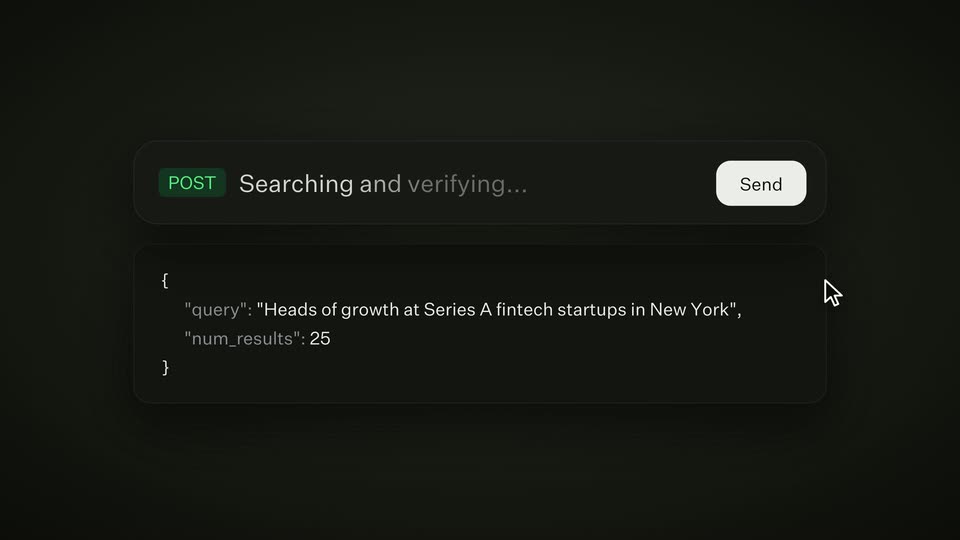
A dark API request panel shows a POST endpoint and a JSON body. A cursor slides in from the lower right and clicks the white Send button, then the endpoint line cross-fades into the status text Searching and verifying.
Techniques: Cursor demo
Camera: Static
10 · Feature reveal · 0:49–0:50
A dark rounded input bar holds a green mark, the gray text “Searching and verifying…” and a Send button, with a white cursor at lower right. The content fades out and the bar shrinks into a small central pill revealing the Ploid logo and wordmark.
Techniques: Cursor demo, Morph
Camera: Static
11 · Feature reveal · 0:50–0:51
A dark rounded pill holding the white Ploid logo and wordmark sits centered on a near-black background with faint concentric rings. The pill stretches to the left, sliding the logo to the right edge and opening an empty field.
Camera: Static
12 · Feature reveal · 0:51–0:55
Two dark rounded chips float on a black background, joined by a thin line. The left chip cycles through partner names, Claude, Codex, Cursor, each with its logo, while the right keeps the Ploid mark. A small pill pops into the line's middle, reading MCP, then CLI.
On-screen text: “Claude”, “Ploid”, “Codex”, “Cursor”, “MCP”, “CLI”
Techniques: Kinetic type
Camera: Static
13 · CTA · 0:55–1:07
A man in a black t-shirt and jeans stands barefoot in a dark studio, gesturing as he speaks to camera. He then turns and walks off to the right, and the Ploid wordmark with a diamond mark resolves into focus on the empty set.
On-screen text: “Ploid”
Camera: Static
14 · Outro · 1:07–1:10
A white PLOID wordmark with a pixelated arrow icon and the URL ploid.com below sit centered on a dark gradient backdrop. The lockup sharpens and brightens over the first second, then holds still on a locked-off frame.
On-screen text: “PLOID”, “ploid.com”
Camera: Static