0:38

Maayan Albert - I was shocked that 3/4s of designers work in coding agents rather tha
Proto · B2B · Nov 2026
Jam · Jul 2025 · 0:32 · AI-annotated
Jam’s 0:32 launch film runs 15 scenes, about 2.1 s each. The product is on screen from the first frame and 2 features are revealed. The call to action lands at 0:28 (90% in). The video is built as a chain of centered white UI cards on a flat pale lavender field, each card sliding, zooming or morphing into the next while a bold two-line headline fills the gap between them. Pacing is steady at about 140 bpm with short 2 to 4 second beats, and the signature moves are the gray-to-black two-tone headline fill, the tilted 3D dashboard card, and the wiggling blob transition into the end card.
Is this your launch? to your site or press kit.
A bold black headline slides in on two lines over a pale lavender background. Two tilted app icons then pop in below: a black rounded square with a white spark mark and a purple square with a pink strawberry. The text and icons fade out.
On-screen text: “Automate customer bug reports with Fin AI & Jam”
Techniques: Kinetic type
Camera: Static
A chat app card fades in centered on a soft lavender background. The dark header shows the Fin AI Agent with a green online dot, and a message bubble with the word How types in at the bottom above the reply field.
Camera: Pull out
A chat card on a pale lavender field shows the Fin AI Agent greeting, then a user bubble with avatar. The view zooms into the thread to reveal a screen-recording request card with a Record screen button and a Customer tag, a cursor hovering. The card fades out.
Techniques: UI zoom, Cursor demo
Camera: Pull out
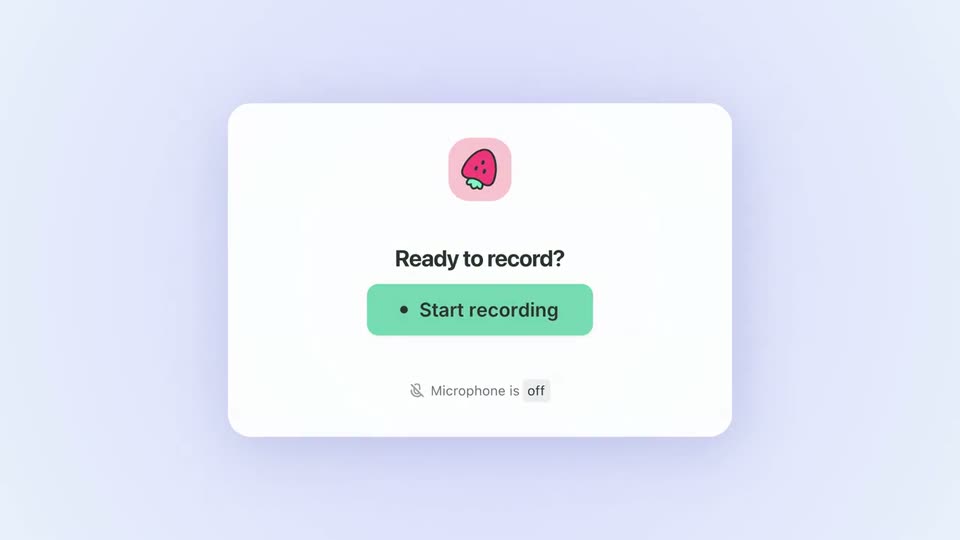
A white modal card with a strawberry icon and a green Start recording button sits on a lavender field. A cursor moves over the button and a Customer tooltip pops up, then the card fades out as the headline Recordings uploaded to Jam automatically scales in.
On-screen text: “Recordings uploaded to Jam automatically”
Techniques: Cursor demo, Kinetic type
Camera: Static
Centered black sans-serif text on a pale lavender background. The first line stays still while the second line scales up and darkens from gray to black, completing the sentence.
On-screen text: “Recordings uploaded to”, “Jam automatically”
Techniques: Kinetic type
Camera: Static
A tilted 3D dashboard card rotates to face the camera as a large gray headline scales in behind it. The card then morphs into a developer console panel; its tabs and colored log rows fill in, a cursor clicks the tabs, and the panel empties.
On-screen text: “Recordings uploaded to Jam automatically”
Techniques: 3D mockup, Kinetic type, Morph, Cursor demo
Camera: Pan
A dark sans headline holds center on a pale lavender field as a console panel dissolves out behind it. Below, the line set up slides in, the word up fading from light gray to dark.
On-screen text: “Quick and intuitive”, “set up”
Techniques: Kinetic type
Camera: Static
A bold black headline reads “Quick and intuitive set up”, centered on a pale lavender background. The word “up” lags in a soft gray, then the whole line slides down and fades out as the clip ends.
On-screen text: “Quick and intuitive set up”
Techniques: Kinetic type
Camera: Static
A centered gray headline reads on a light lavender field, then slides out as a white rounded interface card slides in from the right, its faint sidebar menu items entering at the left edge.
On-screen text: “Quick and intuitive set up”
Techniques: Kinetic type
Camera: Static
A light app panel with a left menu sits on a lavender field. A cursor clicks the Fin AI Agent item, the frame zooms into its sub-list of options, then rests on the Workflows row as it highlights.
Techniques: Cursor demo, UI zoom
Camera: Push in
A white trigger card with a yellow speech-bubble icon and the label 'When conversation is started' slides in from the right, fading from ghosted to solid, and settles on the left in front of a keyword panel titled 'If customer says...' listing Bug, Issue and Problem.
Camera: Static
Two connected UI cards sit on a pale lavender field; a white callout with a yellow icon reads “When conversation is started”. The callout fades, then the left card slides off left, centering the right card with its AI agent prompt and Record screen button.
On-screen text: “When conversation is started”
Camera: Push in
On a pale lavender field, two white cards sit on a thin horizontal line. The left card, a Request a Jam recording panel with a strawberry icon and a dark Record screen button, slides left while the right Let Fin AI answer card brightens from faint to solid.
Camera: Static
A light lavender chat interface with two cards fades out as a purple rounded square holding a pink strawberry icon scales up at center, its edges wiggling into a soft blob shape.
Techniques: Morph
Camera: Static
On a pale lavender field, a black app icon with a white radial mark and a purple icon with a strawberry sit side by side. They rise slightly as the words and URL fade in below, then the whole composition fades out.
On-screen text: “Try now”, “jam.dev/cs”
Camera: Static