0:28


Jitter is now in public beta! · Jitter
Jitter · Feb 2025
CopilotKit · Nov 2026 · 1:20 · AI-annotated
CopilotKit’s 1:20 launch film runs 29 scenes, about 2.8 s each. The product is on screen from the first frame and 7 features are revealed, with social proof. The call to action lands at 1:13 (92% in), over a voiceover. The video is built as a title card, a quick product demo, a stats block, then a steady march of single-feature beats, each pairing a bold headline with an animated flat UI card, and closes on a logo wall and a URL card. Signature moves are locked-off frames, blur-and-fade transitions between beats, count-up numbers, and cards sliding in over a static dot-grid pastel field, with the iridescent orb returning at the open, the pivot, and the close.
Is this your launch? to your site or press kit.
Jitter · Feb 2025
Proto · B2B · Nov 2026
Gradon · B2B · Oct 2026
A light dotted background with soft pastel color fields holds a title card. Introducing fades in above a gradient orb and the bold black OpenBot 1.0, then the gray tagline The open agent workspace for enterprises. appears below.
On-screen text: “Introducing”, “OpenBot 1.0”, “The open agent workspace for enterprises.”
Techniques: Kinetic type
Camera: Static
The OpenBot workspace opens on an Operations chat where a browser window lists evening flight turns. The view zooms into the table as green On time and red Late badges pop onto rows, then pulls back to reveal a second window asking to approve rebooking 14 passengers.
Techniques: UI zoom
Camera: Static
A flat OpenBot chat interface plays out an approval flow: a cursor clicks Allow once on a rebooking card, a green confirmation banner and a stats card with four number tiles fill in, then the UI fades out to a large 42.2K GitHub stars stat on a soft gradient.
On-screen text: “42.2K GitHub stars”
Techniques: Cursor demo, Kinetic type
Camera: Pull out
A black GitHub mark sits left of a large black number that counts up from 5.00K to 10.5K, above a gray “GitHub stars” caption, on a pale pastel gradient with a fine dot grid. The frame stays locked off.
On-screen text: “10.5K”, “GitHub stars”
Techniques: Kinetic type
Camera: Static
A soft pastel gradient with a faint dot grid holds two stacked text cards. The headline 'Thousands' with subline 'of downloads' holds, then blurs into 'Inproduction' with the subline 'Real teams, real work', and finally fades to the empty background.
On-screen text: “Thousands”, “of downloads”, “Inproduction”, “Real teams, real work”
Techniques: Kinetic type
Camera: Static
A bold headline holds at the top of a dotted, color-washed grid. Five white pill badges with gradient dots pop in one by one while a GitHub star counter ticks up from 1.0K to 26.6K. The headline and counter fade out as the badges blur and drift.
On-screen text: “Five open-source launches since June.”, “OpenTag 1.3K”, “OpenBot 10.5K”, “OpenMuse 6.3K”, “OpenDots 6.5K”, “OpenDuet 2.0K”, “26.6K GitHub stars”
Techniques: Kinetic type
Camera: Static
Four white pill cards with gradient icons and project names float in 3D perspective over a soft purple-to-mint dotted background. They tilt, then spin and shrink toward the center, blurring into a tiny cluster as the frame holds.
Techniques: 3D mockup
Camera: Static
A pastel gradient field with a faint dot grid holds a centered iridescent orb. Below it, the headline builds word by word, each word fading from light gray to black, while the frame stays locked off.
On-screen text: “Now, one product.”
Techniques: Kinetic type
Camera: Static
A black headline and bullet list sit on a pale dotted gradient. Each line snaps to black with a purple tick as named, while a flat mockup on the right switches from a chat inbox to a browser form, where a cursor rests on a field and a dark button.
On-screen text: “OpenBot brings everything you'd expect.”, “A great experience”, “Computer use”, “Web search and integrations”, “Routines that run on their own”, “Approvals and security”
Techniques: Cursor demo
Camera: Static
A black headline tops a feature list on the left while a product panel on the right scrolls from a plugins list to a routines view. The active bullet highlight moves down the list as the items shift upward.
On-screen text: “OpenBot brings everything you'd expect.”, “A great experience”, “Computer use”, “Web search and integrations”, “Routines that run on their own”, “Approvals and security”
Camera: Static
A light gradient background with a dot grid holds a large black headline. On the left, a bulleted list highlights 'Routines that run on their own' in black with a blue bar. On the right, a white 'Routines' card lists three tasks, with the bottom toggle switching from off to on.
On-screen text: “OpenBot brings everything you'd expect.”, “A great experience”, “Computer use”, “Web search and integrations”, “Routines that run on their own”, “Approvals and security”
Camera: Static
A black headline sits above a gray bullet list on a dotted lavender-to-mint background, the last line Approvals and security highlighted in black with a purple bar. On the right, a Ticket Triage card shows an Approve/Deny prompt as an Access check panel slides in and out at its edge.
On-screen text: “OpenBot brings everything you'd expect.”, “A great experience”, “Computer use”, “Web search and integrations”, “Routines that run on their own”, “Approvals and security”
Camera: Static
A centered line of bold sans-serif text reads “And so much more.” on a pale gradient background with a faint dot grid. The word “more.” is tinted purple while the rest stays black. The frame is locked-off and the text holds still.
On-screen text: “And so much more.”
Camera: Static
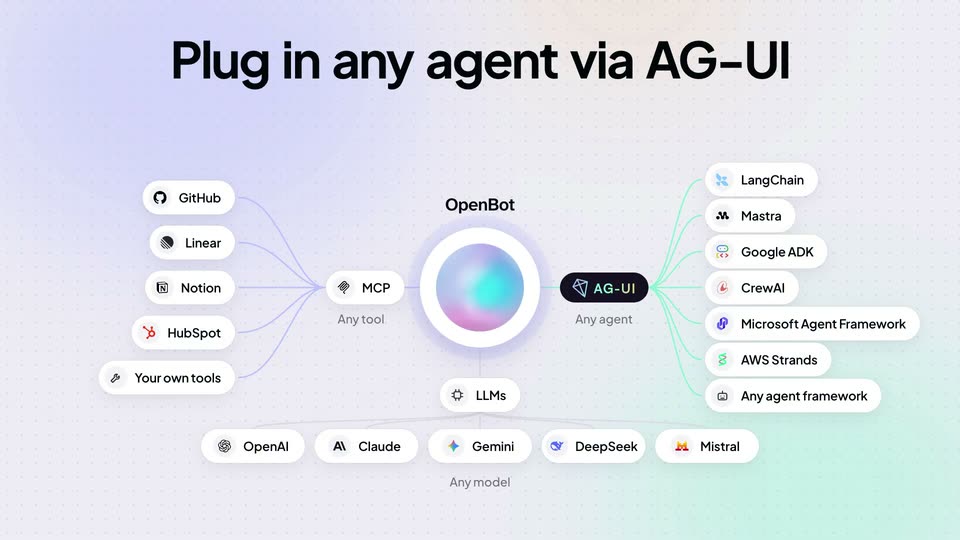
Under the headline “Plug in any agent via AG-UI”, a gradient orb labeled OpenBot anchors a hub-and-spoke diagram on a pale dot-grid background. Pill-shaped brand nodes pop in around it with thin connecting lines as Any tool, Any agent and Any model captions fade in.
On-screen text: “Plug in any agent via AG-UI”
Camera: Static
A hub-and-spoke diagram on a dotted purple-to-green gradient shows a central OpenBot orb linked to tool, agent and model labels. A white rounded card fades in over the center as the diagram blurs.
On-screen text: “Plug in any agent via AG-UI”
Camera: Static
A black 'Self-hostable' headline tops a dark terminal on a light dotted background with purple and mint tints. The terminal types a helm install command. A white OpenBot card slides in from the right, then four platform cards fade in below. The scene blurs and fades out.
On-screen text: “Self-hostable”, “OpenBot”, “Desktop app for Mac and Windows”, “AWS”, “Your VPC · EKS”, “Azure”, “Your VNet · AKS”, “Google Cloud”, “Your VPC · GKE”, “Kubernetes”
Camera: Static
A white audit table card sits centered below a bold black heading. Table rows fill in from the top, one row gains a red outline, then a smaller Slack permissions card slides up into the lower left corner over the dotted background.
On-screen text: “Enterprise-ready”
Camera: Static
A large black headline reads Enterprise-ready above two floating white cards on a lavender-to-green dotted gradient. The top card lists an Audit table of bot actions with decision labels; the lower card shows Slack post-message permissions. The layout holds static.
On-screen text: “Enterprise-ready”
Camera: Static
On a dotted light background, the bold black headline “Continual learning” completes as “learning” fades in. A white record-a-task card on the left gains a matched checkmark and a step list, while a blurred skill card fades in on the right.
On-screen text: “Continual learning”
Camera: Static
On a dotted lavender-to-mint field, the headline sits above two overlapping UI cards. The left card shows a recorded task with a browser window; the right card's badge flips from Waiting on you to Done while a cursor hovers the Create it button.
On-screen text: “Continual learning”
Techniques: Cursor demo
Camera: Static
A light dotted background holds a big black headline that swaps from 'Continual learning' to 'Best-in-class generative UI'. Below, flat white UI cards change from a task-recording view with cursors on buttons to a chat panel with a 'Research Desk' row.
On-screen text: “Continual learning”, “Best-in-class generative UI”, “Including A2UI and MCP Apps”
Techniques: Kinetic type, Cursor demo
Camera: Static
A flat white product card sits on a dotted lavender-to-mint gradient beneath a bold black headline and purple subhead. Inside the card, four horizontal bar charts fill from left to right with purple gradients as green percentage values pop in at the right edge.
On-screen text: “Best-in-class generative UI”, “Including A2UI and MCP Apps”
Camera: Static
A flat white card sits on a dotted purple-to-green gradient beneath a bold black headline. The card's interior swaps from a bookings bar chart to a flight list, then the first flight row highlights in light purple.
On-screen text: “Best-in-class generative UI”, “Including A2UI and MCP Apps”
Camera: Static
A flight-booking card dissolves into two 3D device mockups, a phone and a desktop chat window, on a dotted lavender-to-mint gradient. The bold black headline 'Wherever work happens.' fades in at the top as the earlier purple subtitle fades out.
On-screen text: “Best in class generative UI”, “Including A2UI and MCP Apps”, “Wherever work happens.”
Techniques: 3D mockup
Camera: Static
A flat composition of product screens sits under the headline “Wherever work happens.” A phone, a desktop window and two chat cards slide in from the right, chat bubbles pop into the phone, and a platform caption fades in at the bottom, then the frame holds.
On-screen text: “Wherever work happens.”, “Available now Mac · Windows Early access iOS · Android · Slack · Teams”
Camera: Static
A dotted-grid gradient backdrop holds a settings window mockup on the right, which sharpens into focus as the black headline 'Fully customizable' settles on the left and a gray subline about selectable skins fades in beneath it.
On-screen text: “Fully customizable”, “Or choose a selectable skin, based on Muse, Dots and Duet.”
Techniques: Kinetic type, 3D mockup
Camera: Static
A settings panel with an open skin dropdown transitions into a desktop chat window, which then shrinks to tablet and phone sizes, while a purple skin name swaps below the static headline on the left.
On-screen text: “Fully customizable”, “Or choose a selectable skin, based on Muse, Dots and Duet.”, “OpenDots”, “OpenMuse”, “OpenDuet”
Techniques: Morph
Camera: Static
On a pale lavender-to-mint gradient with a faint dot grid, the headline builds word by word. Three white pills with GitHub star counts pop in, then a caption and a grid of 24 company logos fade up from low opacity and hold.
On-screen text: “From the team behind CopilotKit and AG-UI.”, “GitHub stars”, “CopilotKit 38.5K”, “AG-UI 17.1K”, “OpenBot 10.5K”, “Trusted by the majority of the Fortune 500 in production.”
Techniques: Kinetic type
Camera: Static
On a pale dotted background, an iridescent 3D sphere floats at right while the left-side text block snaps from blur into focus, revealing the open.bot wordmark, two pill buttons, and a license line.
On-screen text: “OpenBot by CopilotKit”, “Get started at”, “open.bot”, “DOWNLOAD FOR MAC OR WINDOWS”, “GET EARLY ACCESS TO OPENBOT FOR BUSINESS”, “Fully open source · MIT license”
Camera: Static