
1:23
Explore
Tsenta (YC S26) Demo | Automatic Job Applier
Tsenta · Feb 2026 · 1:54 · Full motion · AI-annotated
- Length
- 1:54
- Scenes
- 29 · 3.9 s avg
- Product on screen
- 0:08
- Features shown
- 5
- Call to action
- 1:47 · 95%
- Voiceover
- Yes
- Views
- 11K on YouTube
as of November 28, 2026
00:00:00 / 01:54:00
- Length
- 1:54
- Scenes
- 29 · 3.9 s avg
- Product on screen
- 0:08
- Features shown
- 5
- Call to action
- 1:47 · 95%
- Voiceover
- Yes
- Views
- 11K on YouTube
as of November 28, 2026
Tsenta’s 1:54 launch film runs 29 scenes, about 3.9 s each. The product shows up at 0:08 and 5 features are revealed, with social proof. The call to action lands at 1:47 (95% in), over a voiceover. The video states the pain of re-entering application data, names Tsentia, then walks feature by feature through a 3D-tilted mockup that floats over shifting pastel gradients. Pacing is steady at about six cuts per minute, with the camera tilting, zooming and panning across the interface while a dark caption bar types out each voiceover line.
No filming indicatedEstimated needs: 3 capture groups — your screens or recordings · 1 official logo — reused across the film · 23 3D passages — build or supply
Is this your launch? to your site or press kit.
More like this

0:34

SaaS Explainer Video | Loom
Loom · Productivity · Sep 2023
1:00

Introducing Tecto - Governance Platform for AI Employees
TectoAI · B2B · Jul 2025
Similar soundtrack
Films whose music sounds like this one, voice left out
1:28


Compresr (YC W26) launch video
Compresr · Electronic
2:32

RoboParty - 🚀RP1 is officially here. 🌍Putting control of robotics back in develo
RoboParty · Electronic
0:56
Best SaaS Marketing Video | Promotional Brand Video | Supahub
Supahub · Modern electronic dance music with pop and rap elements.
Tsenta (YC S26) Demo | Automatic Job Applier, scene by scene
· 29 scenes as text
01 · Problem · 0:00–0:06
A 3D laptop mockup zooms into a white job-application form. A cursor clicks the First Name field and types, popping a dark autofill menu, then scrolls down to fill the address block. A gray caption bar at the bottom carries the narration.
On-screen text: “Trying to hit 100 applications this week, but stuck re-entering your profile info for the 50th time?”
Techniques: 3D mockup, UI zoom, Cursor demo
Camera: Push in
02 · Problem · 0:06–0:08
A pale lavender field crossed by a soft diagonal shadow band holds the bold violet words Us too. centered, each letter carrying a faint offset shadow. A small rounded bar at the bottom edge widens while the line stays locked in place.
On-screen text: “Us too.”
Camera: Static
03 · Product intro · 0:08–0:10
A bold headline fades in from pale gray as a tilted laptop mockup of the job dashboard rotates to a flat front view, while a phone slides out of frame. A dark pill caption at the bottom types out the voiceover line.
On-screen text: “Time for something new”, “It's time for something new.”
Techniques: 3D mockup, Kinetic type
Camera: Pan
04 · Product intro · 0:10–0:13
A job dashboard window sits in 3D perspective over a pink-and-purple gradient. A cursor hovers a card, then a hand icon pops at center as the screen blurs. A bottom caption types out the line letter by letter.
On-screen text: “Introducing Tsentia.”, “Simply start by clicking Apply on Jobs You Like.”
Techniques: 3D mockup, Cursor demo, Kinetic type
Camera: Push in
05 · Feature reveal · 0:13–0:19
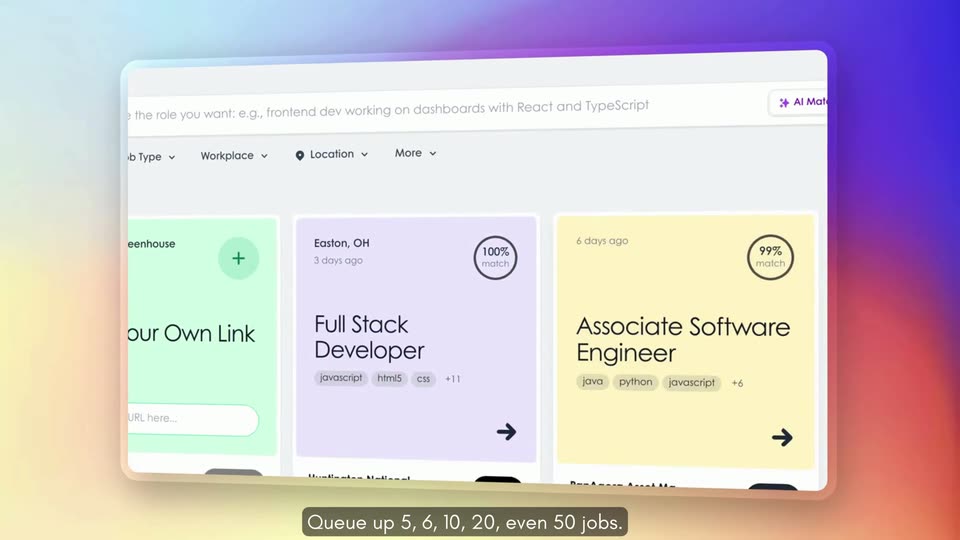
A rounded dashboard mockup tilts in 3D over a soft gradient. A cursor clicks an Apply button on a job card, the frame pulls back to reveal the full Tsentra board, then pushes in on the card grid and pans right as a resume-optimizing sidebar slides in.
On-screen text: “Simply start by clicking Apply on Jobs You Like.”, “Queue up 5, 6, 10, 20, even 50 jobs.”, “We tailor yo”
Techniques: Cursor demo, 3D mockup, UI zoom
Camera: Push in
06 · Feature reveal · 0:19–0:20
A tilted 3D mockup of a resume-optimization dashboard floats over a soft gradient. A hand cursor clicks a company chip, then the view reframes onto the resume document as a caption types out below.
On-screen text: “We tailor your resume for each job.”
Techniques: 3D mockup, Cursor demo, UI zoom
Camera: Pull out
07 · Feature reveal · 0:20–0:22
A tilted 3D window of the resume dashboard floats over a pastel gradient. The view zooms into the skill-match panel as a cursor hovers the buttons, then the panels clear to white, leaving the sidebar and action bar.
On-screen text: “We tailor your resume for each job.”, “Just hit Approve.”
Techniques: 3D mockup, UI zoom, Cursor demo
Camera: Static
08 · Feature reveal · 0:22–0:36
A tilted 3D browser mockup of the Tsenta dashboard floats on a blue-to-orange gradient. A cursor clicks Approve on an application modal, the page advances through a sign-up form, then the frame zooms into the skill-match panel as the cursor hits Approve & Submit. Bottom captions narrate the steps.
On-screen text: “Just hit Approve.”, “Now Tsenta gets to work while you grab a coffee.”, “Let's approve the remaining applications.”, “Or if you trust the AI,”, “flip on Auto-Approve and never see this screen again.”
Techniques: 3D mockup, Cursor demo, Speed ramp, UI zoom
Camera: Push in
09 · Feature reveal · 0:36–0:37
A 3D-tilted interface mockup on a purple gradient shows a company list, a match panel and a resume. A cursor hovers the Approve & Submit button, which flickers to Approving, while a bottom caption reads on Auto-Approve.
On-screen text: “flip on Auto-Approve and never see this screen again.”
Techniques: 3D mockup, Cursor demo
Camera: Static
10 · Feature reveal · 0:37–0:39
A tablet in 3D perspective on a purple gradient displays a three-panel job app: company list, match score, and resume. A cursor moves to the bottom button, which flips from white to orange as the label changes to I've Applied.
Techniques: 3D mockup, Cursor demo
Camera: Static
11 · Feature reveal · 0:39–0:41
An angled mockup of a web application interface displays a resume matching dashboard. A cursor moves from a company list on the left to an approve button in the center column.
Techniques: Cursor demo
Camera: Static
12 · Feature reveal · 0:41–0:42
A rounded app window floats on a soft purple and orange gradient. The main panel switches from a dashboard with a progress bar to a full resume document as a cursor clicks through the view.
Techniques: Cursor demo
Camera: Static
13 · Feature reveal · 0:42–0:42
A tilted resume editor UI floats in 3D perspective over a purple gradient background. A hand cursor drifts from the Download button to the resume body. A white caption types in along the bottom bar.
On-screen text: “You can also directly edit your resume by clicking on it here.”
Techniques: 3D mockup, Cursor demo
Camera: Static
14 · Feature reveal · 0:42–0:47
A resume editor interface floats in 3D on a purple-to-peach gradient. A cursor clicks the Programming Languages line, which becomes a purple-bordered editable field, then the whole panel tilts into a 3D angle, exposing a vertical step list on the left.
On-screen text: “You can also directly edit your resume by clicking on it”
Techniques: Cursor demo, 3D mockup
Camera: Static
15 · Feature reveal · 0:47–0:49
A resume review dashboard floats in 3D perspective against a purple gradient. A cursor glides to the Approve and Submit button and clicks it; the button swaps to a spinner reading Approving.
Techniques: 3D mockup, Cursor demo
Camera: Static
16 · Feature reveal · 0:49–0:50
A tilted 3D mockup of a recruiting app floats over a soft multicolor gradient. The resume preview on the right slides away, the cursor sweeps up the candidate list, and a dark score tooltip pops up beside a highlighted row.
Techniques: 3D mockup, Cursor demo
Camera: Static
17 · Feature reveal · 0:50–0:54
A tilted 3D browser mockup of the Tsenta job application form floats against a soft multicolor gradient. The form scrolls down through address and phone fields while a cursor hovers and a resume upload tooltip appears.
Techniques: 3D mockup, Cursor demo
Camera: Static
18 · Feature reveal · 0:54–1:05
A 3D-tilted browser window on a purple-orange gradient shows the Tsenta app auto-filling job forms. The interface scrolls through BlackRock and LPL Financial pages, then zooms into the sidebar and a question form as a cursor clicks. Bottom captions narrate the steps.
On-screen text: “From here, Tsenta takes over.”, “It fills your work history.”, “Every job, every date, every description.”, “Education, skills, screening questions, all of it.”, “And the stuff that”
Techniques: 3D mockup, UI zoom, Cursor demo
Camera: Push in
19 · Feature reveal · 1:05–1:12
A tilted 3D mockup of a job-application automation app floats over a soft blue-to-orange gradient. The right pane scrolls through application forms while a hand cursor clicks an Add Another button. Subtitle captions run along the bottom.
On-screen text: “And the stuff that breaks other tools?”, “Logins, OTPs, verification emails,”, “handled automatically.”
Techniques: 3D mockup, Cursor demo
Camera: Pull out
20 · Feature reveal · 1:12–1:16
A 3D browser window of the Tsenta app floats on a pastel gradient. The right panel switches from a job form to application-question dropdowns while a hand cursor hovers. The window blurs as a dark caption pill slides up at the bottom.
On-screen text: “But here's the thing.”
Techniques: 3D mockup, Cursor demo
Camera: Push in
21 · Feature reveal · 1:16–1:20
A job-automation dashboard tilts in 3D over a blue-to-orange gradient. A cursor clicks through a company list on the left while the view reframes onto a BlackRock application form on the right. A caption bar sits at the bottom.
On-screen text: “It all happens right here in your browser.”
Techniques: 3D mockup, Cursor demo, UI zoom
Camera: Static
22 · Feature reveal · 1:20–1:25
A tablet mockup tilted in 3D against a gradient background shows the Tsentia app with a candidate list, a submission stepper and a BlackRock form. A cursor hovers the list while the form scrolls from disclosures to the review page; a dark caption pill at the bottom swaps text.
On-screen text: “You see everything.”, “Don't like something? Stop at any time.”
Techniques: 3D mockup, Cursor demo, UI zoom
Camera: Pull out
23 · Feature reveal · 1:25–1:28
A tilted 3D browser window over a pastel gradient shows the Tsenta dashboard: a submission panel beside a job application form with a Congratulations dialog. A cursor glides to a sidebar row and a tooltip pops up. A dark caption bar at the bottom types out the line.
On-screen text: “You have 100 % control.”, “Nothing happens in the background. Nothing hidden.”
Techniques: 3D mockup, Cursor demo
Camera: Push in
24 · Feature reveal · 1:28–1:39
Two overlapping 3D browser windows separate into one, showing the Tsentra app auto-filling a Huntington application form. The form scrolls steadily through dropdowns, checkboxes and an Errors Found panel, ending on the review page. A bottom caption reads “Nothing happens in the background. Nothing hidden.”
On-screen text: “Nothing happens in the background. Nothing hidden.”
Techniques: 3D mockup
Camera: Pull out
25 · Social proof · 1:39–1:40
A 3D laptop mockup rests on a blue-to-orange gradient, its screen showing the Tsenfa dashboard with a Congratulations modal and a green check. The frame eases out to center the device while a cursor hovers over a sidebar entry.
Techniques: 3D mockup
Camera: Static
26 · Social proof · 1:40–1:40
A front-on view of the Tsenta dashboard holds on a blue-to-orange gradient. A cursor rests on a sidebar item, raising a small tooltip, while a Congratulations modal with account fields sits over a dimmed job page.
Camera: Static
27 · Social proof · 1:40–1:47
A tablet mockup in 3D perspective rotates from a tilt to face the camera, showing a Gmail inbox with a highlighted list of job-application emails. A purple headline sits above while a dark caption pill types the voiceover line by line at the bottom.
On-screen text: “And here's the proof.”, “Get started in minutes”, “Six applications received emails.”, “All done while you watched. For”
Techniques: 3D mockup, Kinetic type
Camera: Static
28 · CTA · 1:47–1:51
A centered headline reads “For best in class” in dark bold sans on a pale background, while the last word swaps in violet with a soft fade: automation, then simplicity, then control. A gray rounded caption bar at the bottom carries the voiceover. The frame stays locked off.
On-screen text: “For best in class automation”, “best-in-class automation, simplicity, and control.”, “For best in class simplicity”, “For best in class control”
Techniques: Kinetic type
Camera: Static
29 · Outro · 1:51–1:54
A purple gradient square logo with a white peak and the word Tsenta transition from a muted grey to full color, then the URL tsenta.com fades in below on a light grey background.
On-screen text: “Tsenta”, “tsenta.com”
Camera: Pull out