1:00


Introducing Tecto - Governance Platform for AI Employees
TectoAI · B2B · Jul 2025
Loom · Sep 2023 · 0:34 · Full motion · AI-annotated
studio MotionCue
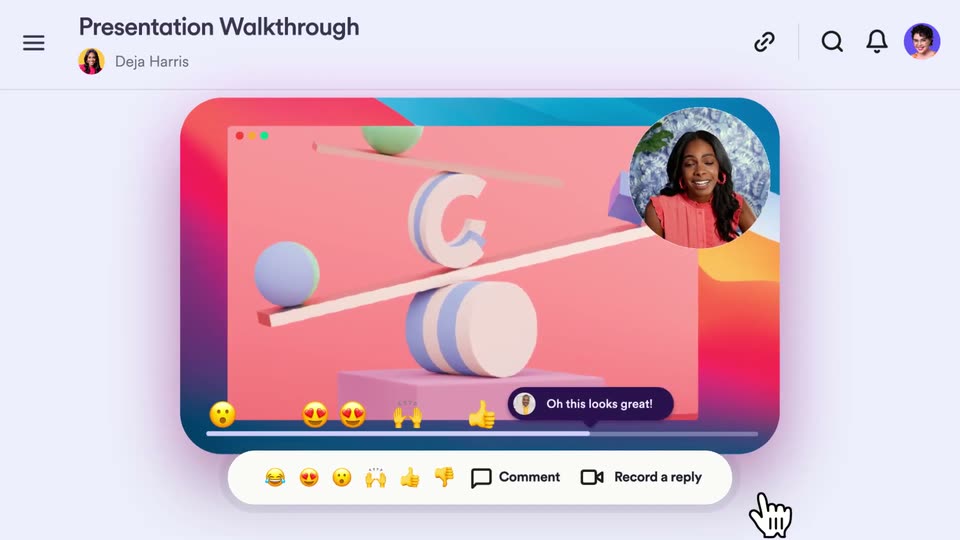
Loom’s 0:34 launch film runs 16 scenes, about 2.1 s each. The product shows up at 0:04 and 3 features are revealed. The call to action lands at 0:25 (75% in), over a voiceover. The video follows a problem-to-payoff arc: a pain point, a logo reveal, three cursor-driven feature demos for recording, sharing and reacting, a schedule payoff, and a verbal sign-up over the closing logo. Its signature moves are smooth zooms into flat UI mockups, a recurring pastel 3D seesaw scene as the demo content, and a circular webcam bubble that keeps a human face in frame.
Is this your launch? to your site or press kit.
TectoAI · B2B · Jul 2025
Creatify AI · Sep 2026
Miro · Productivity · Jul 2024
Films whose music sounds like this one, voice left out
Hanji · Modern electronic, corporate tech
BYT · Upbeat electronic
YouLearn · Upbeat electronic
On a pale lavender field, a white notification card fades in at center. It carries a red alert badge, the header New notification, a round avatar labeled Tamira, and a two-line message that slides in. The frame stays locked.
Camera: Static
A chat window mockup with a dark purple sidebar and two messages floats on a pale background. The view zooms into Addie's message, and a lavender highlight slides in behind the line 'we don't have time to schedule a meeting!'.
Techniques: UI zoom
Camera: Push in
A purple sunburst icon sits centered on a pale lavender field, then the loom wordmark scales in to its right. Four colored pills with white captions, red, orange, green and purple, slide in around the logo while pale rounded shapes fill the background.
On-screen text: “Clear communication”, “Team collaboration”, “Efficient workflows”, “Better engagement”
Camera: Static
A Loom chat window mockup scales up from a small offset position to fill the center on a pale lavender background. The panel shows a #project-launch thread with a video card and play button, while the loom logo and three benefit lines slide in.
On-screen text: “loom”, “Clear communication”, “Team collaboratior”, “Efficient workflows”
Camera: Push in
The Loom interface plays a pastel 3D scene inside a video player, with a camera bubble of a woman in the corner. A hand cursor taps Record a reply, and a dark comment bubble with a mic icon pops in.
Techniques: Cursor demo
Camera: Static
A flat browser mockup titled Demo Review sits on a purple gradient beside a white control panel. A hand cursor taps the orange Start recording button as a circular camera preview of a man appears in the panel and a dark toolbar slides in at the left edge.
Techniques: Cursor demo
Camera: Static
A flat recorder window on a purple gradient shows a 3D seesaw scene; a white hand cursor drags a blue sphere, tilting the beam, while a circular webcam feed of a talking man in a white suit sits top-right. A left toolbar holds a stop button and timer.
Techniques: Cursor demo
Camera: Static
A whiteboard app window sits on a purple gradient with a floating toolbar; a hand cursor taps the top tool, then the view zooms into the full interface, revealing a header, a 3D shape illustration on a pink canvas, and a round video call avatar.
Techniques: Cursor demo, UI zoom
Camera: Pull out
A flat product screen shows a comment thread with a browser mockup of a 3D illustration and a circular talking-head video. A hand cursor clicks the link icon at the top right, and a dark “Link copied!” pill pops up beside it.
On-screen text: “One quick change”
Techniques: Cursor demo
Camera: Static
A flat email compose window fills the frame. A comment bubble with Gordon Whitaker's avatar and a Loom link slides into the message body, then a hand cursor moves down and presses the blue Send button.
On-screen text: “One quick change”
Techniques: Cursor demo
Camera: Static
An email compose screen with a Loom video embed: the purple gradient video card settles into place with a circular webcam bubble, while a hand cursor glides to the blue Send button.
Techniques: Cursor demo
Camera: Static
An email compose window with an embedded Loom video card is shown, then the camera zooms into the video thumbnail, landing on a Demo Review page with a 3D letter illustration and a presenter's face in a corner circle.
Techniques: UI zoom
Camera: Push in
A 3D-angled Loom interface pans right across a purple panel and a pink panel with floating 3D shapes. A hand cursor taps a laughing emoji, then a column of emojis rises from the input bar as the bar slides to reveal the Comment and Record a reply options.
Techniques: 3D mockup, Cursor demo
Camera: Pan
A dark comments list brightens from a dimmed state, revealing a top comment and a nested reply. A glowing highlighted reply button at the bottom holds a purple border that fades as the list settles.
Camera: Static
A light schedule timeline fills the frame as the Today's Schedule title slides in at left. The stacked event blocks vanish, leaving only the 8AM stand-up and the 1PM deadline, which flashes with small colored squares and shifts from orange to green.
On-screen text: “Today's Schedule”
Techniques: Particles
Camera: Static
A violet sunburst mark spins in the center of a pale lavender field, then shrinks and slides left as the dark navy wordmark loom builds in beside it. The lockup settles and holds still.
On-screen text: “loom”
Techniques: Kinetic type
Camera: Static