1:20

Introducing recordings | Turn presentations into expressive video narratives
Pitch · Productivity · Apr 2022
The video opens on a dark purple problem beat, then settles into a cream pastel world where 3D UI mockups tilt into frame under typed headlines. Pacing runs about 14 cuts per minute, alternating interface demos, cartoon character cards and rounded live-action footage with sliding captions.
Pitch · Productivity · Apr 2022
Runway · AI · May 2026
HeyReach · Oct 2026
A game store window with a 'Fun Games' headline and Download button sits center, flanked by a left chat card and a right photo with a Generate button. A blurred controller floats in front. Panels slide in and the chat text updates to a question.
Techniques: 3D mockup
Camera: Pull out
Two children sit on a couch, the girl resting her chin on her hands while the boy holds a tablet, the footage set in a rounded card on a blue-to-purple gradient. A white caption slides in at the bottom, then a second line holds below it.
On-screen text: “Making Judgment Calls”, “Before Anyone Teaches Them How”
Camera: Push in
On a soft cream gradient, a yellow disc grows behind a rounded blue B that expands into the BYT monogram, then the mark shifts left as the words digital and education slide in to its right in thin gray type.
On-screen text: “burnwe”, “digital”, “education”, “Before Anyone Teaches Them How”
Techniques: Morph
Camera: Pull out
A tilted dashboard mockup rotates to face the camera as four circular portrait avatars of children pop in along its top edge, beneath the programme headline.
On-screen text: “A Complete Digital Citizenship Programme”
Techniques: 3D mockup
Camera: Pull out
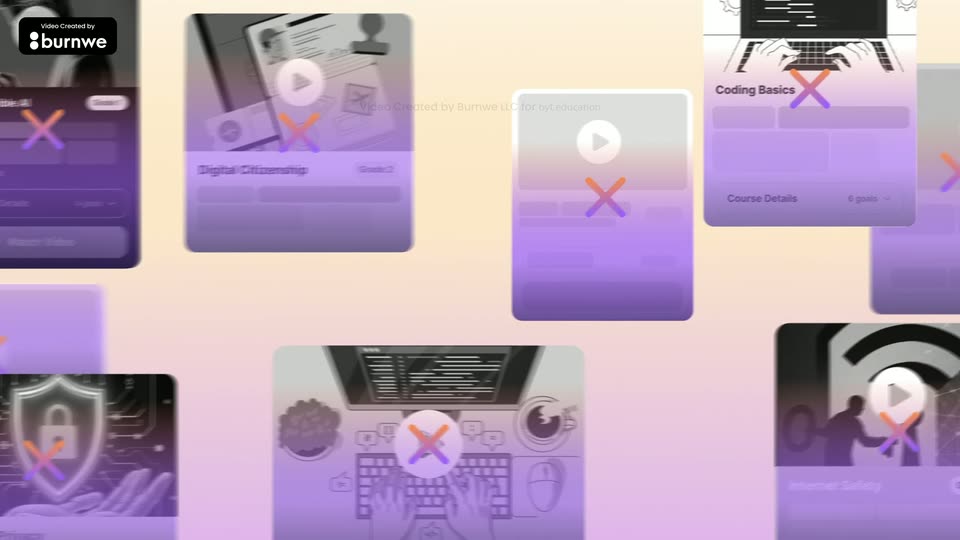
A flat dashboard welcome card fills the frame, then the camera pulls back through it to reveal a wall of course cards, each stamped with an orange-purple cross, sliding with motion blur.
On-screen text: “burnwe”
Techniques: UI zoom, Parallax
Camera: Pull out
A white course card tilts into 3D on the left as a winding white path draws across a pink gradient, linking numbered lesson pills that fade in. A hand cursor hovers the right card, which expands to show locked lessons, while a new card fades in at the bottom.
On-screen text: “Video Created by”, “burnwe”
Techniques: 3D mockup, Cursor demo
Camera: Pull out
A tilted 3D mockup of a learning app on a pink-to-orange gradient. A course card sits left, lesson cards link along a white path in the middle, and a lesson list on the right shows a hand cursor over Robot or Human?. A burnwe credit badge is pinned top-left.
On-screen text: “Video Created by”, “burnwe”
Techniques: 3D mockup, Cursor demo
Camera: Static
A horizontal carousel of five circular cartoon portraits slides left, each character enlarging in the center as a matching name caption swaps in below. A 3D fountain pen and black glasses sit at the lower corners on a pink-to-cream gradient. The title stays fixed at top.
On-screen text: “Meet The BYT Characters”, “Kernel Storyteller”, “Byte Main Guide”, “Circuit Tech Expert”, “Shield Safety Guardian”, “Glitch Problem Solver”
Camera: Pull out
A chat screen on a pale background: a user message fades in with a round avatar, then a dark scam bubble slides up into place. A warning triangle pops onto the bubble's corner, and a teal selection frame draws around it to flag the message.
On-screen text: “Video Created by”, “burnwe”, “Meet The BYT Characters”, “Spark Creative Guide”
Camera: Static
A flat chat screen shows a conversation between a starry planet AI avatar and a child. A hand cursor clicks, the AI's corrected message pops in, then a purple warning triangle appears at the bubble's corner as a teal-to-purple outline highlights it.
On-screen text: “Video Created by”, “burnwe”
Techniques: Cursor demo
Camera: Static
A chat bubble on a light background types out two lines of a message with a blinking cursor. The second line then highlights in blue as a hand cursor selects it, and a green check badge pops in at the top right.
On-screen text: “Video Created by Burnwe LLC for byEducation”
Techniques: Kinetic type, Cursor demo
Camera: Static
A laptop on a wooden desk, flanked by a blue lamp and a potted cactus, displays an education app's learning journey page. The frame zooms into the screen as the page scrolls, and a large Digital Safety headline scales in at the top.
On-screen text: “Video Created by”, “burnwe”, “Digital Safety”
Techniques: Kinetic type, UI zoom
Camera: Static
A 3D laptop mockup on a desk with a blue lamp and potted plants shows an education app. The page scrolls down through course cards as a large black headline changes from Digital Safety to Responsible AI to All Designed Around How Children Learn.
On-screen text: “Digital Safety”, “Responsible AI”, “All Designed Around How Children Learn”
Techniques: Kinetic type, 3D mockup
Camera: Static
Split screen: a girl laughs on the left while a laptop on a desk shows a quiz on the right. A hand cursor clicks an answer option, which fills green as she smiles.
On-screen text: “All Designed Around How Children Learn”
Techniques: Split screen, Cursor demo
Camera: Static
In a sunlit office, a standing woman and a seated man point at a yellow monitor while a colleague smiles beside them. Floating white progress cards for students pop in around the group, their bars filling and percentages counting up.
On-screen text: “burnwe”
Camera: Static
A man and woman on a couch look at a tablet and laugh. A 3D-perspective dashboard mockup floats at the right of the frame, and a second panel slides in behind it, lifting the stack upward.
Techniques: 3D mockup
Camera: Static
A family of three sits on a living room floor at dusk, the mother holding a tablet and an open laptop on the table. Two lines of white text appear centered over the footage, the first line giving way to the second as its words fill in.
On-screen text: “Video Created by burnwe”, “Right Conversations at Home”, “That Move Them Forward”
Techniques: Kinetic type
Camera: Static
A gold all-in-one computer sits on a wooden desk flanked by plants, notebooks and a pen cup. On its screen a pastel sunburst radiates behind navy text that builds word by word into ISTE·CASEL·UNESCO, then a subtitle line appears below. The camera slowly pushes in on the monitor.
On-screen text: “ISTE·CASEL·UNESCO”, “Digital Citizenship Schools Trust”
Techniques: Kinetic type
Camera: Push in
On a cream gradient, the BYT logo scales up, then locks with the digital education wordmark and tagline. The lockup slides up as the headline types in and a student dashboard panel rises from the bottom, capped by a purple CTA button.
On-screen text: “Building Digital Citizens For Tomorrow”, “ISTE·CASEL·UNESCO”, “Digital Citizenship Schools Trust”, “Bring BYT to Your School”, “Start your journey today”
Techniques: Kinetic type, Masking
Camera: Pull out