0:47
Mubert Render: Soundtracks That Fit Your Content Perfectly
Mubert · Sep 2021
Miro · Jul 2024 · 1:01 · Full motion · AI-annotated
Miro’s 1:01 launch film runs 28 scenes, about 2.2 s each. The product shows up at 0:08 and 3 features are revealed. There is no explicit call to action; a voiceover carries the film. The video opens on a flat layered collage of scattered work tools that resolves into the named Intelligent Canvas, then runs three parallel AI beats (summaries and diagrams, sidekicks, workflows) before closing on an integrated board and a logo card. Its signature moves are the pull-back reveals on flat layered collages, the purple sparkle as the AI marker, sliding card carousels, and named cursors drifting across the canvas at a steady 120 bpm.
Is this your launch? to your site or press kit.
Mubert · Sep 2021
Ramp · Finance · Oct 2026
Google · AI · Apr 2018
Films whose music sounds like this one, voice left out
CloudCruise · Modern electronic
Arga Labs · Electronic, Tech Promo
Pitch · Upbeat electronic
A light background holds a scattered collage of work interfaces: a meeting notes document, a project timeline, a task board, and colored sticky notes. The frame opens tight on the notes and timeline, then zooms out to reveal the full layout.
Camera: Pull out
A cluttered collage of overlapping interface panels, including a task board, calendar, Gantt chart, document and contact list, fills the frame and drifts slowly as a flat layered stack.
Camera: Pull out
A flat board of overlapping UI cards, task lists, sticky notes, a pitch deck, a mind map and a document, sits on a pale background. The camera eases out to reveal the full layout as a cursor glides over a yellow note.
Techniques: UI zoom, Cursor demo
Camera: Pull out
A flat collage of overlapping app cards, a summary doc, calendar, task list, timeline and pitch deck, sits on a white field. A mouse cursor drifts from the left document panel toward the orange card on the right.
Techniques: Cursor demo
Camera: Pull out
A collage of pastel app panels, a document, task boards, a timeline and a pitch deck, fans out across a white background as the camera pulls back to the full layout.
Techniques: Parallax
Camera: Pull out
A black cursor sits at center over ghosted, blurred UI panels, a form and a list, while thin radial lines burst outward. The background shifts from white to a soft pink-purple gradient.
Techniques: Cursor demo
Camera: Static
A Miro canvas fills the frame on a pale pink backdrop. A cursor drags a thin selection box into a wide rectangle, and the words 'intelligent canvas' materialize inside it in gray and blue type.
Techniques: Cursor demo
Camera: Static
A Miro whiteboard opens on a selected text box reading 'Intelligent Canvas' in bold gradient type, the cursor resting at its corner. The view then zooms out to reveal a full sprint board with people and story-points panels and a context menu on the left.
Techniques: Cursor demo, UI zoom
Camera: Pull out
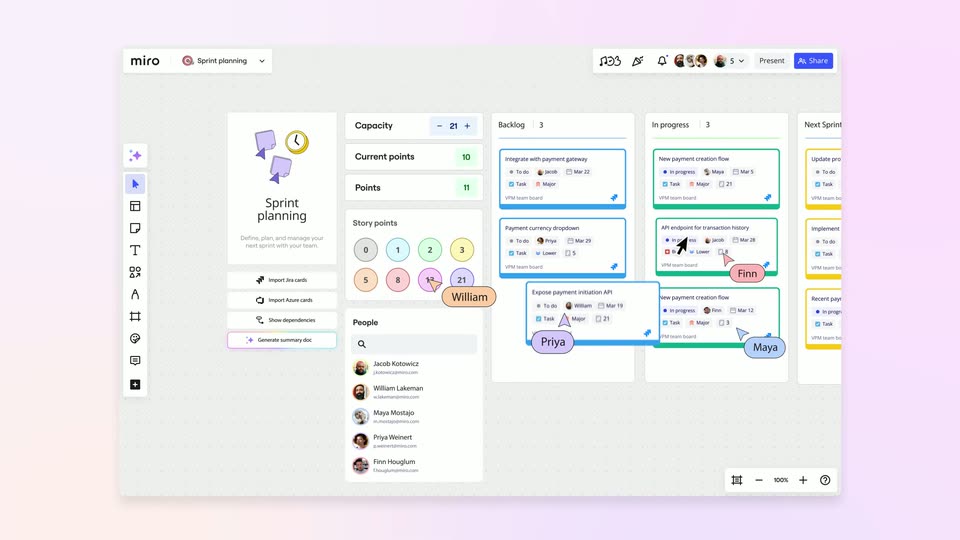
A Miro sprint-planning board fills the frame. A cursor drags colored name tags, Finn, Maya, William and Priya, from the people list onto task cards in the Backlog and In progress columns, then the cards shuffle. The view zooms in with a motion blur.
Techniques: Cursor demo, UI zoom
Camera: Push in
A white pill button with a thin pink-to-blue gradient border and a purple four-point sparkle icon sits on a soft pastel gradient. The button starts large and cropped at the left edge, then scales down to a small centered size, carrying the dark gray label inside it.
Camera: Static
A black cursor glides to a white pill button labeled “Generate summary doc” on a pastel gradient, then the frame pulls back to reveal the button resting on a tilted document mockup with purple placeholder lines.
Techniques: Cursor demo, UI zoom, 3D mockup
Camera: Static
A close-up of a Sprint Planning Summary document pulls back to reveal a Miro whiteboard. The document sits as a card on the left, while a template panel on the right shows a flowchart, story point circles, and a people list.
Techniques: UI zoom
Camera: Pull out
A vertical white strip scrolls down against a soft gradient background, revealing a sequence of black line icons and a blue square with a cursor.
Camera: Static
A black cursor glides to a white rounded card holding a purple sparkle icon on a soft blue-to-pink gradient. The card fades as the cursor overlaps it, then the sparkle scales up and blurs at the center.
Techniques: Cursor demo
Camera: Static
A white Miro AI panel with a pink-to-blue gradient border floats tilted in 3D, then rotates to face the camera flat. The Flowchart pill is highlighted in purple and a prompt is typed into the text field below.
Techniques: 3D mockup
Camera: Push in
A flowchart of colored nodes and arrows assembles on a dotted grid, then the view zooms into the top toolbar where collaborator avatars, a counter and a Present button slide in.
Techniques: UI zoom
Camera: Push in
A white toolbar with icons, avatars and a Present button sits on a dotted light-gray canvas. A pill badge with a rainbow gradient outline and a sparkle icon fades in, scaling up as a blue arrow points to it, then the camera zooms in on the badge.
Techniques: UI zoom
Camera: Static
A collaborative whiteboard with yellow, blue and green sticky notes is shown close up, then the view zooms out to reveal three columns and several named cursors. A sparkle icon label reads Product Leader and rescales as the board reframes.
Techniques: UI zoom
Camera: Pull out
Yellow sticky notes with audience labels fill a whiteboard canvas. The view pans down, following a Product Leader tag as a cursor drops a sparkle reaction badge on the Small business owners note.
Techniques: Cursor demo
Camera: Push in
A flat row of persona cards slides left across a white background. A yellow card labeled Tech-savvy users exits the left edge while a white comment card titled Product Leader, with a sparkle avatar and 1m ago timestamp, drifts from center to the left, a black cursor resting on its corner. A green card with a right arrow enters from the right.
Camera: Push in
A dotted whiteboard canvas holds green and purple sticky notes with feature text. The view pans right and zooms into the purple note grid under the Suggest more solutions heading. A Product Leader label with a cursor arrow rests at the lower right.
On-screen text: “Research synthesis”
Techniques: UI zoom, Kinetic type
Camera: Push in
A single white card with a sparkle icon and colored quadrant squares, labeled Research synthesis, scales in on a pale lavender gradient. It gives way to a row of template cards (grid, flowchart, roadmap) sliding left, each carrying a rainbow-bordered pill label and a black cursor arrow.
On-screen text: “Research synthesis”, “Sprint planning”, “Product brief brainstorm”, “Roadmapping”, “Customer journey map”, “Product brief”
Techniques: Cursor demo
Camera: Pull out
A row of flat feature cards slides left across a soft blue-to-pink gradient. Each card holds a stylized mock, color grids or gantt bars, with a labeled pill below. A large black arrow and small hand-cursor icons rest on the cards.
On-screen text: “Customer journey map”, “Roadmapping”, “Product brief brainstorm”, “PI planning”
Camera: Pan
A locked-off shot of a horizontal strip of white UI cards sliding right to left over a pale lavender gradient. Each card shows abstract colored list bars, a purple sparkle icon and a black arrow cursor, with pill labels reading Sprint planning and Research synthesis beneath.
On-screen text: “Sprint planning”, “Research synthesis”
Camera: Pan
A horizontal carousel of white feature cards slides right across a soft pastel gradient, each card pairing a pastel interface illustration with a rainbow-bordered label pill. A black cursor arrow with a white outline drifts along between the cards.
On-screen text: “Sprint planning”, “Research synthesis”, “I planning”
Camera: Pan
A Miro sprint-planning board assembles from a blur, kanban columns and cards sliding into place. Five named cursors drift over the canvas, confetti pops, and dashed lines connect the tasks.
Techniques: Cursor demo, Particles
Camera: Pull out
A flat task-board card with colored cards and a dotted line shrinks away on a yellow field, leaving the black Miro app icon centered. The lowercase word “miro” appears to its right while thin curved lines trace around the mark.
On-screen text: “miro”
Camera: Static
The Miro logo, a black rounded square with three yellow chevrons beside the lowercase wordmark, sits centered on a flat yellow field and holds still.
On-screen text: “miro”
Camera: Static