0:57
ObsessionDB: The Data Warehouse Built for AI Agents
ObsessionDB · B2B · Oct 2026
CloudCruise · Jun 2026 · 1:41 · Full motion · AI-annotated
CloudCruise’s 1:41 launch film runs 28 scenes, about 3.6 s each. The product shows up at 0:25 and 2 features are revealed, with social proof. The call to action lands at 1:33 (92% in), over a voiceover. A clean blue-and-white launch film built on soft gradients, frosted-glass UI cards and one recurring 3D sphere, paced at a slow 84 bpm with long camera pushes and zooms rather than hard cuts. The structure is a contradiction hook, a pain montage, a logo sting, two feature demos (conversational builder, then self-healing), a proof block and a single closing card; the signature moves are word-by-word headline builds, the comparison-card assembly, and the wall-of-browser-windows grid that snaps, bl
Is this your launch? to your site or press kit.
ObsessionDB · B2B · Oct 2026
Elefta · Sep 2026
Agency Tool Company · Industrials · Jul 2026
Films whose music sounds like this one, voice left out
Paloma · Modern electronic
Pitch · Upbeat electronic
Leeroo · Electronic
A soft blue gradient holds one line of text that scrolls right to left, with 'browser' and 'choose' in bold black. The line gives way to two glowing white cards, AI Agents and RPA, each listing type, set up speed and reliability, with a cursor at the bottom.
On-screen text: “Current healthcare browser automation tools make you choose”
Techniques: Kinetic type
Camera: Static
Two comparison cards sit side by side on white. The left card, ringed by a blue glow, shows a neural-network circle and an AI Agents spec list with a nearly full blue speed bar and a short red reliability bar. The right RPA card is dimmed and empty. A black cursor drifts near the left card's bars.
On-screen text: “AI Agents”, “Type”, “Pure AI Browser Agent”, “Set up speed”, “Reliability”, “RPA”, “Type”, “Traditional RPA”, “Set up speed”, “Reliability”
Techniques: Cursor demo
Camera: Static
Two flat comparison cards, AI Agents and RPA, sit on a pale background with a soft blue glow. They slide apart and blur as a third card, CloudCruise, assembles in the center, its rows and bars animating in.
On-screen text: “AI Agents”, “Type”, “Pure AI Browser Agent”, “Set up speed”, “Reliability”, “RPA”, “Traditional RPA”, “CloudCruise”, “Name”
Camera: Static
Three white comparison cards float on a plain white field, the center card in sharp focus with a glowing blue edge and a 3D three-sphere logo above the title Cloud Cruise, while the AI Agents and RPA cards sit blurred at the sides. A black cursor rests on the Reliability bar as the whole group drifts slowly left.
Techniques: 3D mockup
Camera: Push in
A white calendar card with a Wed to Sat grid scales in on a soft blue gradient, its columns filling with gray and blue meeting blocks. The view then zooms in on the Sat column, where the Birthday Party block turns vivid blue.
Techniques: UI zoom
Camera: Push in
A light blue grid of app cards fills the frame, a calendar on the left with a blue Birthday Party block and a notification card on the right. The camera zooms in on the notification card, pushing the calendar off the left edge.
Techniques: UI zoom
Camera: Push in
A grid of soft blue UI cards fills the frame: a weekly calendar with event blocks, an email alert, and a phone card with a Slide to answer pill. The camera pans and zooms across the layout, settling on the incoming call card.
Techniques: UI zoom
Camera: Pan
A slow zoom out reveals a grid of four app panels: a calendar with events, a chat showing an urgent alert, a missed-call screen with a slide bar, and a chat where a blue reply bubble types in.
Techniques: UI zoom
Camera: Static
Four frosted-glass UI cards slide in from the left and settle into a 2x2 grid on a soft blue gradient. They show a weekly calendar, a client chat with an urgent alert, a slide-to-answer call screen, and a chat reply button.
Techniques: Split screen
Camera: Static
A soft blue 3D sphere with a blue ring bobs on a white background while the CloudCruise logo and tagline scale in at center. The lockup fades out, the headline “Building automations is simple” appears word by word, then a cut reveals the product UI with a browser login page.
On-screen text: “CloudCruise”, “Browser agents for mission-critical healthcare workflows”, “Building automations is simple”
Techniques: Kinetic type
Camera: Static
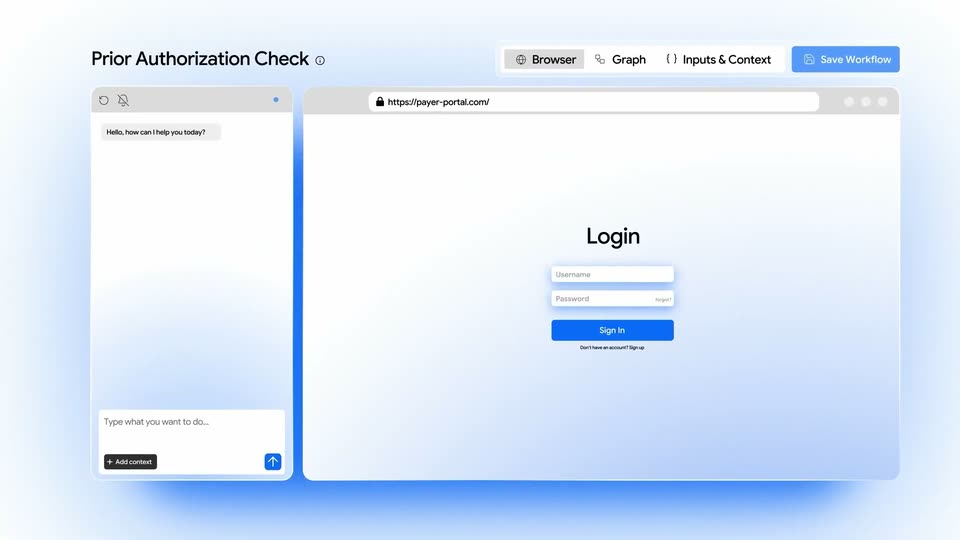
A flat workflow screen titled Prior Authorization Check holds a chat panel on the left and a browser mockup on the right showing a payer portal Login form. The composition sits on a soft blue gradient and slowly pushes in, settling on the login window while the voiceover explains the automation.
Camera: Push in
A locked-off close-up of a white input card on a blurred blue background. “Login to the website.” types out letter by letter, then the field shows the placeholder “Type what you want to do...” while a black cursor glides to the blue up-arrow button and clicks it.
Techniques: Kinetic type, Cursor demo
Camera: Static
A flat product UI pulls back from a chat card to a two-panel layout: a workflow chat on the left, a browser login on the right. Steps and typed credentials fill in as the form submits, then the view zooms into the input box and a cursor clicks the send button.
Techniques: UI zoom, Cursor demo
Camera: Pull out
A workflow builder interface settles into place: the left chat panel fades and scales in under the title “Prior Authorization Check” while the browser window on the right zooms out to full size. The modal input types “AWAPOW” as the step list gains a new “Enter Prior Authorization number” row.
Techniques: UI zoom
Camera: Pull out
A workflow builder UI shows a step list filling in on the left while a browser preview on the right switches from a login popup to a status card. A cursor clicks the Graph tab, revealing a vertical flowchart, then the view zooms into the step list.
Techniques: Cursor demo, UI zoom
Camera: Push in
A zoomed-in step list scrolls down past login steps and a blue instruction box, then a chat field types a sentence word by word. The view pulls back to the full app window with tabs, node graph, and a cursor by the send button.
Techniques: UI zoom, Cursor demo
Camera: Pull out
A workflow editor screen shows a step list on the left and a vertical node graph on the right. A black cursor rests on a blue button in the left panel while the Check Box node in the graph highlights blue and the graph scrolls down slightly.
Techniques: Cursor demo
Camera: Static
A browser mockup and an Events list sit side by side on a light blue grid. The blue highlight steps down the list while the login form fills in, then a prior-authorization modal pops up and its field types out.
Techniques: Split screen
Camera: Static
A flat browser window and an Events panel sit side by side on a blue grid background. The center dialog changes from an authorization-number form to a status card with skeleton lines, while the final event row is highlighted.
Techniques: Morph
Camera: Static
A light blue grid backdrop holds a browser window with a Prior Authorization status card on the left and an Events checklist panel on the right. The two panels drift gently downward as a soft shadow sits beneath each.
Camera: Pull out
A grid of identical browser windows, each showing a login form, snaps from a scattered overlap into an aligned wall. The forms fill in, then switch to a Logging in spinner and an authorization number prompt. The whole wall whips into a diagonal motion blur.
Techniques: Speed ramp
Camera: Pan
A grid of stylized browser windows on a pale blue backdrop starts out of focus, then racks sharp as the camera pushes in on the central window. It carries a pink border, a Feedback Survey popup, and a red Error Detected label below it.
On-screen text: “Error Detected”
Techniques: UI zoom
Camera: Push in
A browser mockup and an Events panel sit side by side on a pale blue grid. A pink Feedback Survey popup with a red highlight and Pop up detected tag fades out to reveal a Login form, as a Close Pop Up row appears highlighted blue in the list.
Techniques: Split screen
Camera: Static
A wall of browser windows, each showing a login form, animates from a scattered, overlapping layout into aligned rows and columns, a few windows opening a feedback survey modal, over a soft blue gradient. The camera stays locked off.
Camera: Pan
A grid of login and onboarding UI panels sits on a pale blue grid. The camera pulls back from a tight, blurred view to a locked-off wide frame as a CloudCruise notification card slides in at the lower right.
Camera: Pull out
A white-to-blue gradient fills the frame while the headline builds word by word in the center: “CloudCruise powers 10,000+” on the first line, then “browser automations daily” below it, each word fading in with a slight blur before settling.
On-screen text: “CloudCruise powers 10,000+ browser automations daily”
Techniques: Kinetic type
Camera: Static
Six black client logos in two columns sit on a white-to-blue gradient. They blur into focus, hold steady, then fade out.
On-screen text: “wisdom”, “Substrate”, “Charta”, “SUPERDIAL”, “Valerie Health”, “toothy”
Camera: Static
A soft blue sphere, blurred then in focus, holds a centered tagline that builds word by word, then gives way to the CloudCruise logo above a search pill typing cloudcruise.com, with AICPA SOC and HIPAA badges at bottom right.
On-screen text: “Try the first browser agent platform”, “designed for reliability”, “CloudCruise”, “cloudcruise.com”, “AICPA SOC”, “HIPAA”
Techniques: Kinetic type
Camera: Static