1:37
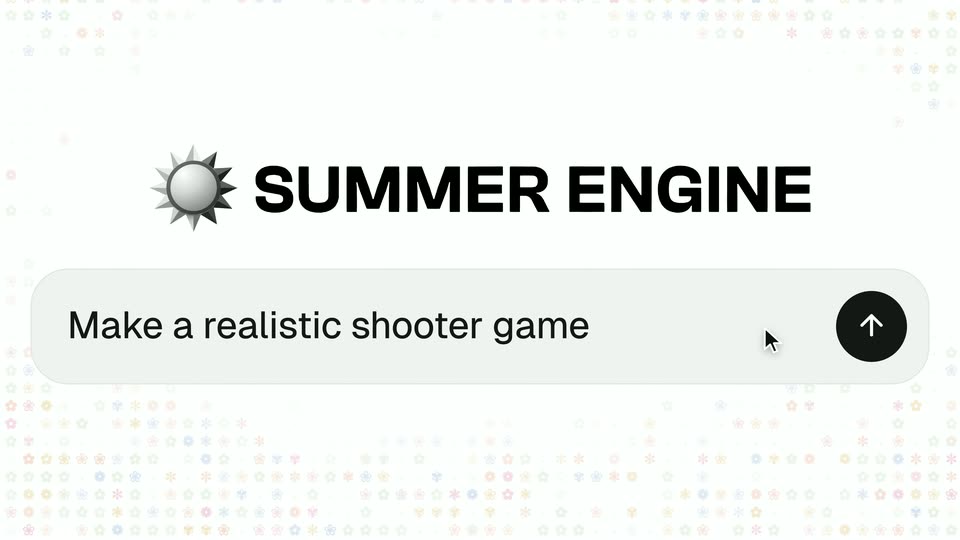
Summer Engine: Make and play games together
Summer Engine · Nov 2026
Arga Labs’s 1:19 launch film runs 42 scenes, about 1.9 s each. The product shows up at 0:22 and 5 features are revealed. There is no explicit call to action; a voiceover carries the film. The video is built as a live-action office vignette that turns into a failed-test gag, then a clean 3D-tilted UI walkthrough, closed by a merged-PR payoff and a static logo card. Its signature moves are oversized serif captions that build word by word over locked-off shots and product screens that float in a slight tilt over a soft blue gradient.
Is this your launch? to your site or press kit.
Summer Engine · Nov 2026
Notion · Productivity · Feb 2026
Films whose music sounds like this one, voice left out
Humain · Modern electronic
CrowdReply · Electronic Dance Music (EDM)
Whoop · Electronic dance music
A woman with a shoulder bag walks into a bright open office and sits at a desk with a monitor and laptop, while a large serif headline builds line by line over the shot. Locked-off camera, shallow depth of field.
On-screen text: “Are you a”, “100X”, “engineer?”
Techniques: Kinetic type
Camera: Static
A red-haired woman in glasses and a cream ribbed turtleneck sits at a desk, raising a hand to her ear as if adjusting an earbud. A blurred monitor edge sits in the foreground. The locked-off shot holds as a caption reads the question.
On-screen text: “Are you a”, “engineer?”, “10”
Camera: Static
A dark macOS terminal window for Claude Code fills the frame, its yellow-bordered welcome box and command lines in light monospace type. The window eases in from a soft blur with a slight horizontal drift, the welcome and tips lines sliding a touch faster than the middle lines.
Camera: Static
A close-up of hands in a gray ribbed sweater types on a silver laptop, the frame blurred by a fast move that settles as the camera swings up to the screen, where a blue terminal prints the Claude Code welcome lines.
Techniques: Speed ramp
Camera: Push in
Overhead view of two hands in a cream knit sweater typing on a silver laptop keyboard. A gray coffee mug sits left, a white cable plugs into the right side. The open screen below mirrors the keys on a wooden table.
Camera: Static
A woman with glasses and a gray ribbed sweater sits at a wooden desk, tucks her hair behind her ear, then drops her hand, eyes on a laptop. A leafy plant and a tan leather chair fill the soft-focus background.
Camera: Static
A physical LG monitor on a desk displays a code editor with React JSX code, set against a blurred office with a wooden ceiling and bright ceiling lights. The shot is static, framed wide enough to include the monitor stand, a wall socket and white cables.
Camera: Static
A hand reaches toward a laptop keyboard in a tight close-up, then the frame opens to a wide shot of a woman at a desk with several monitors and a plant in a bright office.
Camera: Pan
A woman in a striped sweater and glasses sits at a wooden desk, holding a dark mug and glancing at a laptop and monitor that display code. A potted plant frames the left edge and a colleague works at a desk in the background right.
Camera: Static
A red-haired woman in a white turtleneck sits at a desk, speaking, then the view cuts to over her shoulder, framing a monitor and a laptop, both displaying lines of code.
Camera: Static
Over-the-shoulder shot of a woman with long hair and glasses typing on a laptop at a wooden desk. A large monitor behind it shows a code editor on a blue wallpaper. Shallow focus softens her while the screens stay sharp; the camera holds with a slight drift.
Camera: Static
A woman with red hair and glasses in a cream turtleneck sits in an office, looking down then glancing aside. Large dark blue serif words appear one by one across the top, reading Time to test, the newest word carrying a metallic sheen. The camera stays locked off.
On-screen text: “Time to test”
Techniques: Kinetic type
Camera: Static
A purple rounded button reading Start Dev Server sits centered on a light gray field. A black arrow cursor slides in from the lower right and hovers at the button's corner.
On-screen text: “Time to”, “test”
Techniques: Cursor demo
Camera: Static
A red-haired woman in glasses and a cream sweater sits in a softly blurred office, frowning and resting a hand on her chin in a puzzled reaction. The locked-off shot holds on her face while a white caption sits at the bottom.
On-screen text: “Start Dev Server”, “Oh...”
Camera: Static
A light dashboard UI on a blurred blue background as macOS terminal windows multiply on the left and red warning triangles pop into the center in sequence. A small white caption reads Oh...
On-screen text: “Oh...”
Camera: Static
Several macOS terminal windows stacked on a blurred desktop display npm EACCES permission errors. Red neon warning triangles glow over the windows as the panels drift and shift in layered depth.
Techniques: Parallax
Camera: Static
A woman with glasses and long brown hair in a white ribbed sweater sits at a desk, then tilts her head back sharply. The word Bruh holds at the bottom center of the frame.
On-screen text: “Bruh”
Camera: Static
A tired woman in a white sweater is filmed from above at a tilted angle, eyes closed. Large white serif text reads over her, the last words scaling up, then a cut to a macOS notification from Hinson announcing a new tool.
On-screen text: “Don't be a”, “1X”, “1x tester”
Techniques: Kinetic type
Camera: Pan
A tablet interface shows a status bar reading Fri 10 Apr 9:19 PM over a blurred blue background. A frosted notification card with a multicolor dot logo slides into place, displaying the name Hinson and the line From now on we are using Arga!
Camera: Static
A woman in a white sweater leans back in a chair, a striped shirt draped over her face, then sits upright and gestures toward a monitor displaying code windows. A laptop and blue mug rest on the wooden desk beside her.
Camera: Static
A red-haired woman in glasses and a gray turtleneck sits in an office, gazing down at a silver laptop. She blinks and tilts her head slightly as she reads the screen. A potted plant and a mirror fill the blurred background.
Camera: Static
Low-angle shot of a laptop on a wooden desk, a hand types on the blurred keyboard while the screen shows a white App Lock dialog over a mountain wallpaper, a cursor hovers beside it.
Techniques: Cursor demo
Camera: Static
A flat browser window shows a sign-in card over a painterly landscape, a cursor resting on the GitHub button, against a blurred blue backdrop. The frame then zooms into the interface, revealing the Validate Everything page with a left sidebar and three feature cards.
Techniques: Cursor demo, UI zoom
Camera: Static
A white Arga Labs dashboard sits in a slight 3D tilt on a blue gradient, its sidebar, Validate Everything panel and recent-runs list settling into a flat frame as the view zooms in. A large black caption at the bottom reads Arga brings production, then into staging.
On-screen text: “Arga brings production”, “into staging”
Techniques: 3D mockup, UI zoom
Camera: Static
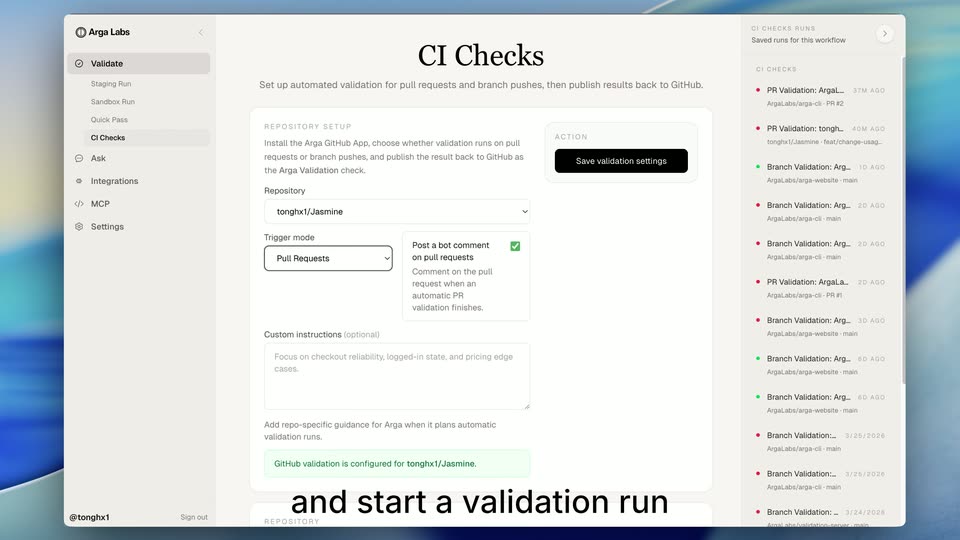
The Arga Labs CI Checks page floats tilted in 3D over a soft blue backdrop. The Trigger mode dropdown opens and selects Pull Requests, the bot comment checkbox ticks, and a green confirmation banner appears. Large serif captions rotate at the bottom.
On-screen text: “Connect your repo”, “pick a pull request”, “or agent workflow”, “and start a validation run”
Techniques: 3D mockup, Kinetic type, Cursor demo
Camera: Static
The Arga Labs Sandbox Run screen fills the frame. A cursor clicks the Stripe, Unstructured and Dropbox service-twin chips, toggling them to black, while large serif caption lines appear at the bottom in sync with the voiceover.
On-screen text: “Arga spins up a sandbox”, “with fully working twins”, “of your real services”
Techniques: Kinetic type, Cursor demo
Camera: Static
A light “Sandbox Run” settings screen fills the frame, showing a repository form and two rows of service twin pills. A cursor rests on a black button that switches to a gray “Deploying to sandbox” state, while a large caption reads across the bottom.
On-screen text: “of your real services”
Techniques: Cursor demo
Camera: Static
The multicolor Slack logo sits in a white circle at the center of a light gray gradient field, with the caption like slack set below in black. The frame holds still for the full second.
On-screen text: “like slack”
Camera: Static
Two white circular cards, one with a multicolor Stripe mark and one with the purple stripe wordmark, slide up off the top as a third card with a dark GitHub mark rises into the lower center. The caption below changes from stripe to GitHub and more.
On-screen text: “stripe”, “GitHub and more”
Camera: Static
A ring of partner logos (Slack, Stripe, GitHub, Discord, Dropbox, Google Drive, Shopify) sits on a light gray background. The camera pushes into the center of the circle as the bottom caption swaps from “GitHub and more” to “So everything runs”.
On-screen text: “GitHub and more”, “So everything runs”
Camera: Pan
A white circle holding two app icons sits at the top of a light gray field. The italic line 'So everything runs' slides into place beneath it, while the large serif words 'exactly like production' fade in one by one across the lower left.
On-screen text: “So everything runs”, “exactly like production”
Techniques: Kinetic type
Camera: Static
On a light gray field, a white circle at the top holds the italic line “So everything runs” above the large serif line “exactly like production”. The Arga Labs logo scales in over the text, fades, and the gray caption “Then test scenarios” appears at the bottom.
On-screen text: “So everything runs”, “exactly like production”, “Arga Labs”, “Then test scenarios”
Techniques: Kinetic type
Camera: Static
A black Arga Labs logo with a circular power mark holds center as lines and two labeled nodes, API and chats, scale in around it. It cuts to a grid of white template cards on a light field, a cursor glides across the cards, captions at the bottom.
On-screen text: “Then test scenarios”, “are auto generated”, “and executed end to end”
Techniques: Cursor demo
Camera: Pull out
A flat product screen shows a grid of white test-scenario cards, then cuts to a pull-request detail view with a red error banner and check rows. A mouse cursor hovers over the cards. A large black caption reads “and executed end to end” along the bottom edge.
On-screen text: “and executed end to end”
Techniques: Cursor demo
Camera: Push in
A dark pull request view lists failing and skipped checks, then a Connect your tools grid appears as a cursor clicks Connect GitHub. White bottom captions cycle through while every action, takes is tracked, connect your stack.
On-screen text: “while every action”, “takes is tracked”, “connect your stack”
Techniques: Cursor demo
Camera: Push in
A light web UI on a blurred blue backdrop. A cursor clicks Connect with OAuth on the Slack card, then Authorize on the Slack permission page; the tools grid returns with Slack connected, then cuts to a validation report. Bottom captions swap line by line.
On-screen text: “connect your stack”, “logs,metrics and workflows”, “so validation reflects”, “how your system actually behaves”, “You get a full validation”
Techniques: Cursor demo
Camera: Static
A light-themed Arga Labs validation report screen scrolls upward through its sections, from What changed and Affected components down to Generated flows and What was validated. Large black serif captions cycle at the bottom in time with the voiceover.
On-screen text: “You get a full validation”, “showing what passed”, “and exactly why it broke”, “before you ship”
Techniques: Kinetic type
Camera: Pan
A woman in a light ribbed sweater walks through a sunlit office, passing a seated colleague and a glowing monitor, then pauses to place a hand on their shoulder. Two large white serif captions appear centered over the soft-focus background.
On-screen text: “Don't let testing”, “be your bottleneck”
Techniques: Kinetic type
Camera: Static
A person in a gray sweater and black pants stands at a wooden desk, holding a brown tote bag and a dark jacket, then lifts the jacket and steps away to the right. A monitor and laptop sit blurred behind, a leather chair in the foreground.
Camera: Static
A blurred office rack-focuses onto a wooden desk holding a monitor and a laptop, both showing app interfaces. A person in a dark jacket walks out of the right edge as the frame sharpens.
Camera: Push in
Close-up of a purple pill badge reading Merged with a branch icon on a dark, curved screen surface. The shot opens soft and small, then zooms in to a sharp hold while partial branch text stays blurred at the right edge.
Techniques: UI zoom
Camera: Push in
A black circular logo and the wordmark Arga Labs sit centered on a plain white background. The frame is locked off and completely static for the full duration, serving as the closing sign-off.
Camera: Static