2:19
Explore
CrowdReply - Today we're introducing Claude for Marketing. The first AI agent tha
CrowdReply · Jul 2026 · 0:53 · AI-annotated
- Length
- 0:53
- Scenes
- 21 · 2.5 s avg
- Product on screen
- 0:12
- Call to action
- 0:46 · 87%
- Voiceover
- Yes
00:00:00 / 00:53:01
CrowdReply’s 0:53 launch film runs 21 scenes, about 2.5 s each. The product shows up at 0:12. The call to action lands at 0:46 (87% in), over a voiceover. The video runs a question-to-answer arc: kinetic type for the hook, a 3D dashboard montage for the problem, then a long chat-UI demo as the payoff, closing on a URL and logo. Signature moves are blur-to-focus text reveals, tilted 3D card stacks, and a recurring glowing orb that carries the agent identity.
No filming indicatedEstimated needs: 2 capture groups — your screens or recordings · 1 official logo — reused across the film · 3 graphic passages — draw or supply · 3 3D passages — build or supply
Is this your launch? to your site or press kit.
More like this

CrowdReply - Today we're introducing Claude for Marketing. The first AI agent tha, scene by scene
· 21 scenes as text
01 · Hook · 0:00–0:00
A cream field holds the charcoal headline, which starts small and blurred at center, then scales up while the line slides left, revealing each word in turn until the phrase exits the frame.
On-screen text: “What if getting found in AI Answers?”
Techniques: Kinetic type
Camera: Static
02 · Hook · 0:00–0:03
A line of black text scrolls left across a cream background, reading What if getting found in AI answers, the word AI in coral serif. A 3D magnifying glass drops into the center, magnifies the AI, then slides left to reveal it again.
On-screen text: “What if getting found in AI answers”
Techniques: Kinetic type, Masking
Camera: Static
03 · Hook · 0:03–0:04
A cream background holds a black lowercase line that snaps into focus, a magnifying glass hovering over the middle of the first phrase before the text resolves to the closing question.
On-screen text: “found in AI answers”, “was as simple as asking?”
Techniques: Kinetic type
Camera: Static
04 · Problem · 0:04–0:05
A black headline, “was as simple as asking?”, sits centered on a cream background, then scales up as a white UI card labeled “LLM Visibility Score &” blurs in from the center.
On-screen text: “was as simple as asking?”
Techniques: Kinetic type
Camera: Static
05 · Problem · 0:05–0:06
Three white dashboard cards slide in and settle into a tilted 3D stack on a cream background. Line charts draw across the panels and a sentiment gauge fills with a green arc.
Techniques: 3D mockup
Camera: Static
06 · Problem · 0:06–0:09
A close-up of dashboard cards, a line chart and a sentiment gauge, pulls back to reveal a full browser window holding the complete analytics dashboard, with cards and a data table settling into a grid.
Techniques: UI zoom
Camera: Pull out
07 · Problem · 0:09–0:12
A tilted 3D browser window displays a brand dashboard of stat cards. The view zooms onto the 'Top sources citing Monday.com' card while the rest blurs, and a cursor moves to the red close button, ringed in pink.
Techniques: 3D mockup, UI zoom, Cursor demo
Camera: Push in
08 · Product intro · 0:12–0:13
A soft gradient washes from pink to blue to peach behind centered dark-gray words. 'Now', 'You' and 'Just' fade and scale into place one after another, a thin blue vertical bar flashing through the final word.
On-screen text: “Now”, “You”, “Just”
Techniques: Kinetic type
Camera: Static
09 · Product intro · 0:13–0:14
On a white field with a soft pink glow at the lower left, the centered black word 'Just' swaps to 'Ask' as a circular send button and a cursor slide in beside it.
On-screen text: “Just”, “Ask”
Techniques: Kinetic type, Cursor demo
Camera: Static
10 · Product intro · 0:14–0:16
On a dark gradient with soft blue and red glows, the word Ask appears beside a rounded send button as a cursor hovers over it. The pair is replaced by a small glowing icon of three stacked bars, blue, orange and white, which shrinks and fades out.
On-screen text: “Ask”
Techniques: Kinetic type, Cursor demo
Camera: Static
11 · Product intro · 0:16–0:18
On a soft white gradient background, a dark circular badge with a glowing pink bar sits at center. The words Introducing and SuperAgent fade in above and below it, rendered in a blue-to-orange gradient, sharpening from a soft blur.
On-screen text: “Introducing”, “SuperAgent”
Camera: Static
12 · Product intro · 0:18–0:19
A dark glossy orb with a pink core sits on a soft blue-to-peach gradient, a cream speech bubble reading “How may i help you?” tied to it by a dashed line. The oversized gradient headline “Introducing SuperAgent” starts defocused behind and dissolves as the orb sharpens.
On-screen text: “Introducing”, “SuperAgent”, “How may i help you?”
Camera: Push in
13 · Demo · 0:19–0:20
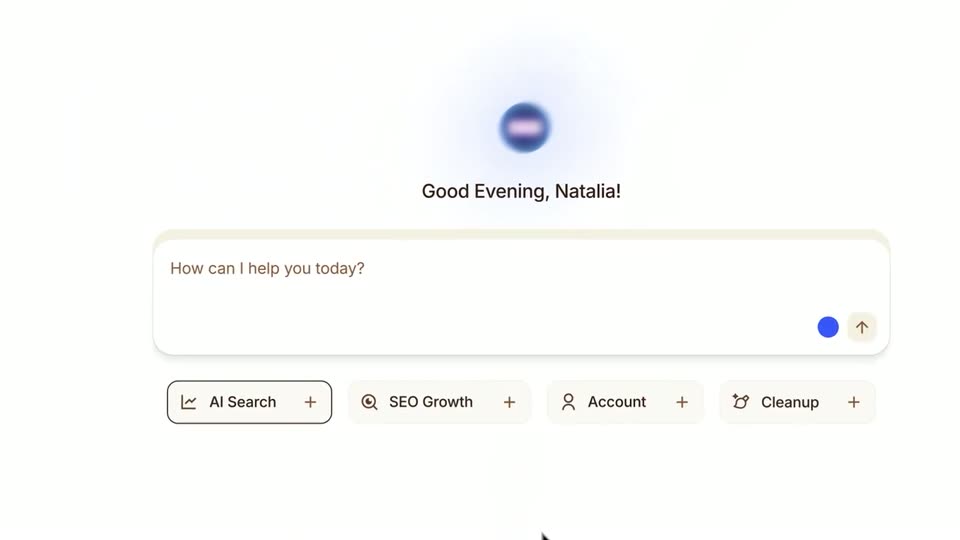
A white interface shows a gradient orb above the greeting Good Evening, Natalia! and a search field with placeholder text, plus a row of labeled chips. The layout zooms in and centers as the orb drifts up and fades, and a cursor appears at the bottom.
Techniques: UI zoom
Camera: Pan
14 · Demo · 0:20–0:29
A white chat interface: a cursor hovers over the input bar as a question types itself in, then the view switches to the thread where the AI orb types an analysis line. The screen scrolls up to three beige cards that fill in with gap findings.
Techniques: Cursor demo, Kinetic type, UI zoom
Camera: Pan
15 · Demo · 0:29–0:30
Three white cards with numbered headings sit across the top of a light chat interface, their body text resolving from blur to sharp. Below, the line “Want me to fix these gaps for you?” fades in, then a small rounded button labeled “Yess pls” slides in from the right.
Camera: Static
16 · Demo · 0:30–0:39
A white chat screen scrolls down past a “Yes pls” button and an “Initiating Actions …” heading with a glowing purple orb. Four cards load from gradient skeleton bars into checkmarked text, then the view settles on a line where a percentage counts up to 70% behind a ghosted numeral.
Techniques: Kinetic type
Camera: Push in
17 · Other · 0:39–0:42
Three rounded white cards with flat illustrations scale in over a soft blue-purple gradient: a bar chart, a red credit card with a plus button, and red and blue sparkles. Each card settles into a staggered layout with a gray caption beneath it.
On-screen text: “See your brand visibility scores at a glance.”, “Check and top up your credit balance.”, “Discover prompts that boost LLM visibility.”
Techniques: Parallax
Camera: Static
18 · Other · 0:42–0:43
A soft pink-and-white gradient fills the frame as the centered phrase builds word by word, 'Your AI' fading in light gray before the full line 'Your AI visibility' settles in dark gray.
On-screen text: “Your AI visibility”
Techniques: Kinetic type
Camera: Static
19 · Other · 0:43–0:46
Prompt input bars with gradient borders float at slight angles on a plain light background. The centered headline “One prompt away” blurs and fades out as a dark blue orb with a glowing pink core materializes in the middle, while the bars drift apart.
On-screen text: “One prompt away”, “See your brand visibility”
Techniques: 3D mockup, Parallax
Camera: Push in
20 · CTA · 0:46–0:48
A dark gradient background, blue on the left and warm orange on the right, holds a thin rounded outline pill centered in frame. The pill carries the white text crowdreply.io/agent and scales up from a small glowing state to its final size as a soft bloom behind it fades out.
On-screen text: “crowdreply.io/agent”
Camera: Static
21 · Outro · 0:48–0:53
On a white field, the centered line “Try it free” gives way to a dark rounded app icon with blue, red and white bars, paired with the words “Only on.” The line resolves into the bold CrowdReply wordmark, and the lockup holds static for the rest of the scene.
On-screen text: “Try it free”, “Only on”, “CrowdReply”, “crowdreply.io/agent”
Camera: Static