0:45

The new Descript – made for professionals
Descript · Design · Nov 2022
Arcade’s 1:48 launch film runs 46 scenes, about 2.4 s each. The product shows up at 0:04 and 6 features are revealed. There is no explicit call to action; a voiceover carries the film. The video alternates locked-off talking-head shots (CEO in a red blazer, CTO behind a laptop) with fast-cut UI demos on a lime-yellow gradient, using a single recurring story (Peter's weekly launch video) to carry every feature. Pacing is quick at about 107 bpm with roughly 16 cuts a minute, and the signature moves are 3D-tilted floating interface cards, blur-to-focus headline reveals, and small pastel gradient pills that label each capability.
Is this your launch? to your site or press kit.
Descript · Design · Nov 2022
SKUVE · Sep 2026
Anything · Sep 2025
Films whose music sounds like this one, voice left out
Razorpay · Corporate promotional music
Capto · Corporate tech launch video with a modern, optimistic tone
STASIS · Electronic, Cinematic
A woman in a red blazer speaks to camera and gestures with both hands, framed mid-torso against wooden shelves and a green curtain. A white lower-third name caption fades in at the lower left.
On-screen text: “Caroline Clark”, “Co-Founder & CEO Arcade”
Camera: Static
A woman in a red blazer stands center frame in an office, gesturing with both hands as she speaks. Wooden shelves sit behind her left, green curtains behind her right. A lower-third name caption and bottom subtitles appear over the locked-off shot.
On-screen text: “Caroline Clark”, “Co-Founder & CEO Arcade”, “scary good at video”, “with each update.”
Camera: Static
A woman in a red blazer talks to camera in an office with wooden shelving. A large white 40,000 builds in on the left beside Teams and a yellow-highlighted and counting, then the stat swaps to the white Arcade logo and wordmark. Subtitles run along the bottom.
On-screen text: “So why do 40,000 teams”, “Teams”, “and counting”, “40,000”, “use Arcade?”, “Arcade”
Techniques: Kinetic type
Camera: Static
A woman in a red blazer stands in a locked-off medium shot before wooden shelves and green curtains, gesturing with open hands as she speaks, then smiling. A white subtitle line sits at the bottom of the frame.
On-screen text: “use Arcade?”, “Let me show you why.”
Camera: Static
A light chat thread scrolls up, revealing earlier messages above Peter's question. A cursor hovers over his name while the bottom caption switches from “This is Peter.” to “He runs marketing.”
On-screen text: “This is Peter.”, “He runs marketing”, “Let me show you why.”
Techniques: Cursor demo
Camera: Pull out
A chat-app contact profile shows a man in a green cap, the name Peter, the title Head of Marketing at Orvane, an Active status and action buttons, with a blurred chat list to the left. Subtitles run along the bottom, then the view blurs and pulls back.
On-screen text: “He runs marketing”, “at a software company.”, “They ship a feature”
Camera: Pull out
A chat thread scrolls up through weekly messages with date dividers, then locks off on Peter asking what is shipping and Sam Okafor asking for a launch video. Small captions swap in at the bottom center.
On-screen text: “They ship a feature”, “every week”, “he needs a launch video.”, “This week: dark mode.”
Camera: Push in
Close-up of a chat interface with shallow depth of field: the words dark mode sit sharp in black while surrounding messages and a green avatar blur out. A gray caption bar reading This week: dark mode. scales in at the bottom.
On-screen text: “This week: dark mode.”, “This is what happened”
Camera: Static
A dark export interface with a file list on the left and a video player in the center; the view zooms into the player, which holds a light card showing “Good work doesn't” and a “Made with Claude” badge. A white caption at the bottom reads “This is what happened”.
On-screen text: “This is what happened”, “when he tried”
Techniques: UI zoom
Camera: Static
A cream card holds the black headline “Good work doesn't stop at sunset.” under a small NEW · FEATURE label; the words sharpen in, then a 3D-tilted Planner board interface rises from below in front of the text, which blurs behind it.
On-screen text: “Made with Claude”, “NEW · FEATURE”, “Good work doesn't”, “to use Claude for it.”, “stop at sunset.”
Techniques: Kinetic type, 3D mockup
Camera: Static
A project board zooms into its workload chart as a dark magnifier lens grows over it. The lens wipes to a beige card where the headline sits above three keycaps: command, up arrow, and L.
On-screen text: “Made with Claude”, “Here's a problem.”, “Switch anytime.”
Techniques: UI zoom, Masking
Camera: Push in
Dark screen with a soft green glow at the left edge and the white heading 'Switch anytime.' above three rounded icon tiles: the Claude mark, an upload arrow, and the letter L. The teal fill on the L tile fades out as the caption changes from 'Here's a problem.' to 'That's not his product.'
On-screen text: “Made with Claude”, “Switch anytime.”, “Here's a problem.”, “That's not his product.”
Camera: Static
On a near-black background, the old line 'Switch anytime.' blurs out while a three-square icon and the heading 'Dark mode' sharpen into focus, then two gray sublines fade in below. A 'Made with Claude' badge sits top-left and a subtitle reads at the bottom.
On-screen text: “Made with Claude”, “Switch anytime.”, “That's not his product.”, “Dark mode”, “Now live for everyone.”, “Available on every plan”
Techniques: Kinetic type
Camera: Static
A woman in a red blazer stands in a wood-shelved room, speaking and gesturing to camera. A dark rounded input bar with a white cursor icon and a Sonnet 5.5 label slides in across the lower third as captions track her words at the bottom.
On-screen text: “There's no product”, “recording,”, “and it gets”, “most of his branding.”
Camera: Static
A woman in a red blazer stands in an office with wooden shelves, speaking and gesturing. A dark prompt bar overlays her torso, typing out a prompt letter by letter, while a caption sits at the bottom.
On-screen text: “most of his branding.”, “Need a bigger headline?”
Camera: Static
A presenter in a red blazer gestures while speaking in front of wooden shelves; a dark chat panel on the left shows the prompt “Make the headline bigger and bolder” and the assistant’s reply with a question card, scrolling up slightly. White captions run along the bottom.
On-screen text: “That's a new prompt,”, “and a whole new video.”
Techniques: Split screen
Camera: Static
A bespectacled man in a gray sweater speaks to camera from behind a laptop at a wooden desk, bookshelves filling the background in a locked-off frame. A white lower-third caption with his name and title sits in the bottom left.
On-screen text: “Rich Manalang”, “Co-Founder & CTO Arcade”
Camera: Static
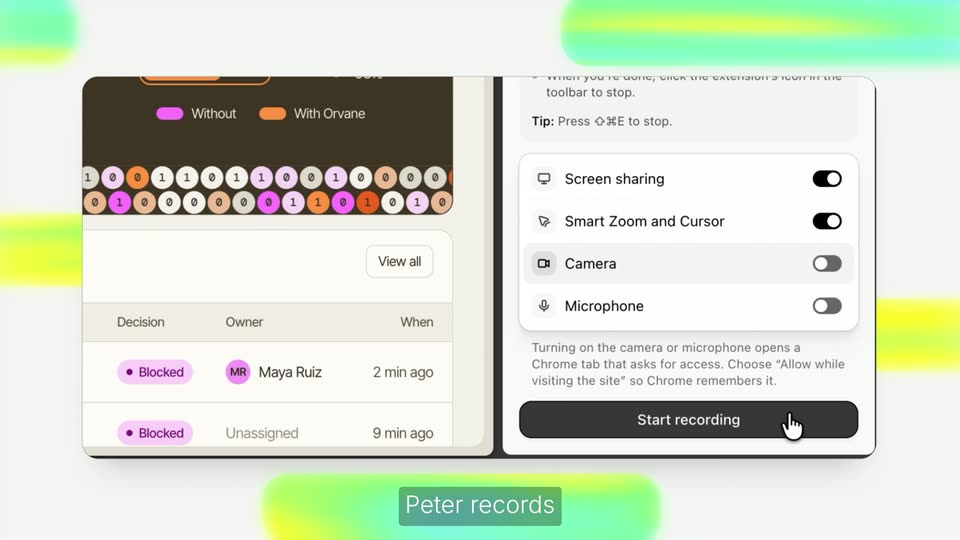
A flat browser dashboard floats on a blurred green and yellow gradient. A cursor clicks a glowing extension icon in the toolbar, and the view reframes onto a panel reading Connecting to Arcade, where the cursor presses Start recording. Bottom captions read To start, then Peter records.
On-screen text: “To start,”, “Peter records”
Techniques: Cursor demo, UI zoom
Camera: Push in
A blurred dashboard interface fills a rounded frame on a light background with green and yellow gradient bars. A countdown ticks from 3 to 1 in the center above a small × button, while a green caption pill at the bottom swaps phrases.
On-screen text: “the new dark mode”, “feature with our”
Camera: Static
A tilted 3D browser window shows the Ovane dashboard in dark mode; a cursor glides over the heatmap and clicks, then the view zooms into the tool-call map and reframes to a light-mode side panel. A green pill caption reads “41 seconds of clicking.”
On-screen text: “feature with our”, “41 seconds of clicking.”
Techniques: 3D mockup, Cursor demo, UI zoom
Camera: Push in
A tilted stack of three floating UI cards sits on white with green and yellow gradient blobs. A cursor taps the right panel as its copy changes, then the view zooms out to a wider dashboard beside a browser window. White captions cycle at the bottom.
On-screen text: “highlights the clicks,”, “and zooms.”, “where it matters.”, “After that,”
Techniques: 3D mockup, Cursor demo, UI zoom
Camera: Pull out
A man with glasses in a gray sweater sits at a wooden desk behind a closed laptop, speaking to camera against a backdrop of bookshelves and a clock. A white subtitle reads “After that,” at the bottom center.
On-screen text: “After that,”
Camera: Static
A white prompt interface with pill buttons. The view zooms into the input field while the prompt is typed, '30 sec' in green, then pans right to a cursor over the black send button. A gray caption below quotes the prompt.
On-screen text: “he prompts one line:”, ““Make a 30 second”, “for dark mode.””
Techniques: UI zoom, Cursor demo
Camera: Pan
A white chat panel on a pastel gradient background. A gray prompt bubble slides up and shrinks, revealing a numbered option list below, while a black cursor hovers over the first choice and an “Arcade asks” pill scales in at the bottom.
On-screen text: “Arcade asks”
Techniques: Cursor demo
Camera: Static
A white agent chat panel framed by a dashed selection box sits on a pastel gradient. The question card inside cycles its options as a cursor hovers over them. A gray caption below swaps phrases with the voiceover, then the frame tightens on the panel.
On-screen text: “Arcade asks”, “two questions,”, “writes the plan,”
Techniques: Kinetic type, Cursor demo, UI zoom
Camera: Static
A soft green-teal glow fills a pale gray field. The line “Develops a strategic plan” with a small dot-grid icon resolves from blur into sharp focus at center, while a caption bar at the bottom switches from “writes the plan,” to “and gets to work.”
On-screen text: “Develops a strategic plan”, “writes the plan,”, “and gets to work.”
Camera: Static
A flat product window sits centered on a white field with a faint color gradient border. The left panel lists prompts and a plan, the right panel's progress counts from 9% to 10%. A gray caption box at the bottom swaps from “and gets to work.” to “And here's the fun part.”
On-screen text: “Develops a strategic plan”, “and gets to work.”, “And here's the fun part.”
Camera: Pull out
A woman in a red blazer stands before a green curtain and wooden bookshelves, gesturing with open hands then clasping them as she addresses the camera. White subtitles track her speech at the bottom. The shot cuts to a blank white frame at the end.
On-screen text: “And here's the fun part.”, “Arcade runs on”, “the best models.”, “So every time”, “the AI gets better,”, “so does your output.”
Camera: Static
A rounded card on white holds the centered headline, then a dashboard interface fades in behind it as the card becomes a windowed view. A gradient pill with a green cube icon and the label rises from the bottom edge.
On-screen text: “Introducing Darkmode”, “Exact Product”
Techniques: Masking
Camera: Static
A 3D tablet mockup of the Orvane dashboard tilts and zooms toward the camera, reframing onto the Overview screen. A cursor moves to the Incidents item, which lights up with a pink ring. A green gradient caption sits below the device.
On-screen text: “Exact Product Colours”
Techniques: 3D mockup, UI zoom, Cursor demo
Camera: Push in
A flat Kestrel dashboard mockup, showing an Incidents list, scrolls down to reveal a dark mode card while a cursor hovers over it. Editor playback controls and feature buttons sit below the frame.
Techniques: Cursor demo
Camera: Static
A video player frame shows a product UI switching from a light preview with a diagonal pink and orange pixel pattern to a dark incidents dashboard, while a dark mode card slides left. Below the player, gradient pill labels fade in one by one.
On-screen text: “Exact Product”, “Colours”, “Logo”, “Voice”, “Captions”
Camera: Pull out
A dark incidents dashboard fills the top of a white video player. Five pastel gradient pills with white labels, Exact Product, Colours, Logo, Voice and Captions, sit in two rows beneath the playback controls. The frame drifts up a few pixels.
On-screen text: “Exact Product”, “Colours”, “Logo”, “Voice”, “Captions”, “Made with Arcade”
Camera: Pan
A dark brown brand-guidelines card settles into the center of a light frame while five glowing green-to-cyan pills drift and reposition around it. A pixel grid of orange, pink and white squares occupies the card's top-right corner.
On-screen text: “Exact Product”, “Colours”, “Logo”, “Voice”, “Captions”
Techniques: 3D mockup
Camera: Pan
A dark brand-guidelines document mockup rests on a white background, its top-right corner a pixel mosaic in orange, pink and purple. A gray caption fades in above it as gradient pills with icons slide into place around the card's edges.
On-screen text: “Extracting Brand Identity”, “Captions”, “Voice”, “Exact Product”, “Colours”, “Logo”
Camera: Static
A bald man in glasses and a gray sweater talks at a laptop in front of a bookshelf; dashed guide lines and two green icon labels, Colors and Logo, slide in at right. The shot cuts to a white UI screen with a phone mockup under the heading Introducing Darkmode.
On-screen text: “He never typed a color,”, “Colors”, “Logo”, “added his logo.”, “And before”, “Peter sees it,”, “Arcade checks”, “its own work.”
Camera: Static
A video editor screen shows a preview with the Introducing Darkmode headline; the cursor clicks it to select, then the frame zooms into the chat input as Make the text bigger is typed. Gray captions narrate each step at the bottom.
On-screen text: “Want a bigger headline?”, “Click it,”, “type “bigger.””, “One thing changes,”
Techniques: Cursor demo, UI zoom
Camera: Push in
A plain off-white frame holds a centered line of gray sans-serif text; “changes” and “moves” are tinted light green. The first half holds, then “nothing else moves” slides in and the line re-centers, while a gray caption pill at the bottom swaps its text.
On-screen text: “One thing changes,”, “One thing changes, nothing else moves”, “nothing else moves.”
Techniques: Kinetic type
Camera: Static
A man with glasses in a gray sweater sits at a desk with an open laptop, bookshelves behind him, speaking as he looks at the screen. A caption reads at the bottom, and a headline line slides in near the end of the shot.
On-screen text: “And finally...”, “One thing changes, nothing else moves”
Camera: Static
A man in a gray sweater sits at a laptop in front of bookshelves. A white export panel slides in on the right; a cursor picks 4K and clicks Export, then the panel fades out. Bottom captions read the voiceover.
On-screen text: “And finally...”, “4K, three formats.”, “No, nothing ships.”, “until Peter says so.”
Techniques: Cursor demo
Camera: Static
A bespectacled man in a gray sweater sits behind a laptop before a bookshelf, then a cut to a woman with short black hair at a desk against a whiteboard. Both face the camera and speak in locked-off close-ups; white subtitles sit at the bottom.
On-screen text: “until Peter says so.”, “Next Friday:”, “the new dashboard.”
Camera: Static
A man in glasses and a gray sweater sits at a desk behind a closed laptop, bookshelves on a concrete wall behind him. He speaks to camera in a locked-off medium shot as white subtitle captions change at the bottom of the frame.
On-screen text: “Next Friday:”, “the new dashboard.”, “Arcade already knows”, “his brand and his voice.”, “The video starts”, “closer to done.”
Camera: Static
A woman in a red blazer stands in an office with wooden shelving, gesturing with open hands as she speaks to camera. White subtitles swap at the bottom center. The camera stays locked off.
On-screen text: “closer to done.”, “Same models”, “as a chatbot.”, “Arcade just knows”, “your product.”
Camera: Static
A woman in a red blazer stands before wooden bookshelves and olive-green curtains, smiling and gesturing with both hands as she speaks to camera. White subtitle captions sit at the bottom of the frame, swapping from one line to the next.
On-screen text: “your product.”, “And this video?”, “Made with Arcade.”
Camera: Static
A small black app icon with a white letter A and a four-point star sits centered on a plain off-white field. The icon holds, loses its gray rim, and the frame cuts to black.
Camera: Static
A black screen holds the brand logo as a brief sign-off, with no other elements or motion visible.
Camera: Static