1:35
Dimi Nikolaou - Today AI Video stops being slop. Introducing Wondercraft Video, an A
Wondercraft · Jan 2026
Anything’s 0:58 launch film runs 52 scenes, about 1.1 s each. The product shows up at 0:30 and 1 feature is revealed. The call to action lands at 0:52 (89% in). The video opens on a slow dreamy 3D shot, then cuts into a rapid meme-and-error montage at roughly 137 bpm to sell the pain of debugging, before settling into clean white chat-and-UI demos that introduce the product and end on a logo-plus-URL lockup. Its signature moves are hard cuts, red error accents on white and near-black fields, scale-in headline text, and a cursor that drives every UI demo.
Is this your launch? to your site or press kit.
Films whose music sounds like this one, voice left out
Sats Terminal · Orchestral
Meta · Cinematic orchestral score with industrial sound effects
Pencil · Orchestral cinematic trailer
A beige retro monitor stands in a field of pink and white cosmos under a blue, cloud-streaked sky. Its screen mirrors the same field in infinite recursion. The camera pushes in slowly as the foreground flowers sway.
Techniques: 3D mockup
Camera: Push in
A static browser view of a sign-up form for a Tic-Tac-Toe app, with a red error toast settling into the top-right corner. A man in a black cap and t-shirt sits in the bottom-right corner, lifting his gaze.
Camera: Static
A locked-off close-up of a web app window: a purple icon and the heading 'new account' on a pale panel, with a red error toast at the top right reading 'new row violates row-level security policy for table
Camera: Static
A static browser window with a dark title bar and black address bar fills the frame. On the white page below, a red rounded error banner with a white cross icon shows a row-level security policy message, while the rest of the page stays empty.
Camera: Static
High-angle shot of an office cubicle where a man in a white shirt sits at a desk with a CRT monitor. The camera slowly pushes in toward him as he leans into the screen.
Camera: Static
A dark code editor fills the frame, React source on the left and a chat panel on the right, with a small webcam feed of a person in the lower left. The view holds static, only the webcam subject shifting.
Camera: Static
A dark code editor with a file tree left and a terminal right fills the frame, the terminal listing repeated red React error logs. A small webcam inset lower left shows a man in a backwards cap pressing his hand over his face.
Camera: Static
A dark error notification card rests on a plain white background, showing a warning icon, the title Error and the line The app encountered an error, with two buttons on the right. A cursor glides to the Try to fix button and presses it. The frame stays locked off.
Techniques: Cursor demo
Camera: Static
A person in a white tank top flails and swings an object beside a desk holding a desktop computer in a dim bedroom, heavily motion blurred. A static error message sits on the frame.
On-screen text: “Showlogs”, “Eror”, “The app encountered an error”, “Try to fix”
Camera: Static
A vertical video player frame shows a POV desk shot with hands typing at two monitors, overlaid with the headline POV FIXING YOUR VIBE CODED BUGS. A small label reads coding debugging at the top left on white.
On-screen text: “coding debugging”, “POV”, “FIXING YOUR”, “VIBE CODED”, “BUGS”
Camera: Static
A locked-off shot of a beige wall with two monitors at the base and a small figurine hanging center frame. Bold overlay text reads POV, then FIXING YOUR, then VIBE CODED, then BUGS, the orange lines scaling in place.
On-screen text: “POV”, “FIXING YOUR”, “VIBE CODED”, “BUGS”
Techniques: Kinetic type
Camera: Static
A tilted phone mockup on a textured off-white field shows the Scan Artwork screen with a spinner, then rotates flat as the screen darkens into an Analysis Failed dialog. A small video inset of a man sits at left while a cursor drifts over the buttons.
On-screen text: “VIBE CODED”, “BUGS”
Techniques: 3D mockup, Cursor demo, Kinetic type
Camera: Static
Locked-off frame on a black screen: an error dialog titled Analysis Failed shows a JSON parse error with Cancel and Try Again buttons. A large white cursor arrow hovers below the dialog and drifts toward Try Again while the Cancel label scales.
Techniques: Cursor demo
Camera: Static
A screen recording of a web app shows a chat panel and a preview window. An error dialog titled Analysis Failed scales into the center, displaying a JSON parse error and two buttons.
On-screen text: “Analysis Failed”, “JSON Parse error: Unexpected character:”, “Try Again”, “Cancel”
Camera: Static
A dark AI chat panel scrolls up a few lines. A white cursor hovers over the Show problems row inside a Potential problems detected card, above three buttons: Attempt fix, Discuss problems, Ignore.
Techniques: Cursor demo
Camera: Static
A dark IDE screen fills a YouTube player window: a red error overlay lists a missing-semicolon message over code, a left chat panel shows a fix list, and a circular webcam of a man sits bottom right. The cursor rests near the overlay; the layout stays static.
On-screen text: “Bolt.new - Fixing Common Errors While Saving Tokens”
Camera: Static
A dark code editor fills the frame with a red-topped error overlay listing a missing semicolon and a few lines of code. A dimmed sign-in form with a Password field and Sign In button sits blurred behind the overlay. The shot holds still.
Camera: Static
A locked-off close-up of a social post view: a user's three-line skeptical post about building a SaaS with AI sits above a quoted reply from Cody Schneider on vibe coding, with a Subscribe button at the top right.
Camera: Static
A white card holds a bulleted list of black sans lines, cropped at the right edge, with the third line highlighted in light blue. The middle lines scale gently while a small
On-screen text: “- you can't really build a Saa”, “- nobody is gonna pay for th”, “- it will be full of bugs”, “lol”
Techniques: Kinetic type
Camera: Static
A man in a checkered shirt and tie sits at a cluttered office desk, a woman in a black blazer standing behind him; he throws his arms up and leans back in his chair as negative quote captions scale in over the locked-off shot.
On-screen text: “- nobody is gonna pay for th”, “- it will be full of bugs”, “- you can't really build a Saa”, “lol”
Techniques: Kinetic type
Camera: Static
A still photograph of a cluttered workshop sits centered on a white background. A man in a gray shirt sits hunched at a desk in the foreground, while two figures stand near a computer and workbench in the back.
Camera: Static
A chat panel on the left scrolls with fix notes beside a code editor showing a red syntax error overlay, with a small webcam of a man and microphone in the corner.
Techniques: Split screen
Camera: Static
A dark code editor holds a static error view: a red plugin message and an underlined file path sit above lines 123 to 127 of code, with a caret marking line 125 and a gray stack trace filling the lower half.
Camera: Static
A dark chat interface scrolls vertically, bringing a red-bordered error card with the text 'Potential problem detected' into the center of the frame. The card displays a 'Show problem' dropdown and 'Attempt fix' and 'Ignore' buttons.
Camera: Static
A dark developer console fills the frame, showing red error lines and white stack traces that cite a minified JS file. The log stays static with no cursor or scrolling.
Camera: Static
A static video player mockup on white: a man in a cap rests his finger on his temple, a red warning banner with a triangle icon and the words CRITICAL ERROR sits over the left, and the player title and button row run along the bottom.
Camera: Static
A man in a tan trucker cap and black shirt rests his fingers on his temple, staring at the camera with a flat expression. A red rounded panel bearing white text CAL ERROR is locked at the left edge; a guitar hangs on the wall behind him.
On-screen text: “CAL ERROR”
Camera: Static
A locked-off YouTube video page fills the frame. The thumbnail shows the words BAD in white and CODE in red beside a bearded man's face and a 3D cube, with the title and channel bar below. No motion occurs.
Camera: Static
A dark title card holds the name BAD CODE in huge bold sans, white over red, with a 3D cube icon top right and a partial close-up of a bearded man's face along the right edge. The frame is locked off and static.
On-screen text: “BAD”, “CODE”
Camera: Static
A YouTube video player mockup sits on a white background. The thumbnail shows a bearded man with a hand to his forehead against a red lightning backdrop, beside a white card whose lines scale into place.
Techniques: Kinetic type
Camera: Static
A white rounded card holds the title with “Top 5” and “Vibe Coders” in red, the rest in black. The text lines scale in over a dark background charged with red electric sparks.
On-screen text: “My Top 5”, “Debugging Hacks”, “for Vibe Coders”
Techniques: Kinetic type
Camera: Static
A flat YouTube video page fills the frame, locked off. The thumbnail shows a man pointing at his temple beside a burning trash bin, with a dashed arrow and a VIBE CODING badge. The title, channel name and action buttons sit below; the whole UI scales in gently.
Camera: Static
A YouTube video card fills the frame: a thumbnail of a person in a dark shirt before a code terminal, with the title, channel name, subscriber count and Subscribe button below. The locked-off card slowly scales up, zooming into the interface.
Techniques: UI zoom
Camera: Static
A 2D cartoon meme plays on a white field: an orange astronaut in a spaceship cockpit slams the control panel as the scene flashes from brown to red. A bold caption sits along the bottom edge of the clip.
On-screen text: “WHY DONT SHIT WORK!?!”
Camera: Static
An orange cartoon figure leans forward in a 3D room of brown grid walls, surrounded by floating white error dialogs with red X icons. The figure vanishes as the dialogs multiply into a flat grid that fills the frame. A white caption sits at the bottom.
On-screen text: “WHY DONT SHIT WORK!?!”
Techniques: 3D mockup
Camera: Static
Over a Windows XP sky-and-hills wallpaper, several grey error dialogs reading Fail with an OK button jump and rearrange across the frame, beside a diagonal staircase of small dropdown controls.
Camera: Static
A white chat card on a light gray background opens with a retro Windows dialog reading Processing and a progress bar, then the dialog clears and a message types out letter by letter while a dark Anything Max pill sits below it.
Camera: Static
A white chat input card on a pale background holds the typed line “Can you test my app for bugs?” over a plus icon, image icon and a dark “Anything Max” pill that scales gently. A cartoon pointing hand sits on the round send button at the right.
Techniques: Cursor demo
Camera: Static
A dark circular avatar sits left of a light gray rounded chat bubble on a plain white background. The reply text inside the bubble fades in from pale gray to solid black while the frame stays locked off.
Camera: Static
On a white background, a single dark dot multiplies into a 2x2 cluster with a faint gray halo, then the four dots spread and settle into a horizontal row.
On-screen text: “Absolutely, happy to help”
Camera: Static
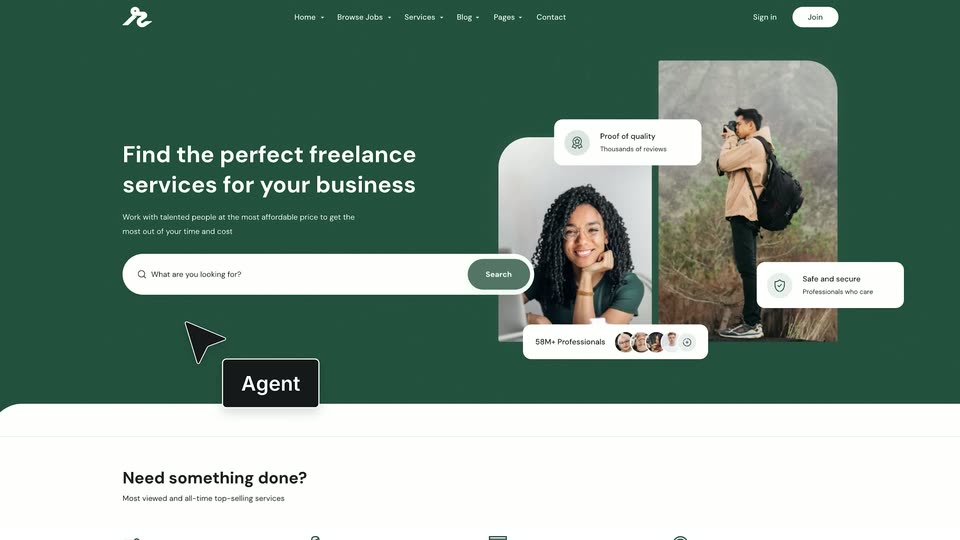
A dark green website hero with a search bar. A black outline cursor glides down from the top to hover over the search field, carrying a dark rounded tag reading Agent that follows its position.
On-screen text: “Agent”
Techniques: Cursor demo
Camera: Static
A white search bar on a dark green field, under a white two-line headline. A black cursor hovers at the bar while a dark Agent button scales in below; Photographers then types into the field, which ends empty.
On-screen text: “Work with talented people at the most affordable price to get the most out of your time and cost”
Techniques: Cursor demo
Camera: Static
A dark green website hero holds a white headline and subheadline on the left above a rounded search bar reading Photographers with a green Search button. On the right, a photo card of a smiling woman with glasses sits under a Proof of quality badge and an Agent badge with avatar circles. A cursor glides up to the Search button while the second line of body copy slides in.
Techniques: Cursor demo
Camera: Static
A freelance marketplace page is shown flat, with a dark green hero banner and a row of service cards. A cursor with a dark Agent tooltip hovers at the top right corner, drifting slightly.
On-screen text: “Agent”
Techniques: Cursor demo
Camera: Pull out
A marketplace interface fills the frame, a filter sidebar on the left and a grid of photography service cards on the right. A black cursor glides from one card to the next with an Agent tag beside it, while a notes column scrolls on the right edge.
On-screen text: “Explored Freelance Marketplace Website”, “I'll systematically test this by following your instructions: 1. Take a screenshot to see the current state and then navigate to the r”, “Taking a screenshot”, “I notice the 'Continue' button seems unresponsive. This might be”
Techniques: Cursor demo
Camera: Pull out
A white card shows a freelance marketplace page with a cursor labeled Agent over the Continue Edit button. Gray thought bubbles on the right explain the agent's next step, then a small browser address bar appears under a Ctrl+L caption.
On-screen text: “Explored Freelance Marketplace Website”, “Replay”, “I notice the “Continue” button seems to be unresponsive. This might be a bug or there might be form validation preventing progress. Let me try to skip the onb”, “Agent”, “Pressing Ctrl+L key”
Techniques: Cursor demo
Camera: Pull out
A near-black frame holds a small line of light text, a sentence fragment, locked in place with no motion. The caption sits low in the frame and stays still for the brief clip.
On-screen text: “r”, “@”, “progress. Let me try to skip the”
Camera: Static
A near-black frame holds centered white text reading the first ai dev, then cuts to a second line, that fixes its own errors, spanning the frame width. Both lines sit still on the plain background with no camera movement.
On-screen text: “the first ai dev”, “that fixes its own errors”
Camera: Static
A black round logo with a white abstract mark sits left of a light gray chat bubble on a white background. The message fades in from light gray to dark: “Your app is now bug-free.”, then “Ready to ship?” appears on a second line.
On-screen text: “Your app is now bug-free.”, “Ready to ship?”
Camera: Static
The MAX wordmark holds center on a near-black field. Red and blue offset shadows flicker across the letters, then the logo reads clean white before dimming to gray. The URL createanything.com/max sits below and fades out by the end.
On-screen text: “Your app is now bug-free.”, “Ready to ship?”, “MAX”, “createanything.com/max”
Camera: Static
A dark gray MAX wordmark holds centered on a near-black background, with a small URL beneath it. The locked-off frame fades to black.
On-screen text: “MAX”, “createanything.com/max”
Camera: Static
The word Anything reveals through a horizontal mask on a dark background, the first half set in an italic serif and the rest in a light sans-serif. The text then holds centered in the locked-off frame.
On-screen text: “Anything”
Techniques: Masking
Camera: Static