0:57

Creative SaaS Launch Video | FrenchFry
FrenchFry · Nov 2026
Wondercraft · Jan 2026 · 1:35 · AI-annotated
Wondercraft’s 1:35 launch film runs 47 scenes, about 2.0 s each. The product shows up at 0:16 and 3 features are revealed, with social proof. The call to action lands at 1:20 (84% in), over a voiceover. The video opens with a fast-cut AI-slop montage and podcast clips posing the question of who gets value from AI, then pivots to the founder on a street before moving into clean white UI demos of two use cases, internal and promotional video, and closes with brand logos and a comment-for-credits call to action. Its signature moves are bold multicolor captions stacked over live footage, hand-drawn yellow brushstrokes and doodles, and a cartoon hand cursor driving the interface on mint-white 3D set
Is this your launch? to your site or press kit.
FrenchFry · Nov 2026
Anything · Sep 2025
Runway · AI · Oct 2026
A person in a striped shirt and red glasses works behind a counter in a cluttered workshop. Large yellow words stack over the footage; 'All' scales in, then 'of the content' locks in place.
On-screen text: “All of the content”
Techniques: Kinetic type
Camera: Pull out
A hand holds a phone playing a 3D Pikachu ASMR clip in a short-video feed, a thumb taps the like icon, and the words “is” then “pure” appear at left, “pure” in green, over a blurred desk.
On-screen text: “is pure”
Camera: Push in
A hand holds a phone showing a grid of AI thumbnails; a thumb scrolls the feed up beside the words “is pure” and “AI”. The shot then zooms into a dark post showing a glowing yellow Pikachu with the caption “Pikachu doing asmr”.
On-screen text: “is pure AI”, “Pikachu doing asmr”
Techniques: UI zoom
Camera: Pull out
A hand lowers a small silver tin with black lettering onto a paint-splattered wooden table. Low table-level camera, shallow depth of field, a person blurred in the background.
Camera: Static
A centered newsletter card cross-dissolves into a full news article page. The green highlight on the words 'AI Slop' persists through the transition, linking the two views. The author name appears in orange at the bottom.
Camera: Static
A white news article page reframes fast from a tight crop of a green-highlighted phrase to a wider view that reveals the top navigation bar. The headline and date overlap as ghosted green and magenta duplicates during the quick crossfade.
Techniques: UI zoom, Morph
Camera: Static
A man in an olive t-shirt sits at a microphone before a slatted wood wall, talking. Large glowing lowercase captions stack on the left, 'how do we' in white, 'make sure' in mint, 'society' in yellow, in sync with his speech.
On-screen text: “how do we”, “make sure”, “society”
Techniques: Kinetic type
Camera: Push in
A gray-haired man in a brown shirt speaks into a studio mic before a slatted wood wall as a caption blurs in over him. The shot cuts to two men on a couch, the right one gesturing.
On-screen text: “gets the value out of this?”
Techniques: Kinetic type
Camera: Static
Two men sit in armchairs across a microphone in a sunlit room lined with plants. A locked-off frame holds them as white caption text builds up and a glowing yellow 'yes?' pops in to the right.
On-screen text: “well, I”, “yes?”
Techniques: Kinetic type
Camera: Static
A man in a brown t-shirt sits in a chair speaking into a microphone, with a white caption at the bottom of the frame.
On-screen text: “I don't know?”, “I don't know? I-”
Camera: Static
A man in a brown t-shirt sits at a studio microphone, speaking to camera against a blurred plant-filled background. A white circular loading spinner rotates on his forehead while the caption reads across his chest.
On-screen text: “I would...”
Camera: Push in
Split screen: a man in a black tee and glasses stands on a white stage with a blue light strip; the right half shows a dark blue-lit crowd from a phone POV. 'Live Demo @nearcyan' badge top left, 'MARK'S POV' and news.com.au logo top right.
On-screen text: “Live Demo”, “@nearcyan”, “MARK'S POV”, “news.com.au”, “I would...”
Techniques: Split screen
Camera: Static
A man in a black tee and glasses stands center stage before a white wall with a blue light strip. He turns his head to the right toward a dark blue-lit area, while a red Live Demo badge and a MARK'S POV caption stay fixed in the corners.
On-screen text: “Live Demo @nearcyan”, “MARK'S POV”
Camera: Static
A man in a black tee and tan pants stands on a white stage with a blue light strip as a second presenter in all black appears on the right, gesturing while he speaks. A red Live Demo badge and an X handle watermark sit top-left.
On-screen text: “Live Demo”, “X @nearcyan”
Camera: Static
A man in a denim jacket stands on a blurred city street, gesturing. Multicolor text 'AI VIDEO ISN'T THE PROBLEM' builds over him, then the shot pushes in as 'turning it into something useful is' appears with yellow doodles. A handwritten name caption sits bottom right.
On-screen text: “AI VIDEO”, “Dimi Nikolaou”, “Co-Founder of Wondercraft”, “ISN'T THE”, “PROBLEM”, “turning it into”, “something”, “useful is”
Techniques: Kinetic type
Camera: Push in
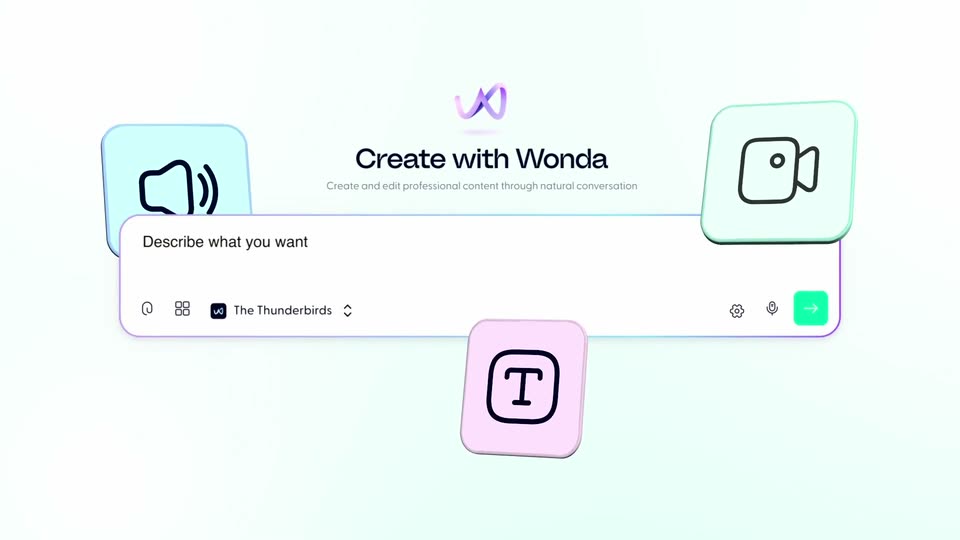
On a white-to-mint gradient, the Wondercraft wordmark with its teal W mark sits centered. A gray 'Create with Wonda' headline, a small tagline and a rounded search-bar outline fade in above it with tilted icon cards, then the wordmark scales up to fill the frame.
On-screen text: “Create with Wonda”, “Create and edit professional content through natural conversation”, “Wondercraft”
Techniques: Kinetic type
Camera: Static
The Wonda interface shows a centered headline above a prompt bar, flanked by three rounded icon tiles for audio, video and text. The tiles drift toward the corners while the prompt bar expands to full width as the layout settles.
Camera: Static
A teal inverted cone fills the frame while blurred pastel app icons drift down and spread into a V inside it, growing softer. The black word Wonda stays static and sharp in the center.
On-screen text: “Create with Wonda”
Techniques: 3D mockup
Camera: Static
A column of pastel rounded tiles, each stamped with an AI brand logo and name, scrolls down a vertical channel framed by glowing teal lines on a soft mint-and-white gradient. The tiles keep a slight left-right offset and soft drop shadows as they pass.
On-screen text: “Create with Wonda”
Camera: Static
A video editing timeline tilts in 3D perspective, its text and video tracks receding to the right, with a playhead line at the left edge. Two rounded 3D badges, a blue ElevenLabs and a pink Sora, float above the tracks.
On-screen text: “ElevenLabs”, “Sora”
Techniques: 3D mockup
Camera: Pull out
Four video thumbnails sit in a loose 2x2 grid over a white background with a soft teal and purple glow. Each card carries a white pill with a line icon naming its use case, and the pills and thumbnails settle into place with a brief slide.
On-screen text: “Training videos”, “Onboarding videos”, “Product launches”, “Promotional videos”
Camera: Pull out
A man in a denim jacket over a white hoodie sits on a gray couch behind a laptop, gesturing with both hands as he speaks, then lowers them to the keyboard. A bright room with a floor lamp and a potted plant frames him.
Camera: Static
A man in a denim jacket sits on a couch with a laptop, talking and gesturing, while a white interface panel with a purple logo and a prompt field sits on the right. The panel settles in with a slight scale.
Techniques: Split screen
Camera: Pull out
Split screen: a man in a denim jacket and white hoodie sits at a laptop on the left, speaking to camera then looking down, while the right shows the Arc app home screen with its prompt and template chips, slowly zooming in.
Techniques: Split screen, UI zoom
Camera: Push in
A light interface zooms out from the prompt field to the full screen under the heading What do you want to create?. A cursor drags a red PDF icon into the box, dropping it as a file chip, then clicks the green arrow button.
Techniques: UI zoom, Cursor demo
Camera: Pull out
A dark blue rounded card holding the white line “Approx. 5 min remaining” and a thin progress bar scrolls upward on a pale white background. Below it sits a video player timeline with a play button, a timecode, and a row of caption chips with small avatars.
Techniques: Kinetic type
Camera: Pan
A dark preview panel at the top displays 'Approx. 5 min remaining' over a progress bar, then a teal logo appears in its corner. Below, a timeline of labeled video clips scrolls while a hand cursor drifts up to the play button.
Techniques: Cursor demo
Camera: Pull out
A video editor timeline with stacked text, image and cloud tracks pans right as the playhead advances, beneath a dark preview bar holding a teal W logo. A hand cursor icon sits beside the play button at the left.
Camera: Static
A video preview with a green glow sits left of a style settings panel. A white hand cursor glides from the visual style options to the preview and back while the preview swaps from a three-panel montage to a single subway shot.
Techniques: Cursor demo
Camera: Static
A product interface fills the frame in two panels. Left shows a video preview with a cartoon number-six illustration and a script timeline; right lists visual-style thumbnails and settings. A hand cursor taps the Playful Pastel thumbnail, then moves up and clicks the Preview button.
Techniques: Cursor demo
Camera: Static
A 3D editor window with a glowing teal border fills the frame as three vertical video clips and a headline card populate its dark canvas. The view then zooms into the office clip, showing a man in a denim jacket standing beside a whiteboard.
On-screen text: “Ship Ready Video”, “You can edit”
Techniques: 3D mockup, UI zoom
Camera: Push in
A man in a denim jacket stands in a bright office beside a whiteboard, talking to camera as colored caption words pop in across the frame and a yellow hand-drawn arrow points at the board.
On-screen text: “so that's how teams handle internal video”, “look at”
Techniques: Kinetic type
Camera: Pull out
A presenter in a denim jacket stands in a bright office, gesturing, as a product interface panel appears on the right behind a yellow brush-stroke reveal. Large magenta 'look at' and teal 'marketing' words pop over his chest.
On-screen text: “look at”, “marketing”
Techniques: Kinetic type, Masking
Camera: Static
A light product screen with two feature cards and a row of category pills. A hand cursor slides in from the right and clicks the Promotional video pill, which gains a purple outline, as the heading and cards pan left into frame.
Techniques: Cursor demo
Camera: Pull out
A product form scrolls down the right side as a hand cursor drops in a fur coat photo, picks format and duration options, and taps a green Next button. A blurred clip of a man in a camel coat sharpens on the left.
Techniques: Cursor demo
Camera: Pull out
A woman in a brown coat spins on a city street inside a rounded-rectangle frame on a light gray background. Her coat flares wide as she turns from profile to face the camera, traffic and pedestrians blurred behind her.
Camera: Push in
A model in a brown teddy coat and white collar stands on a blurred city street, framed in a rounded card on white. The camera pushes in slowly toward the face.
Camera: Static
A flat product card on a soft gradient shows an upload panel. A cartoon hand cursor taps the green Next button, the view zooms in to reveal a list of five uploaded files, then reframes to the next step titled What is the video for?
Techniques: Cursor demo, UI zoom
Camera: Push in
A white form panel shows a goal field and format toggles. Text types into the field, then a hand cursor slides in and points at the green Generate button.
Techniques: UI zoom, Cursor demo
Camera: Push in
A settings panel with a green Generate button is in focus as a hand cursor taps it. The panel blurs away, a video preview of a man on a street opens, and the view zooms in until he fills the frame against a brick wall.
Techniques: Cursor demo, UI zoom
Camera: Push in
A man in a denim jacket talks against a brick wall. Creative and Internal appear at the top with green underlines, brand logos pop in around him, and pixel building icons grow along the bottom. A yellow brush wipe covers the frame.
On-screen text: “Creative”, “M&CSAATCHI”, “Internal”, “SIEMENS”, “Blistex”, “Canon”, “BCG”
Techniques: Kinetic type, Masking
Camera: Pan
A yellow brushstroke mask wipes away to reveal a man in a denim jacket speaking on a stoop, gesturing with both hands. Hand-drawn text assembles around him: a white starburst with we the, pink spent, yellow last months, teal building this, then the shot fades to white.
On-screen text: “we”, “the”, “spent”, “last months”, “building this”
Techniques: Masking, Kinetic type
Camera: Pull out
A social post card fades in, announcing Wondercraft Video and Wonda above a street video thumbnail. The view scrolls down to a comment thread where a user comments 'Wonda' and Dimi replies, the names scaling and the comment sliding in.
Techniques: UI zoom, Kinetic type
Camera: Push in
On a light background, a comment thread animates in. A green circle avatar and the bold name Tom Wondercraft User post the word Wonda, with a Like | Reply line. A connecting line drops to a photo avatar of Dimi Nikolaou and a short reply. The names and text scale and slide in with a brief motion blur.
Techniques: Kinetic type
Camera: Static
Five rounded credit cards fan across a white background; the center dark-purple card is in focus, reading 'You've got 1,000 in credits' with a green W mark, the outer four blurred and gray. The shot starts soft, sharpens, then slowly pushes in on the center card.
Techniques: 3D mockup
Camera: Pull out
The Wondercraft wordmark, a green-to-blue gradient W with dark serif lettering, sits centered on a plain off-white field and slides up slightly as a tagline fades in below. A green highlight bar then sweeps left to right across the URL in the tagline.
On-screen text: “Visit wondercraft.ai/studio today”
Camera: Static
A plain black frame holds the small “Wondercraft” wordmark, static and locked off, as a sign-off.
On-screen text: “Wondercraft”
Camera: Static