
1:48
Explore
00:00:00 / 00:45:18
- Length
- 0:45
- Scenes
- 21 · 2.2 s avg
- Product on screen
- 0:06
- Features shown
- 4
- Voiceover
- Yes
- Views
- 507K on YouTube
as of November 22, 2026
Descript’s 0:45 launch film runs 21 scenes, about 2.2 s each. The product shows up at 0:06 and 4 features are revealed. There is no explicit call to action; a voiceover carries the film. The video is built as a parody welcome message that doubles as a feature tour, alternating live-action shots of a presenter at a purple desk with screen-capture demos, each feature introduced by a flat lavender title card. Pacing is brisk at around 21 cuts per minute, with signature moves like the 3D editor panel rotating flat, the self-typing transcript, and a recurring lavender palette that ties the live action and the UI together.
Footage neededEstimated needs: 4 capture groups — your screens or recordings · 1 official logo — reused across the film · 9 filmed passages — shoot, supply or replace · 1 graphic passage — draw or supply · 2 3D passages — build or supply
Is this your launch? to your site or press kit.
More like this


Similar soundtrack
Films whose music sounds like this one, voice left out
0:38

SaaS Explainer Video Consumer Intelligence Platform | MFour x MotionCue
MFour · Modern electronic
0:45
Neal Patel - You already gave the LLM the answer. So why is it writing it out from
Scaladown · Upbeat electronic
0:55
Y Combinator - HEVN (@hevn_finance) is building a “Brex for non-US companies” — an a
Hevn · Modern electronic corporate advertisement
The new Descript – made for professionals, scene by scene
· 21 scenes as text
01 · Hook · 0:00–0:06
A man sits in silhouette at a desk on the right of a purple set, then the lighting brightens to reveal him smiling behind a laptop, and he looks up to speak to the camera.
On-screen text: “TP”
Camera: Static
02 · Product intro · 0:06–0:10
A web video editor fills the frame: a man speaks on a purple background at center, a properties panel sits right, and left, a transcript types itself word by word, each new word flashing blue. A thumbnail timeline and a growing caption line run along the bottom.
Camera: Static
03 · Product intro · 0:10–0:11
A man in a green sweater sits at a purple desk gesturing as he talks. The laptop in front of him rotates from a closed angle to face the camera, revealing a video call screen, while the framing shifts to keep the laptop centered.
On-screen text: “A”
Techniques: Kinetic type
Camera: Push in
04 · Product intro · 0:11–0:14
A tilted 3D panel of the Descript editor rotates and flattens to face the camera, settling into a flat frontal view. The left script shows the word Descript highlighted in blue while a man talks in the right preview.
Techniques: 3D mockup
Camera: Push in
05 · Feature reveal · 0:14–0:16
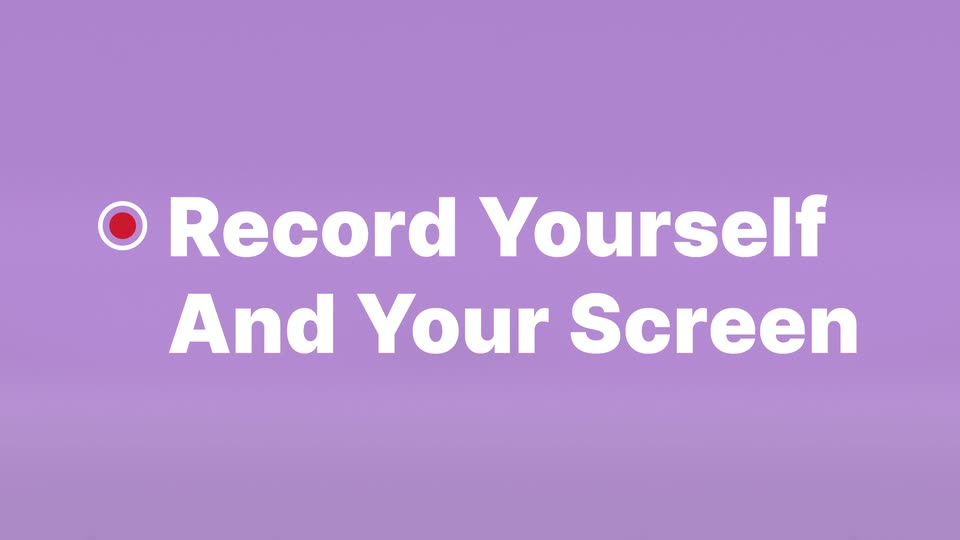
A static title card on a lavender background. White bold sans-serif text reads “Record Yourself” and “And Your Screen” on two lines, with a red record button icon beside the first line. The frame stays locked off throughout.
On-screen text: “Record Yourself”, “And Your Screen”
Camera: Static
06 · Feature reveal · 0:16–0:17
A Record dialog sits over a document editor, showing Audio only, Camera and Screen & Camera tiles plus mic and camera dropdowns and a blue Record to script button. A cursor glides to the Screen & Camera tile, which gains a blue selection ring.
On-screen text: “Record Yourself”, “And Your Screen”
Techniques: Cursor demo
Camera: Static
07 · Feature reveal · 0:17–0:19
A tablet mockup inside a blue highlight frame shows a presentation slide and a circular camera bubble of a presenter, labeled Screen & Camera below with a large cursor pointing at it; the view then zooms into the tablet screen.
On-screen text: “Screen & Camera”
Techniques: UI zoom
Camera: Push in
08 · Feature reveal · 0:19–0:20
A presentation editor window displays a dark slide with the words Welcome to JA in blue-to-purple gradient type. A circular webcam of a man talking overlaps the bottom left corner.
Camera: Static
09 · Feature reveal · 0:20–0:22
A white two-line title on a flat lavender background holds, then cuts to a close-up of a hand typing on a dark laptop keyboard.
On-screen text: “Replace Your Background”
Camera: Static
10 · Feature reveal · 0:22–0:23
A close-up shows a hand resting on a black laptop trackpad, fingers tapping the pad and the keys above, set against a purple surface. A large still headline reads over the shot.
On-screen text: “Replace Your”, “Background”
Camera: Static
11 · Feature reveal · 0:23–0:26
A man in a green zip sweater is filmed against a blue and purple starfield, glancing upward as he talks. The shot cuts to a white page titled Welcome George with a short welcome message and a text caret.
Camera: Static
12 · Feature reveal · 0:26–0:28
A white text document headed 'Welcome George' holds a paragraph of body copy. An I-beam cursor highlights the line 'Blather, blather, blather.' in pale blue, then deletes it, leaving the remaining lines in place.
Techniques: Cursor demo
Camera: Static
13 · Feature reveal · 0:28–0:30
A man in a green and brown striped zip-up sweater sits against a solid purple backdrop, facing the camera. He gestures with his hands, a purple-faced watch on his wrist, as he speaks.
Camera: Static
14 · Feature reveal · 0:30–0:32
The word Templates is centered in large white type on a solid purple gradient background, holding a static, locked-off frame for the duration of the shot.
On-screen text: “Templates”
Camera: Static
15 · Feature reveal · 0:32–0:33
A locked-off screen recording shows a video editor with a Templates modal open, listing intro thumbnails labeled Title goes here. A cursor hovers over a thumbnail in the gallery. A circular video-call avatar of a man sits in the lower left corner.
Techniques: Cursor demo
Camera: Static
16 · Feature reveal · 0:33–0:34
A web video editor screen shows an open Templates panel over the project. A grid of intro thumbnails scrolls while the cursor hovers a dark blue template. A circular webcam of the presenter stays in the lower left corner.
Techniques: Cursor demo
Camera: Static
17 · Feature reveal · 0:34–0:35
A man in a green sweater talks against a solid purple backdrop. The shot then scales down and slides to the lower right as a template canvas opens, with a headline and body copy on the left, a purple circle behind the video box, and a page counter top right.
On-screen text: “Welcome to JA Analytics”, “YOUR FIRST POINT GOES HERE. BRILLIANT POINT. COULDN'T HAVE SAID IT BETTER.”, “2/8”
Techniques: Kinetic type, Masking
Camera: Static
18 · Feature reveal · 0:35–0:38
A static template slide on pale lavender: a bold black headline and an uppercase text block sit left, while a rectangular video of a man in a green sweater talks right, framed by two purple circles. A 2/8 counter marks the corner. Only the man's face moves.
On-screen text: “Welcome to JA Analytics”, “YOUR FIRST POINT GOES HERE. BRILLIANT POINT. COULDN'T HAVE SAID IT BETTER.”, “2/8”
Techniques: Split screen
Camera: Static
19 · Other · 0:38–0:38
A tight close-up on a black laptop keyboard and trackpad. A hand rests on the pad, fingers tapping and swiping across its surface. The frame holds steady on the gesture, with a sliver of purple visible at the bottom edge.
Camera: Static
20 · Other · 0:38–0:41
A man in a green sweater sits at a purple desk with a laptop and purple desk props against a lavender backdrop. He looks at the laptop, then turns his head to the right and speaks, reacting to something off screen. Static, symmetrical medium shot.
Camera: Static
21 · Outro · 0:41–0:45
A blue abstract mark assembles from horizontal bars at center while the word descript types out letter by letter behind a thin gray caret, then holds static on the white background.
On-screen text: “descript”
Techniques: Kinetic type
Camera: Static