3:07
Explore
Neal Patel - You already gave the LLM the answer. So why is it writing it out from
Scaladown · Oct 2026 · 0:45 · AI-annotated
- Length
- 0:45
- Scenes
- 15 · 3.1 s avg
- Product on screen
- 0:02
- Features shown
- 2
- Call to action
- 0:37 · 81%
- Voiceover
- Yes
00:00:00 / 00:45:27
Scaladown’s 0:45 launch film runs 15 scenes, about 3.1 s each. The product shows up at 0:02 and 2 features are revealed, with social proof. The call to action lands at 0:37 (81% in), over a voiceover. The video is built as a question, a product reveal, then a run of split-screen demos and pixel-grid title cards that escalate from the CDM comparison to a capability tour, a stat card, and a free-tokens CTA. Signature moves are monospace type snapping into place on a faint grid, blue squares assembling into logos and transitions, and hard cuts on a steady 129 BPM pulse.
No filming indicatedEstimated needs: 2 capture groups — your screens or recordings · 4 graphic passages — draw or supply
Is this your launch? to your site or press kit.
More like this



Neal Patel - You already gave the LLM the answer. So why is it writing it out from, scene by scene
· 15 scenes as text
01 · Hook · 0:00–0:01
Scattered gray words on a white grid background slide inward and align into the line “Your LLM already read the answer”, with “read” in blue. A small blue square at the left edge moves out of frame early in the clip.
On-screen text: “Your LLM already read the answer”
Techniques: Kinetic type
Camera: Static
02 · Hook · 0:01–0:02
On a white background with a faint grid, the monospace line “Your LLM already read the answer” slides into the center, with “read” and “answer” highlighted in blue. The frame stays locked off as the text settles.
On-screen text: “Your LLM already read the answer”
Techniques: Kinetic type
Camera: Static
03 · Product intro · 0:02–0:06
A split screen pairs an invoice on the left with a heading and a token grid on the right, as answer tokens type into the boxes. The panels slide away to reveal a pixelated Constrained Decoding title framed by blue squares.
On-screen text: “SO WHY IS IT STILL TYPING?”, “Question:”, “What is the Supplier Name, Date, and Currency?”, “Answer:”, “introducing”, “Constrained Decoding”
Techniques: Split screen, Kinetic type
Camera: Static
04 · Demo · 0:06–0:08
A pixelated black title reads left of a small feature list whose blue highlight slides from Classify to Summarize, then the card fades into a side-by-side invoice comparison UI labeled Traditional LLM and Scaledown CDM, with decode steps and empty output fields.
On-screen text: “Constrained Decoding Models”, “[01] Classify”, “[02] Extract”, “[03] Summarize”
Camera: Static
05 · Demo · 0:08–0:21
Split screen compares two invoice extraction methods. Left, a red panel fills a token grid with JSON one token at a time as its counters climb. Right, blue lines point from invoice fields to the output, done in one step. A blue grid logo lands center at the end.
On-screen text: “TRADITIONAL LLM”, “SCALEDOWN CDM”
Techniques: Split screen
Camera: Static
06 · Feature reveal · 0:21–0:22
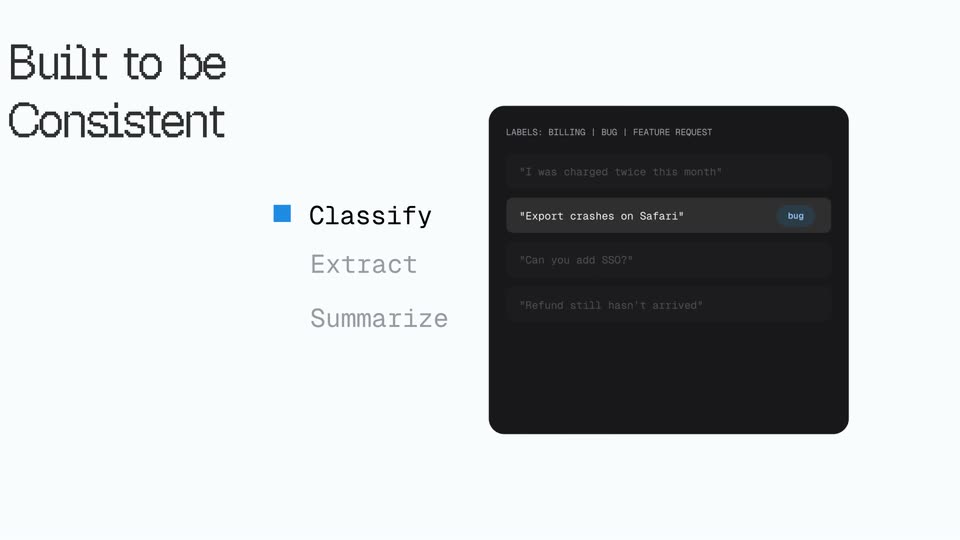
A blue tiled grid clears to reveal a light layout: a dark serif headline top-left, a three-line feature list (Classify, Extract, Summarize) center-left with blue square markers, and a dark UI panel on the right showing labeled message rows.
On-screen text: “Classify”, “Extract”, “Summarize”, “Built to be Consistent”
Techniques: Masking
Camera: Static
07 · Feature reveal · 0:22–0:25
A pale gray field holds a dark rounded panel that crossfades through three states, labels, entity JSON, and a decision summary. A left list highlights Classify, then Extract, then Summarize with a blue square, while large pixel text Nothing Made up stays fixed on the right.
On-screen text: “Classify”, “Extract”, “Summarize”, “Nothing Made up”
Camera: Static
08 · Feature reveal · 0:25–0:27
A dark interface card sits centered on a light background, showing a meeting transcript input and a summarized output list. Left, a vertical list reads Classify, Extract, Summarize, the last word black with a blue square; right, large pixel text reads Nothing Made up. The whole layout drifts slowly downward.
On-screen text: “Classify”, “Extract”, “Summarize”, “Nothing Made up”
Camera: Pull out
09 · Feature reveal · 0:27–0:29
Blue square tiles holding white line icons for text, video, image, audio, table and chart multiply across a light gray field, then shrink into a full-screen pixel grid of gray and blue squares.
Techniques: Morph
Camera: Pull out
10 · Feature reveal · 0:29–0:30
A pale gray square grid fills the frame on white. Blue squares hop between cells, snapping into three pixelated letter-like shapes, while a small gray '>' and 'A' rest in the grid. The motion is quick and staccato.
Camera: Pull out
11 · Feature reveal · 0:30–0:32
A faint grid fills a light background as the words TEXT AND IMAGES sit stacked and staggered in the center. Small punctuation marks, a percent sign, slashes and tildes, drift in around the type.
On-screen text: “TEXT AND IMAGES”
Camera: Static
12 · Social proof · 0:32–0:37
On a black grid dotted with blue squares, two large white figures flank a thin vertical rule: 200x left and a number right that glitches and counts up to 467x. Blue FASTER and CHEAPER labels sit beneath, with a white caption THAN FRONTIER LLM APIS at the bottom.
On-screen text: “200x”, “467x”, “FASTER”, “CHEAPER”, “THAN FRONTIER LLM APIS”
Techniques: Kinetic type
Camera: Push in
13 · CTA · 0:37–0:41
The scaledown wordmark fades in letter by letter beside its star mark on white. Two rows of partner names fade in below, then a plus-shaped cluster of blue tiles assembles in the center over a TOKENS counter, ending on large 200x and 467x stats with the URL.
On-screen text: “OpenRouter”, “Vercel”, “LiteLLM”, “LangChain”, “TrustedRouter”, “Arthur”, “RouterPlus”, “TOKENS”, “200x”, “FASTER”
Camera: Static
14 · CTA · 0:41–0:41
A mosaic grid of square tiles fills the frame, the outer light tiles turning blue while the center darkens to a black panel. The white headline and blue URL stay fixed in the middle.
On-screen text: “50M FREE TOKENS AT SIGNUP”, “www.scaledown.ai”
Techniques: Masking
Camera: Static
15 · CTA · 0:41–0:45
Centered on a black field, a white monospace headline and a smaller blue URL sit locked off while a sparse grid of small dark-blue squares drifts and fades in the background. The motion is slow and minimal.
On-screen text: “50M FREE TOKENS AT SIGNUP”, “www.scaledown.ai”
Camera: Static