1:58

GPT-6.2 Astra and GPT-6.2 Sol—Models built for the real world
OpenAI · AI · Nov 2026
Mubert · Sep 2021 · 0:47 · Full motion · AI-annotated
studio Flowjam
Mubert’s 0:47 launch film runs 23 scenes, about 2.1 s each. The product shows up at 0:12. There is no explicit call to action; a voiceover carries the film. The video runs as a tight problem-to-workflow arc: a flat editor mockup states the duration pain, a 3D product card names Mubert Render, then a cursor-driven tour covers select, generate, listen, download and repeat. The look pairs flat UI panels with glossy 3D props on a pale blue field, punctuated by popping white caption pills, a recurring teal emoji mascot, and looping purple ribbons.
Is this your launch? to your site or press kit.
OpenAI · AI · Nov 2026
Lightwork · Jun 2026
Lovable · Developer tools · Mar 2026
Films whose music sounds like this one, voice left out
Framer · Modern upbeat electronic
Clueso · Upbeat electronic
Pennant · Corporate Electronic
A flat illustrated video-editor timeline fills with a green-selected clip as a playhead line drops down and a blue 02:14 duration badge pops in above. A cursor drags a gray audio waveform bar, splitting it into two segments.
On-screen text: “02:14”
Techniques: Cursor demo
Camera: Static
A white video editor timeline shows a blue clip and a green audio track. A blue timecode bubble slides right from 02:40 to 03:20 while the playhead line follows, and an indigo caption reading Your video: 3m 24s scales in below.
On-screen text: “Your video: 3m 24s”
Camera: Static
A flat video-editor panel shows a blue filmstrip above an audio waveform, with a vertical playhead line at 03:25. A white cursor arrow glides across the waveform while a lower caption reads Your video: 3m 24s.
On-screen text: “Your video: 3m 24s”
Techniques: Cursor demo
Camera: Static
A flat video-editor timeline mockup holds a blue filmstrip and an audio waveform under a 03:25 playhead. A white cursor glides along the waveform, the bottom caption swaps from “Your video: 3m 24s” to “Soundtracks from music stocks”, and an angry teal ball bounces in at the right.
On-screen text: “Your video: 3m 24s”, “Soundtracks from music stocks”
Techniques: Cursor demo
Camera: Static
Diagonal gray waveform bars fill a light blue field, each carrying a 3D cyan sphere with a cartoon face that rolls along the track. A white rounded caption box with blue text sits at the bottom center while the bars and spheres drift slowly.
On-screen text: “03:25”, “Soundtracks from music stocks”, “Stock music never fits the video!”
Techniques: 3D mockup
Camera: Static
Cyan 3D emoji balls with grinning and winking faces roll along diagonal gray audio waveform bars on a pale blue field. A white caption box with blue text scales in at the bottom center.
On-screen text: “Stock music never fits the video!”
Techniques: Kinetic type
Camera: Pan
Rows of gray audio waveform bars alternate with teal 3D emoji faces showing gritted teeth, smirks and anger, drifting slowly to the right on a pale blue field. A white caption box with blue text sits at the bottom center, scaling down and fading out.
On-screen text: “Stock music never fits the video!”
Camera: Pull out
A white editor panel holds a blue video track and an empty audio track, with a 03:25 timecode badge at the corner. A blue-purple waveform clip is dragged up to align under the video as the frame reframes. A white caption box scales in at the bottom.
On-screen text: “Stock music never fits the video!”, “Mubert Render makes soundtracks of exact length!”
Techniques: Cursor demo, UI zoom
Camera: Static
A white edit panel with a blue frame sits in 3D perspective, showing a video strip of a blue elephant above a purple waveform track. A black cursor glides right along the waveform as the blue caption bar scales in at the bottom.
On-screen text: “Mubert Render makes soundtracks of exact length!”
Techniques: 3D mockup, Cursor demo, Kinetic type
Camera: Push in
Close-up of an editing timeline: a row of blue video clips above a purple-to-pink audio waveform. A cursor hovers over the waveform while the view zooms in on it, and a white caption pill with blue text scales up at the bottom.
On-screen text: “Soundtrack fits your video content like a glove!”
Techniques: Cursor demo, UI zoom
Camera: Static
A tight close-up of a blue-to-purple gradient panel filled with white vertical bars that bounce like an audio waveform. A white rounded caption with blue text sits across the lower bars and scales up. Above, a pale gray strip and the edge of another blue panel are visible.
On-screen text: “Soundtrack fits your video content like a glove!”
Techniques: Kinetic type
Camera: Static
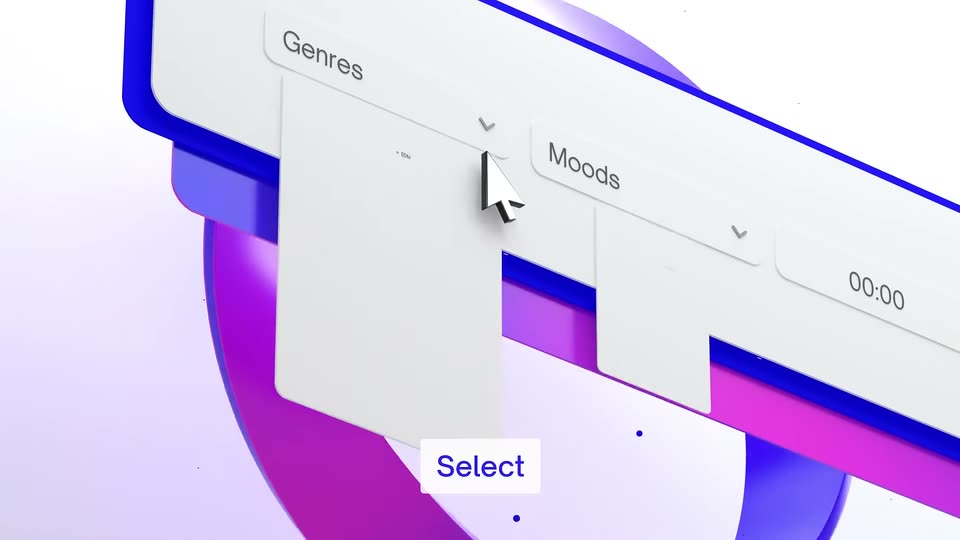
A white toolbar with Genres and Moods dropdowns floats in 3D over a purple gradient ribbon on a pale background. A cursor opens the Moods list, then the Genres list expands with genre options, while a Select button sits below.
On-screen text: “Soundtrack fits your video content like a glove!”
Techniques: 3D mockup, Cursor demo
Camera: Static
A white interface panel tilts in 3D perspective as a blue duration field counts up from 03:00 to 03:25 under a 3D cursor. The view then reframes onto a blue Generate Track button the cursor taps, with a Set duration caption below.
On-screen text: “Set duration”
Techniques: 3D mockup, Cursor demo, UI zoom
Camera: Static
A white control card floats in 3D perspective over a blue plane, with a 3D cursor resting on the blue Generate Track button. The camera pulls back from a tight close-up to reveal the full card with Genres and Moods fields and a 03:25 timer, while pink and purple ribbons loop in the background.
Techniques: Cursor demo, 3D mockup, UI zoom
Camera: Static
A white control panel in 3D perspective floats over a pink and purple ring, with a cursor moving to the Generate Track button. The panel then gives way to a player card showing a pink play button and an audio waveform.
Techniques: 3D mockup, Cursor demo
Camera: Static
A purple-to-pink gradient play button floats above a white audio player bar with a gray waveform and a 03:25 timecode. A white cursor arrow slides in from the right toward the button. A blue caption, Listen to the track, sits over a soft purple 3D shape at the bottom.
On-screen text: “Listen to the track”
Techniques: Cursor demo
Camera: Static
Close-up of an audio player on white: the waveform playhead advances from 00:29 to 00:32 as a cursor hovers over the bars. A gradient oval download button pops in at center and the bottom caption swaps to a purple tagline that scales in.
On-screen text: “Like what you hear? Make it yours”
Techniques: Cursor demo, Kinetic type
Camera: Static
A 3D purple gradient download button with a white arrow icon floats centered on white, and a 3D black-and-white cursor clicks its edge. An animated purple waveform bar runs along the bottom, and a blue caption on a white pill scales in below the button.
On-screen text: “Like what you hear? Make it yours”
Techniques: 3D mockup, Cursor demo, Kinetic type
Camera: Static
A white audio-player card with a purple-and-blue waveform and a 03:25 timecode slides left across a pale blue background, its rounded right edge and blue underline coming into view. A blue caption line holds steady below the card.
On-screen text: “Like what you hear? Make it yours”
Camera: Pan
A 3D purple-to-pink ring frames a white card holding a blue Generate Track button. A cursor arrow glides up and rests on the button. Below, a white waveform strip shows 00:00 to 03:25, and a blue caption reads Make another one.
On-screen text: “Make another one”
Techniques: 3D mockup, Cursor demo
Camera: Static
A 3D white card with a blue Generate Track button sits in perspective over a magenta ring, a 3D cursor arrow points at the button, and a caption below reads Make another one before switching to Make as many as you want.
On-screen text: “Make another one”, “Make as many as you want”
Techniques: 3D mockup
Camera: Static
A purple Generate Track button with a white cursor sits at the top of a column of audio waveform cards that scroll upward. A blue caption reading Make as many as you want holds at the bottom as the list moves past it.
On-screen text: “Make as many as you want”
Techniques: Cursor demo, Parallax
Camera: Pan
A blue wavy-line logo sits above a blue pill button labeled Mubert Render on a pale gradient background. A cursor glides in from the lower right and rests on the button while caption bars swap at the bottom.
On-screen text: “Mubert Render - limitless source of music powered by AI”, “Soundtrack for this video was generated by AI!”, “To hear it - unmute, and play the video again”
Techniques: Cursor demo
Camera: Static