0:31
B2B Corporate Video Ad Example for SaaS Companies | LangEase
LangEase · Jun 2025
1Password · Oct 2026 · 0:39 · AI-annotated
1Password’s 0:39 launch film runs 20 scenes, about 2.0 s each. The product shows up at 0:04. The call to action lands at 0:33 (86% in), over a voiceover. The video is built on a single pale cream grid: abstract 3D icon animations introduce the key logo, then a montage of rounded live-action clips and flat UI cards chained by one drawing blue connector line, before the logo orbits brand marks and a QR end card closes. Signature moves are the coin and badge flips, the panning connector line, and stock footage masked into rounded cards.
Is this your launch? to your site or press kit.
LangEase · Jun 2025
Tenera · Oct 2026
A navy circle bearing a white robot icon sits at the center of a cream field. It scales down as a repeating grid of identical icons expands to fill the frame, the center icon tilting briefly before the pattern locks into place.
Camera: Pull out
A grid of circular icons on a light background slides left as dark robot glyphs and blue clock glyphs flip into blue checkmarks, row by row. A horizontal scan line and a rounded pill outline sweep across the middle row, highlighting it as the icons resolve.
On-screen text: “O”
Techniques: Morph, Masking
Camera: Pull out
A white rounded pill floats centered on a cream grid, holding a row of glossy coins in 3D. The coins flip in place, turning from blue faces with white checkmarks into dark, edge-on discs.
Techniques: 3D mockup, Morph
Camera: Static
A dark circular badge with a white key icon sits centered on a faint grid. The key rotates upright as the badge shrinks, and a thin rainbow halo ring expands outward around it.
Camera: Static
On a cream grid, a white key glyph on a black disc, a padlock, and a robot glyph on a blue disc align on a horizontal line. The line draws in, the padlock fills navy, the robot disc gains a purple gradient, and the diagram slowly pushes in.
Camera: Static
A white grid background features a horizontal blue line connecting three circular icons: a black circle with white braces, a small black circle with a white padlock, and a large blue gradient circle with a white robot. The view pans right, moving past the icons as the line extends and curves.
Camera: Pull out
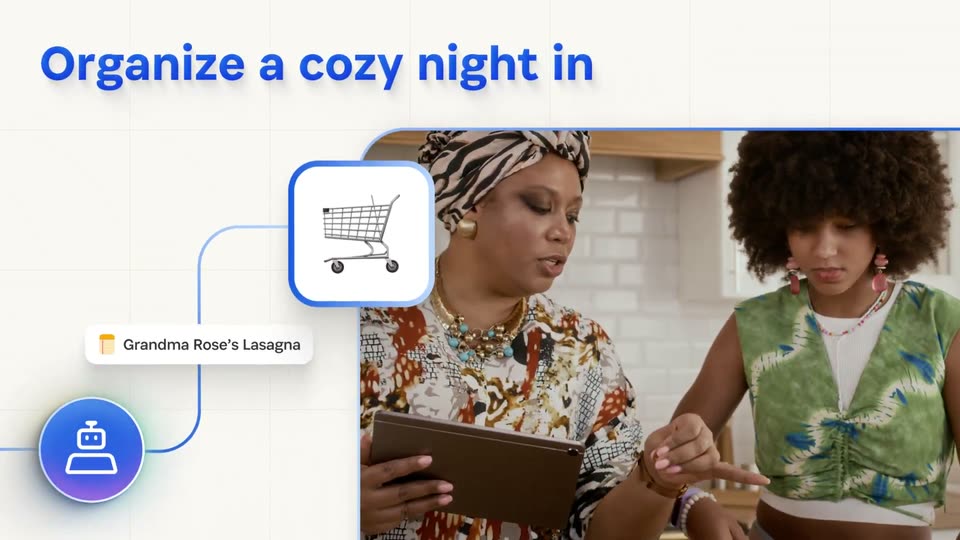
A blue headline tops a rounded video window over a white grid: women in a kitchen with a tablet, then women toasting wine at a restaurant. A shopping-cart icon and a tag link to a robot badge; a calendar icon and the bottom caption slide in.
On-screen text: “Organize a cozy night in”, “Grandma Rose's Lasagna”, “or a memorable night out”
Techniques: Kinetic type
Camera: Pull out
A white grid panel on the left holds a blue webcam icon linked by a thin line to a JUL 17 calendar icon. A rounded window on the right plays footage of women raising wine glasses and clinking them in a toast. A blue caption runs along the bottom.
On-screen text: “or a memorable night out”
Techniques: Split screen
Camera: Push in
A man on a bed in a bright bedroom checks his phone. The clip masks into a blue rounded card that settles top-left on a white grid, while a solid blue circle with a white robot-head line icon pops in below.
Techniques: Masking
Camera: Pull out
A white grid holds a blue headline over a framed clip of a man on his phone. A blue line links a bell icon to an airplane icon and a frame cycling a beach, skiers, a conference. It scrolls down to a woman on her phone and a second headline.
On-screen text: “Book your next ticket”, “out of town”, “Buy the perfect gift”
Techniques: Masking, Parallax
Camera: Pull out
A woman in a mustard sweater sits on a couch, smiling at her phone, inside a rounded rectangle on the left. A blue line traces from the frame to a blue robot icon on the right, while the blue caption slides into place below.
On-screen text: “Buy the perfect gift”
Techniques: Kinetic type
Camera: Push in
A woman in a mustard sweater holds a phone on a couch, shown in a rounded frame at left. A blue circle icon with a robot glyph slides right along a connecting line as a second framed kitchen scene enters from the right edge. A blue caption sits below.
On-screen text: “Buy the perfect gift”
Techniques: Split screen
Camera: Pan
A blue flowchart on a white grid: a gradient robot icon links by a line to a rounded square that fills with a red rose icon. A rounded window on the right plays live footage of a woman handing tulips and a phone to a child in a kitchen. The label and diagram slide upward as the layout scrolls.
On-screen text: “Buy the perfect gift”
Techniques: Split screen, Kinetic type
Camera: Pull out
On a light grid background, a flat calendar card for November 2026 with colored event blocks sits right. A blue headline, Clear your calendar, appears top left, and a round blue robot icon pops in below it, linked by a thin vertical line.
On-screen text: “Clear your calendar”
Techniques: Kinetic type
Camera: Static
A cream grid background holds a flat November 2026 calendar card whose colored event blocks round and shrink. A blue headline reads top left, and a circular video-camera icon on the left links to the card by a thin line.
On-screen text: “Clear your calendar”
Techniques: Morph
Camera: Static
A blue headline reading Create your calendar and a white calendar card for November 2026 sit on a cream grid, with a robot icon in a gradient circle at lower left. The whole composition slides left and exits the frame, leaving empty grid behind.
On-screen text: “Create your calendar”
Camera: Pan
A central blue circular icon with a white robot symbol sits on a light grid, connected by blue lines to dark code panels that slide in from the edges. A dark blue headline reads Build your next project in the top right.
On-screen text: “Build your next project”
Techniques: 3D mockup
Camera: Pull out
A dark circular logo with a white notched bar sits centered on a grid. A ring of outlined circles holding brand logos and emoji icons pops in around it, then the field of icons expands and drifts outward, floating across the frame while the center mark holds steady.
Techniques: Particles
Camera: Pull out
A grid of small circular brand icons sits on a pale background, the center dark circle holding a white key. The outer icons fade out and a multicolor ring pulses around the key.
Camera: Push in
The 1Password mark shrinks from center as the wordmark appears beside it, then the logo settles at the top above a white card holding a QR code and the URL. The card holds still for the rest of the clip.
On-screen text: “1Password”, “Find out more at”, “1password.com/personal-agents”
Camera: Static