0:31
B2B Corporate Video Ad Example for SaaS Companies | LangEase
LangEase · Jun 2025
Oasis · Jul 2026 · 1:59 · AI-annotated
Oasis’s 1:59 launch film runs 60 scenes, about 2.0 s each. The product is on screen from the first frame and 6 features are revealed. The call to action lands at 1:48 (91% in), over a voiceover. The video is a keynote-style launch: two presenters bookend a fast montage that alternates live action, flat UI captures and glossy 3D renders, with each feature announced by voiceover and shown in one continuous flow. Signature moves are the recurring blue glass orb, the zoom-out from a single chat window into a grid of them, and the calm desert oasis set that grounds the AI product in a sunlit, human world.
Is this your launch? to your site or press kit.
LangEase · Jun 2025
Ecovadis · Nov 2020
Zapier · Productivity · May 2023
Two men in black t-shirts stand on a pale platform, the right one gesturing with open hands as he speaks. Behind them, a desert oasis with a pool, palm trees, and a futuristic city skyline sits under a clear sky.
On-screen text: “Introducing Oasis,”
Camera: Static
On a light dotted grid, white cards with avatars and names start scattered at mixed sizes, then glide and scale into a tidy hierarchy as thin gray lines connect them, while a dark caption bar at the bottom swaps phrases.
On-screen text: “Introducing Oasis,”, “the world's first virtual office,”, “where every person”
Camera: Push in
A browser window showing the Oasis virtual office interface sits flat over a blurred backdrop of palm trees and water. The right panel holds a blue 3D globe and a grid of participant avatars. A bottom caption reads where every person, then and every AI agent on your team.
On-screen text: “where every person”, “and every AI agent on your team”
Camera: Static
A white chat thread scrolls upward as messages arrive in sequence from Olha, a UI Design Agent, Daniel and an SDR Agent, each with avatar, name and timestamp. A dark caption at the bottom swaps from the first phrase to the second.
On-screen text: “and every AI agent on your team”, “works side by side.”
Camera: Static
Two men in dark t-shirts stand on a concrete patio before a desert lake and a futuristic skyline. The man on the right speaks, gesturing with open hands, while the man on the left stands still with hands clasped. A subtitle line sits at the bottom of the frame.
On-screen text: “Let me show you the future of your job.”
Camera: Pull out
A light-themed chat workspace fills the frame, showing a thread of agent and user messages under an “Enterprise website creation” header, with a right-hand panel of agent avatars and a blue 3D blob. A dark caption pill at the bottom reads “Let's say you want to 10x” while the UI eases into focus.
On-screen text: “Let's say you want to 10x”, “Let me show you the future of your job.”
Camera: Pull out
A single chat window centered over a blurred beach backdrop scales down as the camera pulls back, revealing a grid of identical interface panels. A black caption box at the bottom updates to a new phrase.
On-screen text: “Let's say you want to 10x”, “your team's output using AI agents.”
Techniques: UI zoom
Camera: Pull out
A grid of white cards, each with a green checkbox and a task label, drifts across a blurred beach backdrop. A dark caption bar at the bottom shows the subtitle.
On-screen text: “your team's output using AI agents.”
Camera: Pull out
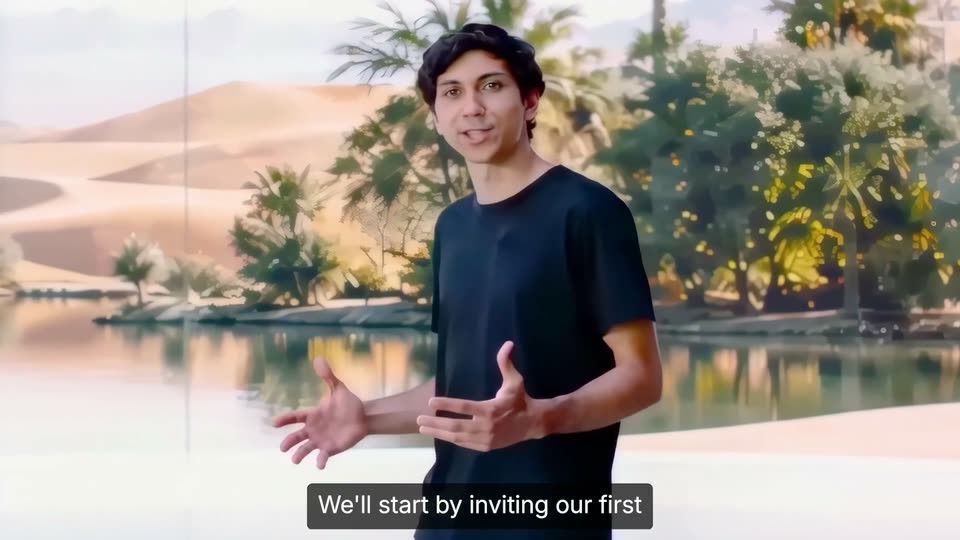
A man in a black t-shirt stands before a glass wall framing a desert oasis of palms, water and dunes. A translucent duplicate of him on the right dissolves away as he settles to center, gesturing with both hands while captions run along the bottom.
On-screen text: “We'll start by inviting our first”, “AI employee to the Oasis.”
Camera: Pan
A man in a black t-shirt stands before a glass wall overlooking desert dunes and a palm-lined pool, gesturing with open hands as he speaks. A white subtitle on a dark bar sits at the bottom. The camera holds a medium shot with a slight drift.
On-screen text: “AI employee to the Oasis.”
Camera: Pan
A man in a black tee stands before a screen showing a desert oasis, gesturing and turning toward a blue glass sphere that floats in at left. White captions in dark rounded boxes sit at the bottom of the frame.
On-screen text: “Al employee to the Oasis.”, “Oh, hello.”
Camera: Pan
A man in a black tee gestures before a desert lake backdrop, addressing a rippling 3D water blob floating at left. A white UI panel with window controls and a mic icon slides in from the left edge. A caption reads “Oh, hello.”
On-screen text: “Oh, hello.”
Camera: Pull out
A man in a black tee stands before a desert lake backdrop, gesturing as he speaks. On the left, a white chat panel scales up and a message from Oasis, Chief of Staff, appears above the blue orb and Welcome to Oasis line. Bottom captions read his line.
On-screen text: “This is Oasis.”, “Oasis functions is your chief of staff.”
Camera: Static
A light chat window shows two messages from an AI named Oasis, then zooms into the input field, where the sentence “I need a sales agent that can find me leads overnight” is typed out and a send button appears. A dark caption bar at the bottom carries the narration.
On-screen text: “Oasis functions is your chief of staff.”, “We'll tell it.”, “I need a sales agent that can find me leads overnight.”
Techniques: UI zoom, Kinetic type
Camera: Push in
A white search bar fills the frame as the query types in and scrolls left, its round submit button shifting from black to gray. A dark caption box below repeats the words leads overnight.
On-screen text: “leads overnight.”
Camera: Static
A flat chat panel on the left shows the Oasis thread as a small Sales Agent tile expands into a wide blue card with icons. A presenter in a black tee stands right, gesturing against a lake backdrop. A dark caption bar sits at the bottom.
On-screen text: “It knows to restrict its permissions”
Techniques: Split screen, Morph
Camera: Static
A chat view resolves from a blurred close-up to a sharp frame showing a blue Sales Agent card with a grid of tool icons. Below it, Gmail, Drive and 1Password rows slide in with Allow buttons while a cursor hovers at the right edge.
On-screen text: “to only the tools our sales”
Techniques: UI zoom, Cursor demo
Camera: Push in
A blue Sales Agent card sits above a list of integrations, each row paired with an Allow button. A cursor moves across the card, tapping small permission icons as green check marks appear. A dark caption bar reads at the bottom of the frame.
On-screen text: “to only the tools our sales”, “team uses every day.”
Techniques: Cursor demo
Camera: Pan
A chat thread fills in message by message, a blue highlight sweeps across each line as it lands, then the view pulls back to reveal the full window with a header and a circular button on the right.
On-screen text: “It also uncovers hidden SOPs from every project”
Techniques: UI zoom
Camera: Pull out
A chat-and-graph interface fills the frame. Left: a message thread scrolls up with two lines highlighted blue. Right: a node map centers on a blue Hidden SOP node linked to gray nodes. A dark caption bar at the bottom rolls the line about uncovering hidden SOPs.
On-screen text: “It also uncovers hidden SOPs from every project”, “you run inside the Oasis, and creates”
Camera: Static
A split product screen shows a team chat on the left and a labeled node graph on the right. The camera zooms into the graph, pushing the chat out of frame while the nodes and connecting lines fill the view. A dark caption bar holds at the bottom.
On-screen text: “you run inside the Oasis, and creates”
Techniques: UI zoom
Camera: Push in
A pale network graph of labeled sales nodes drifts and zooms across the frame. White tooltip cards pop up beside nodes in turn, each naming a concept and its definition, while a dark caption bar holds the line at the bottom.
On-screen text: “on how your company operates and closes deals”
Techniques: UI zoom
Camera: Push in
A white node graph centered on a blue Deal Closing point scales up, with thin lines linking it to gray nodes, as a white tooltip card with a title and two lines of text sits top right. A dark caption bar with white text holds the bottom edge.
On-screen text: “on how your company operates and closes deals”
Techniques: UI zoom
Camera: Push in
A glossy blue glass orb with a darker blue core floats centered on a light blue gradient, ringed by a soft white glow. A dashed crosshair frames it and a gray caption reads “In minutes.” at the bottom.
On-screen text: “In minutes.”
Camera: Push in
A glossy blue liquid orb glows at the center of a light blue gradient while white agent cards fade in on dotted lines around it, then all dissolve to leave the orb alone. A dark rounded caption bar at the bottom holds the tagline.
On-screen text: “In minutes.”, “Your new agent employee is trained”
Camera: Pull out
A teal liquid-glass blob on a pale blue gradient shrinks and settles into a small avatar icon as a white chat screen fades in with a message from Oasis Platform. A dark caption pill at the bottom carries the voiceover line.
On-screen text: “Your new agent employee is trained”, “on your team's”
Techniques: Morph
Camera: Static
A chat view shows an Oasis message and a blue Sales Agent card with four app icons, the card updating from Draft to Agent created. The frame zooms out to reveal a right sidebar of agent avatars while dark subtitle captions cycle at the bottom.
On-screen text: “on your team's”, “best practices,”, “are ready to work”, “in their new virtual office,”, “But this is just a glimpse of our new reality.”
Techniques: UI zoom
Camera: Pull out
A young man in a black T-shirt stands in a bright room with floor-to-ceiling windows opening onto a palm-lined lake. He faces the camera, talking and gesturing with both hands. A white subtitle sits in a dark bar along the bottom edge.
On-screen text: “But this is just a glimpse of our new reality.”
Camera: Pull out
A man in a dark green t-shirt stands before a glass wall overlooking a desert lake with palm trees and mountains. He gestures with both hands while speaking. The camera pulls back from a tight shot to a wider centered frame. A caption sits at the bottom.
On-screen text: “But this is just a glimpse of our new reality.”
Camera: Pull out
A white wireframe dome expands to fill the frame against a light blue sky as dozens of colorful circular app icons multiply and spread across its curved grid surface.
On-screen text: “Let's say we now have a team of 100”
Techniques: Particles, Parallax
Camera: Pan
A white gridded 3D globe covered in colorful app icons slides quickly up out of frame, revealing an Agents dashboard with a card grid below, while a few icons float down between the two. The bottom caption bar swaps its line.
On-screen text: “Let's say we now have a team of 100”, “thanks to our new agent workers”
Techniques: Parallax
Camera: Static
A light blue Agents screen shows a grid of white cards with names and avatars under tabs and a search bar. The view pulls back from a tight crop to the full layout while a dark caption bar with white text sits at the bottom.
On-screen text: “thanks to our new agent workers”
Camera: Pull out
A tilted 3D mockup of the Agents grid hovers over a sunlit desert lake, the panel snapping into focus. A dark rounded caption bar sits at the bottom carrying the assistant line.
On-screen text: “like our Open Claw personal assistant, our”
Techniques: 3D mockup
Camera: Pull out
A profile page for the OpenClaw personal assistant assembles: a heading and checkmarked task list on the left, a right sidebar of skill tags, and a central blue circular graphic that rotates, all fading in. A caption bar reads at the bottom.
On-screen text: “like our Open Claw personal assistant, our”
Camera: Static
A light profile card assembles: the Devin logo, an 'AI Developer' heading and a green code block fade in left, a circular abstract blue avatar sits center, and a skill list populates right. A dark bottom caption updates from 'AI developer' to 'built on Devin, a senior researcher'.
On-screen text: “AI DEVELOPER | CODE GENERATION & AUTOMATION”, “AI Developer”, “AI developer”, “built on Devin, a senior researcher”
Camera: Static
A flat resume-style profile page on a dotted light background shows an AI Developer title, a code block, a circular teal liquid image, and a right-hand skills list. A dark subtitle bar at the bottom carries the spoken caption.
On-screen text: “built on Devin, and our senior researcher”
Camera: Static
On a white dotted grid, a left profile card swaps from the Devin AI Developer to the Claude Senior Researcher, the right skills list updates, and the central iridescent orb shifts from teal to gold. A dark caption bar sits at the bottom.
On-screen text: “built on Devin, and our senior researcher”
Camera: Static
A light resume-style profile page for a Senior Researcher sits centered, with a circular gold image in the middle and a skills list on the right. A dark caption bar at the bottom updates through short phrases while the page text blurs and shifts slightly.
On-screen text: “Looks like I was just brought into a room”, “built on Devin, and a Fable 5 researcher”, “running Fable 5.”
Camera: Static
A presenter stands in a desert lake environment as an Oasis invitation email slides in from the left. The frame then reframes onto the email card, blurring the presenter and the background behind it.
On-screen text: “Looks like I was just brought into a room”, “with my EA agent.”
Techniques: UI zoom
Camera: Push in
A 3D chat interface card floats on the left over a blurred desert-and-lake backdrop while a presenter in a black tee stands right, gesturing as he talks. The thread updates from an approval message to a user question, then an Oasis reply tagging agents, with a logo fading out at the start.
On-screen text: “with my EA agent. Cool.”, “We have a invite to Tech Week”, “We were approved for Tech Week”, “Is everything ready to go for this launch?”, “Oasis reads the message.”, “It knows this task requires planning,”
Techniques: 3D mockup, Cursor demo
Camera: Pull out
A chat panel floats left of a presenter on a blurred beach. The view zooms into the panel as agent replies from ChatGPT, Designer and Claude Code appear in sequence, while a bottom caption box reads the line.
On-screen text: “It knows this task requires planning,”, “designing and coding and tags”
Techniques: Split screen, UI zoom
Camera: Push in
A white chat thread lists messages from Oasis and three agents, each with a colored mention pill. The view slides right to reveal a node diagram of Naveen linked to Email, EA, and Claude Code agents, while a dark caption pill at the bottom reads the tagline.
On-screen text: “designing and coding and tags”
Techniques: UI zoom
Camera: Push in
A blurred chat panel sits on the left while a sharp agent hierarchy on the right shows Naveen above two rows of agent avatars with status labels. The frame drifts right and zooms slightly into the diagram as a caption reads at the bottom.
On-screen text: “in the right agents into the room,”
Techniques: UI zoom
Camera: Push in
A white tree diagram of agent cards drifts upward, showing a person profile above Email and EA agents and three more below. A dark subtitle at the bottom reads in the right agents into the room.
On-screen text: “in the right agents into the room,”
Camera: Static
A defocused, magnified chat thread sharpens and zooms out to reveal a full project window; the left pane's task list expands while a right pane opens to show a website preview with a blue-sky hero.
On-screen text: “reading back through memory.”, “agent working on the enterprise”, “realizes that the team didn't”
Techniques: UI zoom, Split screen
Camera: Push in
A close-up of a chat panel shows a Frontend Agent task list with in-progress and done items. The view widens to a split layout: the conversation left, a website preview right with a sky hero reading “Run every project without the chaos.” Captions run along the bottom.
On-screen text: “realizes that the team didn't”, “align on enterprise pricing.”, “The agent decides to ping Margaret,”
Techniques: UI zoom, Split screen
Camera: Pull out
A chat interface shows a Frontend Agent pinging Margaret with a pricing question; her two replies, including an Enterprise Pricing card, scroll into view as the frame pulls back. A dark caption pill tracks the action along the bottom.
On-screen text: “The agent decides to ping Margaret, our head of sales, and asks her”
Techniques: UI zoom
Camera: Pull out
A white pricing document mockup rotates from a tilted angle to face the camera as its title types out. Floating agent chips hover around it while a blue glassy sphere and a wireframe globe drift on either side.
On-screen text: “it learns about the enterprise strategy”, “and provides information to the team”
Techniques: 3D mockup
Camera: Static
A split screen shows a chat app on the left and a website preview on the right, with a caption in a black box at the bottom. The view then reframes into a tilted 3D browser window holding both panes.
On-screen text: “and provides information to the team”, “so they can finish their task.”, “Now,”
Techniques: Split screen, 3D mockup
Camera: Pull out
A heavily defocused sky of white clouds and pale blue holds a faint blue globe at center. Dark rounded caption boxes at the bottom swap from “Now,” to “your team knows this,” while a faint gray “Your” rests at the top left.
On-screen text: “Now,”, “your team knows this”
Camera: Static
A translucent glass sphere floats in a bright cloudy sky, its surface rippling and settling. Centered white text reads “Your team knows this”, then “forever” joins the line to complete the sentence, while a small caption bar at the bottom follows the voiceover.
On-screen text: “Your team knows this”, “your team knows this”, “Your team knows this forever”, “forever.”
Techniques: Kinetic type
Camera: Pull out
Two men in black t-shirts stand side by side before a floor-to-ceiling window overlooking a desert lake, palm trees and mountains. The man on the left speaks and gestures with his hands; the man on the right stands with hands clasped, then gestures. Subtitles run along the bottom.
On-screen text: “The other companies will use AI to replace you.”, “We're building a different world”
Camera: Pull out
Two men in dark t-shirts stand before a desert window, then the backdrop cuts to a white dotted grid as small colored icons and avatars drift in around them on the right.
On-screen text: “We're building a different world”
Camera: Pull out
A glassy blue sphere sits at center on a white dotted grid as circular people avatars and colorful app icons orbit it in a loose ring at varying depths. Dark subtitle bars at the bottom carry the voiceover, and the shot pushes in toward a sandy dune horizon.
On-screen text: “We're building a different world”, “when we're humans,”, “and AI agents work together to 100x”, “human output and creativity.”
Techniques: Parallax
Camera: Pull out
A translucent blue glass orb hovers over golden desert dunes as the camera pans right, revealing a still oasis pool and palm trees on the right. The orb wobbles and catches the light. Subtitles sit in a black bar at the bottom.
On-screen text: “human output and creativity.”, “Your oasis is waiting for you.”
Camera: Pull out
A glossy blue liquid-glass sphere hovers and slowly rotates above a still pool in a desert oasis, with dunes, palms and hazy mountains behind. The camera drifts gently forward. A white caption sits at the bottom center.
On-screen text: “Your oasis is waiting for you.”
Camera: Pull out
Two men in black t-shirts stand in a sunlit room with floor-to-ceiling windows framing a palm-lined desert and skyline. Diagonal rainbow bands wipe across the frame and clear, then the right man gestures while speaking. Subtitles sit at the bottom.
On-screen text: “Your oasis is waiting for you.”, “To celebrate the launch.”
Techniques: Masking
Camera: Pull out
A rendered desert pool with dunes and palms; large white 3D numerals 1,000 settle center frame as white cards with rows of colorful avatar icons and team labels slide behind them. The white headline Agent Teams for free fades in over the water with a reflection, subtitles at the bottom.
On-screen text: “To celebrate the launch.”, “We're building the next 1,000”, “Agent Teams for free”, “agent teams for free”, “Tell us about your business below.”
Techniques: 3D mockup, Kinetic type
Camera: Pull out
The view zooms into the reply box of a post as a black cursor taps it and a user's message types out word by word, with dark caption bars at the bottom relaying the voiceover.
On-screen text: “Tell us about your business below.”, “How many people are on your team,”, “what you do and what you want”, “agents to help with.”
Techniques: UI zoom, Cursor demo
Camera: Push in
A 3D desert oasis with mountains and a modern villa at dusk; the white Oasis logo and a frosted URL pill float in the center, scaling in, while a cursor slides up to the pill.
On-screen text: “joinoasis.com”
Techniques: 3D mockup, Cursor demo
Camera: Pull out