0:51

Risklytics (YC S26) Launch Video
Risklytics · Fintech · Aug 2026
Endstack · Aug 2026 · 1:36 · AI-annotated
Endstack’s 1:36 launch film runs 42 scenes, about 2.3 s each. The product shows up at 0:05. The call to action lands at 1:30 (94% in). Kinetic type cards alternate with 3D-tilted UI mockups on a white field, and the middle of the video plays as one continuous task demo that moves from chat prompt to browser, dashboard, files and channel reactions. Signature moves are chromatic-aberration type reveals, halftone corner dots, and the lavender AI Agent tag that glides across every interface.
Is this your launch? to your site or press kit.
Risklytics · Fintech · Aug 2026
Gojiberry · Oct 2026
Lovable · Developer tools · Apr 2026
On a white field, the line “Every current agent + one” scales up from the center while a small blue robot icon sits above the word “agent”. A chromatic-aberration fringe rides the leading word and a soft blur on the trailing edge sharpens as the text grows, with blue halftone dot grids fixed in the top-left and bottom-right corners.
On-screen text: “Every current agent + one”
Techniques: Kinetic type
Camera: Static
On a white field with halftone dot clusters in two corners, the centered phrase reads “on the market”, then switches to “is incomplete” as small gray labels (Single-player, Fragmented, No shared context, etc.) fade in and drift around the center.
On-screen text: “on the market”, “is incomplete”, “Single-player”, “Fragmented”, “No shared context”, “No real execution”, “No persistent workspace”, “Context resets”, “Chat-bound”, “Handoff breaks”
Techniques: Kinetic type
Camera: Static
A white field of small gray pain-point phrases drifts and softens in focus around a centered headline that reads “we just fixed that”, with “fixed” in purple. Halftone dot clusters sit in two corners as thin grid lines fade across the frame.
On-screen text: “we just fixed that”
Techniques: Parallax
Camera: Push in
On a white field, a soft lavender shape sharpens as the Endstack wordmark slides in beside a hexagon outline; dotted grids sit in two corners and dotted bars rise along the bottom edge.
On-screen text: “Endstack”
Techniques: Kinetic type
Camera: Pull out
White background: the Endstack logo slides out as 'The only agent and workspace' builds word by word, with robot and monitor icons on thin circuit lines. 'You or your team will ever need' follows with a person icon, then 'It's a powerful superagent' settles in centered.
On-screen text: “Endstack”, “The only agent and workspace”, “You or your team will ever need”, “It's a powerful superagent”
Techniques: Kinetic type
Camera: Static
A line of text slides left across a white field of faint orbital ellipses: “It's a powerful superagent + slack + Collaborative Cloud Desktop”, Slack logo inline. The line exits, a thin purple line draws in the center, then “All in One” appears with a purple circular O.
On-screen text: “It's a powerful superagent + slack + Collaborative Cloud Desktop”, “All in One”
Techniques: Kinetic type, Masking
Camera: Push in
An indigo logo tile with a white hex mark scales up at center as thin curved lines radiate outward. Light-indigo tiles with line icons pop in and slide out along the lines, then the network blurs and tints pink and blue on a pull-back.
Techniques: Speed ramp
Camera: Pull out
A white chat composer card floats over a dotted white background. A cursor types a prompt addressed to @Endstack, moves to the send button, then the card tips back in 3D and shrinks into the distance.
Techniques: Cursor demo, 3D mockup
Camera: Static
A chat interface pulls from a soft blur into sharp focus on a white field. A user message to Endstack sits above a bot reply with a working status and a three-step checklist that ticks off line by line, then the whole view blurs out.
Camera: Static
A white Slack-style workspace, blurred at first, snaps into focus as it scales up. A light-blue “AI Agent” pill drifts from the app-icon sidebar to the top-left corner. A dotted grid sits in the upper-left background.
On-screen text: “AI Agent”
Camera: Push in
A white 3D inbox mockup tilts and fades out as a blue AI Agent label slides toward center. A dotted hexagon logo assembles in the middle while a search icon appears at lower left.
On-screen text: “AI Agent”
Techniques: 3D mockup
Camera: Static
A white browser toolbar tilts in 3D perspective on a white field, sliding left to reveal a Chrome icon and terminal icon. A lavender pill labeled AI Agent scales up above it. Faint dotted halftone corners and a dotted hexagon outline frame the scene.
On-screen text: “AI Agent”
Techniques: 3D mockup
Camera: Static
A faint dotted hexagon mark sits on a white field while a Google browser window scales in above a bottom dock. The dock highlights the Chrome icon beneath a small purple AI Agent label.
Camera: Static
A flat browser window on white shows the Google search page. A purple cursor glides to the search bar and types analytics.endstack.com while an AI Agent pill scales in beneath it. The page then flips in 3D into an analytics dashboard with charts and a Total Logins figure.
On-screen text: “AI Agent”
Techniques: Cursor demo, 3D mockup
Camera: Static
A front-facing browser window opens on an analytics dashboard, then zooms in toward the center cards. A faded duplicate of the layout dissolves away as the Total Logins number counts up and the bar and area charts grow larger.
Techniques: UI zoom
Camera: Push in
A white Export button holds the center over a faint dotted hexagon that fades in and out. A purple AI Agent tag detaches from the button and drifts to the lower right as folder icons labeled Sprints, Files and API Docs pop in around the edges.
Camera: Static
Flat light interface: folder icons for Sprints, Reports, Files and API Docs ring a central document with an Export button. A lavender AI Agent chip with a cursor glides from the button to the top right, then the frame crossfades to a dashboard.
On-screen text: “AI Agent”
Techniques: Cursor demo
Camera: Pull out
A browser window with an analytics dashboard, charts and a large login figure, scales down on a white field with corner halftone dots. A dock of app icons appears along the bottom and a tooltip pops above one icon reading AI Agent.
On-screen text: “AI Agent”
Techniques: UI zoom
Camera: Pull out
A 3D-perspective mockup of a chat app floats on a white halftone background, a dock of app icons below it. Two lavender AI Agent tags drift up from the dock across the message list, then the frame reframes tighter on the window.
On-screen text: “AI Agent”
Techniques: 3D mockup, UI zoom
Camera: Push in
Two rounded category chips, a light periwinkle 'general' and a darker indigo 'Design', sit on a white field with faint dotted corners and a dotted cube outline behind. A blue cursor hovers the left chip, which scales up as the right chip slides in.
Techniques: Cursor demo
Camera: Static
Two channel tabs labeled general and Design sit centered on a white dotted background, a blue cursor hovering the left tab. The tabs shrink and slide up into the header of a chat window that scales in below, revealing a sidebar list and a message thread.
Techniques: Cursor demo, UI zoom
Camera: Static
The Startstack chat window fills the frame, then the view pushes into a shared report card and scrolls down through the signup analysis text, settling on a row of emoji reactions whose counts tick upward.
Techniques: UI zoom
Camera: Push in
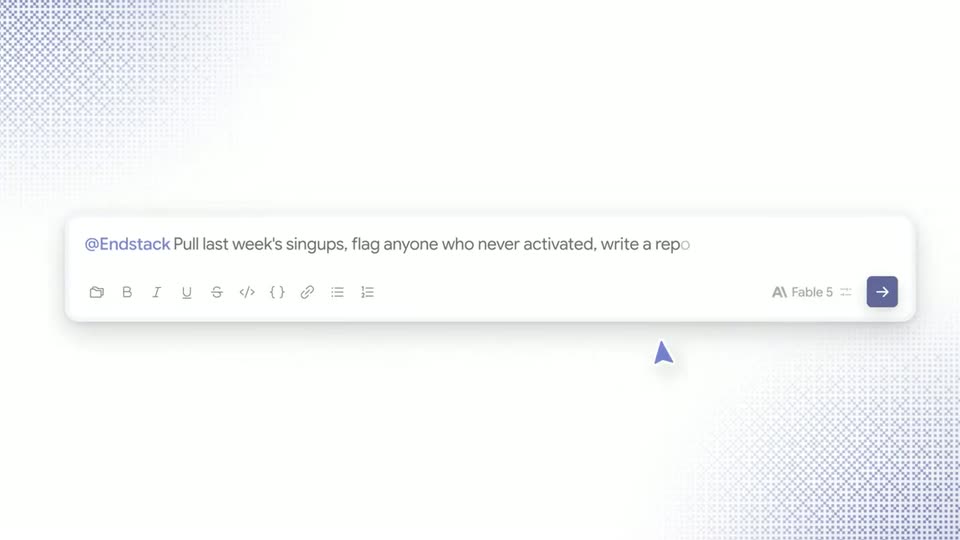
A chat input box sits centered on a white background as a prompt types out left to right. An orange cursor glides to the purple send button and an orange Marketing tag slides in beside it.
Techniques: Kinetic type, Cursor demo
Camera: Static
A faint dot-grid background holds an orange Marketing tab on the right, which slides off-screen as a Google browser window fades in, centered on the homepage with the search bar and top menu.
On-screen text: “Marketing”
Camera: Push in
A browser window showing the Google homepage floats in 3D perspective over a pale lavender background with a dotted grid. The window slides right and settles as a left sidebar with user avatars and names fades in.
Techniques: 3D mockup
Camera: Static
A Google search page in a browser window recedes and slides right while a left chat panel types a follow-up request and a working status, the two layers moving in depth over a halftone dot background.
Techniques: Parallax
Camera: Pull out
A chat thread on the left shows a user asking Endstack to draft follow-up emails. On the right, a Gmail inbox window sits beside it, its email list sliding in from the right to fill the panel.
Techniques: Split screen
Camera: Pan
A Gmail inbox window tilted in 3D perspective slides in from the left and settles beside a chat panel. In the chat, a red Stop button pops in and a text label fades in beneath the working indicator.
Techniques: 3D mockup
Camera: Pan
A white field with halftone dots in the corners holds a small starburst icon and the words Find users on the left. On the right, a tilted white card titled Users Pending Follow-Up scrolls its list of named users while a purple AI Agent tag stays pinned.
On-screen text: “Find users”
Camera: Push in
A white screen with a fading dot grid. On the left, a checked “Find users” sits above a spinner line that types “Draft personalized emails”. On the right, a card of candidate users with avatars, emails and roles scrolls up, then condenses into a four-row list.
On-screen text: “Find users”, “Draft personalized emails”
Techniques: Kinetic type
Camera: Static
A single email draft card fills with text in the center, then the view zooms out to reveal a grid of many personalized email drafts. A white badge with a checkmark and the words Draft is complete pops in over the grid.
On-screen text: “Draft personalized emails”, “Draft is complete”
Techniques: UI zoom
Camera: Pull out
A white chat card with a small Endstack avatar and a 10:16 AM timestamp sits on a light background with faint dot grids. The message body appears line by line, finishing with the task complete line.
Techniques: Kinetic type
Camera: Static
A chat prompt types out across a white screen, “@Endstack can you make … g conversion?”, a blue Engineer speech-bubble tag sliding beneath it. The line blurs and reframes into a small notification card stating Gmail is connected and the follow-up emails are drafted.
Techniques: Kinetic type, UI zoom
Camera: Static
A close-up of a Slack message from Aiden blurs and zooms in as a thumbs-up reaction and a tooltip appear beneath it. The view then pulls back to reveal the full workspace: channel sidebar, the thread with an Endstack reply, and two floating code editor windows.
Techniques: UI zoom
Camera: Pull out
Flat side-by-side layout: a light messaging app with code review cards on the left, a dark terminal on the right that types git commands line by line until a pull request URL appears. Small lavender AI Agent tags point at both panels.
On-screen text: “AI Agent”
Techniques: Split screen, Kinetic type
Camera: Static
Over-the-shoulder shot of a man in a dark jacket holding a smartphone with a lock screen. A notification card reading EndStack with a timestamp materializes and hovers in 3D above the phone.
Techniques: 3D mockup
Camera: Push in
A hand holds a phone in front of a blurred, tree-lined street. The screen shifts from a green-and-blue gradient lock screen with a 9:41 clock to a white messaging thread showing a message and an approval card, then holds.
Techniques: 3D mockup
Camera: Push in
A hand holds a phone on a sunlit sidewalk, the street blurred behind. On the screen, a chat thread with a dark action card showing Approve and Cancel buttons clears away, leaving the conversation and a Send button. The hand stays steady.
Camera: Push in
A hand holds a phone with a chat thread over a blurred street, then a cut lands on a white card where the tagline builds word by word in the left-center.
On-screen text: “Try it for free today”
Techniques: Kinetic type
Camera: Push in
On a plain off-white background, the centered line “Try it for free today” sits with “free” in light lavender and “today” in gray. It is then replaced by “at endstack”, with “endstack” in the same lavender. The frame stays locked off throughout.
On-screen text: “Try it for free today”, “at endstack”
Camera: Static
A thin rounded pill outline sits centered on a white field. The domain endstack.com settles inside it, endstack in blue and .com in gray, the text sliding left into place as the pill widens slightly.
On-screen text: “endstack.com”
Techniques: Kinetic type
Camera: Static
A blurred home-office desk with two monitors, a wooden surface and a round window sits darkened behind the white Endstack wordmark and hexagon icon, held static and centered as the sign-off.
On-screen text: “endstack.com”
Camera: Static